
Introduction
This manual provides detailed instructions for the safe and efficient operation, installation, and maintenance of your ZAFRO 12000 BTU Mini-Split Air Conditioner and Heater. Please read this manual thoroughly before using the appliance and retain it for future reference.
The ZAFRO Mini-Split system offers both cooling and heating functionalities, featuring advanced inverter technology, Wi-Fi connectivity for smart control, and a high energy efficiency rating of 22 SEER2. It is designed to provide a comfortable indoor environment with low noise operation.
Important Safety Information
Always follow basic safety precautions when using electrical appliances to reduce the risk of fire, electric shock, and injury.
- Read all instructions before use.
- Ensure the unit is properly grounded.
- Do not operate the unit with a damaged power cord or plug.
- Keep the area around the unit clear of obstructions.
- Do not attempt to repair or modify the unit yourself. Contact qualified service personnel.
- Use only the specified refrigerant (R32).
- Supervise children to ensure they do not play with the appliance.
Package Contents
Your ZAFRO Mini-Split system is shipped in two separate boxes. Please verify that all components listed below are present before beginning installation.

Figure 1: Package List. This image illustrates the components included in Box 1 (Indoor Unit, Drain Pipe, Power Cable, Remote Control, Batteries, Mounting Plate) and Box 2 (Outdoor Unit, Connection Pipes, Power Cable, Putty, Wall Sleeve). Note that packages may arrive at different times.
- Indoor Unit: Air handler for interior installation.
- Outdoor Unit: Condenser unit for exterior installation.
- Remote Control: For convenient operation.
- Batteries: For the remote control.
- Mounting Plate: For securing the indoor unit.
- Drain Pipe: For condensate drainage.
- Power Cables: For electrical connections.
- Connection Pipes: Pre-charged refrigerant lines.
- Putty: For sealing wall penetrations.
- Wall Sleeve: For protecting the opening through the wall.
Note: The system is designed with pre-charged refrigerant lines, simplifying installation by eliminating the need for vacuuming or adding refrigerant.
Setup and Installation
Installation of a mini-split system requires basic electrical and plumbing knowledge. While this unit features a DIY-friendly design with pre-charged lines, professional installation is recommended to ensure proper function and compliance with local codes.
1. Site Selection
- Indoor Unit: Choose a location on a sturdy wall, away from direct sunlight or heat sources, with adequate space for airflow and maintenance. Ensure the drain pipe can be routed downwards.
- Outdoor Unit: Select a stable, level surface outdoors, away from high traffic areas, direct sunlight, or sources of exhaust. Maintain sufficient clearance around the unit for proper airflow.
2. Mounting the Indoor Unit
- Secure the mounting plate to the wall using appropriate fasteners, ensuring it is level.
- Drill a hole through the wall for the refrigerant lines, drain pipe, and electrical cables.
- Connect the refrigerant lines, drain pipe, and electrical wiring to the indoor unit.
- Mount the indoor unit onto the mounting plate.
3. Installing the Outdoor Unit
- Place the outdoor unit on a level, stable surface or mount it on a wall bracket.
- Connect the pre-charged refrigerant lines from the indoor unit to the outdoor unit. Ensure connections are tight to prevent leaks.
- Connect the electrical wiring between the indoor and outdoor units, and to the main power supply (115V).
- Seal the wall penetration with the provided putty and wall sleeve.
4. Electrical Connection
The ZAFRO 12000 BTU Mini-Split operates on 115V. Ensure the electrical circuit is dedicated and properly sized for the unit's power requirements. All electrical work should comply with local electrical codes.

Figure 2: ZAFRO Mini-Split System Components. This image displays all the main components of the ZAFRO 12000 BTU Mini-Split Air Conditioner and Heater, including the indoor unit, outdoor unit, remote control, and various installation accessories.
Operating Instructions
Your ZAFRO Mini-Split system can be controlled via the included remote control or through the Tuya Smart app on your smartphone.
Remote Control Operation

Figure 3: Remote and App Control. This image shows the remote control and a smartphone displaying the Tuya Smart app, highlighting the various control options available for the ZAFRO Mini-Split system.
Insert the provided batteries into the remote control. Point the remote control towards the indoor unit when operating.
- Power Button: Turns the unit ON or OFF.
- Mode Button: Cycles through operating modes: Cool, Heat, Fan, Dry, Auto.
- Temperature Buttons (▲/▼): Adjusts the desired temperature.
- Fan Speed Button: Selects fan speed (Low, Medium, High, Auto).
- Swing Button: Controls the louver's vertical swing for air distribution.
- Timer Button: Sets the ON/OFF timer.
- Sleep Button: Activates Sleep Mode for quiet operation.
Smart Wi-Fi Control (Tuya Smart App)
The unit is equipped with a Wi-Fi intelligent system, allowing remote control via the Tuya Smart app.
- Download the "Tuya Smart" app from your smartphone's app store (available on App Store and Google Play).
- Register or log in to your Tuya Smart account.
- Follow the in-app instructions to add your ZAFRO Mini-Split AC unit. This typically involves putting the unit into pairing mode.
- Once connected, you can remotely control all functions of the AC unit, including mode, temperature, fan speed, and timer settings.
Operating Modes

Figure 4: Four Operating Modes. This graphic details the four primary operating modes of the ZAFRO Mini-Split: Fan, Cool, Dry, and Heat, along with their typical functions and temperature ranges.
- Cool Mode: Provides cooling to lower room temperature. Adjustable down to 60°F.
- Heat Mode: Provides heating to raise room temperature. Adjustable up to 90°F.
- Fan Mode: Circulates air without cooling or heating. Fan speed can be adjusted.
- Dry Mode (Dehumidify): Reduces humidity in the room, removing up to 51 pints per day.
- Auto Mode: Automatically selects cooling or heating based on the set temperature and current room temperature.
Special Features
- Fast Cooling & Heating: The inverter technology allows the compressor to reach maximum power quickly, providing rapid temperature adjustment.
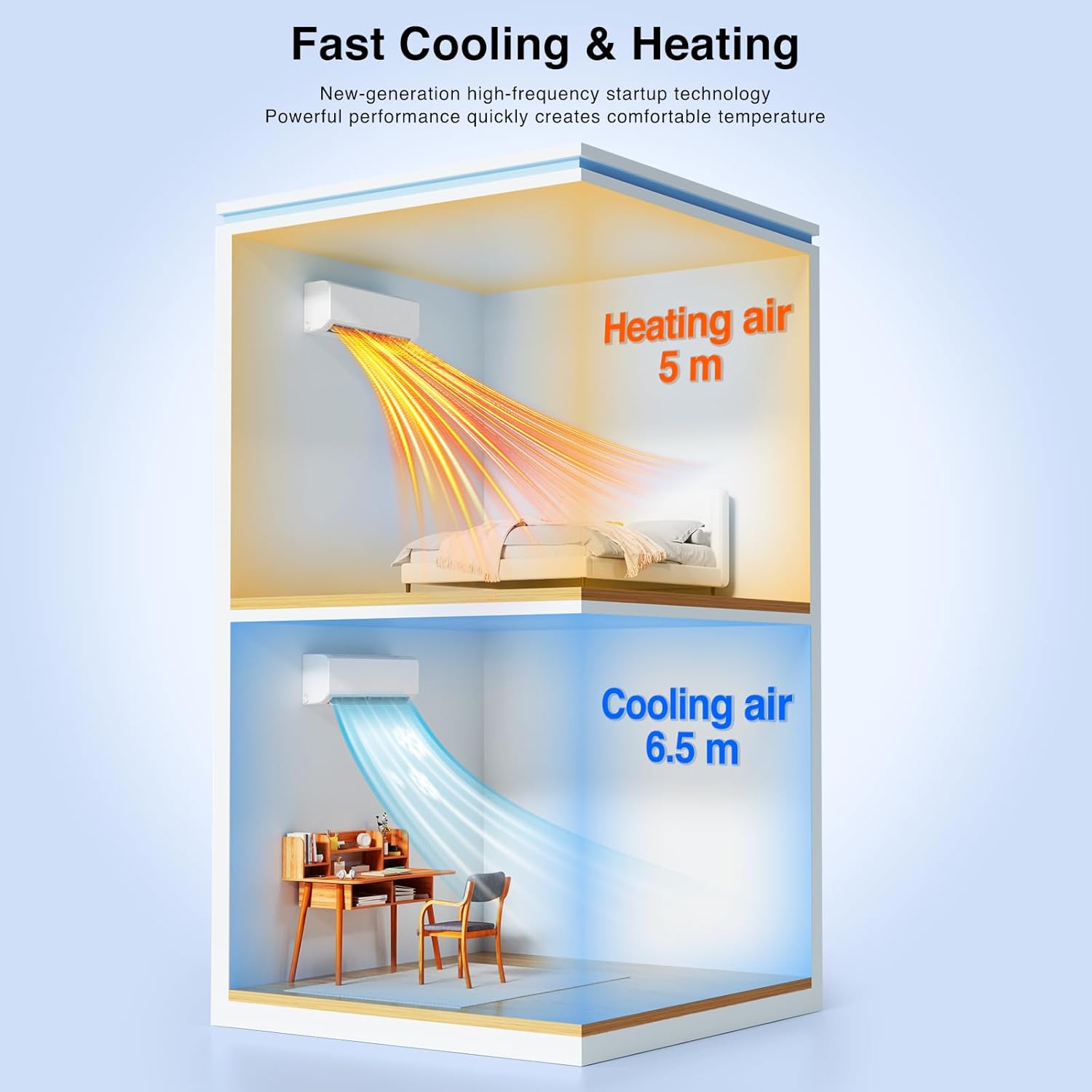
Figure 5: Fast Cooling and Heating. This diagram visually represents the rapid distribution of conditioned air, with cooling air reaching up to 6.5 meters and heating air up to 5 meters from the indoor unit.
- Quiet Sleep Mode: Designed for minimal noise during sleep. This mode typically reduces fan speed and may adjust temperature slightly for optimal comfort. The indoor unit operates at less than 24 dB.

Figure 6: Quiet Sleep Mode. This image highlights the quiet operation of the ZAFRO Mini-Split in Sleep Mode, featuring low noise levels (below 24 dB) and options for turning off indicator lights and setting timers for a restful night.
Maintenance
Regular maintenance ensures optimal performance and extends the lifespan of your ZAFRO Mini-Split system. Always disconnect power to the unit before performing any maintenance.
Indoor Unit Maintenance
- Air Filter Cleaning: The air filters should be cleaned every 2-4 weeks, or more frequently depending on usage and air quality.
- Open the front panel of the indoor unit.
- Remove the air filters.
- Wash the filters with lukewarm water and mild detergent, or vacuum them to remove dust.
- Allow filters to dry completely before reinstalling.
- Unit Exterior Cleaning: Wipe the exterior of the indoor unit with a soft, damp cloth. Do not use harsh chemicals or abrasive cleaners.
Outdoor Unit Maintenance
- Coil Cleaning: Periodically inspect the outdoor unit's coils for dirt and debris. Use a soft brush or vacuum to gently clean the coils. For heavy buildup, professional cleaning may be required.
- Clear Obstructions: Ensure that the area around the outdoor unit is free from leaves, dirt, and other obstructions that could impede airflow.
- Drainage Check: Verify that the condensate drain pipe is clear and free-flowing to prevent water backup.
Troubleshooting
Before contacting customer support, please refer to the following troubleshooting guide for common issues.
| Problem | Possible Cause | Solution |
|---|---|---|
| Unit does not turn on. | No power, circuit breaker tripped, remote control batteries dead. | Check power supply, reset circuit breaker, replace remote control batteries. |
| Insufficient cooling/heating. | Dirty air filters, blocked outdoor unit, wrong mode selected, temperature setting too high/low. | Clean air filters, clear obstructions from outdoor unit, select correct mode, adjust temperature. |
| Unusual noise. | Loose parts, foreign objects, unit not level. | Inspect for loose parts or foreign objects, ensure unit is level. If noise persists, contact support. |
| Water leakage from indoor unit. | Blocked drain pipe, improper installation. | Check and clear the drain pipe. If issue persists, professional inspection may be needed. |
| Wi-Fi connection issues. | Router issues, incorrect Wi-Fi password, unit too far from router. | Restart router, re-enter Wi-Fi password in app, move unit closer to router or use a Wi-Fi extender. |
Specifications
| Feature | Detail |
|---|---|
| Model Number | A7201SW-12K |
| Brand | ZAFRO |
| Capacity | 12000 BTU (1 Ton) |
| Voltage | 115 Volts |
| SEER2 Rating | 22 |
| Refrigerant Type | R-32 |
| Indoor Unit Noise Level | 42 dB (standard), <24 dB (Sleep Mode) |
| Outdoor Unit Noise Level | 53 dB |
| Indoor Unit Dimensions (D x W x H) | 9.83" x 31.5" x 13.39" |
| Indoor Unit Item Weight | 15.4 pounds |
| Special Features | Fast Cooling, Wi-Fi Control, Inverter Technology |
| Included Components | Indoor Unit, Outdoor Unit, Remote Control, Installation Accessories |
Warranty Information
The ZAFRO 12000 BTU Mini-Split Air Conditioner and Heater (Model A7201SW-12K) comes with a 1-Year Manufacturer's Warranty. This warranty covers defects in materials and workmanship under normal use.
Please retain your proof of purchase for warranty claims. The warranty does not cover damage resulting from improper installation, misuse, neglect, unauthorized repairs, or acts of nature. For specific terms and conditions, please refer to the warranty card included with your product or contact ZAFRO customer support.
Customer Support
If you have any questions, require technical assistance, or need to make a warranty claim, please contact ZAFRO customer support.
- Website: Visit the official ZAFRO website for FAQs and support resources.
- Email: Refer to your product packaging or warranty card for customer service email contact.
- Phone: Refer to your product packaging or warranty card for customer service phone number.
When contacting support, please have your model number (A7201SW-12K) and purchase date readily available.


