1. Introduction
This manual provides detailed instructions for the safe and efficient use of your Music Sound DRIFT Wireless In-Ear Earbuds. Please read this manual thoroughly before using the product and retain it for future reference.
2. Package Contents
Verify that all items listed below are present in your package:
- Music Sound DRIFT Wireless Earbuds (Left and Right)
- Charging Case
- USB-C Charging Cable
- User Guide
- Multiple sizes of ear tips (S, M, L)
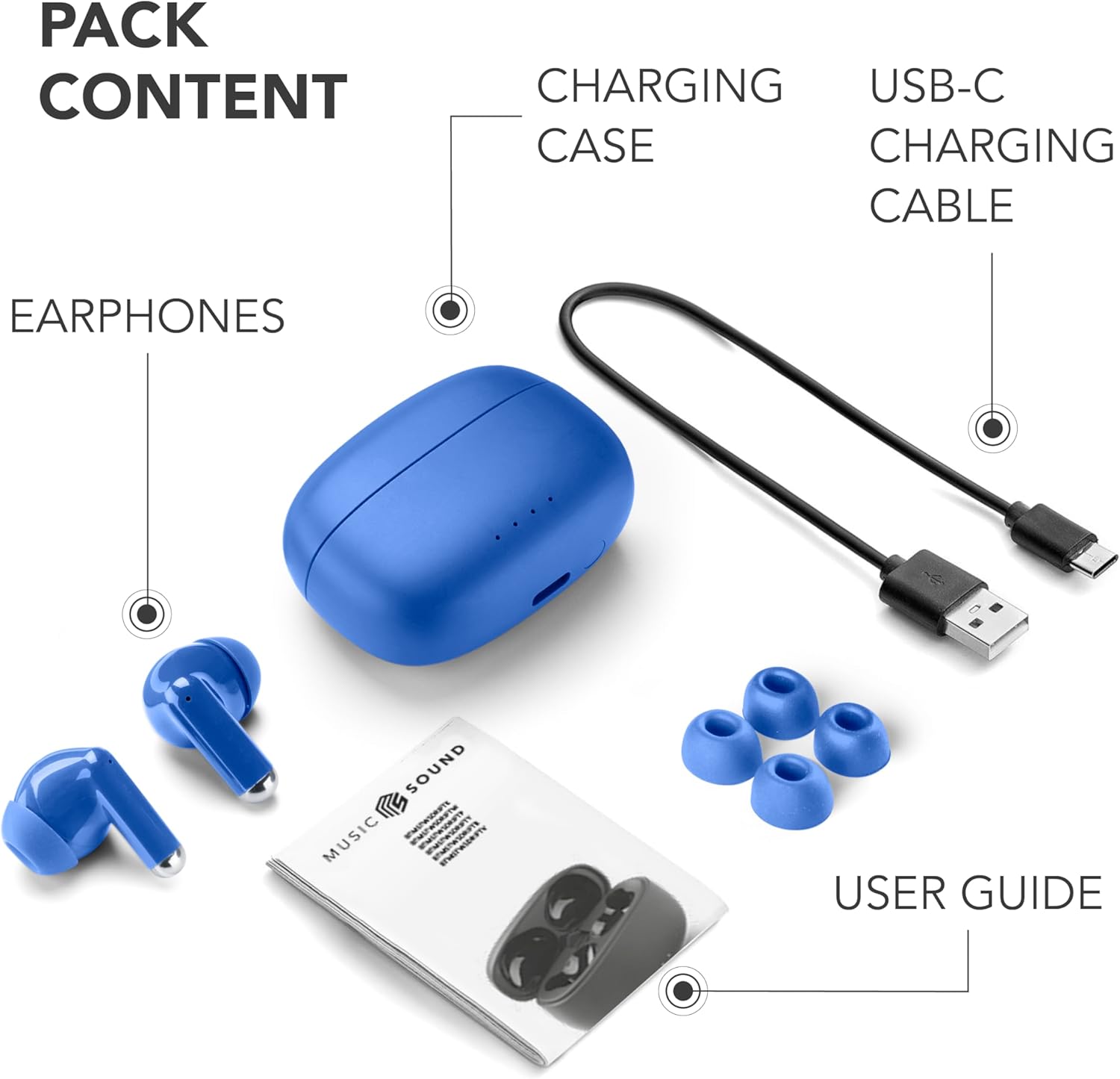
Image: Contents of the Music Sound DRIFT Earbuds package, including the earbuds, charging case, USB-C cable, user guide, and various ear tip sizes.
3. Product Overview
The Music Sound DRIFT earbuds feature an in-ear design for a secure fit and immersive audio. The compact charging case provides extended battery life and easy portability.

Image: The Music Sound DRIFT wireless earbuds resting in their open blue charging case, showcasing the sleek design and LED indicators on the case.
Key Features:
- In-Ear Design: Ensures a comfortable and stable fit for extended listening.
- Compact Charging Case: Easy to carry, providing additional charges on the go.
- Bluetooth Connectivity: Wireless audio experience with auto-pairing functionality.
- Touch Controls: Manage music playback, calls, and voice assistant directly from the earbuds.
- Extended Playtime: Up to 22 hours of total battery life with the charging case.

Image: Diagram illustrating the touch control areas on the earbuds for functions like calls, volume, and track navigation, along with the LED battery level indicator.
4. Setup
4.1 Initial Charging
- Place both earbuds into the charging case.
- Connect the USB-C charging cable to the charging port on the case and the other end to a USB power adapter (not included).
- The LED indicators on the case will illuminate to show charging status. A full charge typically takes approximately 2 hours.
- Once fully charged, disconnect the charging cable.
4.2 Pairing with a Device
- Ensure the earbuds are charged.
- Open the charging case. The earbuds will automatically enter pairing mode, and their indicator lights will flash.
- On your device (smartphone, tablet, etc.), enable Bluetooth.
- Search for "Music Sound DRIFT" in the list of available Bluetooth devices.
- Select "Music Sound DRIFT" to connect. Once connected, the earbud indicator lights will stop flashing.
- The earbuds will automatically reconnect to the last paired device when removed from the case, if Bluetooth is enabled on the device.
5. Operating Instructions
5.1 Power On/Off
- Power On: Open the charging case, or long-press the touch control area on both earbuds for 3 seconds.
- Power Off: Place the earbuds back into the charging case and close the lid, or long-press the touch control area on both earbuds for 5 seconds.
5.2 Touch Controls
The Music Sound DRIFT earbuds feature intuitive touch controls. Refer to the diagram below for common functions:
| Function | Action |
|---|---|
| Play/Pause Music | Single tap on either earbud |
| Answer/End Call | Single tap on either earbud |
| Reject Call | Long press on either earbud |
| Next Track | Double tap on the right earbud |
| Previous Track | Double tap on the left earbud |
| Activate Voice Assistant | Triple tap on either earbud |
5.3 Charging the Earbuds and Case
The earbuds provide up to 5 hours of playback on a single charge, and the charging case extends the total playtime to 22 hours.

Image: Graphic illustrating the total playtime of 22 hours with the charging case and 5 hours on a single earbud charge.
- Charging Earbuds: Place them into the charging case. They will charge automatically.
- Charging Case: Connect the USB-C cable to the case and a power source. The LED indicators on the case show the charging status.
6. Maintenance
6.1 Cleaning
- Gently wipe the earbuds and charging case with a soft, dry, lint-free cloth.
- Do not use abrasive cleaners, alcohol, or chemical solvents.
- Ensure the charging contacts on both the earbuds and the case are clean and dry.
6.2 Storage
- When not in use, store the earbuds in their charging case to protect them and keep them charged.
- Store the product in a cool, dry place, away from extreme temperatures and direct sunlight.
7. Troubleshooting
| Problem | Solution |
|---|---|
| Earbuds not pairing | Ensure earbuds are charged. Turn off and on Bluetooth on your device. Forget "Music Sound DRIFT" from your device's Bluetooth list and re-pair. |
| Only one earbud working | Place both earbuds back into the charging case, close the lid, then open it again. Ensure both earbuds are charged. |
| No sound | Check device volume. Ensure earbuds are properly connected. Try re-pairing. |
| Charging case not charging | Check USB-C cable connection and power adapter. Try a different cable or power source. |
8. Specifications
| Feature | Detail |
|---|---|
| Model Name | BTMSTWSDRIFTB |
| Brand | Music Sound |
| Connectivity Technology | Wireless (Bluetooth 5) |
| Form Factor | In-Ear |
| Control Method | Touch |
| Total Playtime (with case) | Up to 22 Hours |
| Earbud Playtime (single charge) | Up to 5 Hours |
| Charging Interface | USB-C |
| Material | Plastic |
| Weight | 140 g (product) |
| Color | Blue |
9. Warranty and Support
For warranty information and customer support, please refer to the contact details provided on the product packaging or the official Music Sound website. Keep your proof of purchase for warranty claims.


