
1. Introduction
The FeelTech P9 is an advanced outdoor laser distance meter designed for precise measurements. It features a point-to-point measurement system, an integrated camera for screenshots, Bluetooth connectivity for data transfer, and a measurement range of up to 400 meters. This manual provides essential information for the safe and effective use of your device.
2. Safety Information
Please read and understand all safety instructions before operating the device. Failure to do so may result in injury or damage to the device.
- Laser Radiation: This device emits Class 2 laser radiation. Do not stare into the laser beam or direct it at other people.
- Eye Protection: Avoid direct eye exposure to the laser beam.
- Children: Keep the device out of reach of children.
- Operating Environment: Do not operate the device in explosive environments or near flammable materials.
- Modifications: Do not attempt to modify or disassemble the device. Repairs should only be performed by authorized service personnel.
- Battery Safety: Use only recommended batteries and dispose of them properly.
3. Product Overview
The FeelTech P9 is equipped with a range of features to enhance measurement accuracy and user experience.
Key Features:
- High-performance laser distance measurement up to 400m.
- Integrated camera for point-finder and screenshot storage.
- 3.00-inch IPS color display for clear visibility.
- Bluetooth connectivity for wireless data transfer.
- Wireless charging capability.
- Advanced laser-point trace technology.
- Multiple measurement functions including 3D measurement.
- User-friendly interface with mOS 5.0 operating system.
Included Components:
The standard package includes the following items:
- FeelTech P9 Laser Distance Meter
- Leather Case
- User Manual
- Lanyard
- USB Charging Cable
- Certificate of Conformity
- Batteries
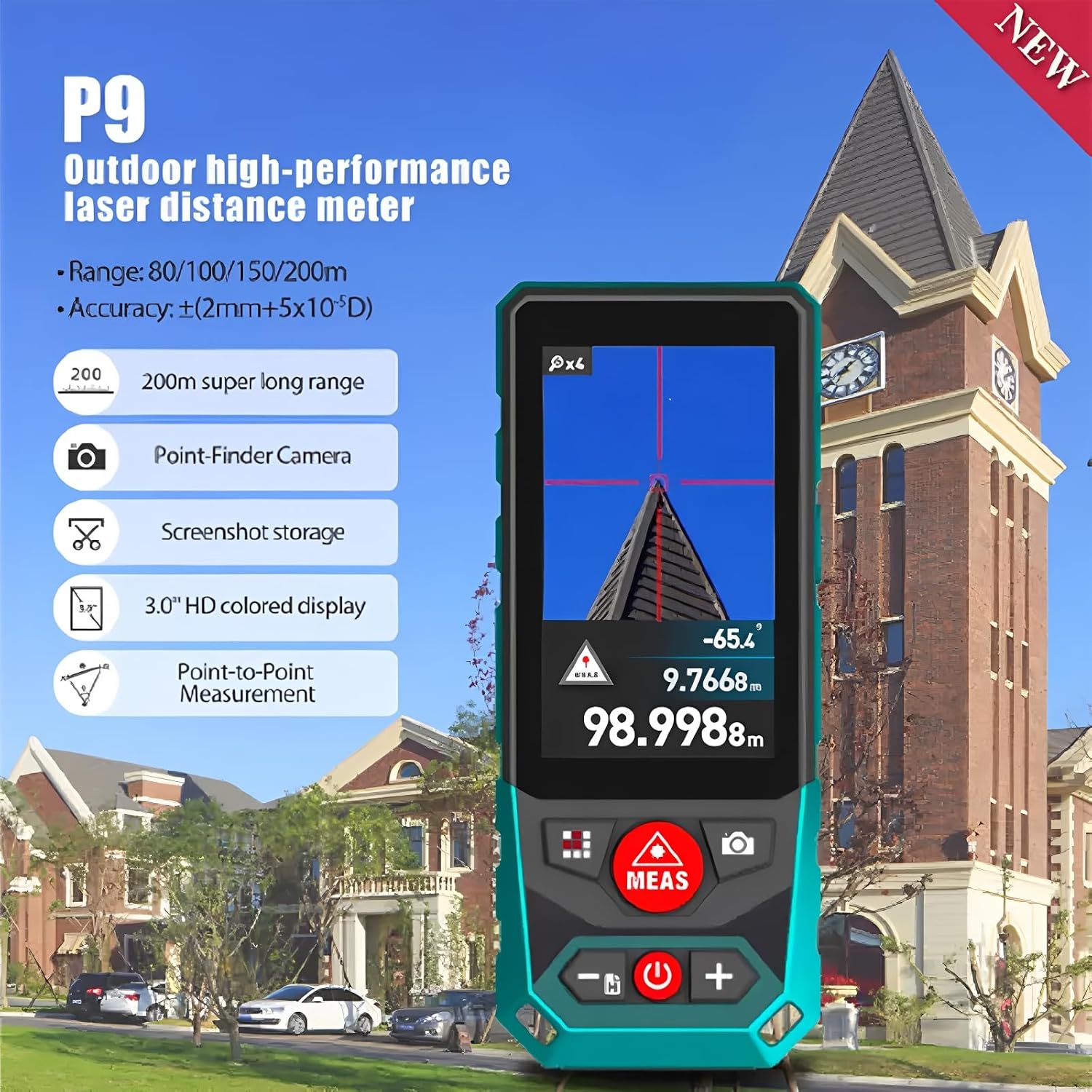
Figure 3.1: Overview of the FeelTech P9 Laser Distance Meter, highlighting its display and key functions like point-finder camera and point-to-point measurement.

Figure 3.2: The user-friendly interface of the P9, demonstrating the mOS 5.0 operating system and convenient side button design for menu settings and measurements.

Figure 3.3: All components included with the FeelTech P9, such as the device, leather case, lanyard, USB cable, and batteries.
4. Setup
4.1 Battery Installation
Insert the provided batteries into the battery compartment located on the device, ensuring correct polarity. Close the compartment securely.
4.2 Charging the Device
The FeelTech P9 supports wireless charging. Place the device on a compatible wireless charging pad (not included) or connect it using the supplied USB charging cable to a power source.

Figure 4.1: The FeelTech P9 device undergoing wireless charging, demonstrating its convenient power replenishment method.
4.3 Power On/Off
- To Power On: Press and hold the power button (usually marked with a power symbol) until the display illuminates.
- To Power Off: Press and hold the power button again until the display turns off. The device may also power off automatically after a period of inactivity to conserve battery.
5. Operating Instructions
5.1 Basic Measurement
- Single Measurement: Point the laser at the target and press the 'MEAS' button once. The distance will be displayed on the screen.
- Continuous Measurement (Max/Min): Press and hold the 'MEAS' button to activate continuous measurement. The device will continuously measure and display the maximum and minimum distances. Press 'MEAS' again to stop.
5.2 Advanced Measurement Functions
The P9 offers a variety of advanced measurement modes. Navigate through the menu using the directional buttons and select the desired function.

Figure 5.1: Visual representation of the sixteen measurement functions available on the FeelTech P9, including area, volume, Pythagoras, and 3D measurement.
- Area Measurement: Measure two sides to calculate the area.
- Volume Measurement: Measure three dimensions to calculate the volume.
- Pythagorean Measurement: Use indirect measurement for heights or distances where direct measurement is not possible (2-point and 3-point methods).
- Point-to-Point (P2P) Measurement: Measure the distance between two points from a single location.
- 3D Measurement: Utilize advanced functions for complex three-dimensional measurements.
- Auto Level/Height: Automatically determine horizontal or vertical distances.
- Trapezoid Measurement: Calculate areas of trapezoidal shapes.
5.3 Camera and Screenshot Function
The integrated camera allows for precise targeting, especially outdoors. You can also capture screenshots of your measurements or the target view for later review.
- Using the Point-Finder Camera: Activate the camera mode to view the target on the display, aiding in accurate laser placement.
- Taking Screenshots: In camera mode or after a measurement, use the designated button (refer to on-screen prompts) to capture and save a screenshot.
- Image Storage: Screenshots are stored internally. You can access and manage them through the device's menu.

Figure 5.2: The P9 in use for an outdoor measurement, demonstrating its camera feature for precise targeting and measurement visualization.
5.4 Bluetooth Connectivity and Data Export
Connect your P9 to a compatible smartphone or tablet via Bluetooth to transfer measurement data and screenshots.
- Pairing: Enable Bluetooth on your P9 and your mobile device. Search for the P9 in your device's Bluetooth settings and pair them.
- Data Transfer: Use the dedicated mobile application (if available, check product website for details) to manage and export your data.

Figure 5.3: Icons illustrating advanced features such as Bluetooth connectivity and data export, enhancing the device's utility.
6. Maintenance
- Cleaning: Use a soft, damp cloth to clean the device. Do not use abrasive cleaners or solvents. Clean the lens regularly with a soft, lint-free cloth.
- Storage: Store the device in its protective case in a cool, dry place when not in use. Avoid extreme temperatures and direct sunlight.
- Battery Care: Remove batteries if the device will not be used for an extended period. Recharge the device regularly to maintain battery health.
7. Troubleshooting
If you encounter issues with your FeelTech P9, refer to the following common problems and solutions:
| Problem | Possible Cause | Solution |
|---|---|---|
| Device does not power on. | Low battery or incorrect battery installation. | Charge the device or check battery polarity. |
| Inaccurate measurements. | Obstructed laser path, dirty lens, or unsuitable target surface. | Ensure clear path, clean lens, and measure against a reflective surface if possible. |
| Bluetooth connection failure. | Bluetooth not enabled, device out of range, or pairing issue. | Ensure Bluetooth is on for both devices, move closer, and re-attempt pairing. |
| Display issues. | Software glitch or extreme temperature. | Restart the device. Allow device to return to normal operating temperature. |
If the problem persists, contact customer support for assistance.
8. Specifications
| Feature | Specification |
|---|---|
| Brand | FeelTech |
| Model | P9 (EC-Mileseey-P9-400M) |
| Measurement Range | Up to 400 meters (model dependent, other variants 200m/600m) |
| Accuracy | ±(2mm+5x10⁻⁵*D) |
| Display | 3.00-inch IPS Color Screen |
| Connectivity | Bluetooth Wireless |
| Charging | Wireless Charging, USB-C |
| Features | Point-Finder Camera, Screenshot Storage, Data Export, 3D Measurement, Laser Point Trace Technology |
| Operating System | mOS 5.0 |
| Weight | 1 Kilogram (approx.) |
| Manufacturer | Shenzhen Mileseey TECHNOLOGY CO., LTD |
| Country of Origin | China |
9. Warranty and Support
Specific warranty details are typically provided with your purchase documentation. Please refer to the warranty card or contact your retailer for information regarding warranty coverage and terms.
For technical support, service, or inquiries, please contact the manufacturer or your authorized dealer. Keep your purchase receipt and model number handy when seeking support.