
Introduction
This manual provides detailed instructions for the installation, operation, and maintenance of your BLACK+DECKER Smart Lock with Entrance Handle and Gateway. This smart lock offers multiple access methods including fingerprint, passcode, IC card, mechanical key, and control via the BLACK+DECKER Home app. Designed with durable aluminum alloy panels, it ensures a secure and convenient entry solution for various door types.
Product Overview
Familiarize yourself with the components included with your BLACK+DECKER Smart Lock system.

Figure 1: All included components of the smart lock system.

Figure 2: Exterior keypad unit and interior thumb-turn unit of the smart lock.
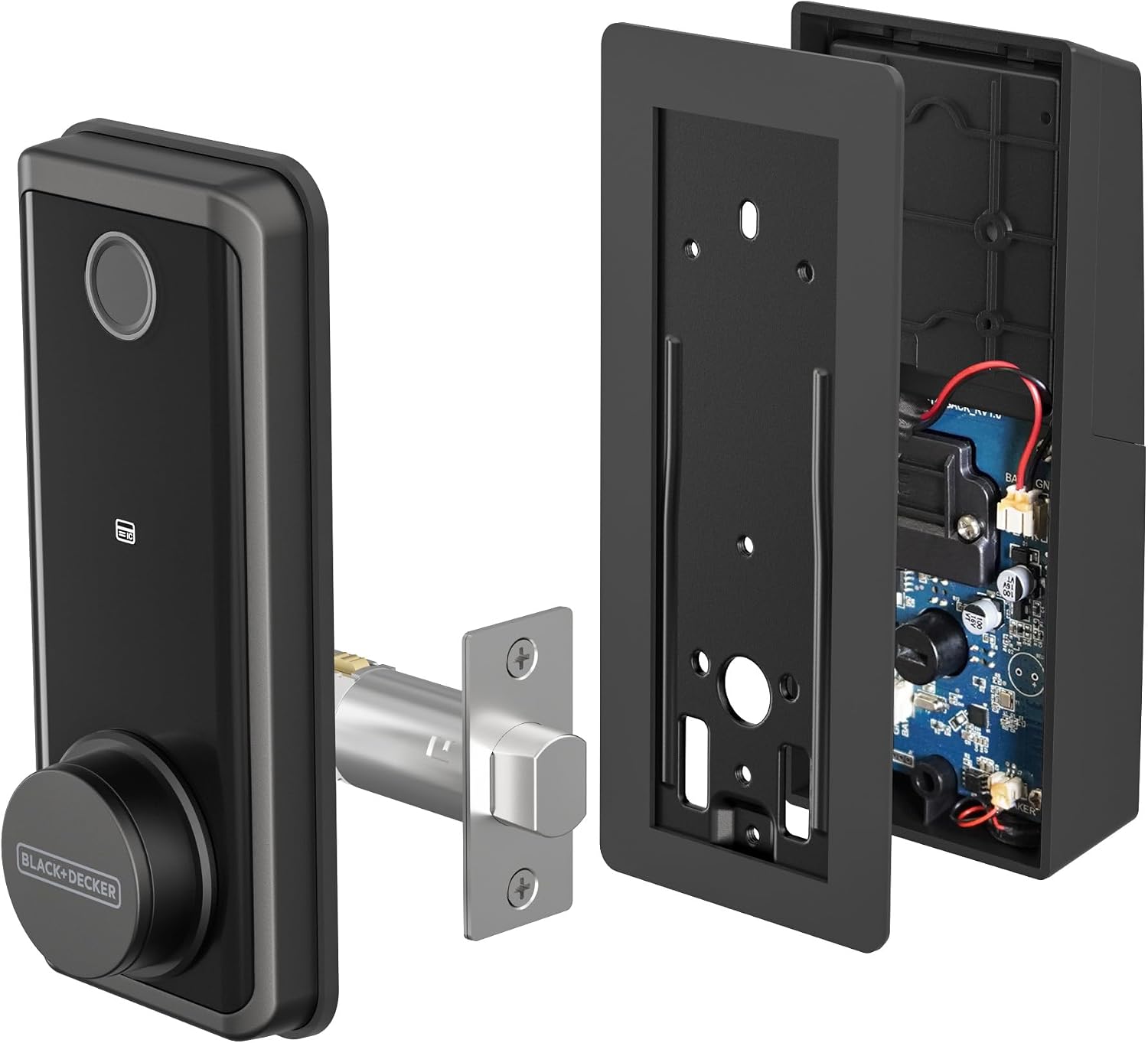
Figure 3: Internal components of the smart lock, showing wiring and battery compartment.
Specifications
| Feature | Detail |
|---|---|
| Manufacturer | BLACK+DECKER |
| Model Number | BXSPBALOCK1BK |
| Product Dimensions | 26.67 x 31.75 x 10.16 cm |
| Item Weight | 2.51 kg |
| Colour | Black |
| Style | Modern Black |
| Finish | Powder Coated |
| Material | Aluminum |
| Special Features | Auto-Lock, Fingerprint, Fob Unlock, Passcode Unlock |
| Included Components | Deadbolt door lock 5-in-1 including Passcode, Requires AA batteries (not included) |
| Lock Type | Electronic Lock |
Setup and Installation
Before beginning installation, ensure your door meets the following requirements:
- Door Thickness: 1-3/8 inches to 1-3/4 inches (35mm to 45mm)
- Bore Hole Diameter: 2-1/8 inches (54mm)
- Backset: Adjustable 2-3/8 inches or 2-3/4 inches (60mm or 70mm)

Figure 4: Door preparation and measurement guide.
General Installation Steps:
- Prepare the Door: Verify door dimensions and bore hole sizes.
- Install the Latch: Adjust the latch to the correct backset (60mm or 70mm) and install it into the door edge. Ensure the square bore is horizontal.
- Install Exterior Handle: Position the exterior handle assembly, ensuring the spindle passes through the latch.
- Install Interior Handle: Attach the interior handle, connecting any necessary cables and securing it with screws.
- Install Deadbolt: Insert the deadbolt into the door frame and secure it.
- Connect Wiring: Carefully connect the wiring between the exterior and interior units.
- Install Batteries: Insert 4 AA batteries (not included) into the interior unit.
- Test Functionality: Test all locking and unlocking mechanisms.
For a visual guide on smart lock installation, please refer to the video below. Note that this video demonstrates a general smart lock installation process and may feature a different brand (Eufy). Specific steps for your BLACK+DECKER model may vary slightly, so always refer to the included printed instructions for precise details.
Video 1: General Smart Lock Installation Guide (Eufy FamiLock E34). This video provides a visual overview of smart lock installation steps. Please consult your BLACK+DECKER manual for model-specific instructions.
Operating Instructions
Your BLACK+DECKER Smart Lock offers multiple convenient ways to access your home:

Figure 5: Overview of the various methods to unlock your smart lock.
- Fingerprint Unlock: Place your registered fingerprint on the sensor for quick access.
- Passcode Entry: Enter your personalized passcode on the keypad.
- IC Card: Tap the provided IC card against the designated area on the lock.
- Mechanical Key: Use the traditional mechanical key as a backup or primary access method.
- BLACK+DECKER Home App: Control your lock remotely via the dedicated smartphone application.
App Control: The BLACK+DECKER Home app, enabled by the included Bluetooth gateway, allows for remote locking, unlocking, activity monitoring, and user management. You can create one-time codes, short-term access, or scheduled entry windows for guests or service providers.

Figure 6: Remote control of the smart lock via the BLACK+DECKER Home app.

Figure 7: App interface displaying lock status, battery percentage, and activity log.
Maintenance
- Cleaning: Use a soft, dry cloth to clean the lock's exterior. Avoid abrasive cleaners or solvents that may damage the finish.
- Battery Replacement: The lock requires 4 AA batteries. Replace them when the low battery indicator appears on the lock or in the app.
- Regular Checks: Periodically check all screws and components to ensure they are secure.
Troubleshooting
- Lock Not Responding: Check battery levels and replace if necessary. Ensure the lock is properly installed and all connections are secure.
- Fingerprint Not Recognized: Ensure your finger is clean and dry. Re-register your fingerprint if issues persist.
- App Connectivity Issues: Verify your Bluetooth gateway is powered on and within range. Check your home Wi-Fi connection.
- Mechanical Key Not Working: Ensure the key is fully inserted and turned correctly. Do not force the key.
Support
For further assistance or technical support, please visit the BLACK+DECKER support website or contact their customer service.
Website: support.blackanddecker.com
Manufacturer Address: Stanley Black & Decker, 1000 Stanley Drive, New Britain, CT 06053, USA