
1. Introduction
This manual provides comprehensive instructions for the WAVLINK USB-C to Dual HDMI Adapter (Model UHP510-MAX). This adapter is designed to expand your display capabilities, offering dual 4K@60Hz HDMI outputs and up to 95W Power Delivery for compatible laptops. It is primarily intended for use with Windows systems.

Image 1: WAVLINK USB-C to Dual HDMI Adapter with connected cables.
2. Product Features
- Dual HDMI Output: Supports two external displays, each capable of 4K@60Hz resolution (under DP1.4).
- 95W Power Delivery: Provides up to 95W power passthrough to charge your laptop (requires a 20V/5A/100W USB-C charger, not included).
- Broad Compatibility: Compatible with most USB-C (Thunderbolt 3/4 compatible) laptops and devices, including Dell XPS, HP Spectre, Lenovo Yoga, Surface Pro, and LG Gram.
- Plug and Play: No driver installation required for most Windows systems.
- Durable Design: Features a sleek aluminum alloy casing for efficient heat dissipation and a reinforced braided nylon cable for enhanced durability.
- Compact and Portable: Lightweight design suitable for home, office, or travel.
3. Package Contents
Verify that all items are present in the package:
- WAVLINK USB-C to Dual HDMI Adapter (UHP510-MAX)
- Quick Start Guide
- Safety Information Card

Image 2: Package contents including the adapter, quick start guide, and safety information.
4. Setup Instructions
Follow these steps to connect your WAVLINK USB-C to Dual HDMI Adapter:
- Connect the USB-C connector of the adapter to a compatible USB-C port on your laptop. Ensure your laptop's USB-C port supports DisplayPort Alt Mode for video output.
- Connect your HDMI monitors to the two HDMI ports on the adapter using standard HDMI cables.
- (Optional) For laptop charging, connect a 20V/5A/100W USB-C power adapter (not included) to the Power Delivery (PD) port on the WAVLINK adapter. The adapter will then deliver up to 95W to your laptop.

Image 3: Connection diagram showing power delivery to a laptop via the adapter.
5. Operating Modes and Resolution
The adapter supports various display configurations depending on your operating system and laptop's DisplayPort version.
Display Modes
- Mirror Mode: Both external displays show the same content as your laptop screen. Supported on Windows and Mac OS.
- Extend Mode (Windows): Each external display can show different content, extending your desktop across multiple screens.
- Extend Mode (Mac OS): Mac OS supports extending to only one external display with different content. The second external display will mirror the first external display.

Image 4: Illustration of Mirror and Extend display modes for Windows and Mac OS.
Resolution Capabilities
| Operating System | Display Mode | Max. Resolution (Single Display) | Max. Resolution (Dual Displays) |
|---|---|---|---|
| Windows | Mirror | 4K@60Hz | DP1.4: 2x 4K@60Hz DP1.2: 4K@60Hz + 4K@30Hz |
| Windows | Extend | 4K@60Hz | DP1.4: 2x 4K@60Hz DP1.2: 4K@60Hz + 4K@30Hz |
| Mac OS | Mirror | 4K@60Hz | 2x 4K@60Hz |
| Mac OS | Extend | 4K@60Hz | 2x 4K@60Hz (Note: Only one external display will show different content; the other will mirror it.) |
Note: For dual 4K@60Hz resolution on Windows, your laptop must support DisplayPort 1.4 (DP1.4). If your laptop supports DP1.2, the maximum dual display resolution will be 4K@60Hz + 4K@30Hz.
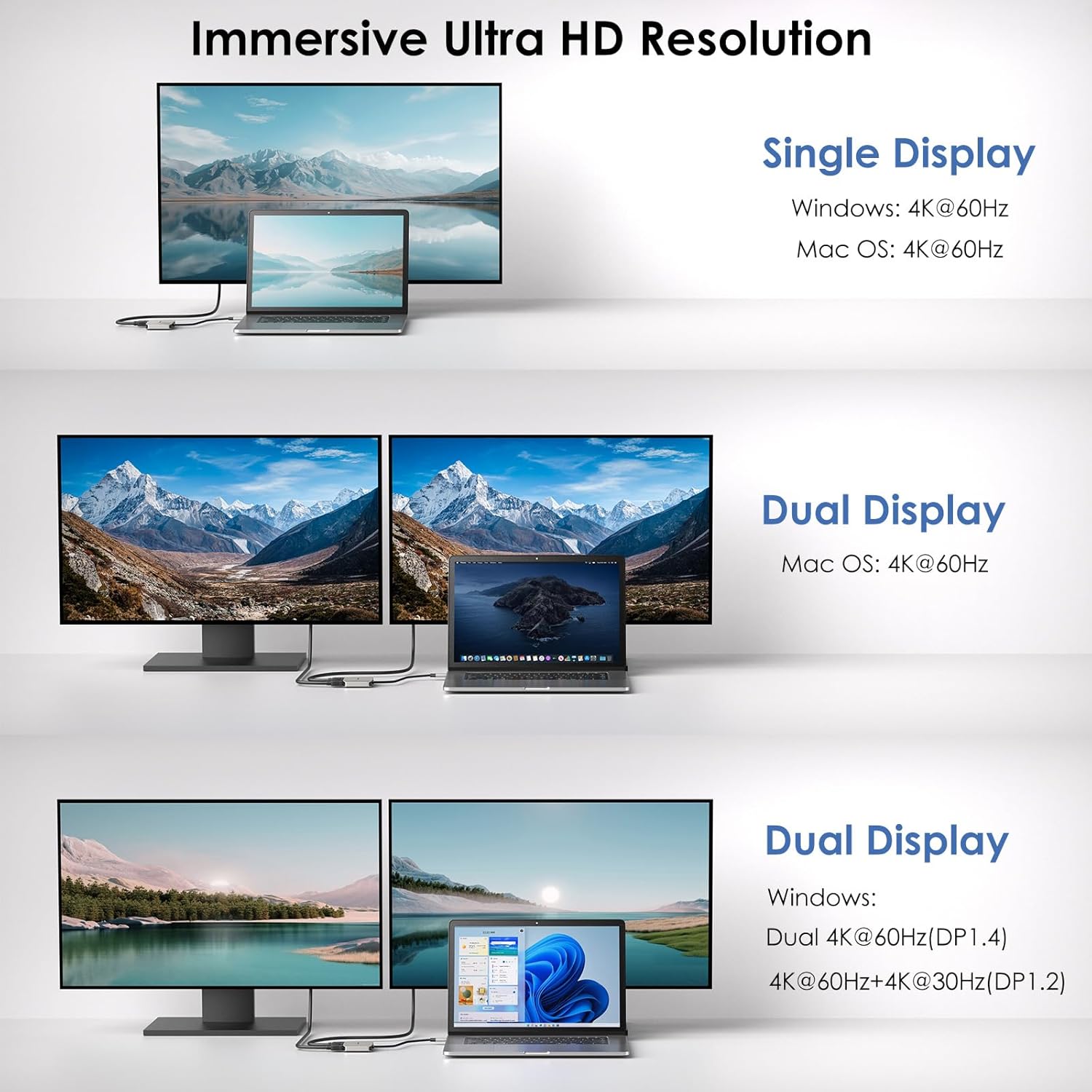
Image 5: Detailed resolution capabilities for single and dual displays across Windows and Mac OS.
6. Compatibility Requirements
To ensure proper functionality, please verify the following requirements for your host device:
- Your laptop's USB-C port must support DisplayPort Alt Mode for video output.
- For power delivery, your USB-C port must support Power Delivery (PD).
- For dual 4K@60Hz resolution on Windows, your laptop must support DisplayPort 1.4 (DP1.4).
- This adapter is not compatible with any MAC OS computer in full extend mode (i.e., two distinct extended displays). Mac OS will only extend to one external display, with the second external display mirroring the first.

Image 6: Visual guide for identifying supported and unsupported USB-C port types.
7. Troubleshooting
- No Display on External Monitors:
- Ensure your laptop's USB-C port supports DisplayPort Alt Mode.
- Check all HDMI cable connections between the adapter and monitors.
- Verify that your monitors are set to the correct HDMI input source.
- Restart your laptop and reconnect the adapter.
- Lower Than Expected Resolution:
- For dual 4K@60Hz on Windows, confirm your laptop supports DisplayPort 1.4. If it supports DP1.2, resolutions will be limited to 4K@60Hz + 4K@30Hz.
- Check your display settings in your operating system to ensure the desired resolution is selected.
- Laptop Not Charging:
- Ensure you are using a 20V/5A/100W USB-C power adapter (not included) connected to the adapter's PD port.
- Confirm your laptop's charging power requirement does not exceed 95W through the adapter.
- Verify your laptop's USB-C port supports Power Delivery.
- Mac OS Dual Extend Mode Behavior:
- As noted, Mac OS only supports extending to one external display with different content. The second external display will mirror the first. This is a limitation of Mac OS, not a defect of the adapter.
8. Specifications
| Feature | Specification |
|---|---|
| Model Number | UHP510-MAX |
| Brand | WAVLINK |
| Connector Type | USB-C Input, Dual HDMI Output, USB-C PD Input |
| Max. Resolution (Single Display) | 4K@60Hz |
| Max. Resolution (Dual Displays, DP1.4) | 2x 4K@60Hz (Windows) |
| Max. Resolution (Dual Displays, DP1.2) | 4K@60Hz + 4K@30Hz (Windows) |
| Power Delivery | Up to 95W (requires 100W charger, not included) |
| Compatible Devices | Dell XPS, HP Spectre, Lenovo Yoga, Surface Pro, LG Gram, etc. |
| Operating Systems | Windows 11/10/8.1/8/7, Mac OS, Chrome OS, Linux, iPad OS, Android |
| Color | Grey |
| Item Weight | 2.12 ounces |
| Package Dimensions | 6.22 x 4.06 x 0.71 inches |
9. Maintenance
To ensure the longevity and optimal performance of your WAVLINK USB-C to Dual HDMI Adapter, follow these maintenance guidelines:
- Cleaning: Use a soft, dry cloth to clean the adapter. Avoid liquid cleaners or aerosols.
- Storage: Store the adapter in a cool, dry place away from direct sunlight and extreme temperatures.
- Handling: Avoid dropping the adapter or subjecting it to strong impacts. Do not bend the cable excessively.
- Disassembly: Do not attempt to disassemble or repair the adapter yourself. This may void your warranty and cause damage.
10. Support and Warranty
For technical support, product information, or warranty inquiries, please refer to the official WAVLINK website or contact their customer service.
- Online Support: Visit the official product page for the latest drivers, FAQs, and support resources: https://www.wavlink.com/en_us/WL-UHP510-MAX
- Warranty Information: Specific warranty terms and conditions may vary by region and retailer. Please consult your purchase documentation or the WAVLINK official website for detailed warranty information.