
HIRREO EF16
HIRREO EF16 Smart Watch User Manual
Model: EF16
1. Introduction
Thank you for choosing the HIRREO EF16 Smart Watch. This device is designed to enhance your daily life with advanced fitness tracking, communication features, and robust durability. This manual provides essential information for setting up, operating, and maintaining your new smartwatch.

Image: The HIRREO EF16 Smart Watch showcasing its 1.6-inch AMOLED HD display, customizable dials, and key features like Always-on Display and 480x480 pixels resolution.
2. What's in the Box
Upon opening your HIRREO EF16 Smart Watch package, you should find the following items:
- Smart Watch (EF16)
- Metal Strap
- Silicone Strap
- Strap Accessories (for adjustment)
- Magnetic Charging Cable
- User's Manual

Image: A visual representation of the package contents, including the smartwatch, two types of straps, a charging cable, and the user manual.
3. Setup Guide
3.1 Initial Charging
Before first use, ensure your smartwatch is fully charged. Connect the magnetic charging cable to the charging points on the back of the watch and plug the USB-A end into a compatible power source (e.g., computer USB port, USB wall adapter).

Image: The smartwatch connected to its magnetic charging cable, illustrating the charging process.
3.2 App Installation
To unlock the full potential of your HIRREO EF16 Smart Watch, download the companion app. Scan the QR code provided in the user manual or search for "FitCloudPro" in your smartphone's app store (compatible with iOS 11.0+ and Android 5.0+).
Video: A tutorial demonstrating the Bluetooth connection process for the K66 Smart Watch, which uses the same FitCloudPro app.
3.3 Device Pairing
Open the FitCloudPro app on your smartphone. Ensure Bluetooth is enabled on your phone. Follow the in-app instructions to search for and pair with your EF16 Smart Watch. Confirm the pairing request on both your phone and the watch screen.
Video: An unboxing and display overview of a HIRREO EF7 smart watch, showing initial setup and app interaction.
4. Operating Your Smart Watch
4.1 Basic Navigation
- Touch Screen: Swipe left/right, up/down to navigate through menus and features. Tap to select.
- Side Buttons: The watch features multiple physical buttons. Typically, one button serves as a power/home button, while others may provide quick access to specific functions like sports modes or the flashlight. Refer to the on-screen prompts for specific button functionalities.
4.2 Changing Watch Faces
Your EF16 Smart Watch offers a variety of pre-installed watch faces. You can also download more through the FitCloudPro app.
- On Watch: From the home screen, long-press the display to enter the watch face selection menu. Swipe left/right to browse and tap to select.
- Via App: In the FitCloudPro app, navigate to the "Watch Face" or "Dial Library" section to explore and sync new watch faces to your device.

Image: The smartwatch screen showing various customizable watch faces, including options to create custom dials from phone photos.
5. Key Features
5.1 1.6-inch AMOLED HD Screen
The EF16 features a vibrant 1.6-inch AMOLED high-definition screen with a 480x480 resolution, offering clear visibility even in bright sunlight. It supports 6 homepage theme styles and an Always-On Display function.
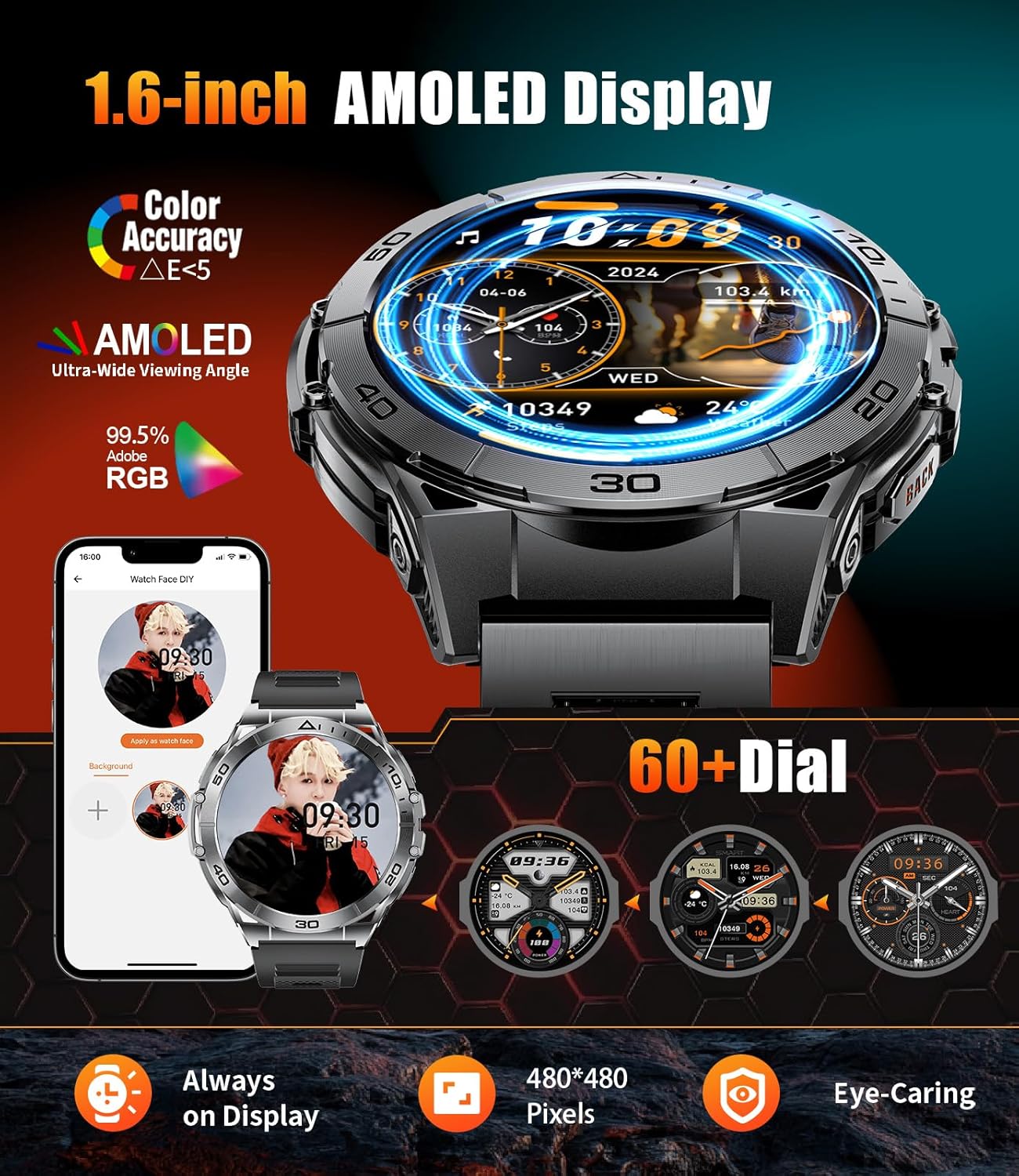
Image: The HIRREO EF16 Smart Watch showcasing its 1.6-inch AMOLED HD display, customizable dials, and key features like Always-on Display and 480x480 pixels resolution.
5.2 116 Sports Modes
Track your workouts with over 100 sports modes, including running, cycling, yoga, skipping rope, and hiking. The watch accurately records steps, distance, and calories, helping you manage your exercise routine effectively.

Image: The smartwatch interface showing various sports modes and real-time tracking of steps, calories, heart rate, and distance during activities.
5.3 Smart LED Flashlight
The built-in LED flashlight provides convenient illumination for various situations, such as night runs, camping, or finding items in the dark. Activate it with a single click.

Image: The smartwatch demonstrating its LED flashlight feature, illuminating a hand in a dark environment.
5.4 Bluetooth 5.3 Call & Notification
Equipped with a Bluetooth 5.3 chip, the watch offers stable connections for calls and notifications. Make and receive calls directly from your wrist using the built-in HD microphone and speaker. Receive smart message notifications from various apps.

Image: The smartwatch displaying incoming call and message notifications, highlighting its Bluetooth communication capabilities.
5.5 Military-Grade Durability
Constructed with a sturdy stainless steel alloy case and hard glass lenses, the EF16 is wear-resistant and drop-resistant. Its IP68 waterproof rating ensures protection against rain, hand washing, and sweat.

Image: A collage demonstrating the smartwatch's durability, including water resistance, impact resistance, and robust construction.
5.6 Efficient Endurance & 600mAh Battery
The 600mAh large-capacity battery, combined with the AMOLED low-power screen and Bluetooth 5.3 technology, provides extended battery life, lasting for multiple days on a single charge.

Image: The smartwatch emphasizing its 600mAh battery capacity and long-lasting power for extended use.
5.7 Multifunctional Capabilities
Beyond core features, the watch includes alarm reminders, intelligent message push, sedentary reminders, exercise goal reminders, Do Not Disturb mode, weather forecasts, music control, and a calculator.

Image: The smartwatch screen showing a grid of various application icons, representing its multifunctional capabilities like music control, camera control, weather, and alarm clock.
6. Health Monitoring
The EF16 Smart Watch provides comprehensive health monitoring features to help you stay informed about your well-being:
- Heart Rate Monitoring: Continuously tracks your heart rate throughout the day.
- Blood Oxygen (SpO2) Monitoring: Measures your blood oxygen saturation levels.
- Sleep Tracking: Analyzes your sleep patterns, including deep sleep, light sleep, and REM stages.
- Breathing Training: Guides you through breathing exercises for relaxation.

Image: The smartwatch interface showing detailed graphs and readings for breathing training, heart rate, blood oxygen, and sleep patterns.
7. Maintenance
- Cleaning: Wipe the watch screen and straps regularly with a soft, dry cloth. For stubborn dirt, use a slightly damp cloth. Avoid harsh chemicals.
- Water Resistance: The watch is IP68 waterproof. It is suitable for daily use, hand washing, and exposure to rain. However, it is not recommended for hot showers, saunas, or diving.
- Charging: Use only the provided magnetic charging cable. Ensure the charging points are clean and dry before connecting.
Video: A demonstration of how to install and remove the metal strap on the EF16 smart watch.
8. Troubleshooting
- Watch not turning on: Ensure the watch is fully charged. Connect it to the charger for at least 30 minutes.
- Unable to pair with phone: Make sure Bluetooth is enabled on your phone and the watch is within range. Restart both devices and try pairing again. Check the FitCloudPro app for specific pairing instructions.
- Inaccurate health data: Ensure the watch is worn snugly on your wrist, not too tight or too loose. Keep the sensor clean. Note that health data is for reference only and not for medical diagnosis.
- Notifications not received: Check app permissions on your phone to ensure FitCloudPro has access to notifications. Verify that notifications are enabled within the FitCloudPro app settings for your watch.
9. Specifications
| Feature | Detail |
|---|---|
| Model Number | EF16-A-US |
| Screen Size | 1.6 Inches AMOLED HD |
| Resolution | 480 x 480 pixels |
| Battery Capacity | 600 mAh |
| Connectivity | Bluetooth 5.3 |
| Waterproof Rating | IP68 |
| Operating System | AsteroidOS |
| Compatibility | iOS 11.0+ (calls iOS 13.0+), Android 5.0+ |
| Special Features | LED Flashlight, 100+ Sports Modes, Answer/Dial Calls, Health Monitoring (HR, SpO2, Sleep), Messaging Notification, Voice Assistant, Calculator, Music Control |
10. Warranty & Support
Your HIRREO EF16 Smart Watch comes with a 24-month warranty. For any issues regarding accessories, quality, operation, or charging, please contact HIRREO customer service. We provide 24-hour online support and will offer a solution within 24 hours.
For further assistance, please visit the HIRREO Store on Amazon.
Ask a question about this manual
Ask about setup, troubleshooting, compatibility, parts, safety, or missing instructions. Manuals+ will review the question and use this page’s manual context to help answer it.