
1. Introduction
The TESMEN TCG-2001 is a sophisticated digital paint thickness gauge designed for precise and non-destructive measurement of coating thickness on metal substrates. Utilizing both electromagnetic induction and eddy current sensing, it automatically identifies ferrous (Fe) and non-ferrous (NFe) metals, providing accurate readings for various applications including automotive paint inspection, industrial coating quality control, and home DIY projects. This manual provides detailed instructions for the proper setup, operation, and maintenance of your TCG-2001 device.
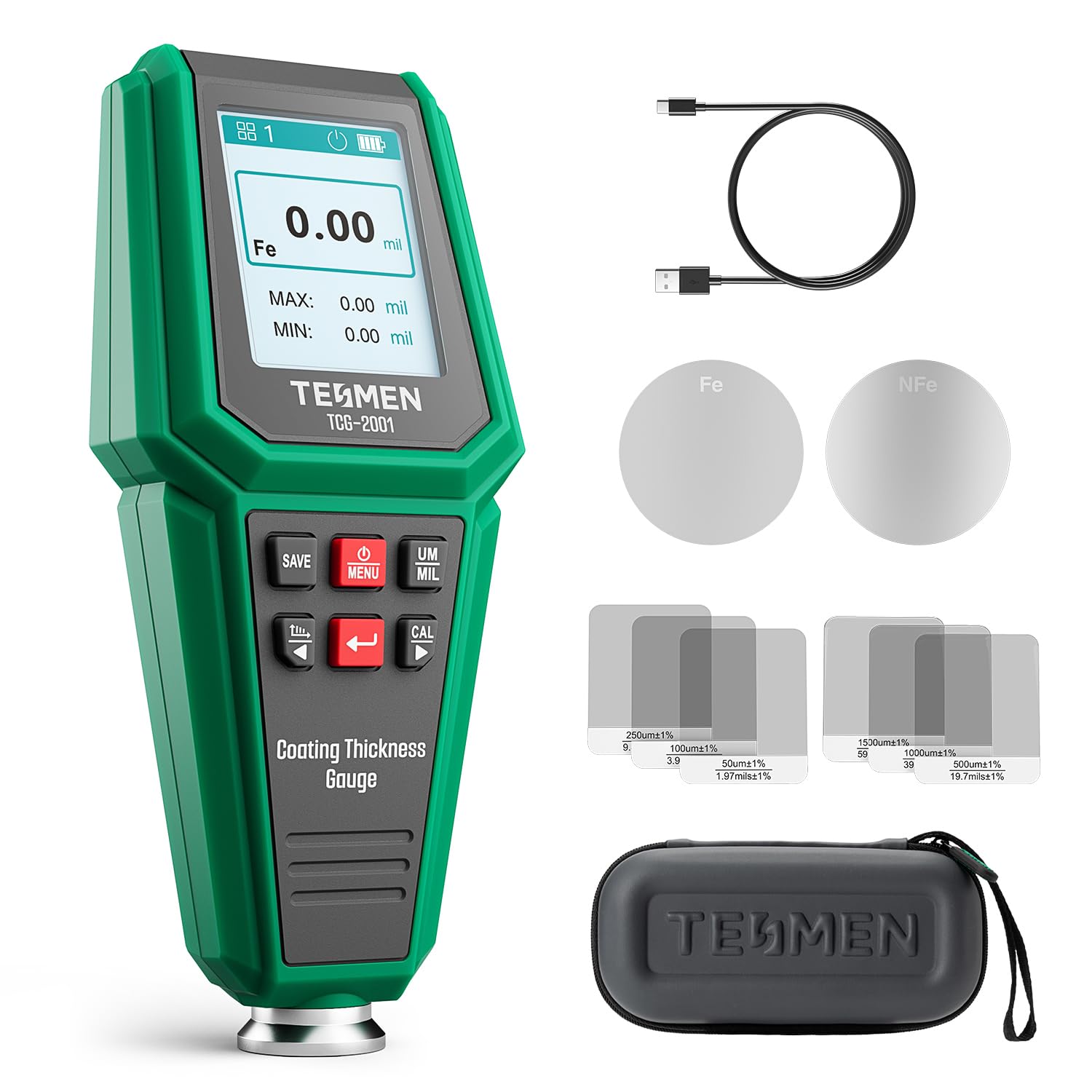
Figure 1: TESMEN TCG-2001 Digital Paint Thickness Gauge in operation.
2. Package Contents
Verify that all items listed below are included in your package:
- TESMEN TCG-2001 Paint Thickness Gauge
- USB-C Charging Cable
- Calibration Films (various thicknesses)
- Ferrous (Fe) Substrate Plate
- Non-Ferrous (NFe) Substrate Plate
- User Manual
- Carrying Pouch

Figure 2: Included items in the TESMEN TCG-2001 package.
3. Product Features
- Smart Dual-Tech Probe: Automatically distinguishes between ferrous and non-ferrous metals for precise coating thickness results on steel, zinc, and aluminum panels.
- Advanced Multi-Mode Testing: Offers Single, Continuous, Quick Check, and Multi-point judgment modes.
- Calibration Options: Supports zero-point and multi-point calibration for enhanced accuracy.
- Over-Limit Alert: Provides instant on-screen guidance with an alert icon when measurements exceed set limits.
- Data Logging & Analysis: Stores up to 256 readings in 8 groups, calculates group statistics (average, minimum, maximum, standard deviation), and displays results with intuitive bar graphs.
- User-Friendly Display: Features a 2.0" TFT color screen with bright backlight and 4-way auto-rotation for clear readings from any direction.
- Fast Charging: Rechargeable via USB-C with approximately 40-minute fast charging.
- Auto Power-Off: Extends battery life by automatically shutting down after a period of inactivity.

Figure 3: Key features of the TCG-2001 including the 2-in-1 smart probe and dual calibration.
4. Setup
The TESMEN TCG-2001 comes with a built-in rechargeable Lithium Polymer battery. Ensure the device is fully charged before first use.
4.1 Charging the Device
- Connect the provided USB-C cable to the charging port on the device.
- Connect the other end of the USB-C cable to a compatible USB power adapter (not included) or a computer's USB port.
- The battery indicator on the screen will show charging status. A full charge typically takes about 40 minutes.

Figure 4: The TCG-2001 supports USB-C fast charging.
4.2 Powering On/Off
- To power on: Press and hold the power button until the screen illuminates.
- To power off: Press and hold the power button until the screen turns off, or allow the device to auto power-off after a period of inactivity.
5. Calibration
Calibration is essential for ensuring the accuracy of your measurements. Perform calibration regularly, especially when measuring different types of materials or if you suspect inaccurate readings.
5.1 Zero-Point Calibration
- Ensure the device is powered on.
- Place the probe firmly and flatly on the bare (uncoated) ferrous (Fe) substrate plate.
- Press the 'CAL' button. The screen should display '0.0' or a value very close to it.
- Repeat the process for the non-ferrous (NFe) substrate plate.
5.2 Multi-Point Calibration
Multi-point calibration uses calibration films of known thicknesses to fine-tune the device's accuracy across a range of values.
- Perform Zero-Point Calibration first.
- Place a calibration film (e.g., 50µm) on the appropriate substrate plate (Fe or NFe).
- Place the probe firmly on the calibration film.
- Press the 'CAL' button. Use the up/down arrow buttons to adjust the displayed value to match the known thickness of the calibration film.
- Press 'OK' to confirm.
- Repeat for other calibration films (e.g., 100µm, 250µm, 500µm, 1000µm, 1500µm) to cover the desired measurement range.

Figure 5: Zero and multi-point calibration ensures accurate measurements.
6. Operating Modes
The TCG-2001 offers several measurement modes to suit different inspection needs.
6.1 Single Measurement Mode
For individual spot checks.
- Select 'Single' mode from the menu.
- Place the probe firmly on the surface to be measured.
- The reading will be displayed instantly. Lift the probe and repeat for new measurements.
6.2 Continuous Measurement Mode
For scanning a surface and observing real-time changes in thickness.
- Select 'Continuous' mode from the menu.
- Place the probe on the surface and slowly drag it across the area.
- The display will update continuously with thickness readings.

Figure 6: Single and Continuous Measurement modes for basic checks.
6.3 Quick Check Mode
Provides a quick pass/fail indication based on a predefined tolerance.
- Select 'Quick Check' mode.
- Set your desired target thickness and tolerance limits in the settings.
- Place the probe on the surface. The device will display 'PASS' or 'FAIL' along with the reading.
6.4 Multi-Point Judgment Mode
Ideal for inspecting larger areas by taking multiple readings and calculating an average for a comprehensive pass/fail assessment.
- Select 'Multi-Point Judgment' mode.
- Take several measurements across the target area.
- The device will automatically calculate the average and provide a pass/fail result based on set parameters.
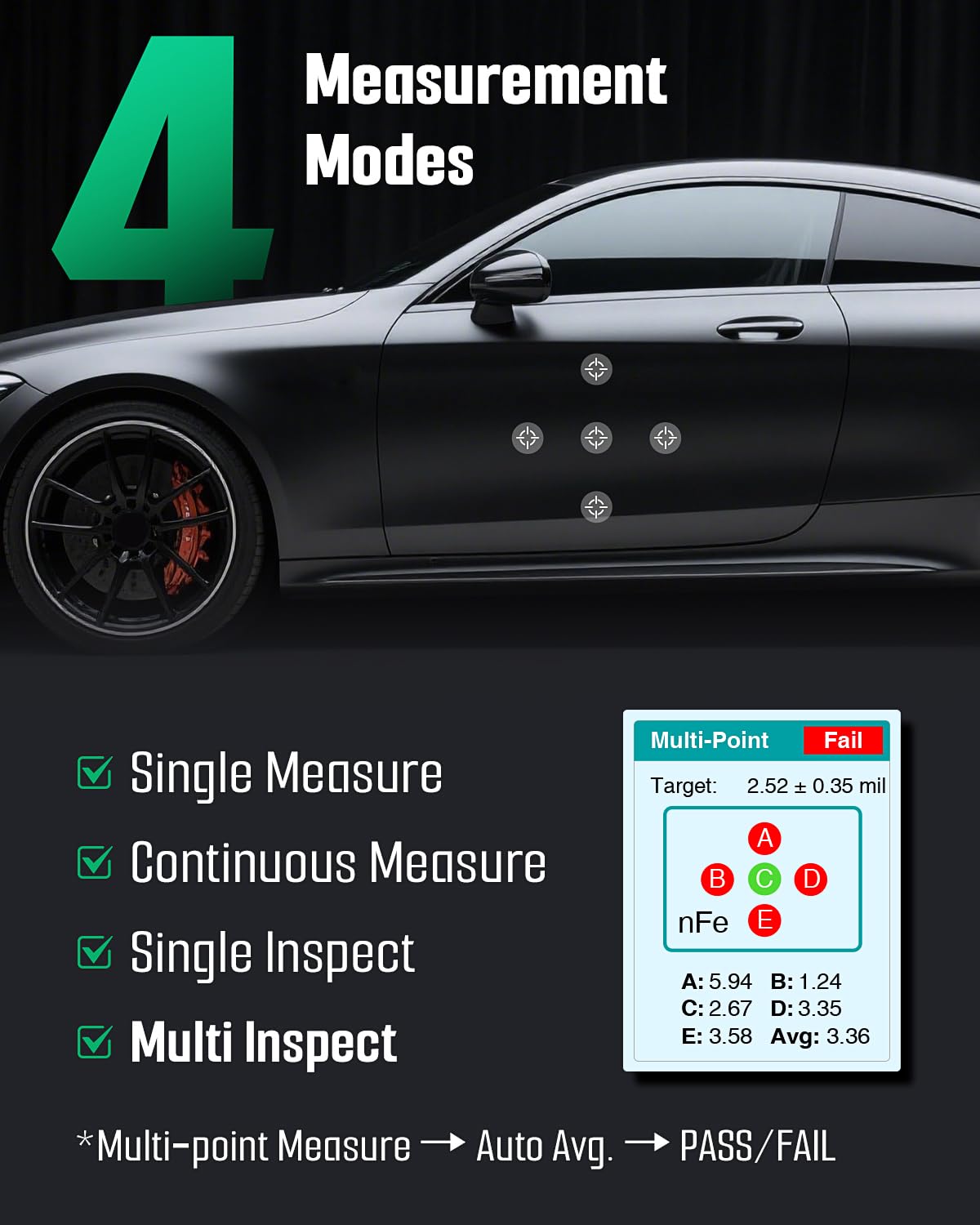
Figure 7: The four measurement modes of the TCG-2001, including Multi-Point Judgment for detailed inspection.
7. Data Management
The TCG-2001 allows you to record, organize, and analyze your measurement data.
7.1 Recording Readings
- After taking a measurement, press the 'SAVE' button to store the reading.
- Readings are organized into groups (up to 8 groups, 32 points per group).
7.2 Viewing Statistics and Bar Graphs
- Navigate to the 'VIEW DATA' or 'STATISTICS' option in the menu.
- The device will display average, minimum, maximum, and standard deviation for the selected group.
- A bar graph visualization helps in quickly understanding the distribution of measurements.

Figure 8: The TCG-2001 provides detailed data records, group statistics, and visual bar graphs for analysis.

Figure 9: Real-time limit alarms and visual data representation enhance inspection efficiency.
8. Applications
The TESMEN TCG-2001 is versatile and suitable for various applications:
- Used Car Evaluation: Quickly check paint thickness to identify repainted areas, accident repairs, or inconsistencies.
- Automotive Manufacturing: Quality control for paint and coating processes.
- Metal Processing: Ensuring uniform coating thickness on metal parts.
- Home Furnishings: Inspecting coatings on metal furniture or appliances.
- General Quality Inspection: Any application requiring non-destructive measurement of coatings on metal.
Note: This device is designed for use on metal surfaces only and is NOT compatible with non-metal substrates such as plastic, glass, fiberglass, or wood.

Figure 10: Diverse applications of the TCG-2001 in automotive, home, and industrial settings.
Video 1: Demonstration of a car coating thickness meter for used car buyers, illustrating practical application.
9. Specifications
| Specification | Value |
|---|---|
| Manufacturer | TESMEN |
| Model Number | TCG-2001 |
| Item Weight | 331 g |
| Power Source | 1 Lithium Polymer battery (included) |
| Charging Interface | USB-C |
| Display | 2.0" TFT Color Screen with Backlight |
| Screen Rotation | 4-way Auto-Rotation |
| Data Storage | Up to 256 readings in 8 groups |
| Measurement Principle | Electromagnetic Induction & Eddy Current |
| Country of Origin | China |
10. Troubleshooting
If you encounter issues with your TESMEN TCG-2001, please refer to the following common problems and solutions:
- Device does not power on:
- Ensure the battery is sufficiently charged. Connect the device to a USB-C charger for at least 15 minutes.
- Verify that the power button is pressed and held correctly.
- Inaccurate readings:
- Perform Zero-Point and Multi-Point Calibration as described in Section 5.
- Ensure the probe is placed firmly and flatly on the surface.
- Check that the surface is clean and free of debris.
- Confirm the device is set to the correct measurement unit (µm or mil).
- Screen is dim or unreadable:
- Adjust the backlight settings in the device menu.
- Ensure the battery is charged, as low battery can affect screen brightness.
- Device not detecting metal type:
- Ensure the probe is making good contact with the metal surface.
- Verify that the surface is indeed a metal substrate (ferrous or non-ferrous). The device is not designed for non-metal materials.
If the issue persists, please contact TESMEN customer support for further assistance.
11. Maintenance
To ensure the longevity and optimal performance of your TCG-2001, follow these maintenance guidelines:
- Cleaning: Wipe the device and probe with a soft, dry cloth. Do not use abrasive cleaners or solvents.
- Storage: Store the device in its carrying pouch in a cool, dry place away from direct sunlight and extreme temperatures.
- Probe Care: Avoid scratching or damaging the probe tip, as this can affect measurement accuracy. Do not drag the metal probe across painted surfaces.
- Battery: Recharge the device regularly, even if not in frequent use, to maintain battery health.
12. Warranty and Support
The TESMEN TCG-2001 comes with a manufacturer's warranty against defects in materials and workmanship. Please refer to the warranty card included in your package for specific terms and conditions.
For technical support, troubleshooting, or warranty claims, please contact TESMEN customer service:
- Email: support@tesmen.com
- Website: Refer to the official TESMEN website for the latest support information and FAQs.
Please have your model number (TCG-2001) and purchase information ready when contacting support.