
1. Introduction
Thank you for choosing the VINZ Paz Bluetooth Headset Helmet. This manual provides essential information for the safe and effective use, maintenance, and care of your helmet. Please read it thoroughly before using your helmet and keep it for future reference.
2. Safety Information
Your safety is paramount. This helmet is designed to provide protection during motorcycling, scootering, or similar activities. Always wear your helmet correctly and ensure it fits properly.
ECE 22.06 Certification
The VINZ Paz helmet is certified according to the ECE 22.06 standard, which is the latest European safety standard for helmets. This certification ensures the helmet meets stringent requirements for impact tests, rotational forces, and accessories like visors. Helmets with ECE 22.06 approval offer a high level of safety and are mandatory for new type approvals within Europe.

Image: ECE 22.06 approval label and explanation. This image highlights the ECE 22.06 certification, indicating compliance with the latest European safety standards for helmets.
Helmet Construction
The helmet features a hard and lightweight ABS outer shell and an EPS inner shell, designed to absorb impact energy effectively.

Image: Overview of helmet features including ECE 22.06 certification, ABS outer shell, comfortable inner lining, and perfect fit design.
3. Product Features
- Integrated Bluetooth Headset: For hands-free calls and music streaming.
- Integrated Sun Visor: A flip-up sun visor for protection against bright sunlight.
- Anti-Scratch Main Visor: A clear, flip-up main visor with anti-scratch properties.
- Micrometric Quick Release Chin Strap: For secure and easy fastening and release.
- Comfortable Inner Lining: Soft, moisture-wicking, removable, and washable for hygiene.
- Lightweight Design: Weighs approximately 1250 grams for comfortable wear.
- Suitable for Glasses Wearers: Designed to accommodate individuals who wear glasses.
- USB-C Charging: Integrated charging port for the Bluetooth headset.
- Microphone Covers: Includes 2 microphone covers for extra hygiene.
- Helmet Bag: A protective bag for storage and transport.
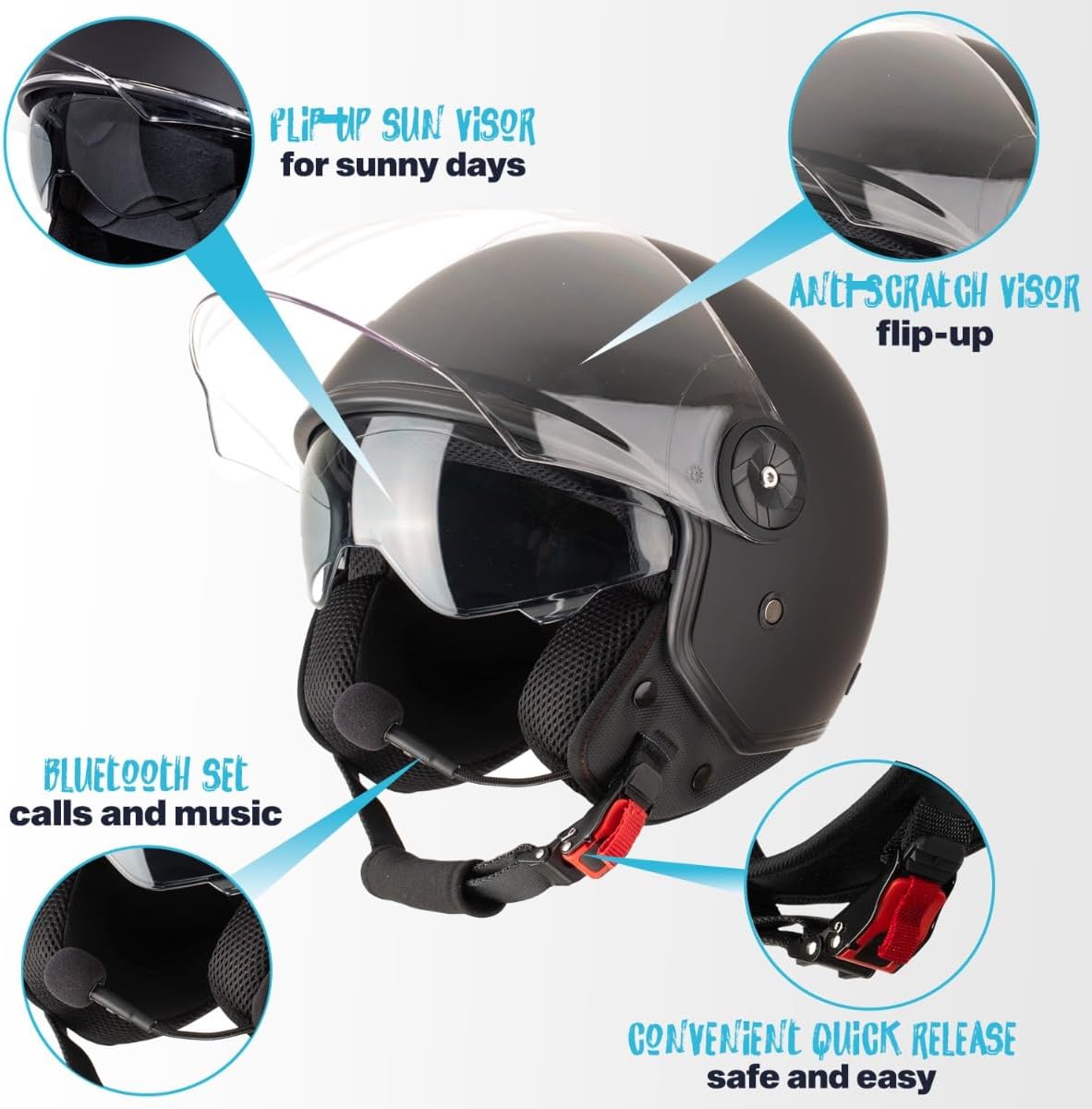
Image: Key features of the VINZ Paz helmet, including the flip-up sun visor, anti-scratch main visor, integrated Bluetooth headset for calls and music, and a convenient quick-release chin strap.

Image: Additional features of the VINZ Paz helmet, showing the included microphone covers, the integrated charging port in the collar, and the USB-C rechargeable capability.
4. Setup
4.1 Determining Your Helmet Size
A correctly sized helmet is crucial for safety and comfort. Follow these steps to determine your size:
- Measure the circumference of your head with a measuring tape.
- Position the tape approximately 2.5 cm (1 inch) above your ears.
- Refer to the size chart below to find your corresponding helmet size.
- If you are between sizes, it is generally recommended to choose one size larger for comfort.

Image: Visual guide for determining helmet size. It shows how to measure head circumference and provides a size chart: XS (53-54 cm), S (55-56 cm), M (57-58 cm), L (59-60 cm), XL (60-61 cm), XXL (61 cm).
4.2 Bluetooth Headset Pairing
To connect your helmet's integrated Bluetooth headset to your smartphone or other Bluetooth-enabled device:
- Ensure the headset is charged (see 4.3 Charging).
- Turn on the Bluetooth headset by pressing and holding the power button until the indicator light flashes, usually indicating pairing mode.
- On your device, go to Bluetooth settings and search for available devices.
- Select 'VINZ Paz' or a similar name from the list.
- Once connected, the indicator light on the headset will change, typically to a slow flash or solid blue.
4.3 Charging the Bluetooth Headset
The Bluetooth headset is rechargeable via a USB-C port located in the helmet's collar.
- Locate the integrated charging port in the collar of the helmet.
- Connect a USB-C cable to the port and the other end to a suitable USB power source (e.g., computer, wall adapter).
- The indicator light will show charging status (e.g., red for charging, blue/green for fully charged).
4.4 Visor Adjustment
The helmet features both a main clear visor and an integrated sun visor.
- Main Visor: Can be flipped up or down manually. Ensure it clicks securely into place when fully closed or open.
- Sun Visor: Operated by a lever on the side of the helmet. Slide the lever down to deploy the sun visor and up to retract it.
4.5 Fastening the Chin Strap
The micrometric quick-release chin strap ensures a secure fit.
- Place the helmet on your head.
- Insert the notched strap into the buckle until it is snug against your chin.
- Pull the strap to tighten it. It should be tight enough that the helmet does not move freely but not uncomfortably so.
- To release, pull the red tab on the buckle.
5. Operating
5.1 Using the Bluetooth Headset
Once paired, you can use the Bluetooth headset for various functions:
- Music Playback: Control music directly from your connected device or via the headset's buttons (if available).
- Phone Calls: Answer or end calls using the headset's controls. The integrated microphone allows for clear communication.
5.2 Using the Visors
- Main Visor: Keep the main visor down for protection against wind, dust, and debris while riding. Flip it up when stationary or for better ventilation.
- Sun Visor: Deploy the integrated sun visor on sunny days to reduce glare and improve visibility. Retract it when not needed or in low-light conditions.
6. Maintenance
6.1 Cleaning the Helmet
- Outer Shell: Clean the outer shell with a soft cloth and mild soap and water. Avoid harsh chemicals or abrasive cleaners.
- Visors: Clean visors with a soft, damp cloth and water. Do not use abrasive materials or chemical cleaners that could damage the anti-scratch coating.
6.2 Removing and Washing the Inner Lining
The inner lining is removable and washable for hygiene.
- Carefully detach the inner lining components from the helmet.
- Wash the lining by hand with mild soap and cool water.
- Rinse thoroughly and allow to air dry completely before reinserting into the helmet.
6.3 Storage
When not in use, store your helmet in the provided helmet bag to protect it from scratches, dust, and dirt. Store in a cool, dry place away from direct sunlight and extreme temperatures.
Image: Explanation of the ECE 22.06 approval and the benefits of the included helmet bag for protecting the helmet from scratches and dirt during storage or transport.
7. Troubleshooting
7.1 Bluetooth Connection Issues
- Headset not pairing: Ensure the headset is in pairing mode (flashing indicator light). Check your device's Bluetooth settings and try re-scanning.
- No sound: Check the volume levels on both the headset and your connected device. Ensure the headset is properly paired.
- Intermittent connection: Ensure there are no obstructions between your device and the helmet. Try moving closer to your device.
7.2 Charging Issues
- Headset not charging: Verify that the USB-C cable is securely connected to both the helmet's port and the power source. Try a different USB-C cable or power adapter.
- Charging indicator not working: Ensure the headset is properly connected. If the issue persists, contact support.
8. Specifications
| Model Name | Paz |
| Model Number | BIS899XXL |
| Helmet Type | Jet Helmet |
| Outer Shell Material | ABS Plastic |
| Inner Shell Material | EPS |
| Weight | Approximately 1250 grams |
| Certification | ECE 22.06 |
| Visors | Anti-scratch main visor, Integrated flip-up sun visor |
| Chin Strap | Micrometric Quick Release |
| Bluetooth | Integrated headset for calls and music |
| Charging Port | USB-C (integrated in collar) |
| Product Dimensions (L x W x H) | 27.5 x 32 x 29 cm |

Image: Visual representation of the helmet's dimensions (31.5 cm length, 24 cm height, 26.4 cm width) and its lightweight design (1250 grams).
9. Warranty
This VINZ Paz helmet comes with a 1-year warranty from the date of purchase. The warranty covers manufacturing defects under normal use. Please retain your proof of purchase for any warranty claims. The warranty does not cover damage caused by misuse, accidents, unauthorized modifications, or normal wear and tear.
10. Support
For further assistance, technical support, or warranty inquiries, please refer to the contact information provided with your purchase or visit the official VINZ website. Always provide your model number (BIS899XXL) and purchase details when contacting support.
