
Cholas RL001
Cholas Red Light Therapy Device with 5 Heads and Stand, Model RL001 User Manual
Comprehensive instructions for safe and effective use.
1. Introduction
The Cholas Red Light Therapy Device (Model RL001) is designed to provide targeted red light and near-infrared light therapy for various parts of the body. This manual provides essential information for the safe and effective operation of your device, including setup, usage, and maintenance instructions.
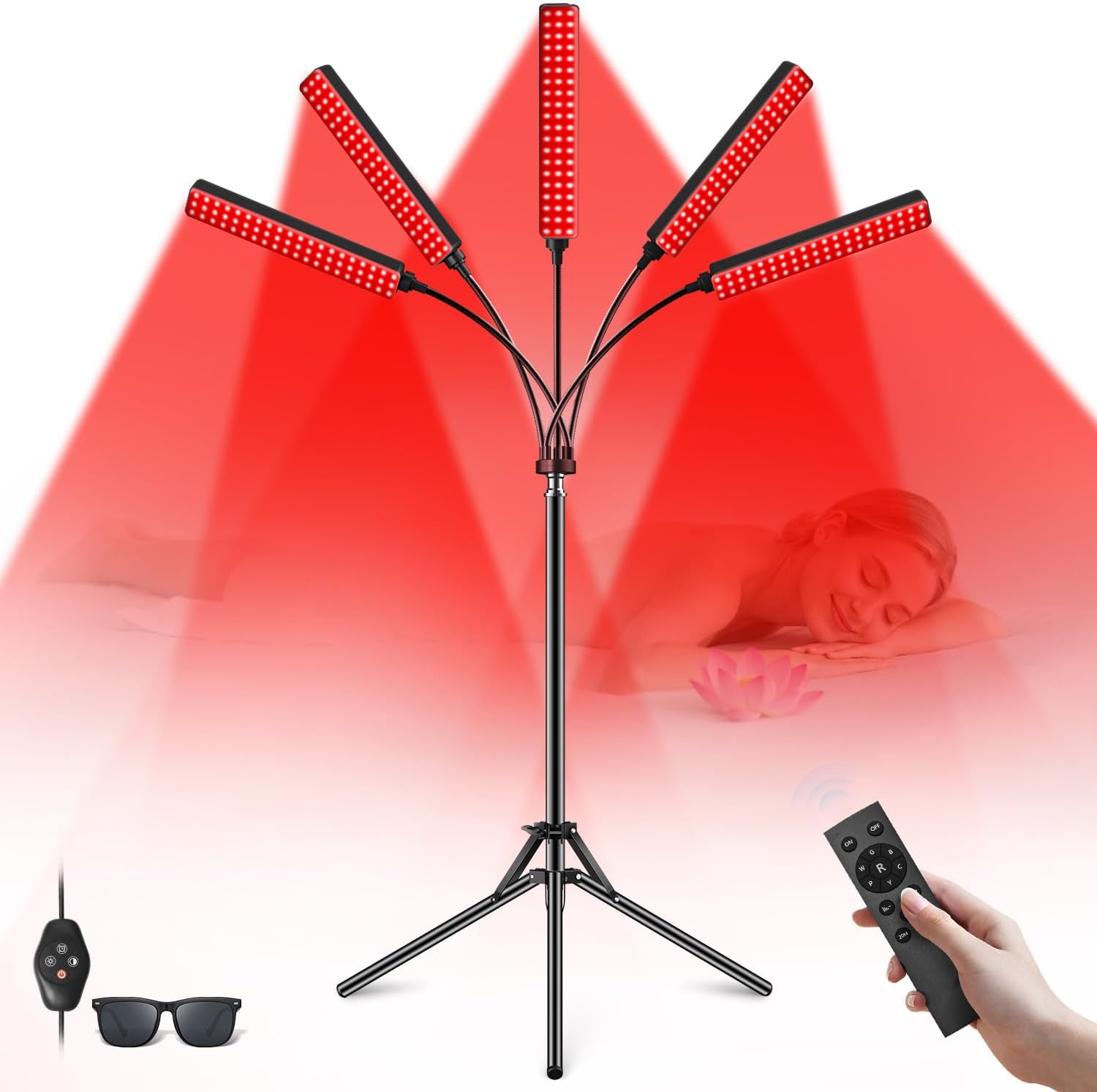
Image 1: Overview of the Cholas Red Light Therapy Device, showing its five adjustable light heads, adjustable stand, remote control, and included protective eyewear.
2. Safety Information
Please read all safety instructions before using the device. Failure to follow these instructions may result in injury or device damage.
- Eye Protection: Always wear the provided protective eyewear during operation to shield your eyes from direct light exposure.
- Distance: Maintain a distance of 10-30 cm (4-12 inches) between the light heads and the skin during use.
- Duration: Adhere to recommended session times. Excessive exposure may not provide additional benefits and could potentially cause discomfort.
- Medical Conditions: Consult a healthcare professional before use if you have any medical conditions, are pregnant, or are taking photosensitizing medications.
- Skin Sensitivity: Discontinue use if you experience any discomfort, redness, or irritation.
- Children and Pets: Keep the device out of reach of children and pets.
- Water Exposure: Do not use the device near water or in wet environments.
- Power Source: Use only the provided power adapter.
- Heat: This device is not a heating lamp and will not cause skin heating when used correctly.
Legal Disclaimer: Statements regarding dietary supplements have not been evaluated by the FDA and are not intended to diagnose, treat, cure, or prevent any disease or health condition.
3. Package Contents
Verify that all items listed below are included in your package:
- 1 x Exquisite Box (Packaging)
- 1 x Infrared Light with Controller (Main Device)
- 1 x Tripod (Stand)
- 1 x User Manual
- 1 x Adapter (Power Supply)
- 1 x Remote Control (Battery not included)
- 1 x Eye Mask
- 1 x Protective Goggles

Image 2: Visual representation of all components included in the Cholas Red Light Therapy Device package.
Unboxing Video:
Video 1: An unboxing video demonstrating the contents of the Cholas Red Light Therapy Device package and initial setup steps.
4. Setup
Follow these steps to assemble your Cholas Red Light Therapy Device:
- Assemble the Tripod: Open the tripod stand and rotate the locking mechanism counter-clockwise to secure the legs.
- Adjust Stand Height: Adjust the support bar to your desired height and secure it using the adjustment knob. The stand is adjustable from 20 to 59 inches.
- Connect the Light Unit: Link the main infrared light unit with its controller to the top of the tripod stand.
- Adjust Light Heads: Position the five flexible gooseneck light heads to direct the light as needed. Each head can be rotated 360 degrees.
- Connect Power: Plug the power adapter into the device and then into a suitable power outlet.

Image 3: Step-by-step visual guide for assembling the Cholas Red Light Therapy Device.
Setup Video:
Video 2: A video demonstrating the assembly and initial setup of the Cholas Red Light Therapy Device.
5. Operating Instructions
Operate your device using the inline controller or the remote control.
5.1. Power On/Off
- Press the "ON" button on the remote control or the power button on the inline controller to turn on the device.
- Press the "OFF" button on the remote control or the power button again to turn off the device.
5.2. Adjusting Brightness Levels
The device features 5 adjustable brightness levels.
- Use the "+" and "-" buttons on the remote control or inline controller to cycle through the 5 brightness levels.
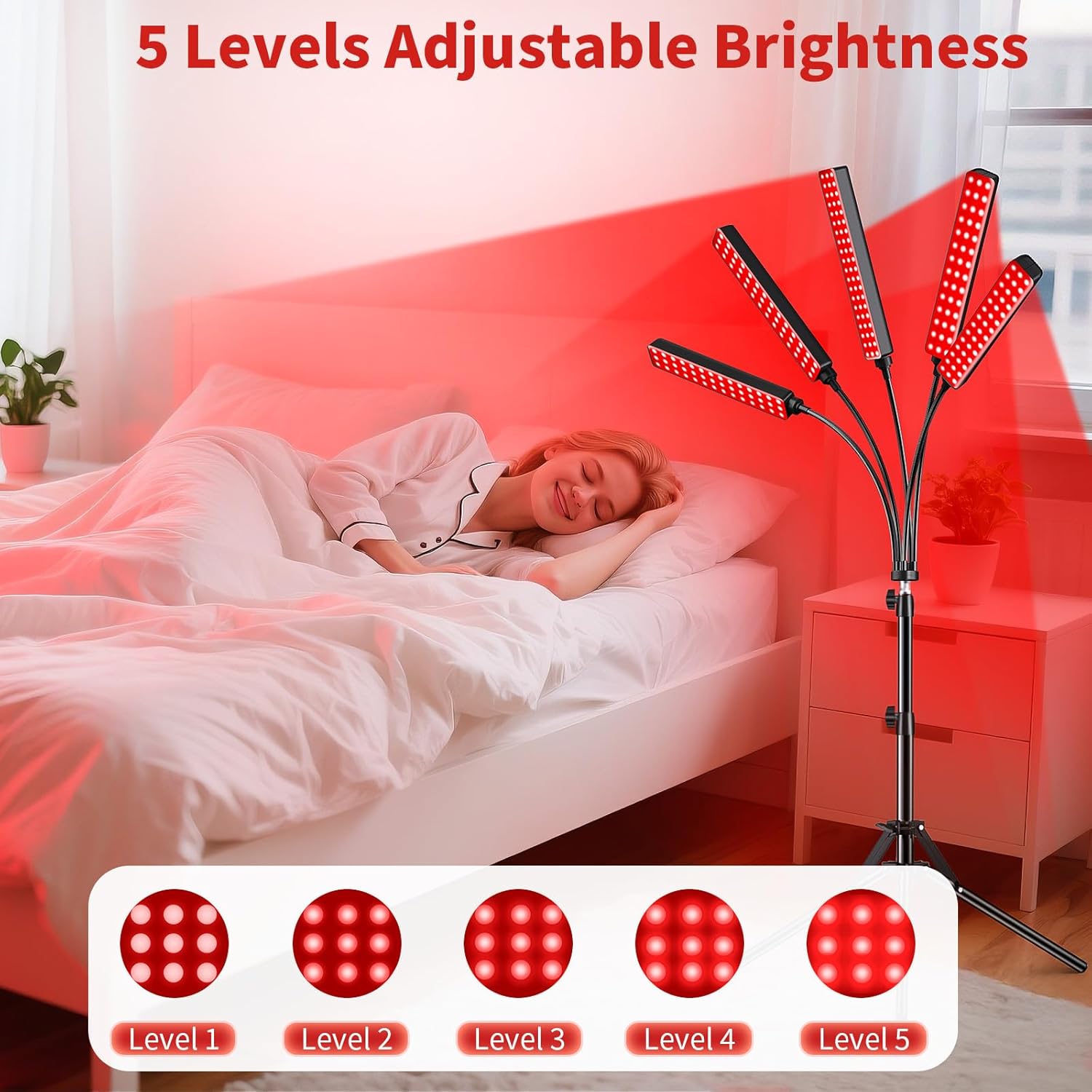
Image 4: The remote control and visual representation of the five dimming levels for the red light therapy device.
5.3. Selecting Light Modes
Choose from 3 light modes: constant on, low-frequency flicker, or high-frequency flicker.
- Press the "M" button on the remote control or inline controller to switch between the three modes.
5.4. Setting the Timer
The device includes a timer function for sessions of 20, 30, 40, 50, or 60 minutes.
- Select your desired session duration by pressing the corresponding time button (20M, 30M, 40M, 50M, 60M) on the remote control. The device will automatically shut off after the set time.
5.5. Adjusting Light Heads and Stand
- The five light heads are connected via 360° flexible goosenecks, allowing you to direct the light precisely to target areas.
- The stand height can be adjusted to suit various usage scenarios, from sitting to lying down.

Image 5: Demonstrating the flexibility of the light heads for targeted application.
Operation Video:
Video 3: A video showcasing the smart timed features and portability of the Cholas Red Light Therapy Device.
6. Usage Guidelines
The Cholas Red Light Therapy Device combines 660nm (visible red light) and 850nm (invisible near-infrared light) wavelengths, which are commonly used for various applications.
6.1. Recommended Distance and Duration
- Position the device 10-30 cm (4-12 inches) away from the skin.
- Typical session duration is 15-20 minutes, 3-5 times per week.
- For relaxation and improved sleep, a 15-20 minute session before bedtime is recommended.
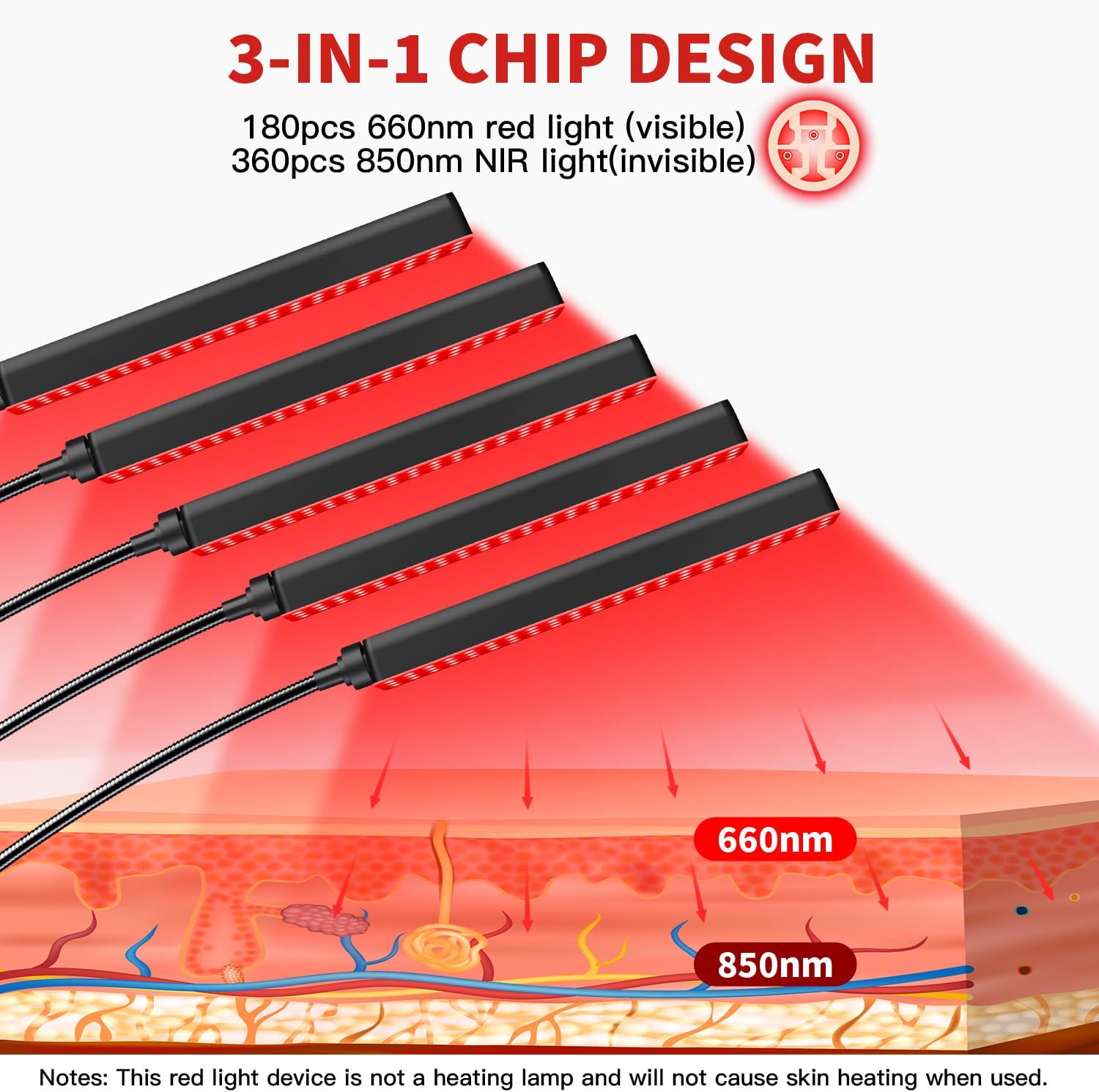
Image 6: Illustration of 660nm red light and 850nm near-infrared light wavelengths and their penetration into the skin layers.
6.2. Application Areas
The adjustable heads allow for targeted application on various body parts:
- Face: May help with skin texture and fine lines.
- Body: Can be used on the back, belly, shoulders, neck, waist, ankles, and other areas for general well-being.

Image 7: Examples of how the red light therapy device can be applied to different areas of the body.
6.3. Wearing Protective Eyewear
Always wear the provided protective goggles during your therapy sessions, especially when targeting facial areas, to protect your eyes from the intense light.
Usage Video:
Video 4: A short video demonstrating the precise red light care for targeted areas.
7. Maintenance
Proper maintenance ensures the longevity and optimal performance of your device.
- Cleaning: Ensure the device is unplugged before cleaning. Use a soft, dry cloth to wipe the light heads and stand. Do not use abrasive cleaners or immerse the device in water.
- Storage: Store the device in a cool, dry place away from direct sunlight and moisture.
- Inspection: Regularly inspect the power cord and light heads for any signs of damage. If damage is found, discontinue use and contact customer support.
8. Troubleshooting
If you encounter any issues with your Cholas Red Light Therapy Device, refer to the following common problems and solutions:
| Problem | Possible Cause | Solution |
|---|---|---|
| Device does not turn on. | Not plugged in correctly; power outlet issue; remote control battery dead. | Check power connections. Try a different outlet. Replace remote control battery. |
| Lights are dim or flickering unexpectedly. | Incorrect brightness setting; selected flicker mode. | Adjust brightness using "+" button. Press "M" button to change light mode to constant on. |
| Remote control not working. | Battery issue; remote out of range. | Replace the battery in the remote control. Ensure remote is pointed towards the device within reasonable range. |
| Device turns off unexpectedly. | Timer function activated. | This is normal if a timer was set. If not, check power connection. |
If the problem persists after trying these solutions, please contact Cholas customer support.
9. Specifications
- Model Number: RL001
- Light Heads: 5 individually adjustable heads
- LED Count: 180 LEDs (180 pcs 660nm visible red light, 360 pcs 850nm invisible infrared light)
- Wavelengths: 660nm (Red Light), 850nm (Near-Infrared Light)
- Brightness Levels: 5 adjustable levels
- Light Modes: 3 (Constant On, Low-Frequency Flicker, High-Frequency Flicker)
- Timer Settings: 20, 30, 40, 50, 60 minutes
- Stand Height Adjustment: 20 - 59 inches
- Flexible Gooseneck: 360° rotation
- Package Dimensions: 17.09 x 7.72 x 4.53 inches
- Item Weight: 3.95 Pounds
- Manufacturer: Cholas
10. Warranty and Support
Cholas is committed to providing quality products and customer satisfaction.
- Warranty: 24-month hassle-free warranty.
- Return Policy: 30-day unconditional return guarantee.
- Customer Support: 7x24 customer support with 24-hour reply.
- Technical Support: Lifetime customer and technical support.
For any questions or support, please log into your Amazon account, navigate to "Your orders," find the order ID, and click "Contact seller."

Image 8: Cholas customer service commitment details.
Ask a question about this manual
Ask about setup, troubleshooting, compatibility, parts, safety, or missing instructions. Manuals+ will review the question and use this page’s manual context to help answer it.