Product Overview
The LIWAN ZC-YT10 is a 4G LTE cellular security camera designed for outdoor use, offering 2K resolution, color night vision, and PIR motion detection. It operates completely wire-free, powered by a solar panel and a rechargeable battery, connecting to the internet via a built-in SIM card. This manual provides detailed instructions for setup, operation, and maintenance to ensure optimal performance.
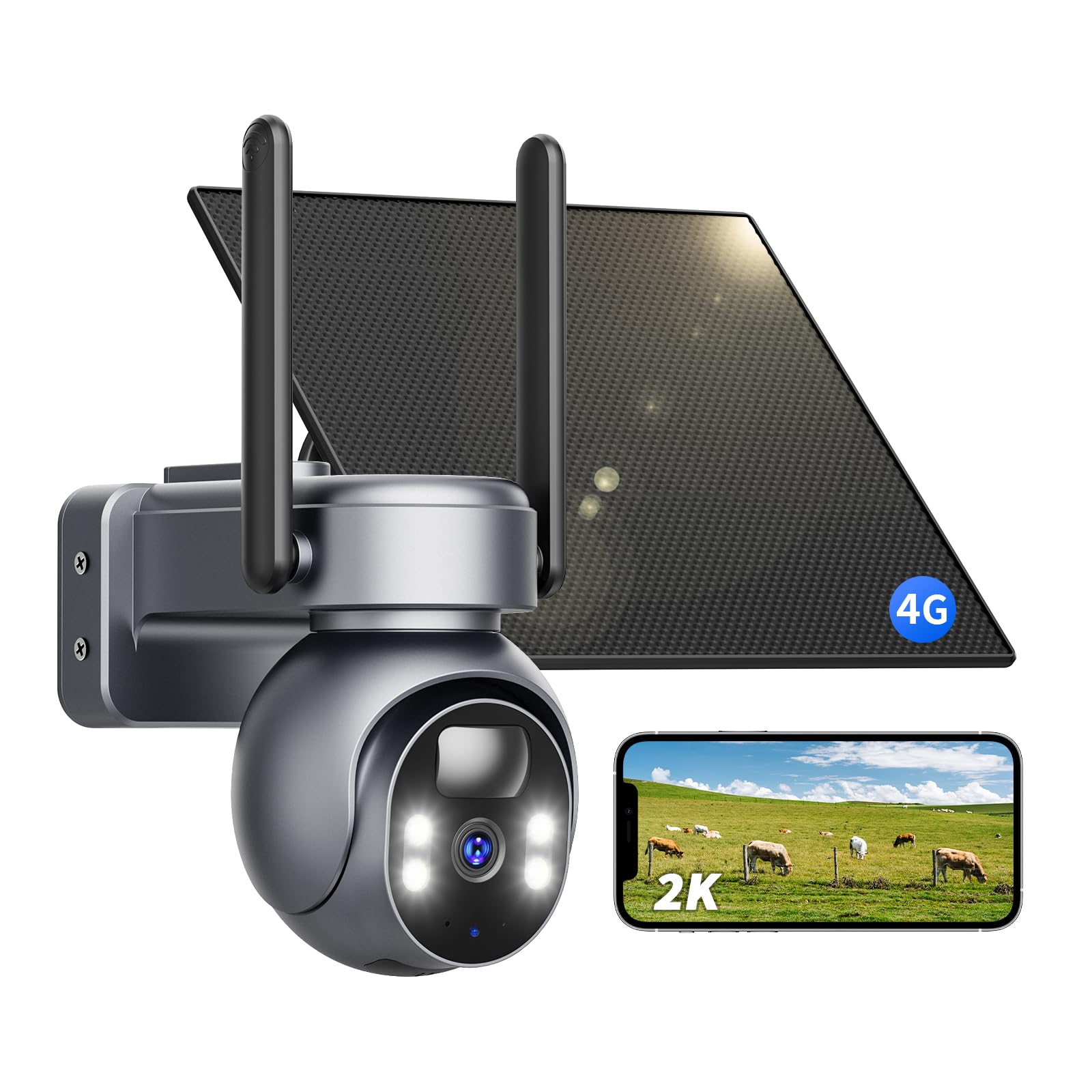
Image: LIWAN 4G LTE Cellular Solar Security Camera. This image displays the main unit of the camera, featuring dual antennas and a solar panel for power. It highlights 4G LTE signal capability and no Wi-Fi requirement, suitable for various outdoor environments like homes, construction sites, farms, and RVs.
What's in the Box
- Cellular Security Camera
- 4G SIM Card (pre-inserted)
- Solar Panel
- Instruction Manual
- Mounting Screws
Setup
1. Initial Charging & SIM Card Activation
Before initial use, fully charge the camera's internal battery using the provided USB-C cable. The camera comes with a pre-inserted 4G SIM card. The trial data for the SIM card will activate once the camera connects to the 4G network. Note that only the built-in SIM card can be used; private SIM cards are not supported.
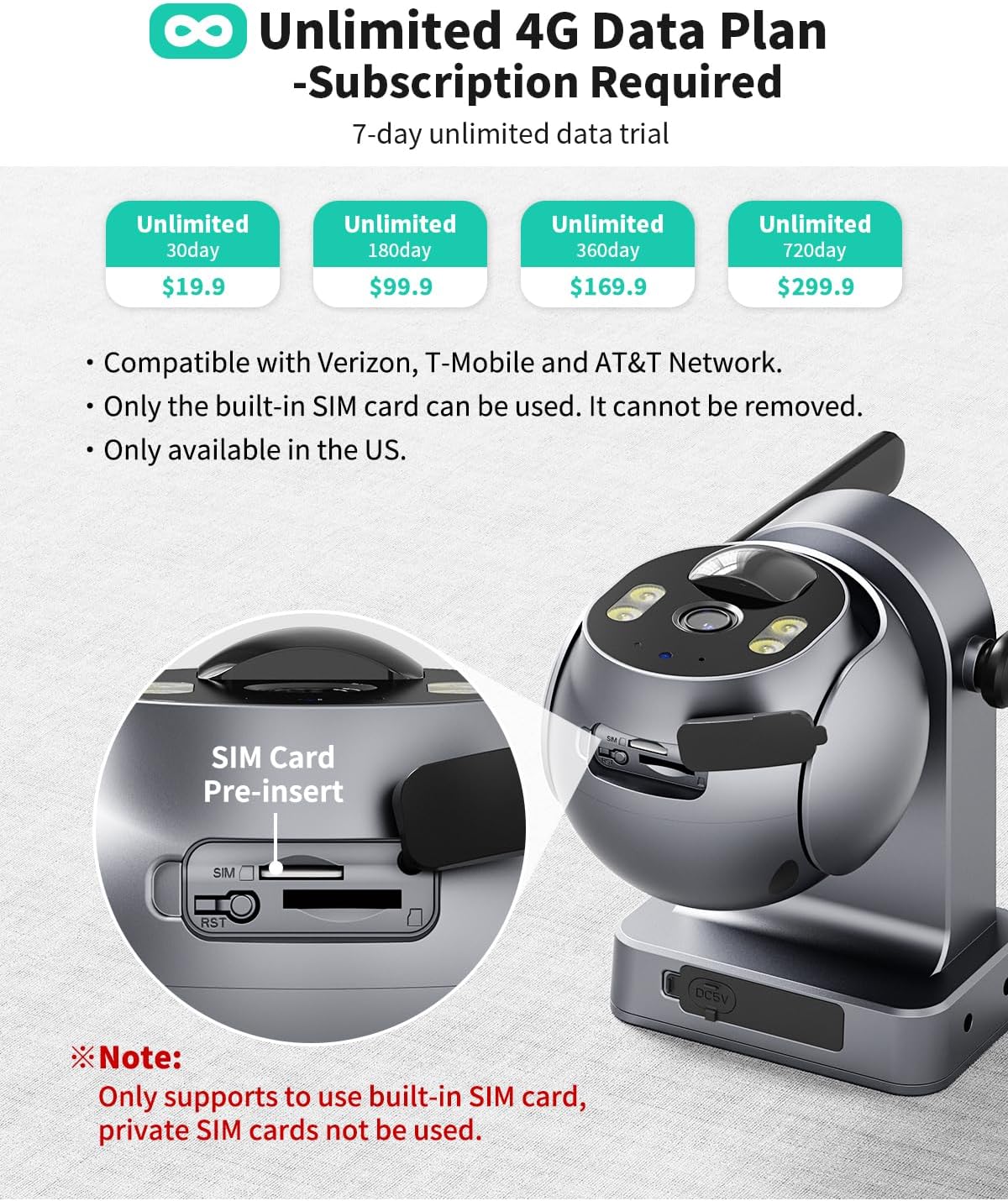
Image: Close-up view of the camera highlighting the pre-inserted SIM card slot. This image also details the available 4G data plans and emphasizes that only the built-in SIM card is compatible.
2. App Installation & Device Pairing
- Download the Ubox App from your smartphone's app store (iOS or Android).
- Create an account and log in.
- Power on the camera.
- In the Ubox App, scan the QR code located on the camera to pair the device.
3. Mounting the Camera and Solar Panel
Mount the camera and solar panel in a location that receives at least 3 hours of direct sunlight daily for continuous power. The camera offers multiple mounting options (wall mount, screw-in). Ensure the solar panel is positioned to maximize sun exposure. The camera is IP66 waterproof, suitable for all weather conditions.

Image: The camera and solar panel are mounted on a wooden post, illustrating a typical outdoor installation. The solar panel is angled to capture sunlight.
Video: This video demonstrates the step-by-step process of installing the LIWAN 4G LTE Cellular Security Camera, including mounting the camera and connecting the solar panel.
Video: This video provides a visual guide on how to install the LIWAN 4G LTE Cellular Security Camera, showing the physical mounting process.
Operating Instructions
1. Live Video and PTZ Control
Access live 2K video streams through the Ubox App. Use the app's controls to pan 355°, tilt 100°, and utilize 4x digital zoom for comprehensive coverage of your monitoring area.

Image: The camera is shown with arrows indicating its 355° pan and 100° tilt capabilities, alongside a smartphone screen displaying the live feed with digital zoom.
2. Night Vision Modes
The camera features 2K color night vision with a built-in spotlight. You can select different night vision modes in the app settings:
- Intelligent Mode: Infrared light automatically turns on in poor lighting. Switches to white light when an event occurs.
- Infrared Mode: Displays a color image in strong light conditions, and a black-and-white infrared image in weak light conditions.
- Full Color Mode: The fill light remains on constantly in poor lighting conditions for continuous color vision.

Image: A split image demonstrating the difference between color night vision (left, showing a well-lit backyard) and infrared night vision (right, showing the same backyard in monochrome).
3. PIR Motion Detection & Intelligent Tracking
The camera utilizes PIR (Passive Infrared) motion detection to identify moving objects. When motion is detected, you will receive instant alerts via the Ubox App. Enable intelligent tracking to automatically focus and zoom in on detected objects.

Image: A person is shown walking in front of a house, with the camera detecting motion and an app notification indicating "Activity detected."
4. Two-Way Audio
The built-in microphone and speaker support real-time, two-way audio communication, allowing you to listen and speak through the camera via the app.
5. Storage Options
Video clips triggered by motion detection can be saved in two ways:
- Local Storage: Supports up to 128GB Micro SD card (not included).
- Cloud Storage: A 30-day free trial is available. Subscription required for continued use.

Image: A smartphone screen displays video clips from the camera, with icons for cloud storage and memory card storage options.
Maintenance
1. Power Management
The camera is primarily powered by its solar panel, which can generate enough energy to keep it running for a full day with just 3 hours of direct sunlight. For continuous recording, it is recommended to use a power plug (charger not included) or select the 'Constant Power Mode' in the app settings. The app also offers 'Power Saving Mode' and 'Low Power Mode' to optimize battery life.

Image: This image highlights the camera's 365-day non-stop solar powered feature, showing the solar panel connected to the camera and emphasizing its 100% wireless operation.
2. Weather Resistance
With an IP66 waterproof rating, the camera is designed to withstand various outdoor conditions, including sunny and rainy weather, and operates effectively in temperatures ranging from -4°F to 131°F.

Image: The camera and solar panel are shown installed on a tree in rainy weather, emphasizing its IP66 waterproof standard and extreme temperature function.
Troubleshooting
1. SIM Card & Data Plan Issues
- SIM Card Not Recognized: Ensure the built-in SIM card is correctly inserted. Only the provided SIM card is compatible.
- Data Plan Expiration: The included 4G SIM card comes with a 7-day trial data. A subscription is required for continued use. Check the Ubox App for available data plans.
2. Connectivity Problems
- No 4G Signal: Ensure the camera is installed in an area with 4G LTE coverage. The camera does not support Wi-Fi connection.
- App Pairing Failure: Re-scan the QR code with the Ubox App. Ensure the camera is powered on.
3. Power & Charging Issues
- Insufficient Solar Charging: Verify the solar panel receives at least 3 hours of direct sunlight daily. Adjust its angle or position if necessary.
- Battery Drain: High power consumption modes (e.g., Constant Power Mode, Intelligent Tracking) can drain the battery faster. Adjust settings or ensure continuous power supply via USB-C.
4. Storage & Recording Problems
- SD Card Not Detected: Ensure the Micro SD card (up to 128GB, not included) is correctly inserted. Restart the camera after insertion.
- No Recordings: Check motion detection settings and sensitivity. Ensure sufficient storage space on the SD card or cloud.
Specifications
| Feature | Specification |
|---|---|
| Model Name | ZC-YT10 |
| Brand | LIWAN |
| Connectivity Technology | 4G LTE Cellular (Wireless) |
| Power Source | Solar Powered (5 watts) |
| Video Capture Resolution | 2K |
| Night Vision Range | 65 Feet (Color Night Vision) |
| Viewing Angle | 360 Degrees (355° Pan, 100° Tilt) |
| Special Features | 2-Way Audio, HD Resolution, Motion Sensor, PTZ Technology, Built-in SIM Card |
| Water Resistance Level | IP66 Waterproof |
| Operating Temperature | -4°F to 131°F |
| Storage | Micro SD Card (up to 128GB), Cloud Storage |
Warranty and Support
For warranty information, technical support, or any inquiries regarding your LIWAN ZC-YT10 camera, please refer to the contact details provided in the user manual included in your product packaging or visit the official LIWAN website. Protection plans are also available for purchase separately through Amazon.


