Introduction
This manual provides instructions for the installation, operation, and maintenance of the AsiaHorse Aurora Pro RGB Cable Cover. This advanced ARGB light strip is designed to enhance your PC setup with synchronized lighting, compatible with major motherboard brands.
Key Features
- 108 ARGB LEDs: Experience seamless lighting coordination with individual LED control. Compatible with major brands like ASUS, MSI, Gigabyte, and ASRock via a 5V 3-pin interface for synchronized lighting.
- Patented High-Quality LEDs: Features 108 patent LEDs that deliver vibrant, true-color rendering, ensuring each color is displayed accurately and consistently. With a lifespan of 20,000 hours, these LEDs provide continuous, reliable illumination without light decay.
- Smooth DIY Lighting Effects: Enjoy ultra-smooth lighting effects with up to 60 FPS. Over 124 preset effects are available for customization, with the ability to sync with motherboard RGB software for further personalization.
- 10 Levels of Brightness Adjustment: Adjust the lighting brightness through remote control or software control to suit your ambiance preferences.
- Flexible Modular Design: The unique soft silicone design adapts to most power cables, effectively hiding clutter and maintaining stable connections for a clean, organized PC interior.
- Easy Installation: A simple three-step process ensures quick enhancement of your PC's appearance. The product size is 205*56*21mm (8.07*2.20*0.82 inches).
Package Contents
Verify that all components are present in the package:
- Aurora soft silicone light board *1
- Instruction manual *1
- Cord manager *6
- Remote control *1
- Controller *1

Image showing the contents of the AsiaHorse Aurora Pro RGB Cable Cover package, including the light board, instruction manual, cord managers, remote, and controller.
Setup and Installation
Follow these steps for proper installation of your RGB cable cover:
- Fix the Cable: Secure your existing power cable to the light strip.
- Secure the Strip: Use the provided transparent plastic clips to hold the light strip in place around the cable.
- Connect ARGB Interface: Connect the 5V 3-pin ARGB interface to your motherboard or an external RGB controller.

Image illustrating the three-step installation process for the AsiaHorse Aurora Pro RGB Cable Cover, showing the cable cover in a PC setup with a remote control.
Wire Compatibility
The cable cover is designed to be compatible with 99% of wires. Three sizes of wire combs are included to accommodate different wire diameters:
- Type A: Suitable for silver-plated wire with a diameter of 1.5-1.9mm.
- Type B: Suitable for wire diameters of 2-4mm, including nylon braid, silicone, and PVC wire.
- Type C: Suitable for 3-6mm diameter thick nylon braided wire and silicone patterned wire.
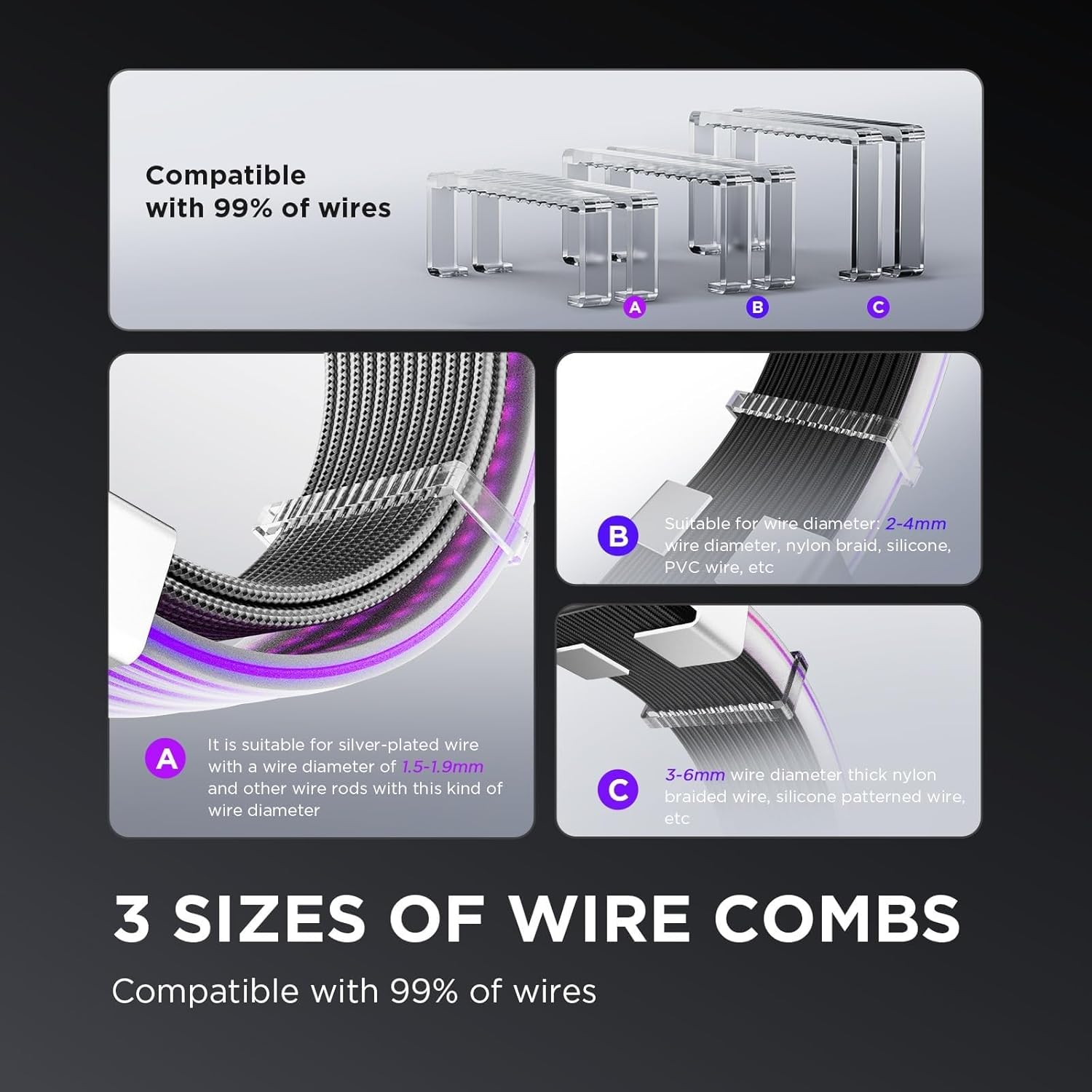
Image detailing the three different sizes of wire combs included with the AsiaHorse Aurora Pro RGB Cable Cover, showing their compatibility with various cable types and diameters.
Operating Instructions
ARGB Synchronization
The cable cover supports 5V 3-pin ARGB synchronization, allowing control through motherboard software from brands like ASUS (Aura Sync), MSI (Mystic Light Sync), Gigabyte (RGB Fusion), and ASRock (Polychrome Sync).

Image demonstrating the 5V 3-pin motherboard synchronization feature of the AsiaHorse Aurora Pro RGB Cable Cover, showing compatibility logos for major motherboard brands.
Lighting Effects and Brightness
The cable cover features 108 LEDs capable of displaying over 124 preset lighting effects at up to 60 FPS. You can adjust the brightness across 10 levels using either the included remote control or compatible motherboard software.
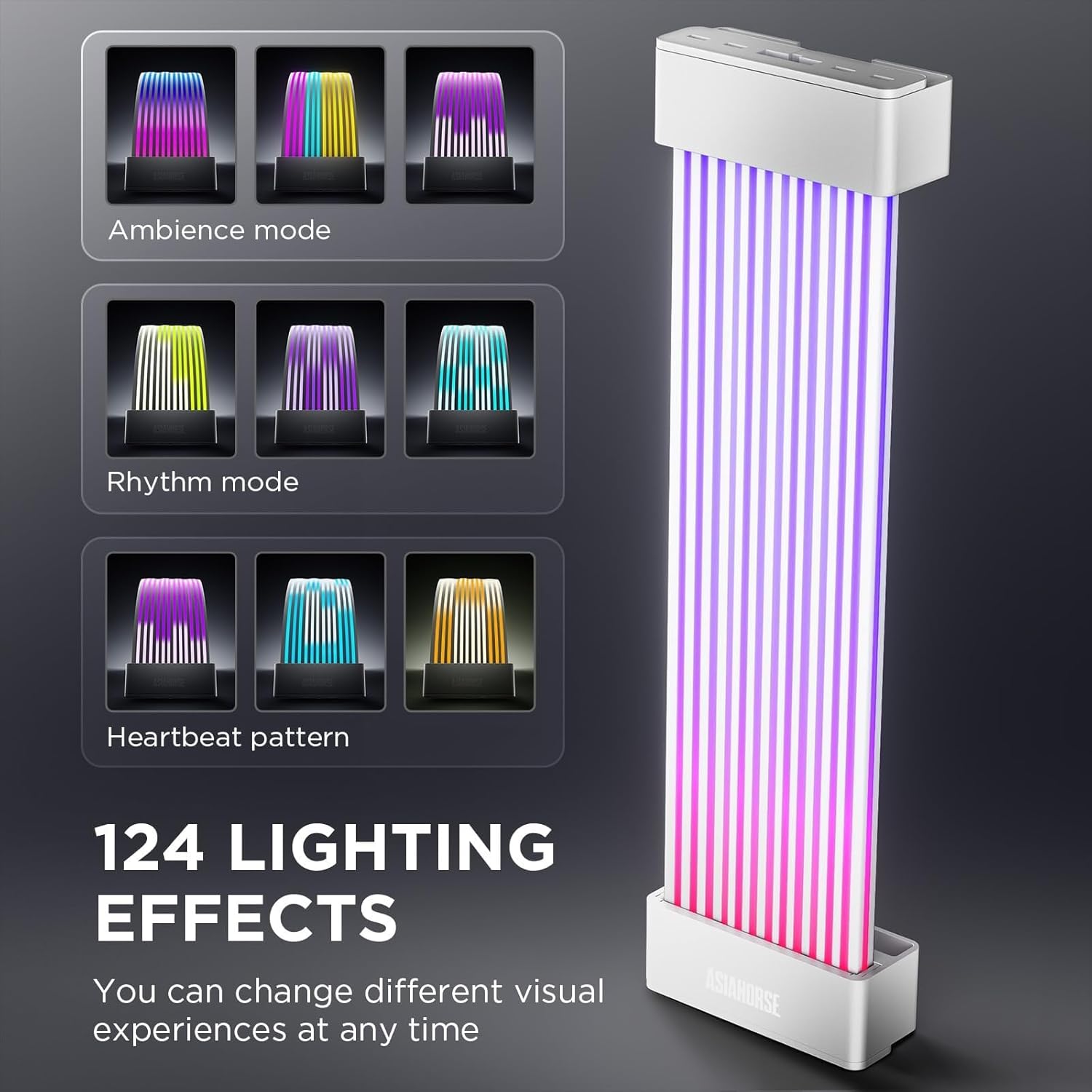
Image showcasing various lighting effects (Ambiance mode, Rhythm mode, Heartbeat pattern) available with the AsiaHorse Aurora Pro RGB Cable Cover, highlighting the 124 preset options.

Image illustrating the 10 levels of brightness adjustment for the AsiaHorse Aurora Pro RGB Cable Cover, ranging from 100% to 10%.
Video Demonstration
This video demonstrates various lighting effects and patterns achievable with the AsiaHorse Aurora Pro RGB Cable Cover, showcasing its dynamic ARGB capabilities within a PC build.
Maintenance
To ensure the longevity and optimal performance of your AsiaHorse Aurora Pro RGB Cable Cover, follow these maintenance guidelines:
- Cleaning: Gently wipe the silicone surface with a soft, dry cloth to remove dust. Avoid using harsh chemicals or abrasive materials.
- Cable Management: Periodically check that the cable cover and the cables it manages are securely in place and not under undue tension.
- Environmental Conditions: Ensure your PC environment is well-ventilated and free from excessive moisture or extreme temperatures.
Troubleshooting
If you encounter issues with your AsiaHorse Aurora Pro RGB Cable Cover, refer to the following common problems and solutions:
Lights Not Turning On
- Power Connection: Verify that the cable cover is correctly connected to a functioning power source.
- ARGB Connection: Ensure the 5V 3-pin ARGB connector is securely plugged into the motherboard header or RGB controller.
- Software/Remote: Check if the lighting is turned off via motherboard software or the remote control.
Incorrect Colors or Effects
- ARGB Software: Confirm that your motherboard's ARGB software is up-to-date and correctly configured for the cable cover.
- Controller Sync: If using an external controller, ensure it is properly synchronized and set to the desired mode.
- Connection Integrity: Re-check the 5V 3-pin ARGB connection for any loose pins or damage.
Flickering Lights
- Power Supply: Ensure your power supply unit (PSU) has sufficient wattage to support all connected components, including the RGB lighting.
- Connections: Inspect all connections for looseness or poor contact.
- Software Conflicts: If multiple RGB software applications are running, they might conflict. Try using only one primary software for control.
Specifications
| Property | Value |
|---|---|
| Color | White |
| Brand | AsiaHorse |
| Indoor/Outdoor Usage | Indoor |
| Light Source Type | LED |
| Power Source | DC Power Supply |
| Light Color | Multicolor, RGB |
| Theme | Rainbow |
| Number of Light Sources | 108 |
| Number of Items | 1 |
| Item Length | 205 Millimeters (8.07 inches) |
| Manufacturer | AsiaHorse |
| Part Number | MJ-WH-24PIN-US-03 |
| Item Weight | 7 ounces |
| Batteries Included? | No |
| Batteries Required? | No |
| Item dimensions L x W x H | 8.07 x 2.2 x 0.83 inches |
Warranty and Support
For warranty information and technical support, please refer to the official AsiaHorse website or contact their customer service directly. Keep your purchase receipt as proof of purchase.
Official AsiaHorse Store: Visit the AsiaHorse Store
For further assistance, please contact AsiaHorse customer support.


