
1. Introduction
The DUSONLAP E6 AI Real-Time Translator Earbuds are designed to facilitate seamless communication across language barriers. This device integrates real-time translation, high-definition calls, and high-fidelity audio into a single, portable solution. With support for up to 164 languages via a dedicated application, the E6 earbuds are suitable for travel, business meetings, academic exchanges, and daily communication.
The E6 earbuds feature a 3-in-1 functionality, combining music playback, call management, and translation capabilities. They offer 7 distinct translation modes to adapt to various scenarios, ensuring natural and fluid communication powered by AI technology.

Image: DUSONLAP E6 AI Translator Earbuds in use, highlighting the brand and model.
2. Package Contents
Upon opening the package, please verify that all components are present and in good condition:
- DUSONLAP E6 Bluetooth Earbuds (Left and Right) x 2
- Type-C Charging Cable x 1
- Charging Case x 1
- User Manual x 1

Image: Visual representation of the DUSONLAP E6 package contents.
3. Product Overview
The DUSONLAP E6 earbuds are designed for comfort and functionality. Each earbud features touch control for various operations, and the charging case includes a digital display for battery status.

Image: The DUSONLAP E6 earbuds inside their charging case, displaying the battery percentage.
Key Features:
- 3-in-1 Functionality: Music, HD Calls, and Real-Time Translation.
- 164 Language Support: Online translation via the dedicated app.
- 7 Translation Modes: Adaptable for various communication needs.
- Bluetooth 5.4: Enhanced connectivity and faster data transfer.
- 14.2mm Dynamic Drivers: For clear audio and HiFi sound quality.
- ENC Noise Reduction: For clear call quality.
- IPX7 Water Resistance: Suitable for workouts and outdoor activities.
- Up to 42 Hours Playtime: With the charging case.
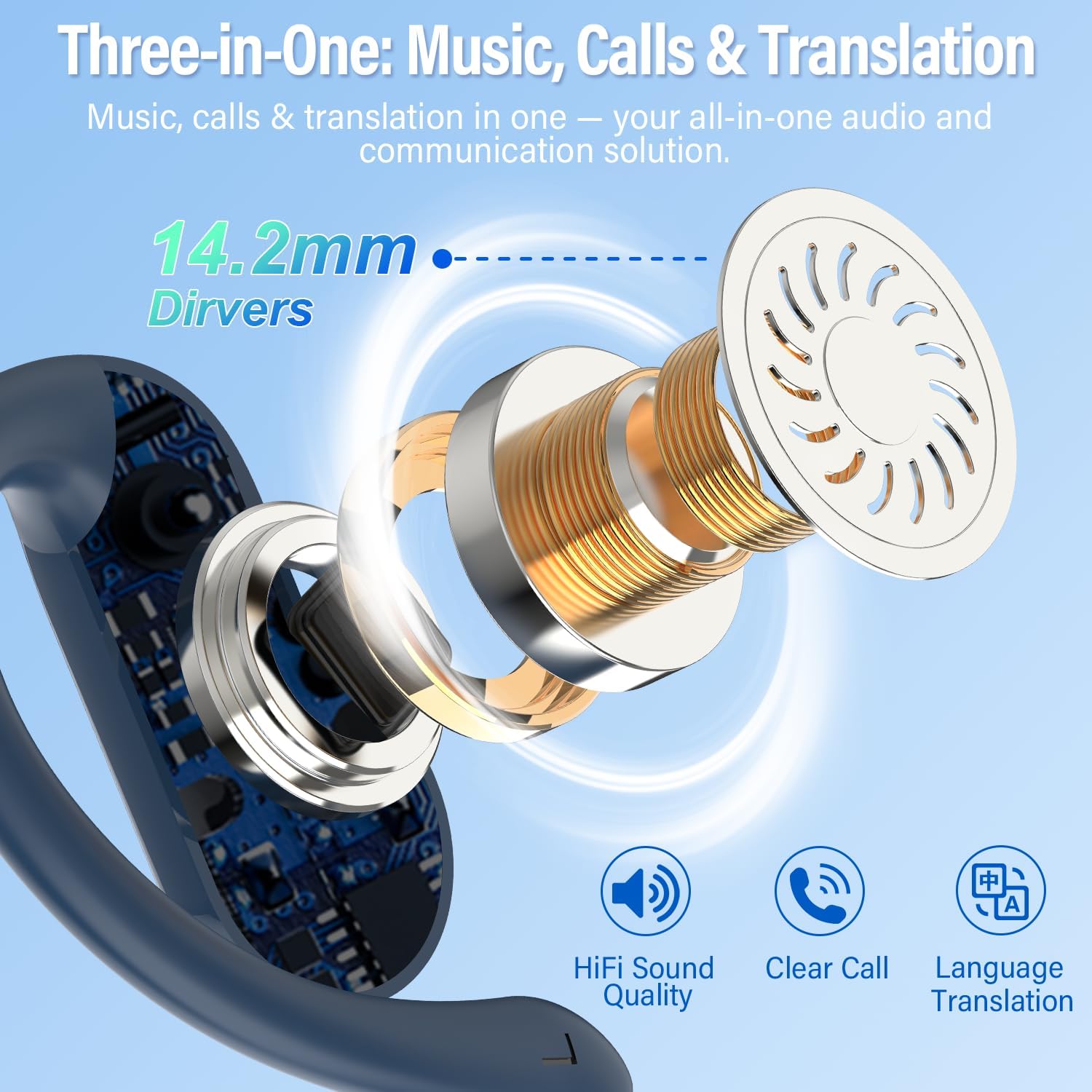
Image: Internal structure of the earbud, illustrating the 14.2mm driver and core functionalities.
4. Setup Guide
4.1 Charging the Earbuds and Case
Before first use, fully charge the earbuds and the charging case. Connect the provided Type-C charging cable to the charging case and a compatible USB power source. The digital display on the case will indicate the charging status.

Image: Battery life indication for DUSONLAP E6 earbuds and charging case.
4.2 Downloading and Connecting to the App
The DUSONLAP E6 earbuds require the "EarDance" application for translation functionalities. Follow these steps to set up the app:
- Download the App: Scan the QR code provided in your user manual or on the packaging box, or visit https://earjoy.watchfun.cn/app-download-h5?appCode=eardance to download the "EarDance" application.
- Launch the App: Open the "EarDance" application. It should automatically attempt to connect to the earbuds if they are powered on and in pairing mode.
- Bind the Device: After the device connects, navigate to the "Me" page within the app and select the option to bind the device.
- Authorization: Scan or manually enter the authorization code (QR code) found on the packaging box. Once authorized, you can begin using the translation features.

Image: Step-by-step instructions for connecting the earbuds to the EarDance application.
4.3 Bluetooth Pairing
The earbuds will automatically enter pairing mode when taken out of the charging case. Enable Bluetooth on your smartphone or other compatible device and select "DUSONLAP E6" from the list of available devices to connect.

Image: Bluetooth 5.4 technology for fast and reliable connection.
5. Operating Instructions
5.1 Wearing the Earbuds
For optimal comfort and sound quality, ensure the earbuds are worn correctly:
- Gently remove the earbuds from the charging case.
- Hook the earbud over the bone of your ear for an initial fit.
- Rotate the earbud and slide it behind your ear.
- Adjust the ear hook, position it, and pull down for a secure fit.

Image: Visual guide for wearing the DUSONLAP E6 earbuds.
5.2 Touch Controls
The DUSONLAP E6 earbuds feature intuitive touch controls for managing audio, calls, and voice assistant functions:
- Single Tap (x1): Volume + (Right Earbud), Volume - (Left Earbud)
- Double Tap (x2): Play/Pause (Music), Answer/Hang Up (Calls)
- Triple Tap (x3): Activate Voice Assistant
- Long Press (2S): Next Track (Right Earbud), Previous Track (Left Earbud), Reject Call

Image: Detailed diagram of earbud touch controls.
5.3 Translation Modes (7 Modes)
The EarDance app provides 7 distinct translation modes to suit various communication needs:
- Free-Speech Mode (Supports 164 languages): Both parties wear one translation earbud each, allowing for smooth, real-time translation between languages. Ideal for direct conversations.
- Headphone + Phone Mode (Supports 164 languages): Initiate real-time translated conversations by double-tapping your earbud, while the other person speaks into your phone.
- Translation Machine Mode (Supports 164 languages): Simply click the language button to translate, and the phone's speaker will play the translated audio.
- Voice Notes Mode (Supports 10 languages): Convert classroom lectures, videos, audio, and more into text records, enabling quick note-taking and easy review later. Note: Does not support recording for extended periods; after 30 minutes of recording, you must take notes and then reconnect.
- Audio and Video Calls (Supports 164 languages): Enjoy seamless cross-language audio and video calls. Perfect for international business meetings or connecting with family worldwide.
- Photo Translation Mode (Supports 20 languages): Instantly recognize and translate text through your camera.
- AI Chat Mode (Supports 20 languages): Integrates OpenAI ChatGPT 4.0 to provide intelligent and efficient responses with faster response times, offering perfect solutions to problems and simplifying your life and work.

Image: Overview of the 7 translation modes available through the EarDance app.


Images: Demonstrations of various translation modes in action.
6. Maintenance
6.1 Cleaning
Regularly clean your earbuds and charging case to ensure optimal performance and hygiene. Use a soft, dry, lint-free cloth. Do not use abrasive materials, solvents, or spray cleaners. Avoid getting moisture in any openings.
6.2 Battery Care
To prolong battery life, avoid fully discharging the earbuds and charging case frequently. Store the device in a cool, dry place when not in use for extended periods. Charge the device regularly, even if not used, to maintain battery health.
6.3 Water Resistance (IPX7)
The DUSONLAP E6 earbuds are IPX7 water-resistant, meaning they can withstand immersion in water up to 1 meter for 30 minutes. They are resistant to rain and sweat, making them suitable for intense workouts and outdoor activities. However, they are not designed for swimming or prolonged submersion. Ensure the earbuds are dry before placing them back in the charging case to prevent damage.

Image: DUSONLAP E6 earbuds demonstrating IPX7 water resistance.
7. Troubleshooting
If you encounter issues with your DUSONLAP E6 earbuds, please refer to the following common solutions:
| Problem | Possible Cause | Solution |
|---|---|---|
| Earbuds not pairing/connecting | Low battery, Bluetooth off, earbuds not in pairing mode, interference. | Ensure earbuds are charged. Turn Bluetooth on/off on your device. Place earbuds in case, close, then reopen to re-enter pairing mode. Move closer to your device. |
| Translation not working or inaccurate | No internet connection, incorrect language settings, app not authorized, background noise. | Check your internet connection. Verify language settings in the EarDance app. Ensure the app is authorized with the QR code. Speak clearly and reduce background noise. |
| One earbud not working | Low battery, connection issue, debris in charging contacts. | Charge both earbuds fully. Clean the charging contacts on the earbud and in the case. Try re-pairing the earbuds. |
| Poor audio quality | Earbuds not properly seated, low battery, distance from device, interference. | Adjust earbuds for a secure fit. Charge earbuds. Reduce distance to your connected device. Avoid environments with strong wireless interference. |
| App issues (crashes, freezes) | Outdated app version, software conflict, temporary glitch. | Update the EarDance app to the latest version. Restart the app or your phone. Reinstall the app if the issue persists. |
8. Specifications
| Feature | Detail |
|---|---|
| Model | E6 |
| Brand | DUSONLAP |
| Control Type | Touch Control |
| Bluetooth Version | 5.4 |
| Wireless Technology | Bluetooth |
| Battery Composition | Lithium Polymer |
| Battery Included | Yes (2 A required, included) |
| Rechargeable Battery | Yes |
| Playtime | Up to 8 hours (single charge), up to 42 hours (with charging case) |
| Water Resistance | IPX7 |
| Compatibility | Devices with Bluetooth (smartphones, tablets, laptops) |
| Product Weight | Approximately 130g (package weight) |
| Ear Placement | Supra-aural (Over-ear hook) |
| Form Factor | In-ear |
9. Warranty and Support
DUSONLAP products are designed for reliability and performance. For warranty information, please refer to the specific terms provided at the time of purchase or contact your retailer. If you require technical assistance or have questions not covered in this manual, please contact DUSONLAP customer support through the official website or your purchase platform.