
Product Overview
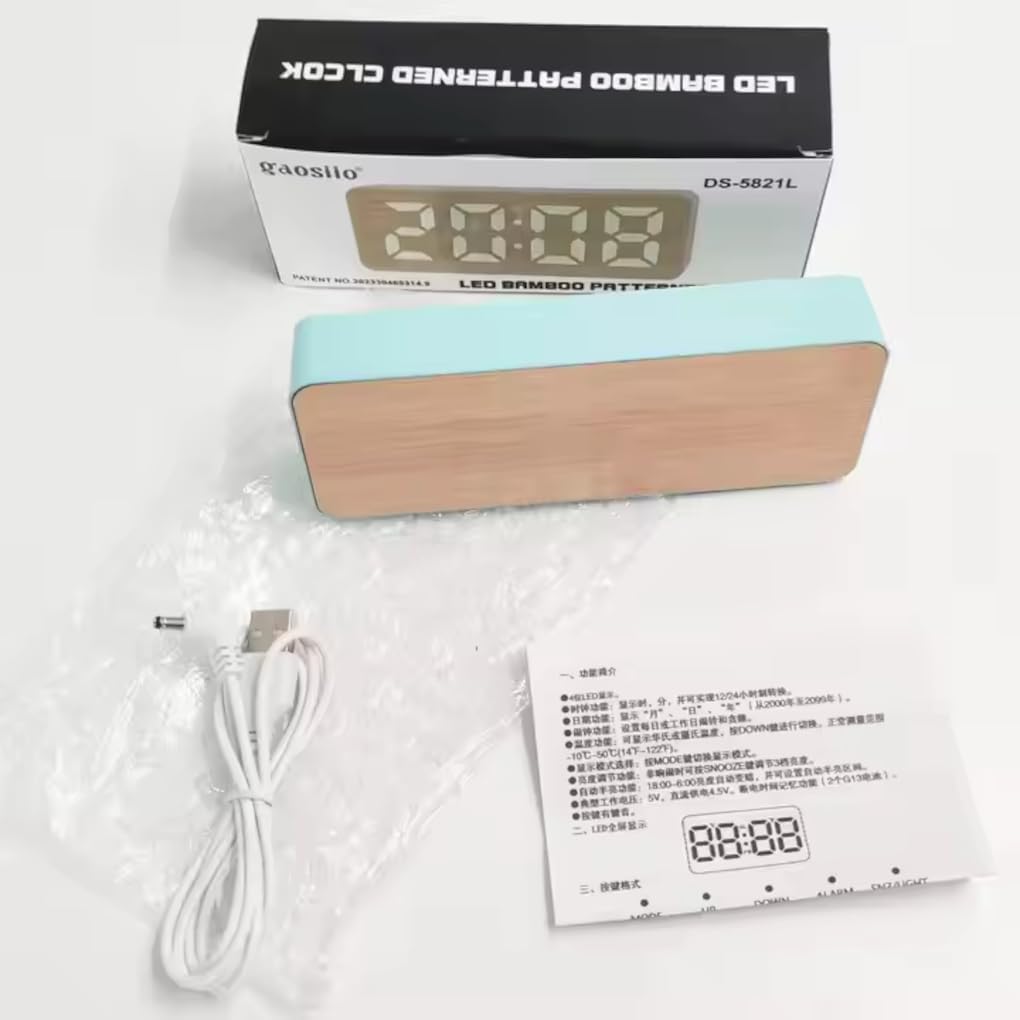
The Digital LED Desk Alarm Clock is designed to provide essential information such as time, date, and temperature, all presented on a clear LED display within an elegant bamboo-patterned casing. This versatile device also includes an alarm with a snooze function and offers flexible power options for convenience.
Package Contents
- Digital LED Desk Alarm Clock
- USB Power Cable
- User Manual


Setup
Powering the Device
The clock can be powered by either the included USB cable or by AAA batteries (not included).
- USB Power: Connect the provided USB cable to the DC 5V port located on the back of the clock. Plug the other end into a compatible USB power adapter (not included) or a computer USB port for continuous power.
- Battery Power: Open the battery compartment on the back of the clock and insert 3 AAA batteries, ensuring correct polarity (+/-). Please note that when powered by batteries, the display may not remain continuously lit to conserve energy.
Operating Instructions
Button Functions
- MODE: Used to switch between Time, Date, and Temperature display modes. Press and hold to enter time/date settings.
- UP: Increases values when setting time/date/alarm. In normal display mode, it can activate or deactivate the alarm.
- DOWN: Decreases values when setting time/date/alarm. In normal display mode, it adjusts display brightness.
- ALM: Enters the alarm setting mode.
- SET (or 'OK' symbol): Confirms selections during setting procedures.
Setting the Time and Date
- Press and hold the MODE button until the display flashes, indicating entry into setting mode.
- Use the UP or DOWN buttons to adjust the year. Press SET to confirm and move to the next setting.
- Repeat this process for setting the month, day, 12/24 hour format, hour, and minute.
- The clock will automatically save the settings after a few seconds of inactivity or by pressing the MODE button again.
Setting the Alarm
- Press the ALM button to enter the alarm setting mode. The alarm time will begin to flash.
- Use the UP or DOWN buttons to set the desired alarm hour. Press SET to confirm.
- Use the UP or DOWN buttons to set the desired alarm minute. Press SET to confirm.
- To activate or deactivate the alarm, press the UP button when in normal time display mode. An alarm icon will appear on the display when activated and disappear when deactivated.
Snooze Function
When the alarm sounds, press any button (except the ALM button) to activate the snooze function. The alarm will temporarily stop and sound again after approximately 5 minutes. To turn off the alarm completely, press the ALM button.
Display Brightness Adjustment
In normal time display mode, repeatedly press the DOWN button to cycle through the available brightness levels for the LED display.
Maintenance
To ensure the longevity and proper functioning of your Digital LED Desk Alarm Clock, please follow these maintenance guidelines:
- Cleaning: Use a soft, dry cloth to gently wipe the surface of the clock. Avoid using abrasive cleaners, solvents, or chemical sprays, as these can damage the finish and internal electronic components.
- Placement: Always place the clock on a stable, flat surface. Keep it away from direct sunlight, sources of extreme temperatures (hot or cold), and areas with high humidity to prevent damage.
- Power Source: If using batteries, replace them promptly when the display dims or the clock malfunctions to prevent potential battery leakage. If using USB power, ensure the cable is not kinked, pinched, or otherwise damaged.
- Storage: If you plan to store the clock for an extended period, it is recommended to remove the batteries to prevent corrosion and preserve battery life.
Troubleshooting
| Problem | Possible Cause | Solution |
|---|---|---|
| Display is blank or dim. | No power, low batteries, or display is in power-saving mode. | Check the USB connection and ensure it's properly plugged in. If using batteries, replace them with fresh ones. Press the DOWN button to adjust brightness or wake the display from power-saving mode. |
| Alarm does not sound. | Alarm not activated, incorrect alarm time set, or a temporary glitch. | Ensure the alarm icon is visible on the display, indicating it's active. Re-set the alarm time following the operating instructions. (Note: This model typically does not have adjustable alarm volume). |
| Time displayed is incorrect. | Time was not set correctly, or there was a power interruption (e.g., batteries removed, USB unplugged). | Re-set the time and date accurately by following the "Setting the Time and Date" instructions. |
| Buttons are unresponsive. | Temporary software glitch or insufficient power. | Disconnect the power source (unplug USB and remove batteries) for a few minutes, then reconnect. Ensure the clock has sufficient power. |
Specifications
- Model: DS-5821L (Desk Clock)
- Display Type: LED Digital
- Time Format: 12H/24H selectable
- Functions: Time, Date, Temperature (Celsius/Fahrenheit), Alarm, Snooze, Adjustable Brightness
- Power Source: DC 5V (USB cable included) or 3x AAA Batteries (not included)
- Material: Bamboo-patterned Plastic
- Dimensions: Approximately 15 cm (L) x 3.81 cm (W) x 6 cm (H) / 5.9 in (L) x 1.5 in (W) x 2.4 in (H)
- Weight: Approximately 102 g (0.22 lbs)
Warranty and Support
This product is covered by a standard manufacturer's warranty against defects in materials and workmanship. Please refer to your purchase receipt or the product listing for specific warranty duration and terms, as these may vary by region and retailer.
For technical support, troubleshooting assistance, or to initiate a warranty claim, please contact the seller or retailer from whom you purchased the product. They will be able to provide the most accurate and timely support.
Manufacturer: MCRA Magazine
Brand: Generic


