
Introduction
This manual provides comprehensive instructions for the setup, operation, and maintenance of your Koss Porta Pro Wireless 2.0 On-Ear Headphones. Please read this manual carefully to ensure proper use and to maximize your listening experience.
Product Overview
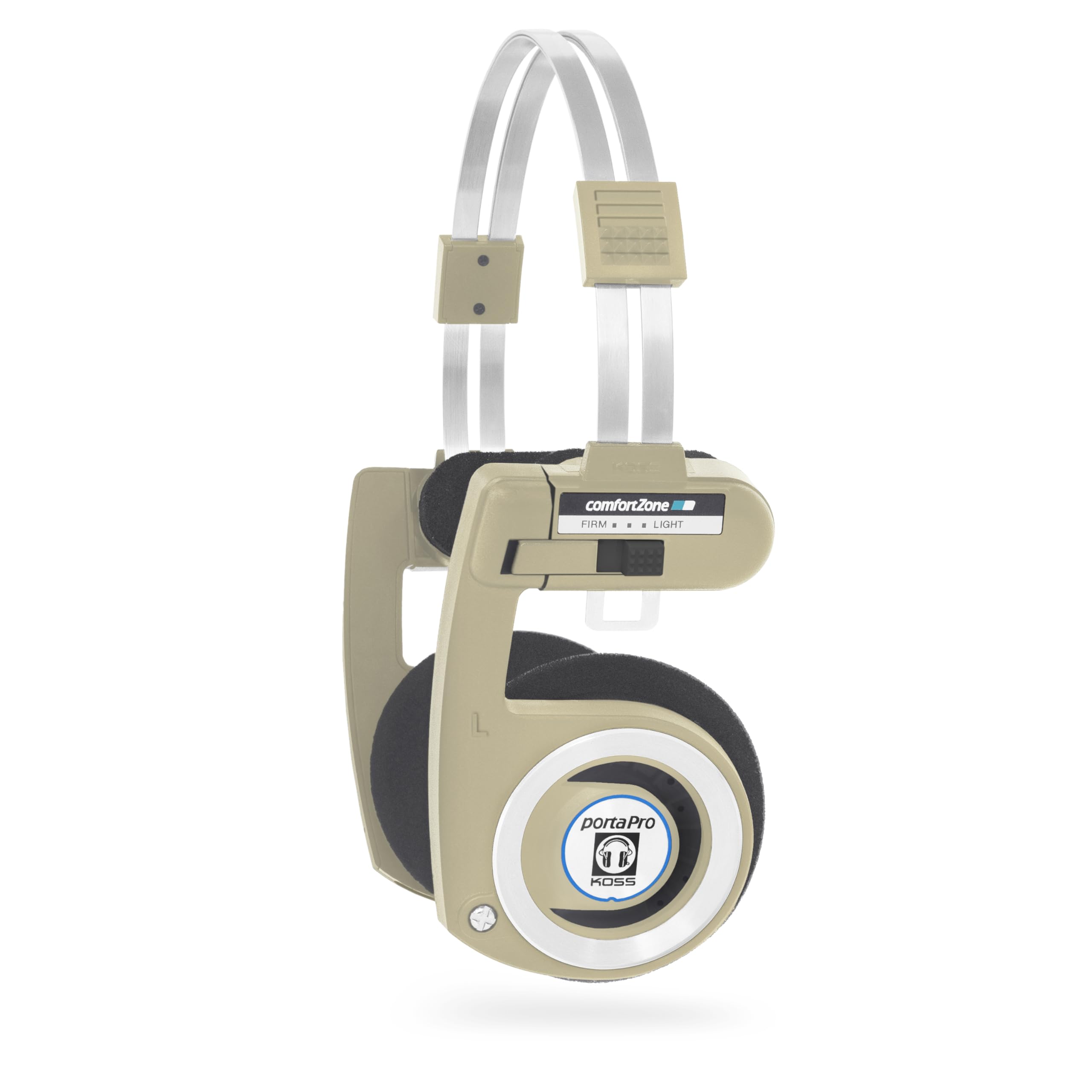
The Koss Porta Pro Wireless 2.0 headphones combine the classic Porta Pro design with modern wireless technology. Enjoy high-fidelity audio, extended battery life, and convenient controls for an unparalleled portable listening experience.
Key Features:
- Wireless Freedom: Bluetooth connectivity delivers high-fidelity audio from 15-25,000 Hz.
- Extended Battery Life: Over 20 hours of play/talk time on a single USB-C charge.
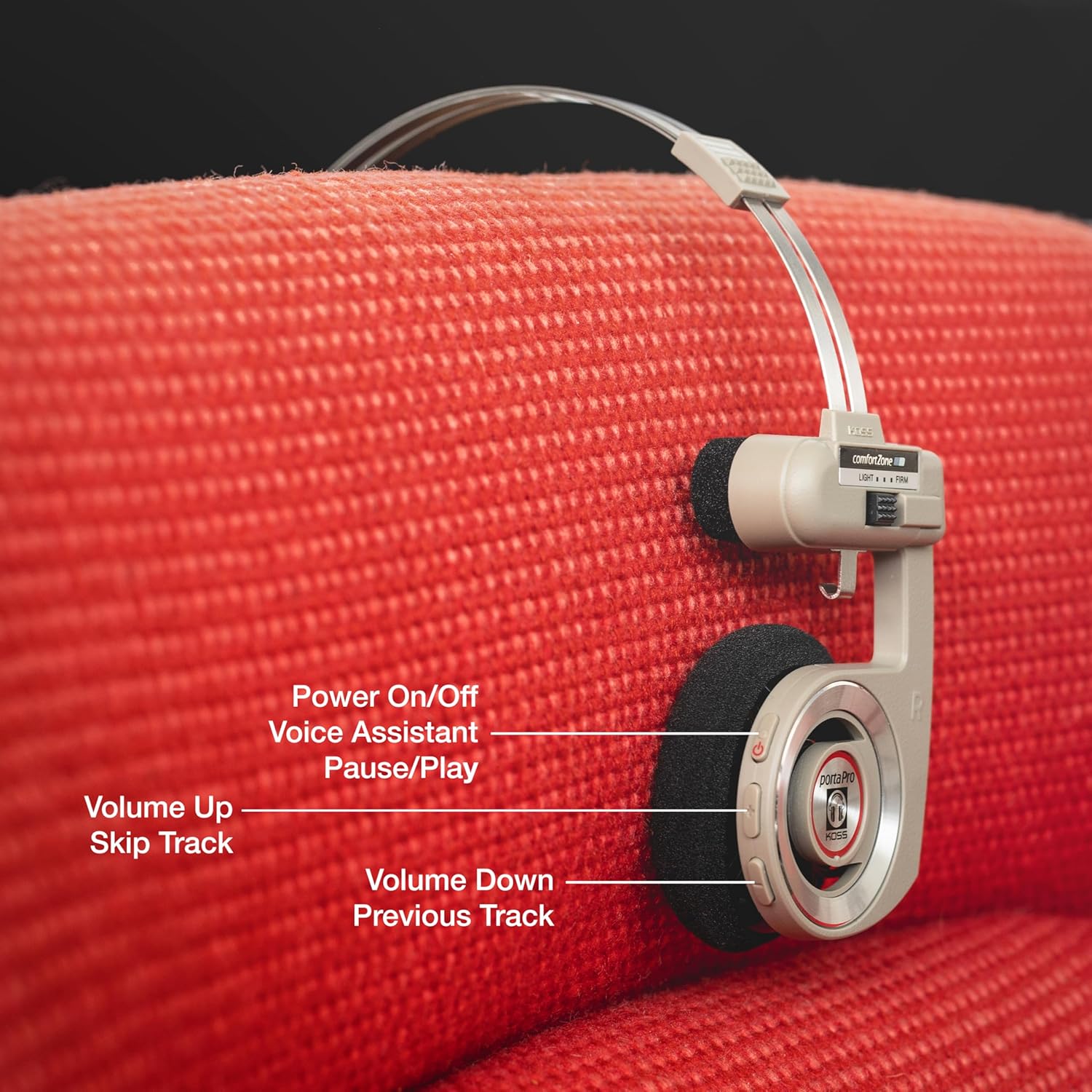
- Integrated Controls: Manage volume, skip tracks, pause/play, activate voice assistant, and handle calls directly from the headphones.
- Comfortable Fit: Durable, lightweight design with ComfortZone and an adjustable headband for secure and comfortable extended use.
- Retro Style: Features the iconic Koss Porta Pro aesthetic.
- Analog Audio Pass-Through: Includes a USB-C to 3.5mm cable for wired connection.
- Portability: Unique collapsible design and a soft shell carrying case for easy transport.
Product Visuals:

Setup
What's in the Box:
- Koss Porta Pro Wireless 2.0 On-Ear Headphones
- Soft Shell Carrying Case
- USB-C to 3.5mm Analog Audio Cable
- USB-C Charging Cable
- User Manual
Charging the Headphones:
Before first use, fully charge your headphones. Connect the provided USB-C charging cable to the headphone's USB-C port and to a compatible USB power source. The LED indicator will show charging status. A full charge provides over 20 hours of listening time.
Bluetooth Pairing:
- Ensure the headphones are powered off.
- Press and hold the Power/Multi-function button until the LED indicator flashes blue and red, indicating pairing mode.
- On your device (smartphone, tablet, computer), enable Bluetooth and search for available devices.
- Select "Koss Porta Pro Wireless 2.0" from the list.
- Once connected, the LED indicator will flash blue slowly.
Operating Instructions
Controls:
The headphones feature intuitive controls located on the right earcup:
- Power On/Off / Voice Assistant / Pause/Play: Press and hold for power, single press for play/pause, double press for voice assistant.
- Volume Up / Skip Track: Single press for volume up, press and hold to skip to the next track.
- Volume Down / Previous Track: Single press for volume down, press and hold to go to the previous track.
- Call Management: Single press to answer/end calls, press and hold to reject calls.
ComfortZone Adjustment:
The ComfortZone feature allows you to adjust the temporal pads for a personalized fit. Slide the temporal pad adjustment to "Light" for less pressure or "Firm" for more secure contact, optimizing comfort during extended listening sessions.

Analog Audio Pass-Through:
For wired listening or when battery is depleted, connect the provided USB-C to 3.5mm audio cable to the headphone's USB-C port and to your audio source's 3.5mm jack. This allows for continued use without Bluetooth.

Maintenance
To ensure the longevity and optimal performance of your Koss Porta Pro Wireless 2.0 headphones, follow these maintenance guidelines:
- Cleaning: Use a soft, dry cloth to clean the earcups and headband. Avoid using harsh chemicals or abrasive materials.
- Storage: When not in use, fold the headphones and store them in the provided soft shell carrying case to protect them from dust and damage.
- Avoid Moisture: Do not expose the headphones to water or excessive moisture.
- Temperature: Store and operate the headphones within recommended temperature ranges to prevent battery degradation.

Troubleshooting
If you encounter issues with your headphones, refer to the following common solutions:
| Problem | Solution |
|---|---|
| Headphones do not power on. | Ensure the headphones are fully charged using the provided USB-C cable. |
| Cannot pair with device. | Make sure the headphones are in pairing mode (flashing blue/red LED). Turn off and on Bluetooth on your device. Ensure the headphones are not already connected to another device. |
| No sound or low volume. | Check the volume levels on both the headphones and your connected device. Ensure the headphones are properly paired. If using the analog cable, ensure it is securely connected. |
| Microphone not working. | Ensure the headphones are connected via Bluetooth and selected as the audio input device on your call application. |
| Intermittent Bluetooth connection. | Reduce the distance between the headphones and your device. Avoid obstacles that may interfere with the signal. Ensure no other devices are causing interference. |
Specifications
| Feature | Detail |
|---|---|
| Model Name | Porta Pro Wireless 2.0 RB |
| Connectivity Technology | Bluetooth |
| Wireless Communication Technology | Bluetooth |
| Bluetooth Version | 5.2 |
| Bluetooth Range | 10 Meters |
| Frequency Response | 15-25,000 Hz |
| Sensitivity | 101 dB |
| Impedance | 60 Ohms |
| Battery Life | 20+ Hours |
| Charging Port | USB-C |
| Headphones Jack | 3.5 mm Jack (via USB-C adapter) |
| Control Type | Push Button |
| Item Weight | 0.18 Kilograms (6.4 ounces) |
| Material | Metal, Plastic |
| Color | Rhythm Beige |
Warranty and Support
Koss products are known for their durability and quality. Your Porta Pro Wireless 2.0 headphones are covered by the manufacturer's warranty. For specific warranty details, please refer to the warranty card included in your product packaging or visit the official Koss website. For technical support or further assistance, please contact Koss customer service.
For more information, visit: www.koss.com


