
Introduction
This manual provides essential information for the proper use and care of your Nokia C200 N151DL smartphone. Please read these instructions carefully before using your device to ensure optimal performance and longevity.
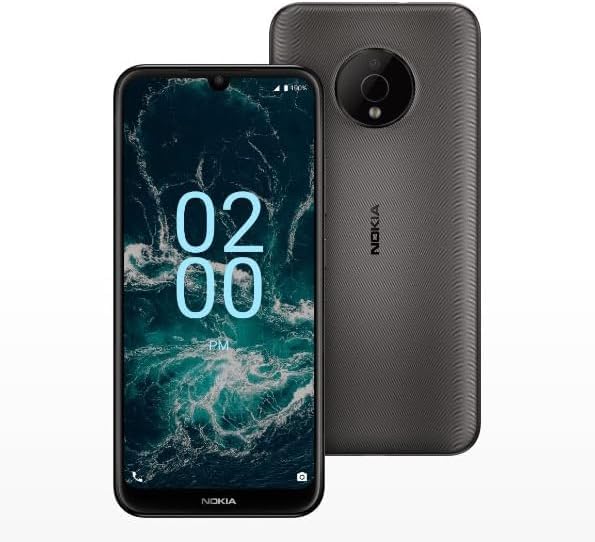
Image: The Nokia C200 N151DL smartphone, featuring its 6.1-inch HD+ display and Space Gray finish.
What's in the Box
Upon unboxing your Nokia C200 N151DL, verify that all the following items are included:
- Nokia C200 N151DL Smartphone
- USB-C Cable
- SIM Ejector Tool
Setup
1. Inserting the SIM Card
- Locate the SIM card tray on the side of your phone.
- Insert the SIM ejector tool into the small hole on the tray to open it.
- Place your Nano-SIM card into the tray with the gold contacts facing down.
- Carefully push the tray back into the phone until it clicks into place.
2. Charging the Device
Before initial use, it is recommended to fully charge your Nokia C200 N151DL.
- Connect the USB-C cable to the charging port at the bottom of the phone.
- Connect the other end of the USB-C cable to a compatible USB wall adapter (not included) and plug it into a power outlet.
- The battery indicator on the screen will show charging progress.
3. Powering On and Initial Configuration
- Press and hold the power button (usually on the right side) until the Nokia logo appears.
- Follow the on-screen prompts to select your language, connect to Wi-Fi, and set up your Google account.
- Your phone runs on Android 12.0, providing a clean and intuitive user experience.
Operating
Basic Navigation
The Nokia C200 N151DL features a 6.1-inch HD+ touchscreen display. Navigate by tapping, swiping, and pinching gestures. The Android 12.0 operating system offers a user-friendly interface for accessing apps, settings, and notifications.
Battery Management
Your device is equipped with a 5000 mAh battery designed for extended daily use. To optimize battery life:
- Adjust screen brightness.
- Close unused applications running in the background.
- Disable Wi-Fi, Bluetooth, or GPS when not in use.
Storage and Performance
With 32GB of internal storage and 3GB of RAM, the Nokia C200 N151DL provides reliable multitasking capabilities and space for your applications and media. For additional storage, consider using a microSD card (sold separately).
Maintenance
Cleaning Your Device
To clean your phone, use a soft, lint-free cloth. Avoid using abrasive materials, alcohol, or chemical cleaners, as these can damage the screen and finish.
Software Updates
Periodically check for software updates to ensure your device has the latest features and security enhancements. Navigate to Settings > System > System update to check for and install available updates.
Troubleshooting
If you encounter issues with your Nokia C200 N151DL, try the following common solutions:
- Phone not powering on: Ensure the battery is charged. Connect the phone to a charger for at least 30 minutes, then try powering it on again.
- Apps crashing or freezing: Close the problematic app and reopen it. If the issue persists, restart your phone.
- Poor network signal: Check your SIM card insertion. Move to an area with better network coverage.
- Charging issues: Verify the USB-C cable and charger are working correctly. Try a different cable or power source.
- Slow performance: Clear cache for frequently used apps. Consider uninstalling unused applications to free up storage.
For more complex issues, refer to Nokia's official support website or contact customer service.
Specifications
Key technical specifications for the Nokia C200 N151DL:
| Feature | Specification |
|---|---|
| Brand | Nokia |
| Model Name | Nokia C200 |
| Operating System | Android 12.0 |
| RAM Memory Installed Size | 3 GB |
| Memory Storage Capacity | 32 GB |
| CPU Model | Qualcomm Snapdragon S1 QSD8650 |
| CPU Speed | 1.8 GHz |
| Screen Size | 6.1 Inches |
| Display Type | LCD |
| Cellular Technology | 4G |
| Wireless Carrier | Straight Talk |
| Battery Power | 5000 mAh |
| Connector Type | USB Type C |
| Color | Space Gray |
| Manufacturer | HMD Global |
| UPC | 617230227802 |
| ASIN | B0FGG1Y47Z |
Warranty and Support
Warranty Information
This product is covered by a 30-day return policy for a full refund or exchange from the date of purchase. Please retain your proof of purchase for warranty claims.
Customer Support
For further assistance, technical support, or warranty inquiries, please visit the official Nokia support website or contact your retailer. Ensure you have your device model number (N151DL) and proof of purchase available when seeking support.


