
Introduction
This manual provides essential information for the proper installation, operation, and maintenance of your Planet Audio AC12D 12-inch car audio subwoofer. Please read these instructions thoroughly before attempting to install or use the product to ensure optimal performance and safety.
Safety Information
- Always disconnect the vehicle's battery before performing any electrical work.
- Ensure all wiring connections are secure and properly insulated to prevent short circuits.
- Mount the subwoofer securely within the vehicle to prevent movement during driving, which could cause injury or damage.
- Avoid exposing the subwoofer to excessive moisture or extreme temperatures.
- Consult a professional car audio installer if you are unsure about any installation steps.
What's in the Box
Upon unpacking, verify that all items are present:
- Planet Audio AC12D 12-inch Subwoofer
- Cut-Out Template for Easy Installation

Image: The retail packaging for the Planet Audio AC12D subwoofer, showing the brand logo and key specifications.
Setup and Installation
The Planet Audio AC12D is a 12-inch dual voice coil (DVC) subwoofer designed for car audio applications. Proper enclosure design and wiring are critical for optimal performance.
Enclosure Requirements
This subwoofer requires a sealed or ported enclosure designed to match its specifications. Refer to recommended enclosure volumes provided by Planet Audio for best results. The mounting depth required is approximately 5 3/8 inches (13.65 cm).
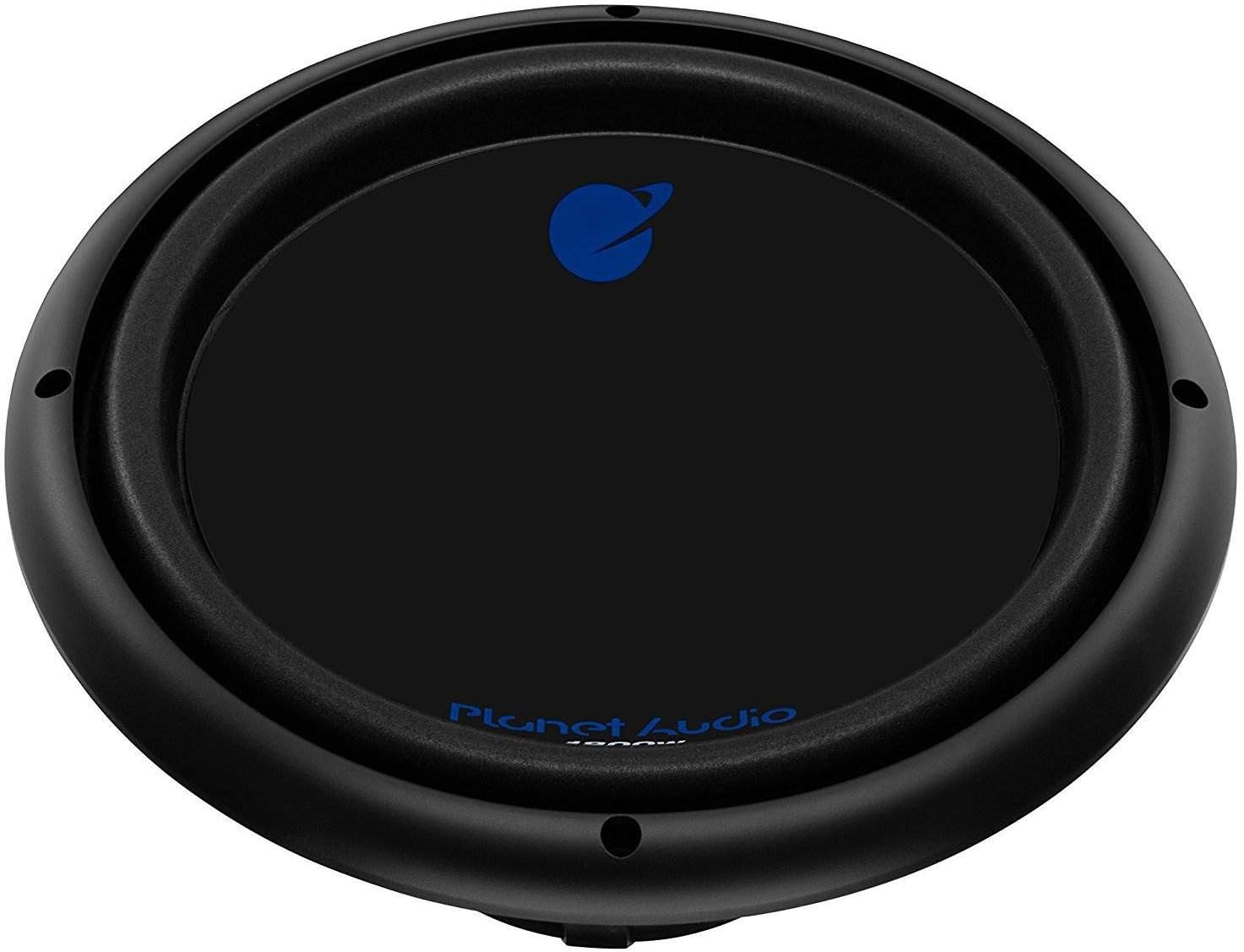
Image: Front view of the Planet Audio AC12D subwoofer, showcasing the cone and surround.

Image: Side view of the Planet Audio AC12D subwoofer, highlighting the robust basket structure and wiring terminals.

Image: Rear view of the Planet Audio AC12D subwoofer, displaying the magnet assembly and dual voice coil terminals.
Wiring Your Subwoofer
The AC12D features dual 4-ohm voice coils, offering flexible wiring options to achieve different impedance loads for your amplifier. Refer to the diagram below for common wiring configurations.
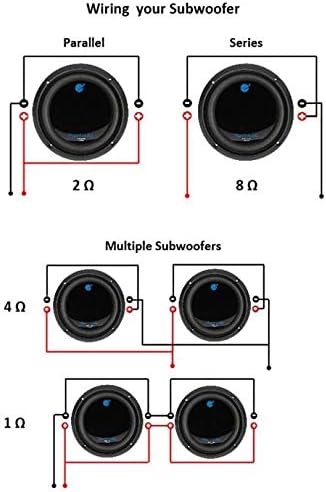
Image: Wiring diagrams illustrating parallel (2 Ohm), series (8 Ohm) connections for a single subwoofer, and configurations for multiple subwoofers (4 Ohm, 1 Ohm).
- Parallel Wiring (Single Subwoofer): Connect the positive terminals of both voice coils together, and the negative terminals of both voice coils together. This results in a 2-ohm load.
- Series Wiring (Single Subwoofer): Connect the positive terminal of one voice coil to the negative terminal of the other voice coil. The remaining positive and negative terminals are then connected to the amplifier. This results in an 8-ohm load.
- Multiple Subwoofers: For multiple subwoofers, combine the parallel and series wiring techniques to achieve the desired final impedance (e.g., 4-ohm or 1-ohm total load). Always ensure the amplifier is stable at the chosen impedance.
Use appropriate gauge wiring for power, ground, and speaker connections to prevent power loss and ensure safety.
Operating Instructions
Once installed, connect the subwoofer to a compatible amplifier. Ensure the amplifier's gain settings are properly adjusted to prevent distortion and damage to the subwoofer. Start with low volume and gradually increase it, listening for any signs of distortion. The AC12D is designed to handle a maximum of 1800 watts peak power and 900 watts RMS power.
- Break-in Period: Allow a break-in period of several hours of moderate use before operating the subwoofer at high volumes. This allows the suspension components to loosen and perform optimally.
- Amplifier Matching: For best performance, pair this subwoofer with a Planet Audio or Boss Audio amplifier that can deliver sufficient power at the chosen impedance.
- Crossover Settings: Utilize your amplifier's or head unit's low-pass filter (LPF) to send only low frequencies to the subwoofer, typically set between 80Hz and 120Hz, depending on your system and preference.
Maintenance
The Planet Audio AC12D subwoofer requires minimal maintenance.
- Keep the subwoofer cone and surround free from dust and debris. Use a soft, dry cloth for cleaning.
- Periodically check all wiring connections to ensure they remain secure.
- Avoid placing heavy objects on the subwoofer or exposing it to direct sunlight for extended periods.
Troubleshooting
| Problem | Possible Cause | Solution |
|---|---|---|
| No sound from subwoofer |
|
|
| Distorted sound |
|
|
| Subwoofer cuts out |
|
|
Specifications
| Feature | Specification |
|---|---|
| Model Number | AC12D-WMT |
| Speaker Type | Car Audio Subwoofer |
| Speaker Size | 12 Inches |
| Audio Driver Size | 12 Inches |
| Voice Coil | Dual 4 Ohm |
| Maximum Power Handling | 1800 Watts |
| RMS Power Handling | 900 Watts |
| Frequency Response | 32Hz - 3kHz |
| Efficiency (1 watt/1 meter) | 88 dB |
| Mounting Depth | 5 3/8 inches (13.65 cm) |
| Connectivity Technology | Wired |
| Material | Metal, Plastic |
| UPC | 842372145138 |
Warranty and Support
For warranty information and technical support, please refer to the documentation included with your purchase or visit the official Planet Audio website. Keep your proof of purchase for any warranty claims.


