
Autel Micro30
Autel 36W Solar Panel with 15,000mAh Power Bank Instruction Manual
Model: Micro30 | Brand: Autel
Introduction
This manual provides essential information for the safe and efficient operation of your Autel 36W Solar Panel with 15,000mAh Power Bank. Please read these instructions thoroughly before use and retain for future reference.
Product Overview
The Autel 36W Solar Panel with 15,000mAh Power Bank is designed for portable power needs, especially in outdoor environments. It combines a high-efficiency foldable solar panel with a durable LiFePO4 power bank, offering multiple charging options for various devices.

Figure 1: Autel 36W Solar Panel and 15,000mAh Power Bank.
What's in the Box
Verify that all items listed below are included in your package:
- 1 x Autel 15,000mAh Power Bank
- 1 x Autel 36W Foldable Solar Panel
- 1 x USB-C to USB-C Cable (short)
- 1 x USB-C to USB-A Adapter
- 2 x Metal Hooks (Carabiners)

Figure 2: All components included in the Autel Power Bank and Solar Panel kit.
Setup
Unboxing and Initial Inspection
Carefully remove all components from the packaging. Inspect each item for any signs of damage. If any components are missing or damaged, contact customer support.
Video 1: A detailed unboxing of the Autel Power Bank and Solar Panel kit, showing how each component is presented within the elegant gift box.
Initial Power Bank Charge
It is recommended to fully charge the power bank before its first use. Connect the power bank to a wall adapter using the provided USB-C cable. The LED indicators on the power bank will show charging progress.
Operating Instructions
Solar Charging the Power Bank
- Deploy the Solar Panel: Unfold the 36W solar panel completely. For optimal performance, place the panel in direct, strong sunlight.
- Connect the Power Bank: Locate the USB-C port on the solar panel's integrated adapter. Use the provided USB-C cable to connect this port to one of the USB-C input/output ports on the 15,000mAh power bank.
- Monitor Charging: The indicator light on the solar panel's adapter will illuminate (red when charging, green when ready to charge a device directly). The LED indicators on the power bank will cycle to show charging progress.
Note: Charging speed varies with sunlight intensity. Full charge via solar typically takes 5-6 hours in strong sunlight. Avoid charging other devices simultaneously for maximum efficiency.

Figure 3: Deploying the solar panel for outdoor charging.
Video 2: Demonstration of connecting the solar panel to the power bank and observing charging indicators.
Charging External Devices with the Power Bank
The power bank offers multiple output options:
- USB-C Ports (x2): Use a USB-C to USB-C cable to connect your compatible devices. One port supports both input and output, while the other is output-only.
- USB-A Port (x1): Use a standard USB-A cable to connect your devices.
- Wireless Charging: The power bank features a wireless charging pad for compatible devices like Apple Watch (S3-S8). Place the device on the designated area for charging.
Press the power button on the power bank to initiate charging. The LED indicators will show the remaining battery level.
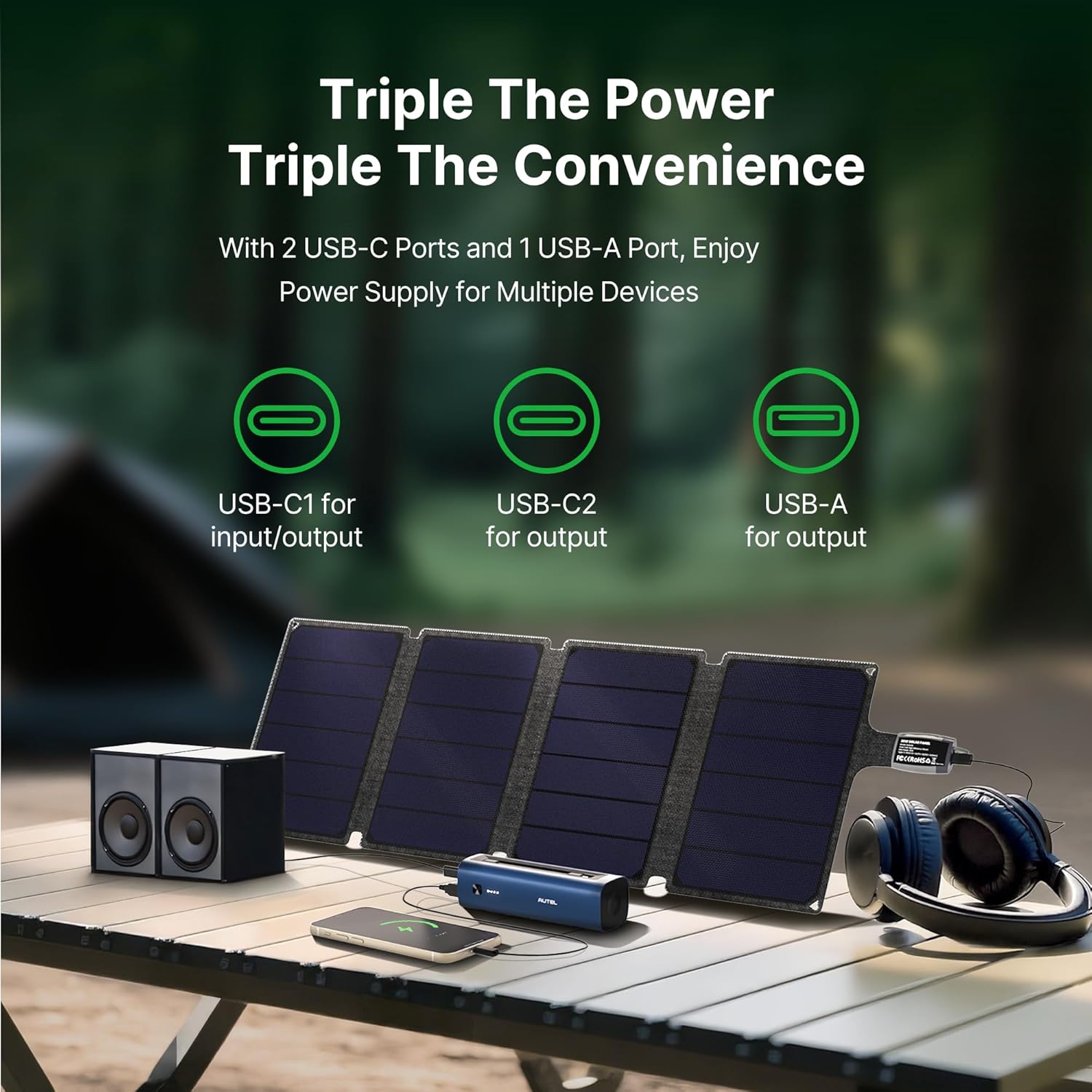
Figure 4: The power bank features two USB-C ports, one USB-A port, and a wireless charging area.
Video 3: A demonstration of the portable solar power bank's fast charging capabilities for various devices.
Features and Highlights
- High Capacity: 15,000mAh LiFePO4 battery for extended power.
- Durable Design: Built to withstand outdoor conditions with a sandblasted anodized finish.
- Fast Charging: 22.5W max discharge power, supporting PPS, PD, QC, AFC, FCP, and SCP protocols.
- High-Efficiency Solar Panel: 36W output with up to 23% conversion efficiency.
- Safety Features: Real-time cell temperature monitoring, over-voltage, and under-voltage protection.
- Portability: Lightweight and foldable design with mounting points and metal hooks for easy transport.

Figure 5: The power bank utilizes LiFePO4 battery technology for enhanced longevity.

Figure 6: The foldable solar panel can be easily attached to a backpack for charging on the go.
Specifications
| Feature | Specification |
|---|---|
| Model Number | Micro30 |
| Power Bank Capacity | 15,000mAh (3.2V/48Wh LiFePO4) |
| Solar Panel Wattage | 36W |
| Solar Conversion Efficiency | Up to 23% |
| Max Discharge Power | 22.5W |
| USB Ports | 2 x USB-C (In/Out), 1 x USB-A (Out) |
| Wireless Charging | 1W (for Apple Watch S3-S8) |
| Power Bank Dimensions | 6.14 x 1.97 x 1.85 inches |
| Power Bank Weight | 1.03 lbs |
| Solar Panel Dimensions (Folded) | 11.02 x 7.8 x 1.2 inches |
| Solar Panel Weight | 1.21 lbs |
| Material | Metal |
| Certifications | UL, FCC, CE, UN38.3, MSDS, RoHS, PSE |
Maintenance
- Cleaning: Wipe the solar panel and power bank with a soft, dry cloth. Avoid harsh chemicals or abrasive materials.
- Storage: Store the device in a cool, dry place away from direct sunlight when not in use. Ensure the power bank is partially charged (around 50%) before long-term storage.
- Battery Care: For optimal battery longevity, avoid completely draining the power bank frequently. Recharge it regularly, even if not in constant use.
Troubleshooting
- Device Not Charging:
- Ensure all cables are securely connected.
- Verify the solar panel is in direct, strong sunlight.
- Check the power bank's battery level.
- Confirm the external device is compatible with the power bank's output specifications.
- Slow Charging:
- Sunlight intensity affects solar charging speed. Adjust the panel's position for maximum exposure.
- Ensure no other devices are drawing power from the solar panel simultaneously.
- Power Bank Not Turning On:
- Press and hold the power button for a few seconds.
- Charge the power bank using a wall adapter to ensure it has sufficient power.
Warranty and Support
The Autel 36W Solar Panel with 15,000mAh Power Bank comes with a 24-month hassle-free warranty. For technical assistance, warranty claims, or general inquiries, please contact Autel customer service. Refer to the official Autel website for contact details and further support information.
Related documentsMicro30


Ask a question about this manual
Ask about setup, troubleshooting, compatibility, parts, safety, or missing instructions. Manuals+ will review the question and use this page’s manual context to help answer it.