
ZAFRO A9047L-8K
Contents
ZAFRO 12000 BTU Portable Air Conditioner User Manual
Model: A9047L-8K
1. Introduction
This user manual provides detailed instructions for the safe and efficient operation, installation, and maintenance of your ZAFRO 12000 BTU Portable Air Conditioner. This unit is designed to provide cooling, fan, and dehumidification functions for various indoor spaces, including bedrooms, living rooms, offices, and dorms. Please read this manual thoroughly before using the appliance and retain it for future reference.

Figure 1: ZAFRO 12000 BTU Portable Air Conditioner unit, remote control, and smartphone app interface.
2. Safety Information
To reduce the risk of fire, electrical shock, or injury when using your air conditioner, follow these basic precautions:
- Read all instructions before using the appliance.
- Ensure the power supply matches the voltage specified on the rating label.
- Do not operate the unit with a damaged cord or plug.
- Do not block air outlets or inlets.
- Always unplug the unit before cleaning or servicing.
- Keep the unit on a flat, stable surface to prevent tipping.
- Do not use the unit in wet environments or near water.
- Supervise children to ensure they do not play with the appliance.
3. Product Features
- Intelligent Control: Features a one-touch LED display control panel, Wi-Fi + APP connectivity, and a fully functional remote control for convenient operation.
- Wider Coverage: Air is discharged obliquely upward for enhanced cooling effect and long-distance air supply, effectively cooling spaces up to 500 sq. ft.
- Energy Efficiency: ASHRAE 12000 BTU (SACC 8000 BTU) cooling capacity with a temperature adjustment range from 61°F to 90°F.
- Easy Mobility: Equipped with 360° casters on the bottom and side handles for effortless movement between rooms.
- 4-in-1 Functionality: Offers Cooling Mode (12000 BTU), Dry Mode (50 Pints/Day), Fan Mode (Low/Mid/High/Auto), and Sleep Mode (Low Noise).
- Self-Evaporating Technology: Designed for drainage-free cooling in short-term use or low humidity conditions. Drainage is required for long-term cooling or high humidity.
- Quiet Operation: Operates at a low noise level of 47 dB, ideal for peaceful sleep.

Figure 2: The ZAFRO Portable Air Conditioner provides 12000 BTU hyper cooling for up to 500 sq. ft., with fan, cooling, dehumidify, and sleep modes.

Figure 3: Self-evaporating technology reduces the need for frequent drainage, especially in low humidity conditions.

Figure 4: The unit features upgraded low noise technology, operating at 47 dB for peaceful sleep.
4. Package Contents
The following items are included in your ZAFRO Portable Air Conditioner package:
- ZAFRO Portable Air Conditioner Unit
- Exhaust Hose
- Window Sealing Kit (Adjustable from 20.67" to 69.29")
- Remote Control
- User Manual
5. Setup
Follow these steps for quick and easy installation:
- Positioning: Place the air conditioner unit on a flat, stable surface near a window. Ensure there is adequate space around the unit for proper airflow.
- Window Kit Assembly: Assemble the window sealing kit according to your window type (double/single-hung or sliding slash window). The kit is adjustable to fit window sizes from 20.67" to 69.29".
- Exhaust Hose Connection: Attach one end of the exhaust hose to the air outlet on the back of the unit and the other end to the window kit adapter. Ensure a secure connection to prevent air leakage.
- Power Connection: Plug the power cord into a grounded electrical outlet.

Figure 5: The window kit allows for both horizontal and vertical window installations, fitting various window sizes.
6. Operating Instructions
Your ZAFRO Portable Air Conditioner can be controlled via the LED display panel, remote control, or a smartphone application.
6.1 Control Panel Overview
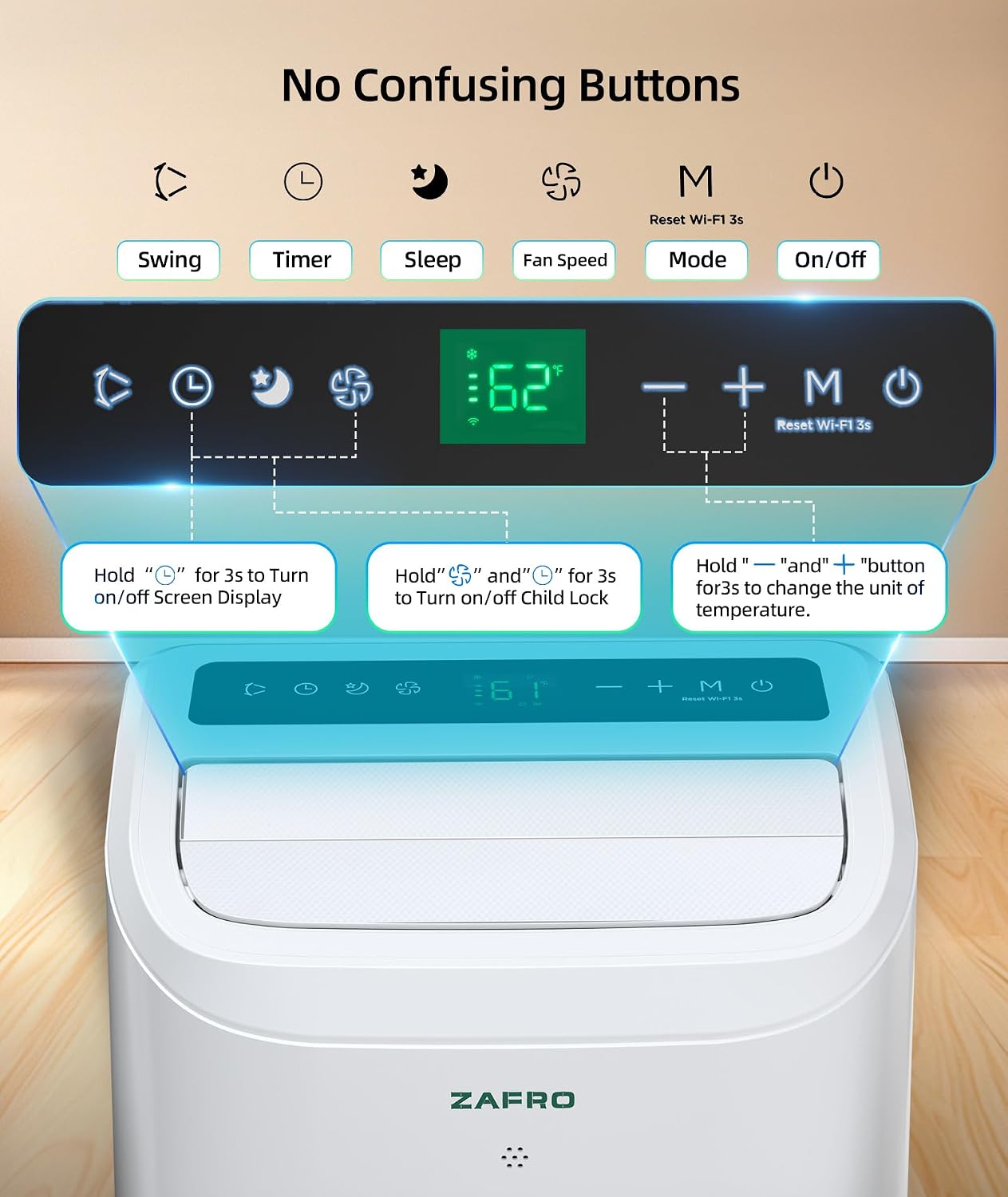
Figure 6: The intuitive LED control panel allows for easy adjustment of settings.
- Power Button: Turns the unit On/Off.
- Mode Button: Cycles through Cooling, Dry, and Fan modes.
- Speed Button: Adjusts fan speed (Low, Mid, High, Auto).
- Timer Button: Sets a 24-hour timer for automatic On/Off.
- Sleep Button: Activates quiet sleep mode.
- Lock Button: Press and hold for 3 seconds to activate/deactivate Child Lock.
- Temperature Adjustment: Use the Up/Down arrows to set the desired temperature (61°F to 90°F).
6.2 Remote Control
The included remote control provides full functionality from a distance, mirroring the control panel options.
6.3 APP Control (Wi-Fi Enabled)
For enhanced convenience, download the ZAFRO app to control your air conditioner from your smartphone. This allows for remote operation and advanced scheduling.

Figure 7: Multiple control options including remote, touch panel, and smartphone app for ultimate convenience.
7. Maintenance
Regular maintenance ensures optimal performance and longevity of your air conditioner.
- Filter Cleaning: The air conditioner features a washable filter. Regularly clean the filter to ensure efficient operation and clean air output. Refer to the unit's back panel for filter access.
- Drainage: While the unit features self-evaporating technology for short-term use, regular drainage is recommended, especially in high humidity conditions or when using the dehumidifier mode. The unit has dual drainage holes for sustainable drainage.
- General Cleaning: Wipe the exterior of the unit with a soft, damp cloth. Do not use harsh chemicals or abrasive cleaners.
- Storage: If storing the unit for an extended period, ensure it is completely drained and cleaned. Store in a dry, cool place.
8. Troubleshooting
If you encounter issues with your ZAFRO Portable Air Conditioner, please refer to the following common troubleshooting steps before contacting support:
| Problem | Possible Cause | Solution |
|---|---|---|
| Unit does not turn on. | No power, power cord unplugged, circuit breaker tripped. | Check power connection, ensure outlet is functional, reset circuit breaker. |
| Unit not cooling effectively. | Air filter clogged, exhaust hose not properly installed, room size too large, windows/doors open. | Clean air filter, ensure exhaust hose is sealed, close windows/doors, verify room size is within specifications. |
| Water leakage. | Drainage plug not secure, drainage hose blocked, water tank full (if applicable). | Ensure drainage plug is secure, clear any blockages in the drainage hose, empty water tank if full. |
| Remote control not working. | Batteries dead or incorrectly inserted. | Replace batteries, ensure correct polarity. |
9. Specifications
- Brand: ZAFRO
- Model Name: Portable Air Conditioner
- Item Model Number: A9047L-8K
- Cooling Power: 12000 British Thermal Units (ASHRAE), 8000 BTU (SACC)
- Coverage Area: Up to 500 sq. ft.
- Temperature Range: 61°F to 90°F
- Noise Level: 47 dB
- Voltage: 115 Volts
- Product Dimensions: 12.99"D x 14.79"W x 23.23"H
- Item Weight: 50 Pounds
- Color: White
- Special Features: Fast Cooling, Remote Controlled, Sleep Mode, WiFi Enabled
10. Warranty and Support
Your ZAFRO Portable Air Conditioner comes with a 1-year warranty from the date of purchase.
For technical support, warranty claims, or any inquiries regarding your product, please visit the official ZAFRO Store on Amazon or contact ZAFRO customer service directly. Keep your purchase receipt as proof of purchase for warranty purposes.
Visit the ZAFRO Store for more information.
Ask a question about this manual
Ask about setup, troubleshooting, compatibility, parts, safety, or missing instructions. Manuals+ will review the question and use this page’s manual context to help answer it.