
1. Product Overview
The ZLPOWER 10000W 48V Hybrid Solar Inverter Charger is a high-performance device designed to provide reliable power for both off-grid and backup systems. It integrates a powerful 200A maximum charging current with dual MPPT controllers, ensuring efficient energy harvesting from solar panels. This inverter delivers a stable 120V/240V AC output, suitable for a wide range of household appliances, and supports various battery types including LiFePO4, Lithium-ion, AGM, and Gel batteries. Its flexible operating modes and scalable design make it an ideal solution for diverse energy needs.

Figure 1: ZLPOWER 10000W 48V Hybrid Solar Inverter Charger
2. Key Features
- Ultra-Fast 200A Charging & Dual MPPT: Features a 200A maximum charging current and dual MPPT controllers (11,000W Max PV Input) for rapid energy harvesting and battery charging.
- True Split Phase 120V/240V Output: Provides stable 120V/240V AC output for heavy-duty appliances, seamlessly switching between Single Phase and Split Phase operation.
- Smart Time-of-Use & 4 Working Modes: Offers a "Time-of-Use" function for optimized charging/discharging and 4 charging modes (Solar/Utility/Hybrid/Priority) with 3 output modes (SBU/Solar/Grid).
- Batteryless Operation & Broad Compatibility: Supports operation without batteries, running loads directly from solar or grid. Compatible with LiFePO4, Lithium-ion, AGM, and Gel batteries with RS485/CAN/USB BMS communication.
- Scalable Power up to 60KW: Allows parallel connection of up to 6 units, expanding the system capacity to 60KW for larger residential or commercial setups.
- Comprehensive Protection System: Incorporates a 14-tier intelligent protection system against PV input current limit, power overvoltage, battery overvoltage, connection issues, overload, PV input overvoltage, undervoltage, overheat, PV reverse, battery overcurrent, AC short, AC high/low volt, and bypass overcurrent.

Figure 2: 14-Tier Intelligent Protection System
3. Unboxing and Components
Upon receiving your ZLPOWER inverter, carefully unbox the unit and verify all components are present and undamaged. The package typically includes the inverter charger, an instruction manual, necessary cables, and a WiFi module.
Video 1: Unboxing and Accessory Display of the ZLPOWER PVT Inverter

Figure 3: Inverter Dimensions and Included Accessories
Included Accessories:
- Inverter Charger Unit
- Instruction Manual (for single inverter use)
- Parallel Inverter Instruction Manual
- Mini USB Cable
- Network Cable (for Lithium battery communication)
- RS232 Control Line
- WiFi Module
4. Setup and Installation
Proper installation is crucial for the safe and efficient operation of your ZLPOWER inverter. Always ensure the power supply is cut off before beginning any installation procedures. Refer to the detailed instructions in the provided manual for specific wiring diagrams and safety guidelines.
4.1 Port Introduction
Familiarize yourself with the various ports and interfaces on the inverter:

Figure 4: Rear Panel Port Layout
- LCD Screen
- LED Indicators
- Touchable Keypad
- ON/OFF Rocker Switch
- PV Input (1/1)
- BAT Input (+)
- BAT Input (-)
- Dry Contact
- CAN/RS485 Port
- WiFi Port
- USB-B Port
- Grounding Screw
- AC OUT (L+L+N)
- AC IN (L+L+N)
- AC Input Breaker
4.2 Electrical Connections
Connect the solar panels to the PV input terminals (PV1, PV2). Connect the battery bank to the BAT+ and BAT- terminals. Ensure correct polarity. The AC input and output connections should be made to the respective AC IN and AC OUT ports. Use the grounding screw for proper system grounding. For parallel operation, connect multiple inverters using the dedicated parallel connection ports.
Video 2: Introduction to Interface Settings and Connections
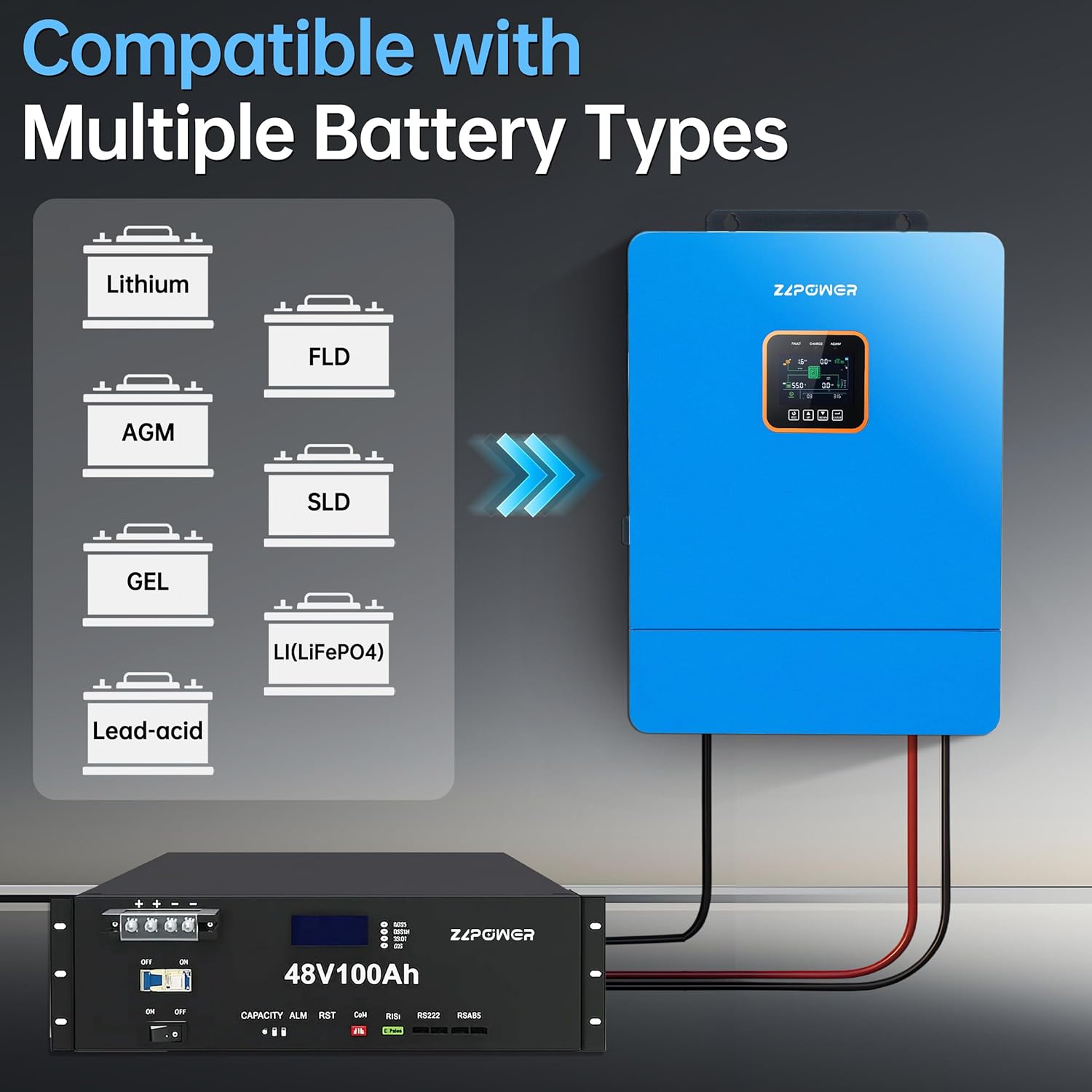
Figure 5: Inverter Compatibility with Various Battery Types
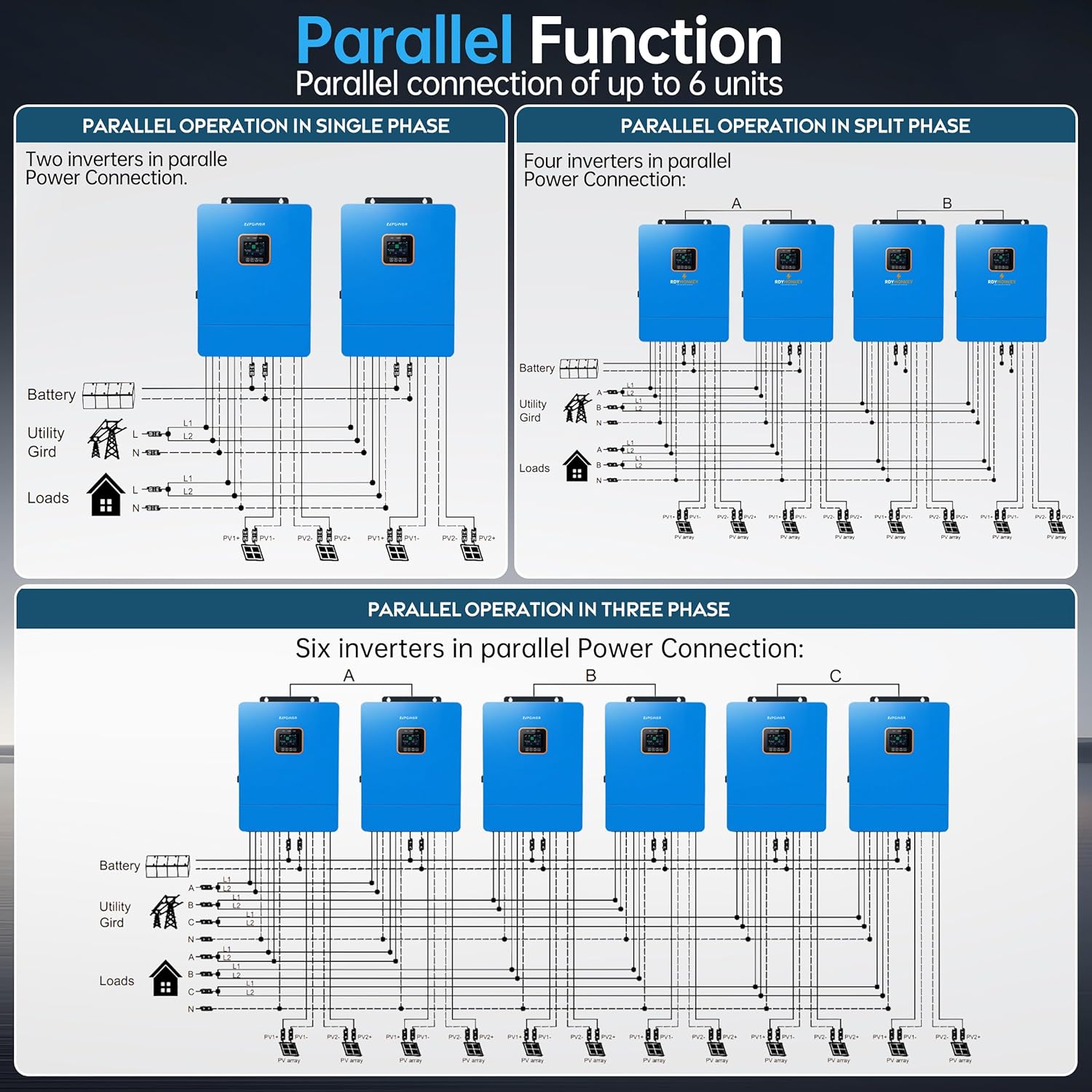
Figure 6: Parallel Connection Diagrams for Single, Split, and Three-Phase Systems
5. Operating Instructions
The inverter features an intuitive LCD screen and touchable keys for monitoring and configuration. After ensuring all connections are secure, press the ON/OFF rocker switch to power on the inverter.
5.1 Display and Navigation
The LCD screen displays real-time system status, including PV input, battery voltage, AC input/output, and charging/discharging information. Use the UP, DOWN, ESC, and ENTER buttons to navigate through menus and adjust settings.
5.2 Working Modes
The inverter offers flexible working modes to optimize energy usage:
- Charging Modes: Solar Priority, Utility Priority, Solar and Utility, Only Solar.
- Output Modes: Solar-Battery-Utility (SBU), Solar First, Grid First.
Configure these modes via the LCD interface to match your specific energy requirements and local utility rates, especially utilizing the 'Time-of-Use' function for cost savings.

Figure 7: Time-Slot Charge and Discharge Control for Energy Savings

Figure 8: Overview of Charging and Discharge Modes
6. Maintenance
Regular maintenance ensures the longevity and optimal performance of your inverter. Keep the unit clean and free from dust. Ensure proper ventilation around the inverter to prevent overheating. Periodically check all electrical connections for tightness and signs of wear or corrosion. Consult the manual for specific cleaning instructions and recommended inspection intervals.
7. Troubleshooting
If you encounter any issues with your ZLPOWER inverter, refer to the troubleshooting section in the comprehensive user manual. Common issues and their solutions are typically outlined there. For persistent problems or complex technical support, please contact ZLPOWER customer service.
Video 3: Safety Reminder for Inverter Installation and Operation
8. Specifications
Below are the detailed technical specifications for the ZLPOWER 10000W 48V Hybrid Solar Inverter Charger (Model ZLP-PVT-10KW):
| Category | Specification | Value |
|---|---|---|
| Brand | Manufacturer | ZLPOWER (NETSOLAR) |
| Inverter Output | Rated Output Power | 10000 Watts |
| Peak Output Power | 20000 Watts | |
| Output Voltage | 120V/240V AC (Split Phase) | |
| Electrical Output Waveform | Pure Sine Wave | |
| Frequency | 60 Hz | |
| Battery | Rated Battery Voltage | 48 Volts |
| Max. Charging Current | 200A | |
| Compatibility | LiFePO4, Lithium-ion, AGM, Gel | |
| PV Input | Max. PV Array Power | 11000W (Dual MPPT) |
| Max. Open Circuit Voltage | 500V DC | |
| MPPT Voltage Range | 125-430Vdc | |
| General | Model Number | ZLP-PVT-10KW |
| Display Type | LCD |
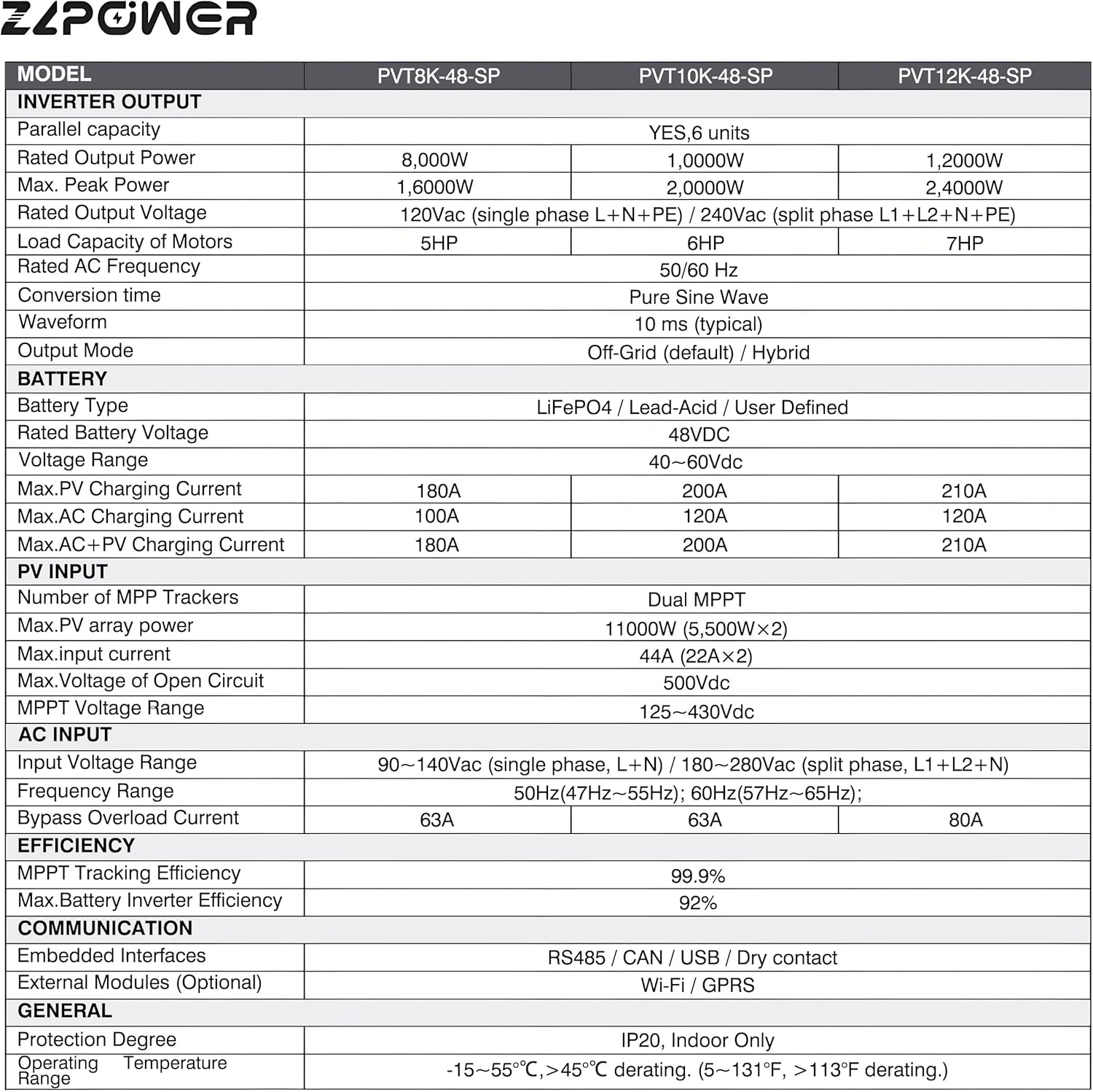
Figure 9: Detailed Specifications Table for ZLPOWER PVT Series Inverters
9. Warranty and Support
The ZLPOWER 10000W 48V Hybrid Solar Inverter Charger is backed by a 60-month (5-year) manufacturer's warranty and lifetime technical support. For any issues or technical assistance, please contact ZLPOWER customer service. Our professional team is available to provide comprehensive and considerate service.
Video 4: ZLPOWER Company Introduction and Commitment to Support