
1. Introduction
Thank you for choosing the Ankilo WA165KM Wireless Weather Station. This device provides accurate indoor and outdoor temperature and humidity readings, along with a 12-hour weather forecast and barometric pressure trends. This manual will guide you through the setup, operation, and maintenance of your new weather station to ensure optimal performance.
2. Product Overview
The Ankilo WA165KM Wireless Weather Station features a color LCD display and comes with three remote sensors to monitor conditions in up to four different locations simultaneously (one indoor, three outdoor). It is designed for ease of use and clear data presentation.
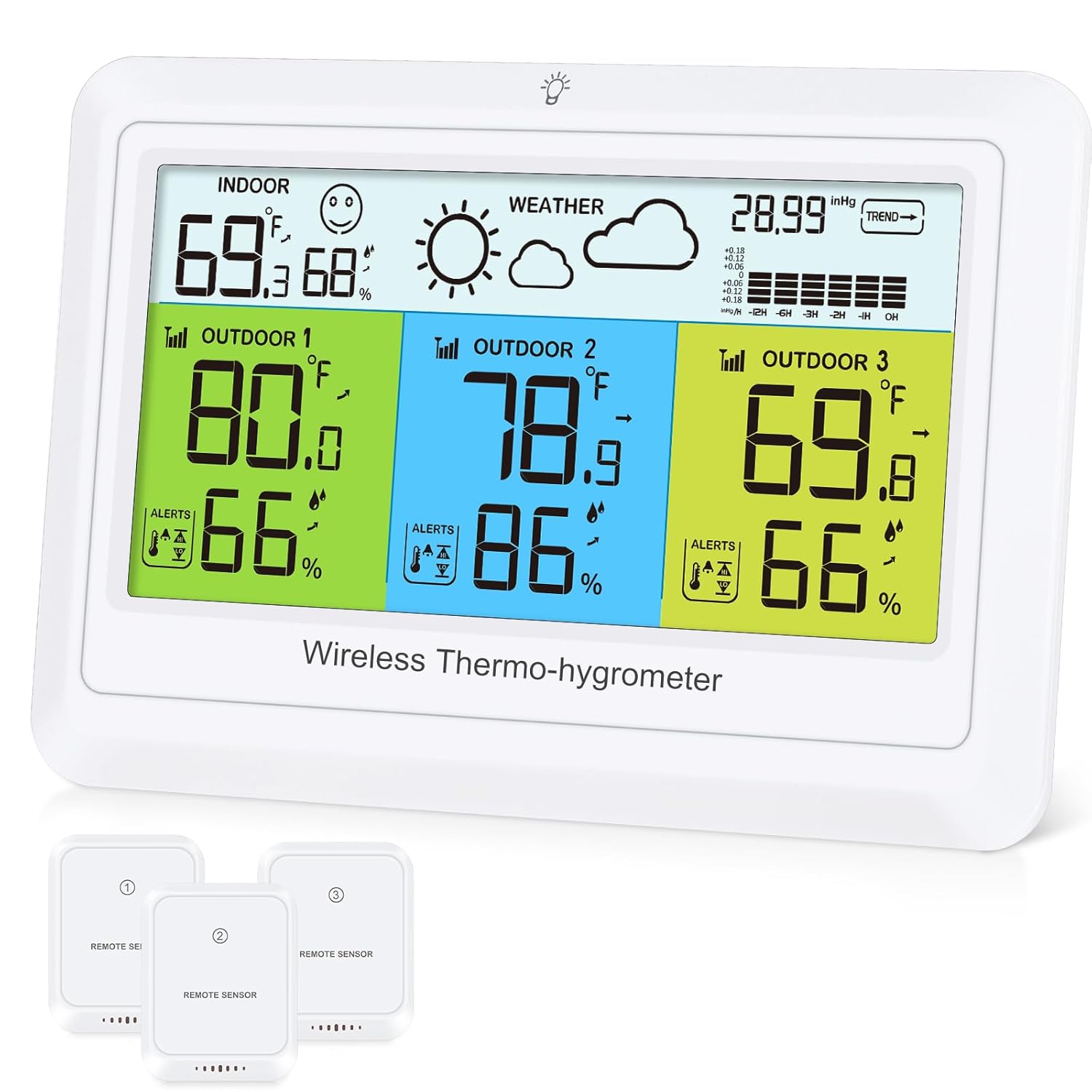
Image 2.1: The main display unit and the three wireless remote sensors.
3. Package Contents
Please check the package for the following items:
- 1 x Ankilo WA165KM Main Weather Station Unit
- 3 x Wireless Remote Sensors
- 1 x 1.5m USB Type-C Charging Cable
- User Manual (this document)
Note: AAA batteries for both the main unit (3x) and sensors (2x per sensor) are not included and must be purchased separately.
4. Setup
4.1 Powering the Main Unit
The main weather station unit can be powered in two ways:
- USB Power (Recommended): Connect the provided USB Type-C cable to the main unit and plug the other end into a USB power adapter (not included). When powered by USB, the backlight can be set to High, Medium, or Low, and remains continuously on.
- Battery Power: Insert 3 AAA batteries (not included) into the battery compartment. When powered by batteries, a short press of the 'Light' button will activate the backlight for 10 seconds.
4.2 Powering the Remote Sensors
Each wireless remote sensor requires 2 AAA batteries (not included). Open the battery compartment on the back of each sensor and insert the batteries, observing the correct polarity. Close the compartment securely.

Image 4.1: Illustration of the dual power supply options for the main unit (USB or 3x AAA batteries) and the backlight settings for each mode.
4.3 Sensor Pairing and Placement
Once the main unit and sensors are powered on, the sensors will automatically connect to the main unit. The main unit will display the indoor temperature and humidity, along with the readings from the three outdoor sensors (labeled OUTDOOR 1, OUTDOOR 2, OUTDOOR 3).
Place the remote sensors in desired outdoor locations or other rooms you wish to monitor. Ensure they are within the maximum transmission range of 100 meters (328 feet) from the main unit. Avoid placing sensors in direct sunlight or rain for accurate readings and longevity. The main unit can be placed indoors on a table or mounted on a wall.

Image 4.2: Example of remote sensor placement in various locations (CH1, CH2, CH3) and the maximum wireless range of 100 meters (328 feet).
4.4 Initial Weather Forecast Calibration
For accurate weather forecasting, the station requires an initial calibration period of 7 to 10 days. During this time, it learns the local barometric pressure patterns. After this period, the weather forecast accuracy is approximately 75%.
5. Operating Instructions
5.1 Understanding the Display
The color LCD screen provides a clear overview of all monitored data:
- Indoor Section: Displays current indoor temperature and humidity.
- Weather Section: Shows the 12-hour weather forecast icon.
- Barometric Pressure: Displays current atmospheric pressure and trend.
- Outdoor Sections (1, 2, 3): Each section displays the temperature and humidity from its corresponding remote sensor. The color-coded display helps differentiate between sensors.

Image 5.1: Detailed view of the color LCD screen, highlighting Indoor Temperature & Humidity, Weather Forecast, Air Pressure, and Outdoor Temperature & Humidity for sensors 1, 2, and 3.
5.2 Weather Forecast Icons
The weather station predicts the weather for the next 12 hours using 7 distinct icons based on barometric pressure changes:
- Sunny
- Partly Cloudy
- Overcast
- Rain
- Thunderstorm
- Light Snowfall
- Heavy Snowfall
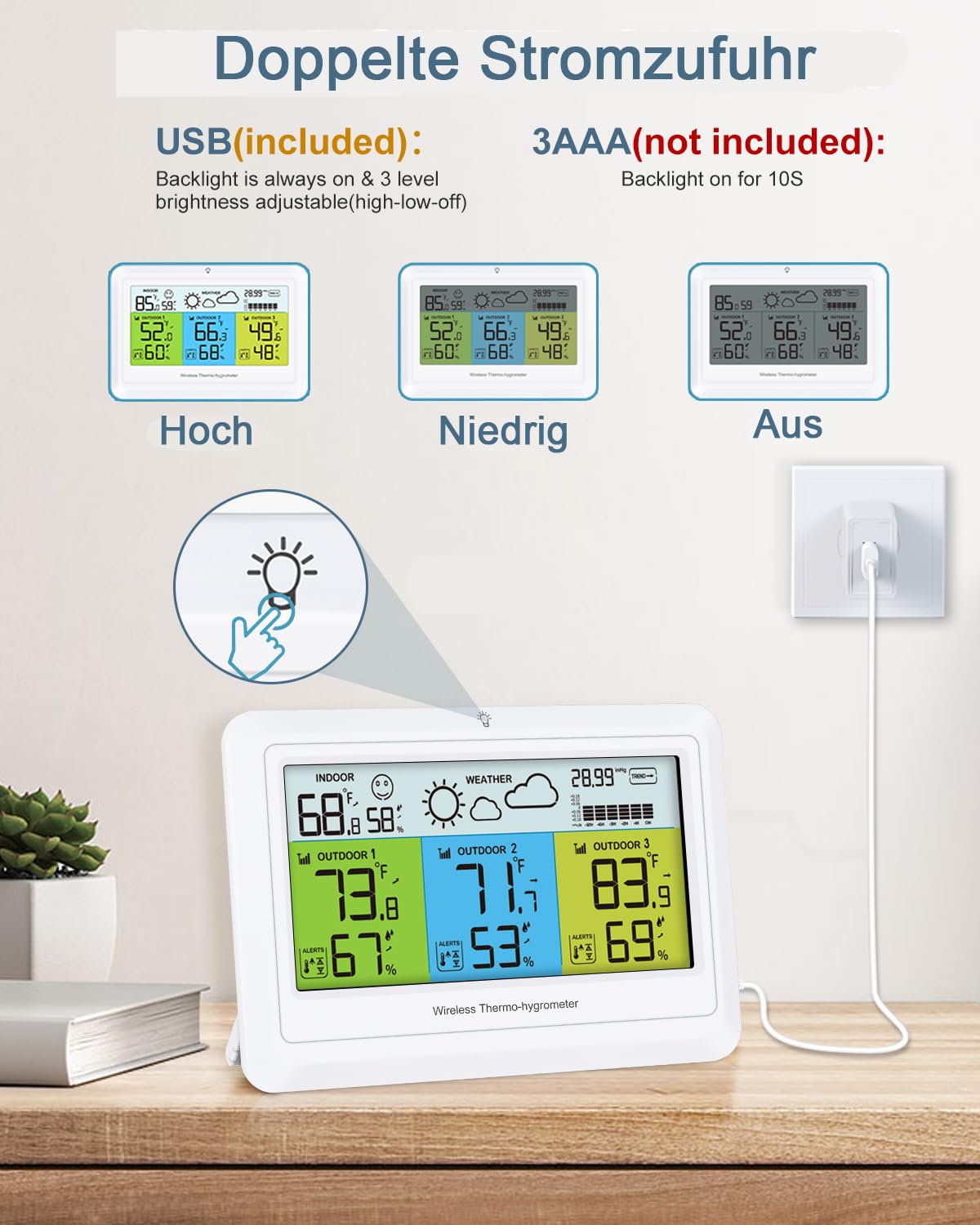
Image 5.2: Visual representation of the 7 weather modes predicted by the station for the next 12 hours.
5.3 Temperature Alarm Function
The weather station allows you to set maximum and minimum temperature alarm values for the outdoor sensors. If the temperature exceeds the set high limit or falls below the set low limit, an alarm will sound. This feature is useful for monitoring conditions in refrigerators, freezers, or other sensitive environments.
- Main Unit Temperature Range: -9.9°C to 50°C (14.2°F to 122°F)
- Sensor Temperature Range: -40°C to 70°C (-40°F to 158°F)
- Temperature Accuracy: ±1°C (±1.8°F)
- Humidity Accuracy: ±5%
- Refresh Frequency: 30 seconds

Image 5.3: Display showing the outdoor temperature alert feature, including alert setting range, temperature accuracy, humidity accuracy, and refresh frequency.
5.4 Backlight Control
- USB Powered: Short press the 'Light' button to cycle through 3 backlight brightness levels: High, Medium, Low. The backlight remains on.
- Battery Powered: Short press the 'Light' button to activate the backlight for 10 seconds.
6. Features
The Ankilo WA165KM Wireless Weather Station offers a range of features for comprehensive environmental monitoring:
- Multi-Location Monitoring: Simultaneously displays temperature and humidity from the main unit (indoor) and three remote sensors (outdoor/other rooms).
- Color LCD Display: Clear and easy-to-read screen with color-coded sections for quick identification of sensor data.
- 12-Hour Weather Forecast: Predicts upcoming weather conditions based on barometric pressure changes.
- Temperature Alarm: Customizable high/low temperature alerts for outdoor sensors.
- Barometric Pressure Trend: Shows the current atmospheric pressure and its trend.
- Min/Max Record: Records the highest and lowest temperature and humidity readings.
- Dual Power Options: Operates via USB cable for continuous backlight or AAA batteries for portable use.
- Wireless Connectivity: Sensors transmit data wirelessly up to 100 meters (328 feet).

Image 6.1: Overview of the multi-functional weather station display, indicating features like Temperature, Humidity, Weather Forecast, Trend, Min/Max Record, Air Pressure, Backlight, and Outdoor Temperature Alert.
7. Maintenance
To ensure the longevity and accuracy of your Ankilo WA165KM Wireless Weather Station, follow these maintenance guidelines:
- Cleaning: Wipe the main unit and sensors with a soft, damp cloth. Do not use abrasive cleaners or solvents.
- Battery Replacement: Replace batteries in the main unit and sensors when the low battery indicator appears on the display. Always replace all batteries at the same time.
- Sensor Placement: Periodically check the outdoor sensors to ensure they are protected from direct heavy rain, snow, and prolonged direct sunlight, which can affect readings and battery life.
- Storage: If storing the device for an extended period, remove all batteries to prevent leakage.
8. Troubleshooting
If you encounter issues with your weather station, refer to the following common problems and solutions:
| Problem | Possible Cause | Solution |
|---|---|---|
| No outdoor sensor readings | Batteries are dead or incorrectly inserted in the sensor. Sensor is out of range or obstructed. | Replace sensor batteries. Move sensor closer to the main unit. Ensure no major obstructions (thick walls, metal objects) between sensor and main unit. |
| Inaccurate temperature/humidity readings | Sensor exposed to direct sunlight, heat sources, or moisture. | Relocate sensors to a shaded, well-ventilated area, away from direct heat or moisture. Allow time for readings to stabilize. |
| Weather forecast seems incorrect | Initial calibration period not complete. Local weather conditions are highly variable. | Allow 7-10 days for initial calibration. Remember forecasts are predictions and not always 100% accurate. |
| Display is dim or off | Low batteries in main unit. USB power not connected or faulty. | Replace main unit batteries or connect to USB power. Check USB cable and adapter. |
9. Specifications
- Model Number: WA165KM
- Brand: Ankilo
- Main Unit Dimensions (L x W x H): 2 x 11 x 16 cm (0.79 x 4.33 x 6.3 inches)
- Weight: 400 grams
- Material: Acrylonitrile Butadiene Styrene (ABS)
- Connectivity Technology: Wireless
- Power Source: Main Unit: USB cable (included) or 3x AAA batteries (not included); Sensors: 2x AAA batteries per sensor (not included)
- Indoor Temperature Range: -9.9°C to 50°C (14.2°F to 122°F)
- Outdoor Temperature Range: -40°C to 70°C (-40°F to 158°F)
- Temperature Accuracy: ±1°C (±1.8°F)
- Humidity Accuracy: ±5%
- Wireless Range: Up to 100 meters (328 feet) in open air
- Special Feature: Wireless, Color LCD Display, Temperature Alarm, Weather Forecast
10. Warranty and Support
Ankilo products are designed for reliability and performance. For any questions, technical support, or warranty inquiries regarding your Ankilo WA165KM Wireless Weather Station, please refer to the contact information provided with your purchase or visit the official Ankilo website. Please retain your proof of purchase for warranty claims.