
Introduction
This manual provides essential instructions for the safe and efficient installation, operation, and maintenance of your OSRAM SMART+ WiFi Outdoor Lamp with Controllable Camera. This compact wall light integrates an adjustable camera, speaker, motion detector, and daylight sensor to enhance your outdoor security and lighting experience. Please read this manual thoroughly before proceeding with installation or use.
Safety Instructions
- Electrical Connections: All electrical connections must be performed by a qualified electrician to prevent electric shock and ensure compliance with local regulations.
- Risk of Electric Shock: Always disconnect power at the main circuit breaker before installing, servicing, or cleaning the device.
- Mounting Surface: Verify the suitability and stability of the wall or ceiling before mounting the lamp. If unsure, consult a professional.
- Outdoor Use: This product is designed for outdoor use (IP44 rated). Ensure all connections are properly sealed to maintain its weather resistance.
- Operating Temperature: Do not operate the device outside its specified temperature range.
Product Features
- Integrated Camera: HD Live View camera for real-time monitoring.
- Motion Detection: Built-in infrared sensor activates lighting and camera upon detecting movement.
- Audio Features: Integrated speaker and alarm siren for communication and deterrence.
- Adjustable Lighting: Dimmable warm white light (3,000 K) with 900 lumens output.
- Smart Control: WiFi connectivity for control via the OSRAM SMART+ app.
- Voice Assistant Compatibility: Works with Google Assistant and Amazon Alexa.
- Durable Design: Robust housing with IP44 protection against rain and dust, and IK05 shock resistance for outdoor durability.
Package Contents
The package includes the OSRAM SMART+ WiFi Wall Camera Control unit and complete mounting and connection accessories.

Image: Product packaging illustrating the SMART+ WiFi Wall Camera Control unit, the SMART+ App, and its integration into a Smart Home system.
Installation
1. Pre-Installation Checks
- Ensure the power supply is disconnected at the main circuit breaker.
- Confirm the mounting surface (wall) is suitable and can support the weight of the lamp (850 grams).
- Have a qualified electrician perform all electrical wiring.
2. Mounting the Lamp
Use the provided mounting accessories to securely attach the lamp to the desired outdoor wall location. The lamp dimensions are 12 cm (length) x 8 cm (width) x 32 cm (height).
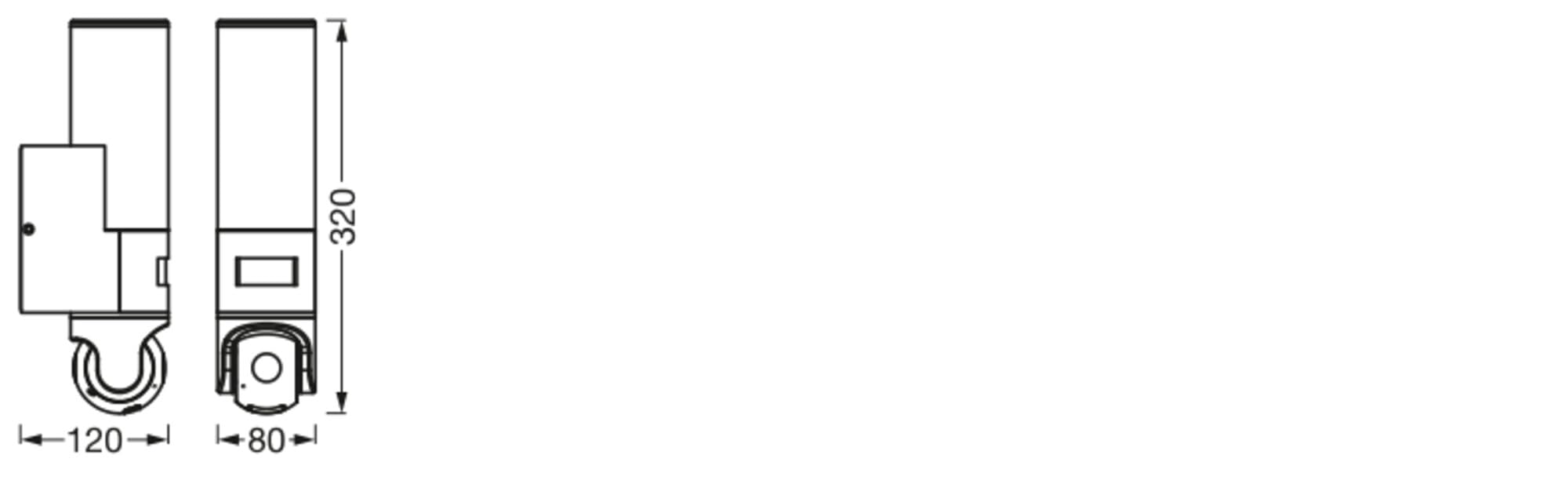
Image: Technical drawing showing the dimensions of the OSRAM SMART+ WiFi Outdoor Lamp. The height is 320mm, depth is 120mm, and width is 80mm.
3. Electrical Connection
Connect the lamp to a 220V AC power source. Ensure all wiring is done according to local electrical codes and by a qualified professional. The lamp is designed for wall mounting.
Setup & Configuration
1. Download the SMART+ App
To control your OSRAM SMART+ WiFi Outdoor Lamp, download the OSRAM SMART+ app. It is available for smartphones and tablets running at least Android 8.0 or iOS 14.0.

Image: Diagram showing a smart home ecosystem where various devices, including lighting and cameras, are interconnected and controllable.
For more information and app download links, visit: https://l.ead.me/SmartPlusWifi
2. Connect to WiFi
Follow the in-app instructions to connect your lamp to your home WiFi network. This typically involves powering on the device, opening the app, and following the pairing process. Ensure your smartphone or tablet is connected to the same WiFi network during setup.
3. Voice Assistant Integration
The lamp is compatible with Google Assistant and Amazon Alexa. Refer to the SMART+ app or your voice assistant's setup guide for instructions on integrating the lamp for voice control.
Operating Instructions
Lighting Control
Use the SMART+ app to turn the light on/off, adjust brightness (dimmable), and set schedules. The lamp provides a warm white light at 3000 Kelvin.
Motion Detection
The integrated motion sensor automatically activates the light and camera when movement is detected. You can configure sensitivity and notification settings within the SMART+ app.

Image: An outdoor wall lamp illuminating a person walking at night, showcasing the motion detection feature.
Camera Live View and Recording
Access the HD Live View camera feed through the SMART+ app to monitor your outdoor area in real-time. The app also allows for recording and playback of events triggered by motion.

Image: An outdoor wall lamp brightly illuminating a figure near a window at night, highlighting its security monitoring capabilities.
Two-Way Audio and Alarm
Utilize the integrated speaker and microphone for two-way communication via the app. In case of suspicious activity, activate the alarm siren remotely through the app.
Maintenance
- Cleaning: Clean the lamp's exterior with a soft, damp cloth. Do not use abrasive cleaners or solvents. Ensure the power is off before cleaning.
- Inspection: Periodically check the mounting and electrical connections for any signs of wear or damage.
- Software Updates: Keep the SMART+ app updated to ensure optimal performance and access to new features.
Troubleshooting
- Lamp Not Functioning:
- Ensure the power supply is connected and the circuit breaker is on.
- Verify that the electrical connections were made correctly by a qualified electrician.
- Check if the lamp is properly paired with the SMART+ app.
- Motion Detector Not Working:
- Check the motion sensor settings within the SMART+ app (sensitivity, detection zones).
- Ensure there are no obstructions blocking the sensor's field of view.
- Clean the sensor lens if it appears dirty.
- Connectivity Issues (WiFi/App):
- Ensure your WiFi network is active and the signal strength is adequate at the lamp's location.
- Restart your WiFi router and the lamp.
- Verify that your smartphone/tablet meets the minimum OS requirements (Android 8.0 / iOS 14.0).
- Try re-pairing the device with the SMART+ app.
- Poor Camera Quality:
- Ensure your WiFi connection is stable and has sufficient bandwidth.
- Clean the camera lens.
If problems persist after following these steps, please contact OSRAM customer support.
Specifications
| Model Number | 4099854474972 |
| Dimensions (L x W x H) | 12 x 8 x 32 cm |
| Weight | 850 Grams |
| Brand | OSRAM |
| Manufacturer | LEDVANCE |
| Color | Dark Grey |
| Material | Plastic |
| Power Source | AC (Alternating Current) |
| Voltage | 220 Volts |
| Wattage | 16 Watts |
| Luminous Flux | 900 Lumens |
| Color Temperature | 3000 Kelvin (Warm White) |
| Light Source Type | LED |
| Control Method | Application (SMART+ App) |
| Connectivity Protocol | WiFi, Amazon Alexa, Google Assistant |
| Ingress Protection (IP) Rating | IP44 (Waterproof) |
| Impact Protection (IK) Rating | IK05 |
| Installation Type | Wall Mount |
| Energy Efficiency Class | D |
Warranty
For information regarding the warranty period and terms for your OSRAM SMART+ WiFi Outdoor Lamp, please refer to the documentation provided with your purchase or visit the official OSRAM website. Keep your proof of purchase for warranty claims.
Support
If you require further assistance, have questions about installation, operation, or troubleshooting that are not covered in this manual, please contact OSRAM customer support. Contact details can typically be found on the OSRAM website or on the product packaging.