1. Introduction
This manual provides detailed instructions for the installation, configuration, and operation of your WAVLINK WiFi 7 BE5100 Outdoor WiFi Extender. This device is designed to provide robust and high-speed wireless connectivity in outdoor environments, supporting multiple operating modes to suit various networking needs.
2. What's in the Box
- 1 x WAVLINK WiFi 7 BE5100 Outdoor WiFi Extender
- 4 x Omni-directional Detachable Fiberglass Antennas
- 1 x PoE Adapter
- 1 x AC Power Adapter
- 1 x RJ45 Ethernet Cable
- 1 x Wall Mounting Kit
- 1 x Installation Guide
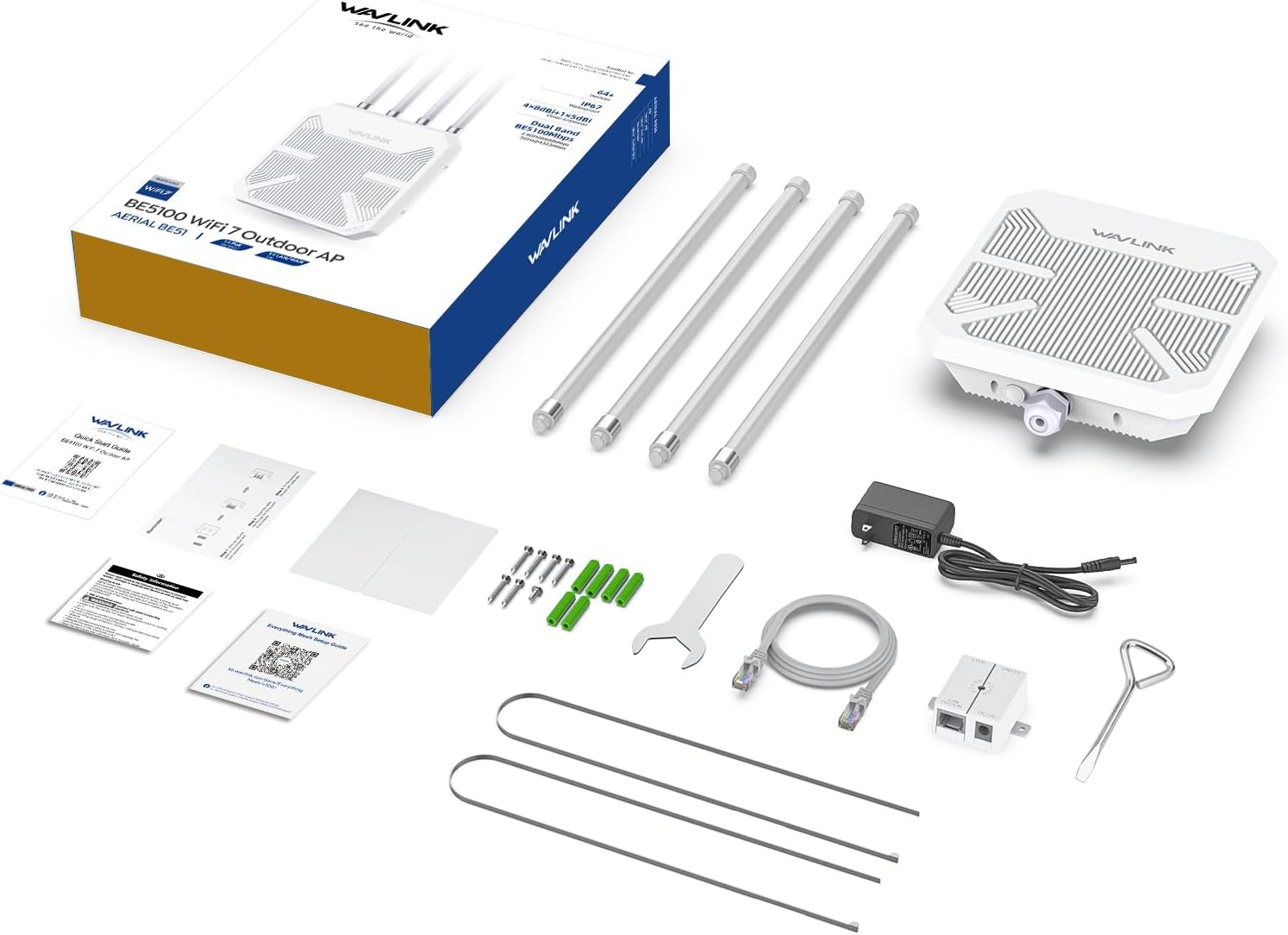
Figure 2.1: Package Contents
3. Product Overview
The WAVLINK WiFi 7 BE5100 is a high-performance outdoor wireless device featuring the latest Wi-Fi 7 technology. It offers dual-band operation, robust outdoor protection, and flexible deployment options.
3.1 Key Features
- Dual Band WiFi 7 (802.11be) Standard: Achieves speeds of up to 4323 Mbps on the 5 GHz band and 688 Mbps on the 2.4 GHz band, utilizing 4-stream technology for optimized signal distribution.
- Extended Range: Equipped with 4x 8dBi omni-directional detachable fiberglass antennas and two built-in high-power amplifiers, providing up to 300m (radius) WiFi coverage and supporting up to 256 connected devices.
- Power over Ethernet (PoE) Support: Compatible with both 802.3AF/AT active and passive PoE for flexible power options. Note: The PoE converter is not waterproof and should be protected from moisture.
- Multiple Working Modes: Supports AP, Router, Repeater, Mesh AP, and Mesh Extender modes to adapt to various network setups. Mesh mode is compatible with other WAVLINK series products.
- Outdoor Durability: Features an IP67 waterproof housing, 15 KV ESD protection, and 6 KV lightning protection, ensuring reliable operation in harsh weather conditions (rain, snow, wind, thunder).

Figure 3.1: Product Features Overview

Figure 3.2: Designed for Harsh Outdoor Conditions
3.2 Components
The device includes four external antennas and a 2.5 Gigabit Ethernet port for WAN/LAN connectivity. A reset button is also present for factory reset or WPS pairing.

Figure 3.3: Product Dimensions
4. Setup & Installation
Follow these steps to set up your WAVLINK WiFi 7 BE5100 Outdoor WiFi Extender.
4.1 Antenna Installation
Carefully screw the four omni-directional detachable fiberglass antennas into their respective ports on the top of the extender unit. Ensure they are securely tightened.
4.2 Power over Ethernet (PoE) Connection
The device is powered via Power over Ethernet. Connect an Ethernet cable (CAT5E or above, not exceeding 100m/328ft) from your network source (router/modem) to the 'LAN DATA IN' port on the PoE adapter. Then, connect another Ethernet cable from the 'POE' port on the adapter to the 2.5G WAN/LAN port on the bottom of the extender. Finally, connect the AC power adapter to the PoE adapter and a power outlet.

Figure 4.1: PoE Connection Diagram
4.3 Physical Mounting
Use the provided wall mounting kit to securely attach the extender to a pole or wall in your desired outdoor location. Ensure the device is positioned for optimal signal coverage and away from major obstructions.

Figure 4.2: Mounting Steps
4.4 Initial Configuration
After physical installation and power-up, connect a computer or mobile device to the extender's default Wi-Fi network (SSID usually found on the device label or quick start guide). Open a web browser and navigate to the default login address (e.g., waplogin.link or 192.168.11.1). Follow the on-screen prompts to set up your desired operating mode, Wi-Fi name (SSID), and password.
Video 4.3: Unboxing and Initial Setup Guide
Video 4.4: Detailed Setup and Configuration Walkthrough
5. Operating Modes
The WAVLINK BE5100 supports several operating modes to provide flexibility for different network requirements:
- AP Mode (Access Point): Converts a wired network connection into a wireless one, allowing wireless devices to connect.
- Repeater Mode: Extends the coverage of an existing wireless network by repeating its signal.
- Router Mode: Functions as a primary router, connecting directly to your internet service provider's modem and creating a new wireless network.
- Mesh AP Mode: Acts as the main access point in a Mesh network, providing seamless Wi-Fi coverage with a single SSID.
- Mesh Extender Mode: Expands an existing Mesh network, working with other WAVLINK Mesh products to eliminate Wi-Fi dead zones.

Figure 5.1: Multiple Working Modes
6. Configuration
Access the web-based management interface to customize your extender's settings.
6.1 Accessing the Web Interface
Connect your device to the extender's Wi-Fi network or via an Ethernet cable. Open a web browser and enter the default IP address (e.g., 192.168.11.1) or domain name (e.g., waplogin.link) into the address bar. Log in using the administrator credentials you set during initial setup.
6.2 Key Settings
- Wireless Settings: Configure SSID, encryption method (WPA2-PSK recommended), and password for both 2.4 GHz and 5 GHz bands. Enable Multi-Link Operation (MLO) for optimal WiFi 7 performance.
- Guest Wi-Fi: Create a separate Wi-Fi network for guests, providing secure access without compromising your main network.
- Signal Adjustment: Adjust the transmit power of the antennas (High, Medium, Low) to optimize coverage and minimize interference.
- Firmware Update: Regularly check for and install firmware updates to ensure optimal performance and security.
7. Specifications
| Feature | Description |
|---|---|
| Model Number | WL-WN573HBE2 |
| Wireless Standard | 802.11be (WiFi 7), 802.11a/b/g/n/ac, 802.11ax |
| Data Transfer Rate | Up to 5100 Mbps (4323 Mbps on 5 GHz, 688 Mbps on 2.4 GHz) |
| Frequency Band | Dual-Band |
| Antennas | 4 x 8dBi Omni-directional Detachable Fiberglass Antennas |
| Ethernet Port | 1 x 2.5 Gbps Ethernet (WAN/LAN) |
| PoE Support | 802.3AF/AT Active & Passive PoE |
| Waterproof Rating | IP67 |
| Protection | 15 KV ESD Protection, 6 KV Lightning Protection |
| Product Dimensions | 17.32 x 12.99 x 3.54 inches |
| Item Weight | 1.87 pounds |
8. Operating the WAVLINK WiFi 7 BE5100
Once configured, the WAVLINK BE5100 operates autonomously based on the selected mode. Ensure the device has a stable power supply and a clear line of sight to the areas requiring Wi-Fi coverage for optimal performance.
Video 8.1: Product Overview and Performance Demonstration
Video 8.2: Outdoor Speed and Range Test
9. Maintenance
Regular maintenance helps ensure the longevity and optimal performance of your outdoor extender.
- Cleaning: Periodically clean the exterior of the device to remove dust, dirt, or debris. Use a soft, damp cloth. Do not use harsh chemicals or abrasive cleaners.
- Firmware Updates: Check the web interface regularly for available firmware updates and install them to benefit from performance improvements and security patches.
- Cable Inspection: Periodically inspect the Ethernet cable and power connections for any signs of wear or damage. Ensure waterproof seals are intact.
10. Troubleshooting
If you encounter issues with your WAVLINK BE5100, try the following steps:
- No Power: Ensure the PoE adapter is correctly connected to a power source and the extender. Check all cable connections.
- No Internet Access: Verify that your main router/modem has an active internet connection. Check the Ethernet cable connection between the PoE adapter and your network source.
- Weak Signal/Poor Performance: Adjust the extender's position for better line of sight. Ensure antennas are securely attached. Check for physical obstructions. Adjust signal adjustment settings in the web interface to 'High'.
- Cannot Access Web Interface: Ensure your device is connected to the extender's Wi-Fi or via Ethernet. Try restarting the extender. Verify the correct IP address or domain name.
- Factory Reset: If problems persist, perform a factory reset by pressing and holding the reset button for approximately 10 seconds until the indicator lights change. Note: This will erase all custom settings.
11. Warranty & Support
WAVLINK products come with a manufacturer's warranty. For technical support, warranty claims, or further assistance, please contact WAVLINK customer service:
- Phone Support: +1 888 973 0883 (UTC-5) Mon - Fri 9 AM - 6 PM
- Email Support: Contact@wavlink.com
- Life-long technical support is provided.


