Introduction
This manual provides detailed instructions for the setup, operation, and maintenance of your VXK T6 Solar WiFi Bluetooth Trail Camera. Please read this manual thoroughly before using the camera to ensure proper function and optimal performance. This camera is designed for outdoor use, including wildlife monitoring, hunting, and property surveillance.
Package Contents
Please check the package contents upon unboxing. If any items are missing or damaged, contact customer support.
- VXK T6 Trail Camera with integrated solar panel
- Mounting Strap
- Mounting Bracket/Support
- USB Cable
- 64GB SD Card
- User Manual
Product Overview
Familiarize yourself with the camera's components.

Image 1: Overview of the VXK T6 Trail Camera, showing the main unit with an integrated solar panel, a 64GB SD card, and a smartphone displaying the camera's app interface with a deer image.

Image 2: The VXK T6 Trail Camera in use, showing its capability to record 4K video and capture images of various wildlife such as foxes, monkeys, and bears.
Setup
1. Battery and Charging
The camera is equipped with a built-in 5200mAh rechargeable lithium-ion battery and an integrated solar panel for continuous charging. For initial use or after prolonged storage, ensure the battery is fully charged.
- Solar Charging: Position the solar panel to receive direct sunlight for optimal charging. The solar panel helps maintain battery life during outdoor deployment.
- DC 5V/2A Charging: For faster charging or when solar power is insufficient, connect the camera to a 5V/2A DC power adapter (not included) using the provided USB cable.

Image 3: Illustration of the two charging methods: solar power via the integrated panel and DC 5V/2A charging using a power adapter (not included).
2. SD Card Installation
A 64GB SD card is included with your camera. This card is essential for storing photos and videos.
- Locate the SD card slot on the camera body.
- Insert the 64GB SD card into the slot with the metal contacts facing the correct direction until it clicks into place.
- To remove, gently push the card until it springs out.
- It is recommended to format the SD card through the camera's settings menu before first use and periodically thereafter to ensure optimal performance.
3. Mounting the Camera
The VXK T6 camera can be mounted using the provided strap or mounting bracket.
- Tree Mount: Use the included strap to secure the camera to a tree or pole. Ensure the camera is stable and pointed towards the desired monitoring area.
- Bracket Mount: Attach the mounting bracket to a flat surface using screws (not included). Then, secure the camera to the bracket.
- Solar Panel Placement: The solar panel can be attached directly to the camera or separated and mounted up to 2 meters away for better sun exposure.

Image 4: Demonstrates flexible mounting options for the solar panel, allowing it to be separated from the camera unit for optimal sun exposure or integrated directly.
Operating Instructions
1. Power On/Off
- To power on the camera, slide the power switch to the "ON" position.
- To power off, slide the switch to the "OFF" position.
2. App Connection (WiFi & Bluetooth)
The camera connects to your smartphone via the "Trailcam Go" application using WiFi and Bluetooth. This allows for remote viewing, settings adjustment, and file download.
- Download the "Trailcam Go" app from your smartphone's app store.
- Ensure your phone's WiFi and Bluetooth are enabled. Do not connect to home WiFi or other Bluetooth devices.
- On the camera, slide the mode switch to the "ON" position.
- Open the "Trailcam Go" app. It will search for and connect to the camera via Bluetooth, then establish a direct WiFi connection.
- The connection range is approximately 55 feet (17 meters).

Image 5: Step-by-step guide for connecting the camera to a smartphone via WiFi and Bluetooth using the "Trailcam Go" app. It shows enabling phone's wireless features, turning on the camera, connecting through the app, and accessing camera settings.
3. Settings Configuration
Once connected via the app, you can adjust various camera settings:
- Working Mode: Select between Photo, Video, or Photo+Video modes.
- Photo Resolution: Up to 48MP.
- Video Resolution: Up to 4K.
- PIR Sensitivity: Adjust the motion sensor sensitivity (Low, Medium, High) to suit the environment and avoid false triggers.
- Trigger Interval: Set the delay between consecutive captures.
- Time Lapse: Configure time-lapse photography.
- Date & Time: Set the correct date and time for accurate timestamps on recordings.
- Language: Select the desired language for the camera interface.
- Format SD Card: Erase all data on the SD card.
4. Viewing and Downloading Files
Through the "Trailcam Go" app, you can access and manage captured media:
- Navigate to the "Gallery" or "Playback" section within the app.
- Browse through photos and videos stored on the SD card.
- Select individual files or multiple files to download directly to your smartphone.
- Files can also be viewed by removing the SD card and inserting it into a computer or compatible device.
Features and Functions
High-Resolution Imaging
The VXK T6 captures detailed images and videos, ensuring clear documentation of wildlife activity.
- 48 Megapixel Photos: Provides high-resolution still images with fine detail.
- 4K Video Recording: Records smooth, high-definition video footage.
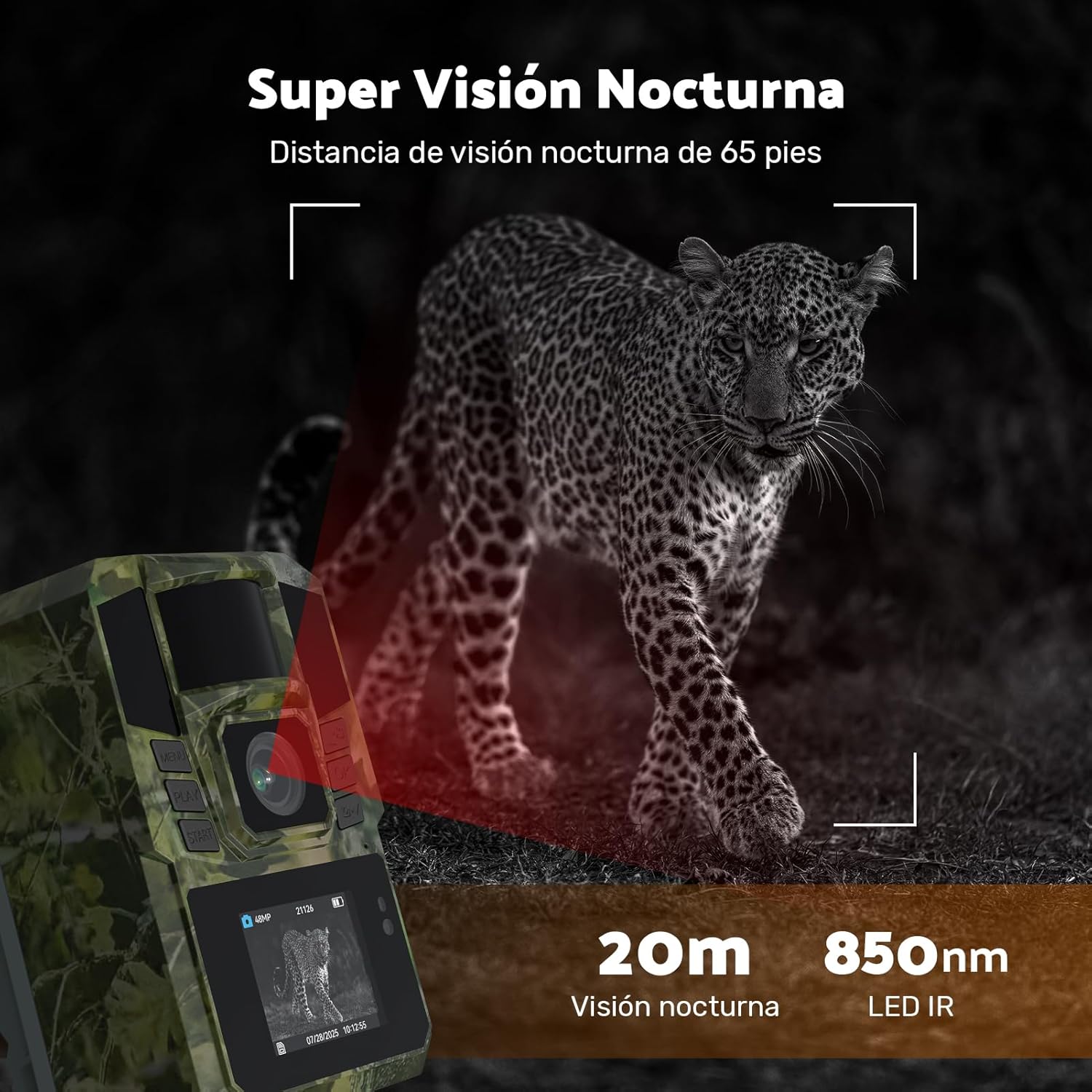
Image 6: A screenshot from the camera's display showing a deer captured in 4K video, indicating the high-quality video capabilities.
Advanced Night Vision
Equipped with 940nm infrared LEDs, the camera provides clear night vision without disturbing animals.
- 65 Feet (20m) Night Vision Range: Captures clear images and videos in complete darkness.
- 940nm No-Glow IR LEDs: Invisible to animals, ensuring natural behavior is recorded.

Image 7: A leopard captured by the camera's night vision. The image indicates 850nm LED IR, while product specifications state 940nm IR LEDs, both providing clear nocturnal imaging.
Fast Trigger Speed and Wide Angle
The camera's rapid trigger and wide field of view ensure no moment is missed.
- 0.1 Second Trigger Speed: Captures fast-moving subjects instantly.
- 90° Wide-Angle Lens: Provides a broad coverage area, reducing blind spots.

Image 8: An image illustrating the camera's 0.1-second fast trigger speed, capturing a bird in mid-flight with clarity.
Durable and Weatherproof Design
Built to withstand harsh outdoor conditions.
- IP65 Waterproof and Dustproof: Protects against heavy rain, dust, and extreme temperatures (-20°C to 60°C).

Image 9: The VXK T6 Trail Camera shown in different weather conditions (sunny, rainy, snowy), highlighting its IP65 waterproof and dustproof rating and ability to operate in temperatures from -20°C to 60°C.
Maintenance
- Cleaning: Use a soft, dry cloth to clean the camera lens and solar panel. Avoid abrasive cleaners or solvents.
- Battery Care: For optimal battery life, avoid fully discharging the battery frequently. If storing for extended periods, charge the battery to about 50% and store in a cool, dry place.
- SD Card: Periodically format the SD card to prevent data corruption and ensure smooth operation. Back up important files before formatting.
- Environmental Protection: While IP65 rated, avoid submerging the camera in water. Ensure all ports are securely closed when deployed outdoors.
Troubleshooting
| Problem | Possible Cause | Solution |
|---|---|---|
| Camera not powering on. | Low battery; Power switch in OFF position. | Charge the battery via solar panel or DC adapter. Ensure power switch is ON. |
| Cannot connect to app. | Camera WiFi/Bluetooth not enabled; Phone too far; App not "Trailcam Go". | Ensure camera is ON. Keep phone within 55 feet. Use the correct "Trailcam Go" app. Check phone's WiFi/Bluetooth settings. |
| Poor image/video quality. | Dirty lens; Low light conditions; Incorrect settings. | Clean the lens. Ensure adequate lighting or proper night vision settings. Adjust resolution settings in the app. |
| Camera not triggering. | PIR sensitivity too low; Obstruction in detection zone; Battery low. | Increase PIR sensitivity. Clear any obstructions. Ensure battery is charged. |
| SD card error. | SD card full; Corrupted card; Incorrectly inserted. | Format the SD card (backup data first). Reinsert the SD card. Try a different SD card if the issue persists. |
Specifications
| Feature | Detail |
|---|---|
| Model | T6 |
| Photo Resolution | Up to 48MP |
| Video Resolution | Up to 4K |
| Connectivity | WiFi, Bluetooth (via "Trailcam Go" app) |
| Night Vision | 940nm IR LEDs, 65 feet (20m) range |
| Trigger Speed | 0.1 seconds |
| Lens Angle | 90° Wide-Angle |
| Battery | 5200mAh Rechargeable Lithium-Ion (integrated) |
| Charging | Solar Panel, DC 5V/2A |
| Storage | 64GB SD Card (included) |
| Waterproof Rating | IP65 |
| Operating Temperature | -20°C to 60°C |
| Dimensions | 20 x 10 x 10 cm |
| Weight | 680 g |
Warranty and Support
For warranty information and technical support, please refer to the contact details provided with your purchase or visit the official VXK website. Keep your purchase receipt as proof of purchase for warranty claims.