
1. Introduction
This manual provides essential information for the safe and efficient use of your DOOGEE Fire 3 Ultra Rugged Smartphone. Please read it thoroughly before operating your device to ensure optimal performance and longevity. The DOOGEE Fire 3 Ultra is designed for durability and performance, featuring a robust build, advanced camera system, and long-lasting battery life.
2. Package Contents
Verify that all items are present in your product package:
- 1x DOOGEE Fire 3 Ultra Rugged Phone
- 1x Type-C USB Cable
- 1x 18W Charger
- 1x Sling
- 1x Card Slot Opener
3. Device Overview
The DOOGEE Fire 3 Ultra is a rugged smartphone designed for demanding environments. It features a 5.5-inch display on the front and a multi-camera system on the rear, housed within a durable chassis.

Image: Front and back view of the DOOGEE Fire 3 Ultra Rugged Smartphone, highlighting its robust design and camera module.
Physical Components:
- Display: 5.5-inch IPS HD+ screen.
- Front Camera: Located at the top of the display.
- Rear Camera Module: Includes 16MP main camera, 20MP night vision camera, and LED flash.
- Side Fingerprint Sensor: Integrated for quick and secure access.
- USB Type-C Port: For charging and data transfer.
- 3.5mm Audio Jack: For headphones.
- Power Button: Located on the side.
- Volume Buttons: Located on the side.
- SIM/TF Card Slot: Accessible via the card slot opener.
4. Setup
4.1 SIM and TF Card Installation
- Locate the SIM/TF card slot on the side of the device.
- Insert the provided card slot opener into the small hole next to the tray and gently push until the tray ejects.
- Place your Nano SIM card(s) and/or TF card (up to 2TB, purchased separately) into the tray according to the diagram on the tray. Ensure the metal contacts face downwards.
- Carefully reinsert the tray into the phone until it is flush with the device body.
4.2 Initial Power On
Press and hold the Power button located on the side of the device until the DOOGEE logo appears on the screen. Follow the on-screen prompts to complete the initial setup of your Android 15 operating system.
4.3 Charging the Device
Connect the Type-C USB cable to the phone's charging port and the 18W charger to a power outlet. The device supports 18W fast charging. Ensure the phone is adequately charged before first use.

Image: The DOOGEE Fire 3 Ultra connected to its 18W fast charger, illustrating the charging process and battery capacity.
5. Operating Your Device
5.1 Memory and Storage
The DOOGEE Fire 3 Ultra comes with 24GB of RAM (6GB physical + 18GB virtual) and 256GB of internal storage. Storage can be expanded up to 2TB using a TF card (sold separately).

Image: Visual representation of the 24GB RAM (6GB basic + 18GB virtual) and 256GB ROM, with an option for 2TB expandable memory.
5.2 Display Features
The 5.5-inch IPS HD+ display offers clear visuals with a 60Hz refresh rate and up to 400 nits brightness. It supports Widevine L1 for high-definition content streaming on compatible platforms.
5.3 Camera Functions
The device is equipped with a 16MP main camera, a 20MP night vision camera, and an 8MP front camera. The night vision camera enhances low-light photography, providing detailed images in dark conditions.

Image: Detailed view of the DOOGEE Fire 3 Ultra's rear camera module, indicating the 16MP main camera, 20MP night vision camera, and infrared night vision light.
Multiple shooting modes are available, including HDR, Pro Mode, Panorama, Night Mode, Beauty, Portrait, Filters, Watermark Camera, Smile Shutter, and QR Code Scan.
5.4 Connectivity
- 4G Dual SIM: Supports two Nano SIM cards or one Nano SIM and one TF card.
- NFC: For mobile payments, device pairing, and access card scanning.
- GPS: Integrated with Beidou, Galileo, Glonass, and GPS systems for accurate navigation.
- Wi-Fi: Supports Wi-Fi 2.4G/5G.
- Bluetooth: For wireless accessory connection.
5.5 Security Features
The device includes a side-mounted fingerprint sensor and Face Unlock for quick and secure access to your phone.
5.6 Battery Management
The 8350mAh battery provides extended usage time. It also supports OTG reverse charging, allowing the phone to act as a power bank for other devices.
6. Durability Features
The DOOGEE Fire 3 Ultra is built to withstand harsh conditions, certified with IP68/IP69K ratings and MIL-STD-810H compliance.
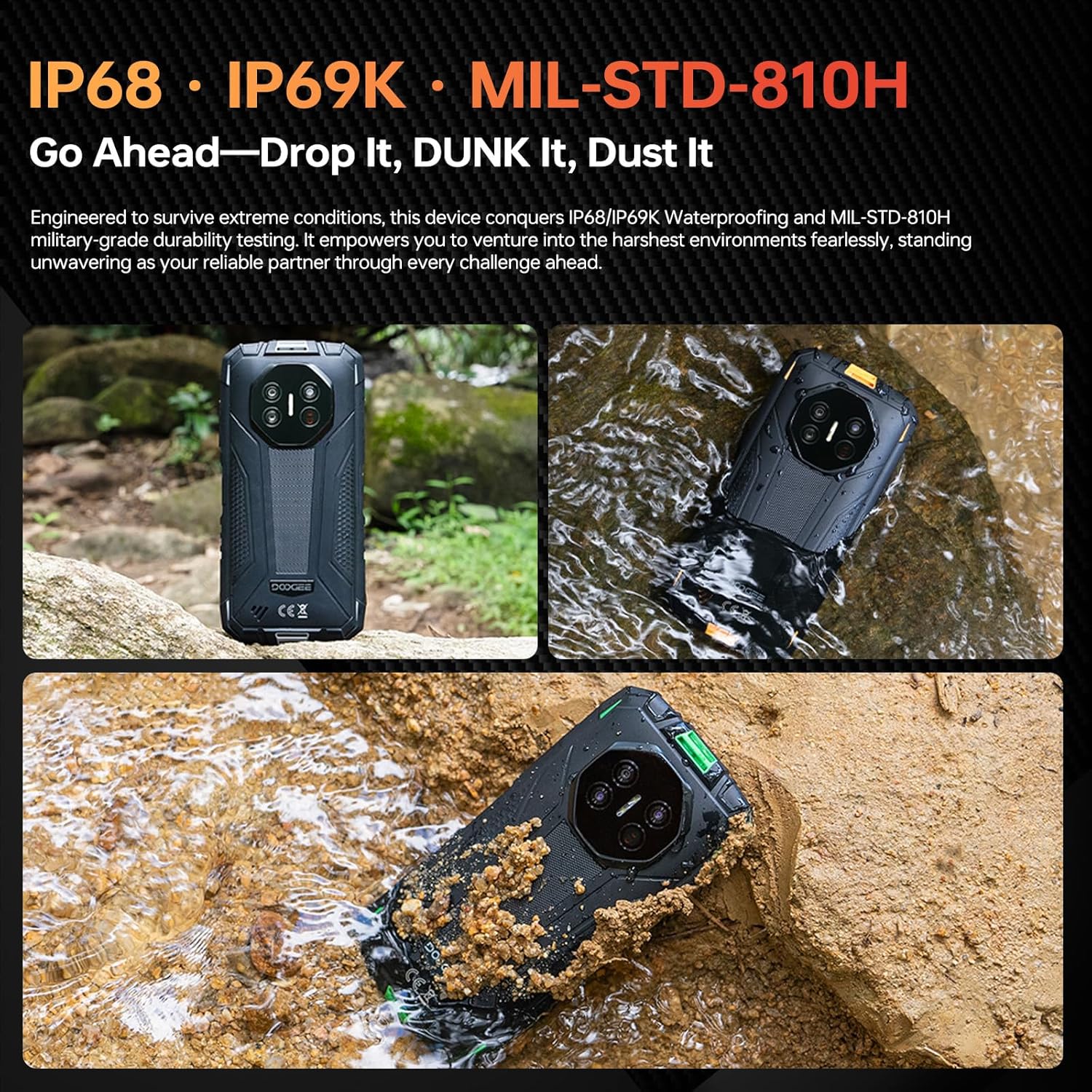
Image: The DOOGEE Fire 3 Ultra submerged in water and covered in dirt, illustrating its IP68/IP69K waterproof and dustproof capabilities.
- IP68/IP69K: Provides dustproof and waterproof protection, allowing submersion up to 1.5 meters for 30 minutes.
- MIL-STD-810H: Military-grade durability ensures resistance to drops from up to 1.5 meters, shocks, and extreme temperatures.
7. Maintenance
To maintain your DOOGEE Fire 3 Ultra in optimal condition:
- Regularly clean the screen and device body with a soft, damp cloth. Avoid harsh chemicals.
- Ensure all port covers are securely closed when the device is exposed to water or dust.
- Avoid exposing the device to extreme temperatures for prolonged periods.
- Keep the device away from strong magnetic fields.
8. Troubleshooting
8.1 Initial Email Registration Issues
If you encounter problems during initial email registration, please check your network connection and ensure the serial number is entered correctly. Occasional system delays may occur; try again later. If the issue persists, contact customer support.
8.2 General Issues
- Device not powering on: Ensure the battery is charged. Connect to the charger for at least 10 minutes before attempting to power on.
- Screen unresponsive: Restart the device by holding the power button. If unresponsive, force restart by holding the power button for an extended period (e.g., 10-15 seconds).
- Network connectivity problems: Check SIM card insertion, ensure mobile data is enabled, or try restarting the device. Verify your carrier's frequency band compatibility.
9. Specifications
| Feature | Specification |
|---|---|
| Model Name | DOOGEE Fire 3 Ultra |
| Operating System | Android 15 |
| RAM | 24GB (6GB physical + 18GB virtual) |
| Internal Storage | 256GB |
| Expandable Storage | Up to 2TB (TF card) |
| Display Size | 5.5 Inches IPS HD+ |
| Resolution | 720 x 1440 |
| Refresh Rate | 60 Hz |
| Main Camera | 16MP |
| Night Vision Camera | 20MP |
| Front Camera | 8MP |
| Battery Capacity | 8350mAh |
| Charging | 18W Fast Charging, OTG Reverse Charging |
| Durability Ratings | IP68, IP69K, MIL-STD-810H |
| Connectivity | 4G Dual SIM, NFC, GPS (Beidou, Galileo, Glonass), Wi-Fi, Bluetooth |
| Security | Side Fingerprint, Face Unlock |
| Dimensions | 6.39 x 3.04 x 0.70 inches |
| Item Weight | 1.2 pounds |
10. Warranty and Support
For warranty information, please refer to the warranty card included in your product package or visit the official DOOGEE website. If you require assistance or encounter any issues not covered in this manual, please contact DOOGEE customer support for further guidance.


