
1. Product Overview
The KZF ZG-562 is a large capacity ultrasonic cool mist humidifier designed to enhance air quality and comfort in various indoor environments. Featuring a 9-liter (2.5-gallon) water tank, it provides continuous humidification for extended periods, reducing the need for frequent refills. Its intelligent design includes a humidistat for precise humidity control, a 360° adjustable nozzle for targeted mist direction, and multiple mist output levels to suit your preferences.
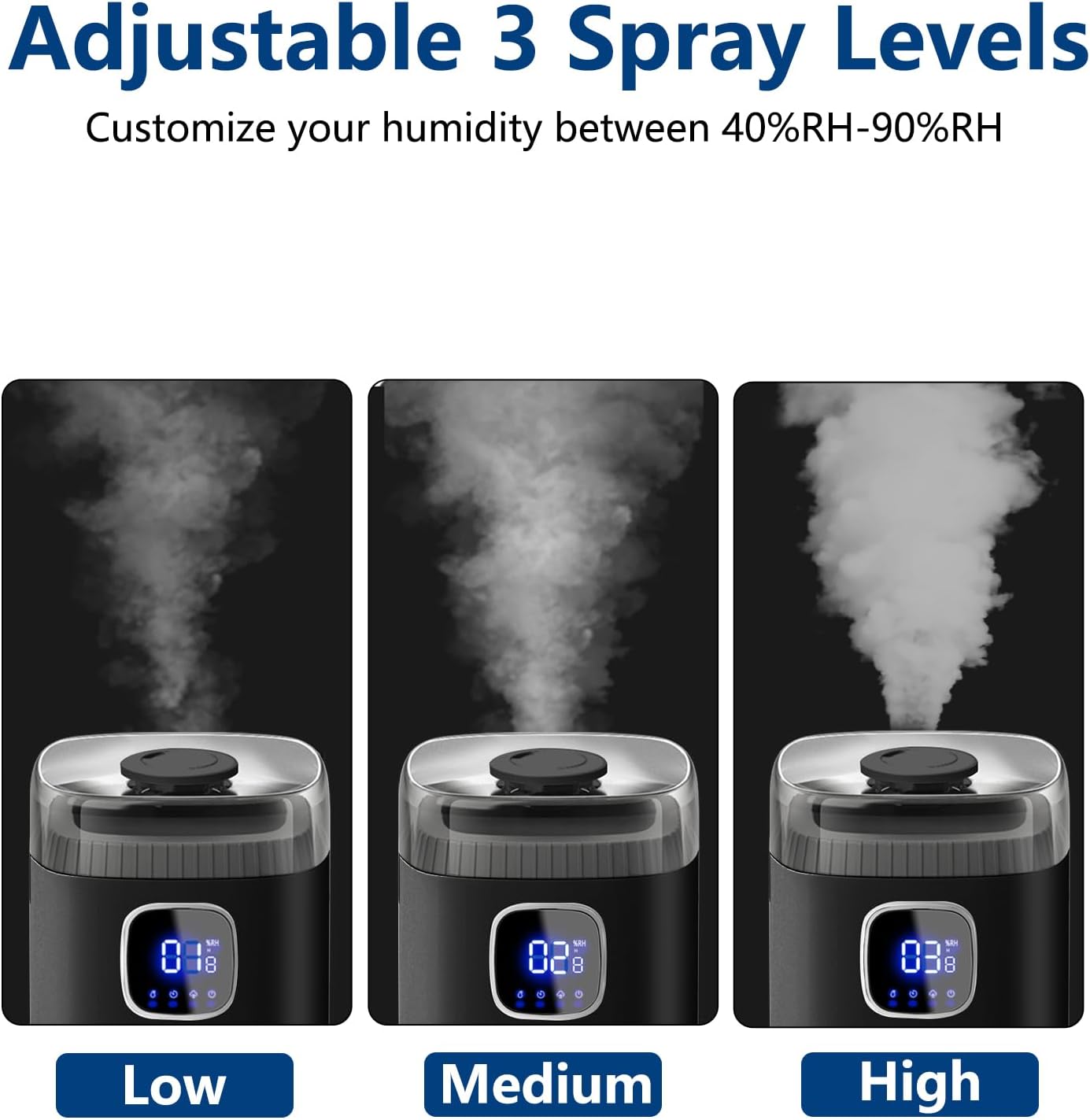
Figure 1: KZF ZG-562 Humidifier Unit
2. Setup Instructions
2.1 Unboxing and Components
Carefully remove all components from the packaging. The package should include the humidifier unit and a remote control. The humidifier features an integrated essential oil tray for aromatherapy.
2.2 Water Filling
The KZF ZG-562 features a convenient top-fill design, allowing for easy refilling without disassembling the unit. The large 9-liter (2.5-gallon) capacity minimizes refill frequency.
- Remove the top cover of the humidifier.
- Pour clean, distilled water directly into the water tank up to the 'MAX' line. Using distilled water is recommended to prevent mineral buildup and white dust.
- Replace the top cover securely.

Figure 2: Top-fill design and wide opening for easy cleaning.

Figure 3: Illustrates the convenient top water filling process.
2.3 Placement
Place the humidifier on a flat, stable surface. Ensure it is not placed too close to walls or furniture to prevent moisture damage. Allow adequate space around the unit for optimal mist dispersion.
Video 1: Demonstrates the setup and initial operation of the KZF Humidifier, including water filling and basic controls.
3. Operating Instructions
The KZF ZG-562 humidifier can be operated using its intuitive touch screen controls or the included remote control.
3.1 Power On/Off and Sleep Mode
- Press the Power button on the unit or remote to turn the humidifier on or off.
- Activate Sleep Mode to turn off the LED screen while the humidifier continues to operate, ensuring an undisturbed sleep environment.
3.2 Mist Volume Adjustment
Adjust the mist output to your desired level (low, medium, high) using the Mist Volume button. The humidifier can produce up to 300ml/hour of mist.

Figure 4: Visual representation of the three adjustable mist spray levels.

Figure 5: Mist levels and the 360° adjustable nozzle for directional mist.
3.3 Custom Humidity Setting
Use the Customize Humidity button to set your desired humidity level between 45% and 90% (adjustable in 5% increments). The built-in humidity sensor monitors ambient humidity and automatically adjusts output to maintain the set level.

Figure 6: Digital display showing real-time humidity and customizable target humidity settings.
3.4 Timer Function
Set the humidifier to run for a specific duration (1-12 hours) using the Timer button. The unit will automatically shut off once the set time expires.
3.5 UV/Night Light
The humidifier includes a UV/Night Light feature. This light can be turned on or off as desired, providing a gentle glow or ensuring complete darkness during sleep mode.
3.6 Essential Oil Tray
Locate the essential oil tray on the back of the unit. Add a few drops of your preferred essential oil to the tray to diffuse fragrance into the room along with the mist. Warning: Please add ONLY 2 drops each time. Please press the essential oil tray before use.
Video 2: Provides a detailed overview of the humidifier's features, including mist levels, timer, and essential oil function.
4. Maintenance
Regular cleaning ensures optimal performance and extends the lifespan of your humidifier.
4.1 Cleaning the Water Tank
The humidifier features a wide opening for easy access and cleaning. To clean, simply remove the top cover and wipe down the interior of the tank. For mineral buildup, a solution of vinegar and water can be used.
- Unplug the humidifier and remove the top cover.
- Empty any remaining water from the tank.
- Pour a small amount of white vinegar into the tank, ensuring it covers the suction part of the unit. Let it sit for approximately 20 minutes.
- Gently scrub the interior with a soft brush or cloth.
- Rinse thoroughly with clean water until the vinegar smell is gone.
- Wipe dry before reassembling.
Figure 7: The wide opening of the water tank facilitates easy cleaning.
5. Troubleshooting
If you encounter issues with your humidifier, please refer to the following common solutions:
- No Mist Output: Check if the water tank is empty. The humidifier features an automatic shut-off function and a flashing water shortage indicator when water levels are low. Refill the tank.
- White Dust Around Unit: This is typically caused by minerals in hard water. Use distilled water to prevent white dust accumulation.
- Unit Not Turning On: Ensure the power cord is securely plugged into a working electrical outlet.
6. Specifications
| Feature | Detail |
|---|---|
| Brand | KZF |
| Model Name | ZG-562 |
| Capacity | 9 Liters (2.5 Gallons) |
| Floor Area Coverage | Up to 500 Square Feet |
| Operation Mode | Ultrasonic Cool Mist |
| Mist Output | Max 300ml/hour |
| Humidity Control | Adjustable 45% to 90% (5% increments) |
| Special Features | Adjustable Humidity Control, Low Water Indicator, Quiet Operation (<35dB), Remote Control, 1-12 Hour Timer, 360° Nozzle, UV/Night Light, Essential Oil Tray |
| Product Dimensions | 7.5"D x 7.5"W x 23"H |
| Item Weight | 3.35 Pounds |
| Voltage | 120 Volts |
| Wattage | 25 Watts |

Figure 8: The KZF ZG-562 humidifier is suitable for areas up to 500 sq ft.

Figure 9: Enjoy quiet humidification with noise levels below 35dB.
7. Warranty and Support
KZF is committed to customer satisfaction. Our professional customer service team is available 24 hours a day to assist with any product problems or inquiries. We offer a 360-day free product replacement policy.
For support, please contact our customer service team.