
Biotronix Solution Forever Ginha HL 1602
Biotronix Solution Forever Ginha HL 1602 Shockwave Therapy Device User Manual
Model: Ginha HL 1602 | Brand: Biotronix Solution Forever
1. Introduction
The Biotronix Solution Forever Ginha HL 1602 is a portable Extracorporeal Shockwave Therapy (ESWT) device designed for non-invasive pain relief and physiotherapy. It delivers high-energy acoustic pulses to stimulate natural healing processes, reduce inflammation, and improve circulation. This manual provides essential instructions for the safe and effective use of your device.
2. Important Safety Information
Please read and understand all safety warnings before operating the device. Failure to do so may result in injury or device damage.
- Always consult a qualified healthcare professional before using this device, especially if you have pre-existing medical conditions.
- Do not use the device on open wounds, infected areas, over pacemakers, or near sensitive organs.
- Keep the device out of reach of children and pets.
- Ensure the device is properly grounded during operation.
- Do not immerse the device or any of its components in water or other liquids.
- Use only the power cord and accessories supplied with the device.
- If you experience any discomfort or adverse reactions during treatment, discontinue use immediately and consult a healthcare professional.
3. Package Contents
Carefully unpack your Ginha HL 1602 device and verify that all the following items are present:
- 1 x Digital Ginha HL 1602 Shockwave Therapy Unit
- 1 x Operating Handle Probe
- 7 x Interchangeable Treatment Heads (various sizes and types)
- 1 x Power Cord
- Rubber Covers for treatment heads
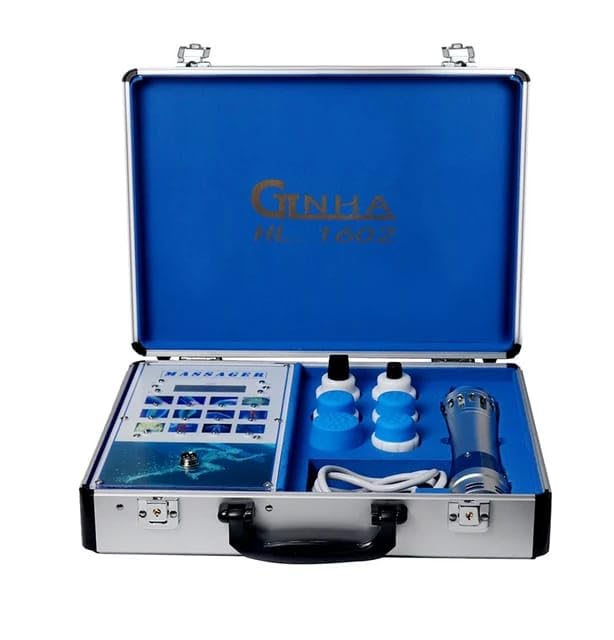
Image: The Ginha HL 1602 device and its accessories stored within the protective carrying case.
4. Product Overview
The Ginha HL 1602 system comprises a main control unit, an operating handle, and a selection of interchangeable treatment heads.
4.1 Main Unit
The main unit features a digital interface for adjusting treatment parameters such as frequency and intensity. It also includes the power switch and connection ports for the operating handle and power cord.
4.2 Operating Handle
The operating handle is the component that delivers the shockwaves to the target area. It is ergonomically designed for comfortable grip and includes a key switch to initiate and stop shockwave delivery.
4.3 Treatment Heads
Seven distinct treatment heads are provided to allow for versatile applications across various body parts and conditions. These heads vary in size and shape (e.g., 8mm, 15mm, 20mm, 36mm, and specialized ED types) to ensure precise and effective therapy.
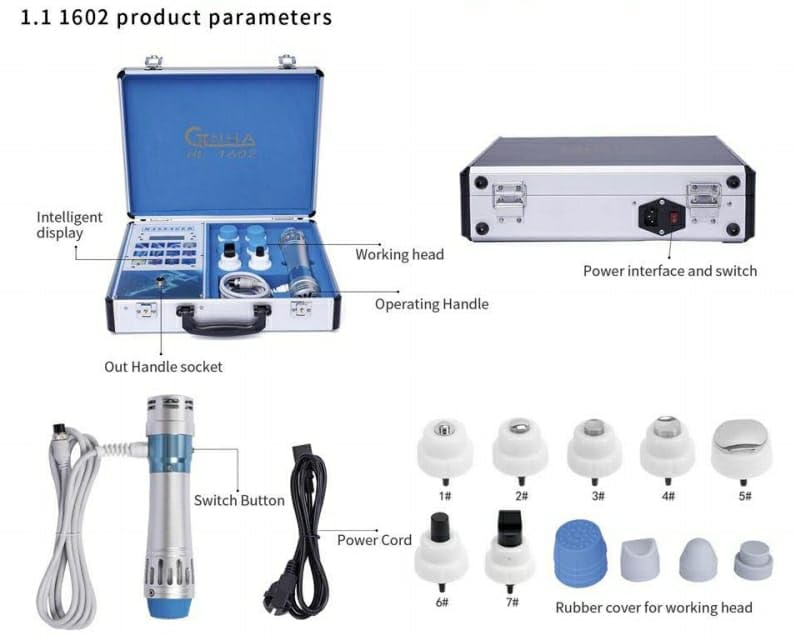
Image: Detailed diagram illustrating the main components of the Ginha HL 1602 device, including the control panel, operating handle, and various treatment heads.
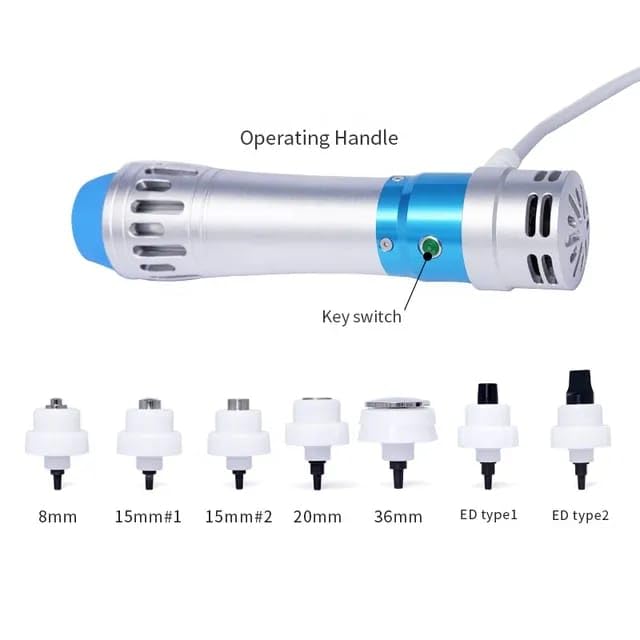
Image: The operating handle and the complete set of seven interchangeable treatment heads, each designed for specific applications.
5. Setup Instructions
Follow these steps to set up your Ginha HL 1602 device for operation:
- Placement: Place the main unit on a stable, flat, and dry surface, ensuring adequate ventilation.
- Connect Operating Handle: Connect the cable of the operating handle to the designated socket on the main unit. Twist the connector to secure it firmly.
- Attach Treatment Head: Select the appropriate treatment head for your intended application and firmly screw it onto the tip of the operating handle.
- Power Connection: Connect the power cord to the power input port on the main unit. Then, plug the other end of the power cord into a grounded electrical outlet (AC110V-AC220V, 50HZ/60HZ).
- Power On: Flip the main power switch, usually located on the back or side of the main unit, to the 'ON' position. The digital display should illuminate.
6. Operating the Device
Once the device is set up, follow these guidelines for safe and effective operation:
6.1 General Usage Steps
- Parameter Selection: After powering on, use the controls on the main unit's digital interface to select the desired output frequency (16 options) and intensity level (12 options). It is recommended to start with lower intensity settings and gradually increase as tolerated by the patient.
- Apply Coupling Gel: Apply a generous amount of coupling gel to the skin over the treatment area. This ensures efficient transmission of shockwaves.
- Position Treatment Head: Place the selected treatment head firmly and directly against the skin in the target area.
- Initiate Treatment: Press the key switch located on the operating handle to begin the shockwave delivery.
- Perform Treatment: Move the operating handle slowly and steadily over the treatment area in a circular or linear motion, as advised by a healthcare professional.
- Monitor Patient: Continuously monitor the patient's comfort level and adjust the intensity or frequency settings as necessary.
- End Treatment: After the session duration is complete, press the key switch on the operating handle again to stop shockwave delivery.
- Clean Up: Turn off the main unit, disconnect the power, and clean the operating handle and treatment head as described in the Maintenance section.
6.2 Treatment Areas and Head Selection
The 7 interchangeable treatment heads are designed to optimize therapy for various conditions and body parts. Consult with a healthcare professional to determine the most appropriate head and settings for specific conditions, which may include:
- Chronic pain conditions
- Muscle injuries and strains
- Tendonitis (e.g., Achilles tendonitis, patellar tendonitis)
- Plantar fasciitis
- Erectile Dysfunction (ED)
- Musculoskeletal pain and stiffness
- Sports injuries

Image: Example of the Ginha HL 1602 device being used for deep tissue relaxation on the back.
7. Maintenance and Care
Proper maintenance ensures the longevity and optimal performance of your Ginha HL 1602 device.
- Cleaning: After each use, disconnect the device from the power supply. Clean the operating handle and all used treatment heads with a soft cloth dampened with a mild, non-abrasive disinfectant. Ensure no liquid enters the main unit or handle. Allow all components to dry completely before storage.
- Storage: Store the device and all accessories in its original carrying case in a cool, dry place, away from direct sunlight, extreme temperatures, and high humidity.
- Inspection: Regularly inspect the power cord, operating handle, and treatment heads for any signs of wear, cracks, or damage. Do not use the device if any component appears damaged; contact customer support for assistance.
8. Troubleshooting
This section addresses common issues you might encounter with your Ginha HL 1602 device.
| Problem | Possible Cause | Solution |
|---|---|---|
| Device does not power on | Power cord not securely connected or no power from outlet. | Ensure the power cord is securely plugged into both the device and a functional, grounded electrical outlet. Check the power switch position. |
| No shockwave output | Operating handle not connected properly, key switch not pressed, or intensity setting is too low. | Verify the operating handle cable is securely connected. Press the key switch on the handle. Increase the intensity level on the main unit. |
| Error message on display | Internal fault or temporary system glitch. | Turn off the device, disconnect from power, wait for 30 seconds, then reconnect and restart. If the error persists, contact customer support. |
| Device feels hot during use | Normal operation, or prolonged use at high intensity. | Some warmth is normal. If it becomes excessively hot, reduce intensity or take a short break. Ensure adequate ventilation around the device. |
9. Technical Specifications
Below are the technical specifications for the Biotronix Solution Forever Ginha HL 1602 Shockwave Therapy Device:
| Parameter | Value |
|---|---|
| Product Name | Shock wave machine |
| Color | Silver + Blue |
| Voltage | AC110V-AC220V |
| Frequency | 50HZ/60HZ |
| Power | 90W MAX |
| Current | 2A MAX |
| Output Frequency Numbers | 16 |
| Output Level Numbers | 12 |
| Transmitters (Treatment Heads) | 7 pcs |
| Item Model Number | ISBSFSWTGINHA001 |
| Product Dimensions | 14 x 12 x 7 cm |
| Item Weight | 3 kg |
| Country of Origin | China |
10. Warranty and Customer Support
The Biotronix Solution Forever Ginha HL 1602 Shockwave Therapy Device is covered by a 1-year warranty from the date of purchase. This warranty covers manufacturing defects under normal use.
For technical assistance, warranty claims, or any questions regarding the operation, maintenance, or troubleshooting of your device, please contact your point of purchase or the manufacturer's customer support.
Manufacturer: Innovative Solutions, Delhi, INDIA.
Ask a question about this manual
Ask about setup, troubleshooting, compatibility, parts, safety, or missing instructions. Manuals+ will review the question and use this page’s manual context to help answer it.