
Superun BA07
SupeRun Walking Pad BA07 User Manual
Model: BA07
1. Introduction
Thank you for choosing the SupeRun Walking Pad BA07. This manual provides essential information for the safe and effective use of your new walking pad. Please read it thoroughly before operation and retain it for future reference.
1.1 Safety Information
Important Safety Instructions:
- Always consult a physician before starting any new exercise program.
- Read all instructions in this manual before using the walking pad.
- Keep children and pets away from the equipment during operation.
- Place the walking pad on a flat, stable surface with adequate clearance around it.
- Wear appropriate athletic footwear during use.
- Do not exceed the maximum user weight capacity of 300 lbs (136 kg).
- Ensure the power cord is not damaged or placed under the unit.
- Unplug the walking pad from the power outlet when not in use or before cleaning/maintenance.

2. Package Contents
Verify that all components are present in the package:
- SupeRun Walking Pad BA07
- Power Cord
- Remote Control
- Tool Kit (may include lubricant, wrench)
- User Manual (this document)
3. Setup
3.1 Unpacking and Placement
- Carefully remove the walking pad and all accessories from the packaging.
- Place the walking pad on a firm, level surface. Ensure there is at least 2 feet (60 cm) of clear space behind the unit and 1 foot (30 cm) on each side for safe operation.
- Inspect the unit for any damage incurred during shipping. If damage is found, contact customer support immediately.
3.2 Power Connection
- Locate the power input port on the walking pad.
- Connect the power cord to the walking pad and then plug it into a grounded electrical outlet.
3.3 Initial Activation and Remote Control
Upon first use, the walking pad may require activation. Refer to the PitPat app section for full functionality. The remote control is typically pre-paired. If not, follow the instructions provided with the remote or in the PitPat app.

4. Operating Instructions
4.1 Power On/Off
To power on the walking pad, ensure it is plugged in and press the 'ON' button on the remote control. To power off, press the 'OFF' button on the remote control.
4.2 Exercise Modes
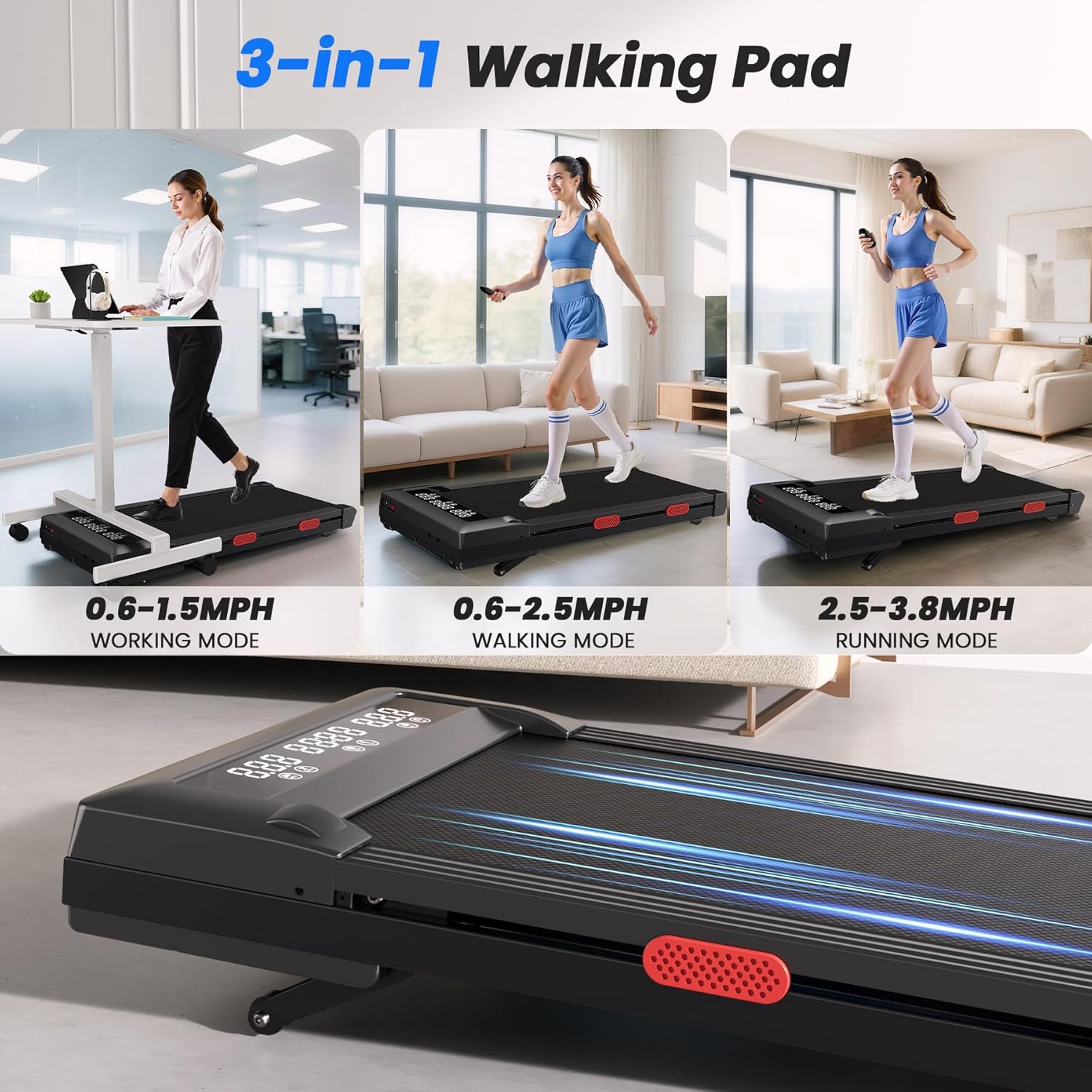
The SupeRun Walking Pad BA07 offers multiple modes to suit your fitness needs:
- Working Mode: Speed range 0.6 - 1.5 MPH (1.0 - 2.4 km/h). Ideal for light activity while working or performing other tasks.
- Walking Mode: Speed range 0.6 - 2.5 MPH (1.0 - 4.0 km/h). Suitable for a brisk walk.
- Running Mode: Speed range 2.5 - 3.8 MPH (4.0 - 6.1 km/h). For light jogging.
4.3 Auto-Incline Adjustment
The walking pad features an auto-incline function, adjustable from 0% to 9%. Use the incline controls on the remote to increase or decrease the incline level during your workout. This feature allows for varied intensity and muscle engagement.
4.4 Remote Control
The included remote control allows you to manage all primary functions of the walking pad:
- ON/OFF: Power the unit on or off.
- Speed +/-: Adjust the walking/jogging speed.
- Incline +/-: Adjust the incline level.
- Mode: Switch between preset programs or modes (if applicable).
4.5 LED Display
The integrated LED display provides real-time workout data:
- Time: Duration of your workout.
- Calories: Estimated calories burned.
- Incline: Current incline percentage.
- Speed: Current speed in MPH.
- Distance: Total distance covered.
- Step: Number of steps taken.

4.6 PitPat App Integration
Enhance your workout experience by connecting your SupeRun Walking Pad BA07 to the PitPat app:
- Download the PitPat app from your device's app store (App Store for iOS, Google Play for Android).
- Follow the in-app instructions to pair your walking pad via Bluetooth.
- The app provides access to expert-designed programs, virtual environments, and engaging challenges to make your fitness journey more interactive.

5. Maintenance
Regular maintenance ensures the longevity and optimal performance of your walking pad.
5.1 Cleaning
- Wipe down the walking pad with a damp cloth after each use to remove sweat and dust.
- Do not use abrasive cleaners or solvents, as these can damage the surface.
5.2 Belt Lubrication
The running belt requires periodic lubrication to reduce friction and extend its lifespan. Refer to the specific instructions in your tool kit or contact customer support for guidance on the correct lubricant and application frequency. Generally, lubrication is recommended every 3-6 months depending on usage.
5.3 Belt Adjustment
If the running belt feels loose or shifts to one side, it may need adjustment. Consult the detailed instructions in your tool kit or contact customer support for proper belt tensioning and centering procedures.
6. Troubleshooting
If you encounter issues with your SupeRun Walking Pad BA07, refer to the following common problems and solutions:
| Problem | Possible Cause | Solution |
|---|---|---|
| Walking pad does not power on. | Power cord not connected; outlet issue; remote battery low. | Ensure power cord is securely plugged in. Test outlet with another device. Replace remote control batteries. |
| Belt stops or slips during use. | Belt too loose; insufficient lubrication; motor overload. | Adjust belt tension (refer to maintenance). Lubricate the belt. Reduce user weight or speed. |
| Unusual noise from the unit. | Loose components; belt misalignment; motor issue. | Check for loose screws. Adjust belt alignment. If noise persists, contact customer support. |
| Remote control not responding. | Low battery; remote not paired. | Replace remote batteries. Refer to initial setup or PitPat app for pairing instructions. |
| PitPat app not connecting. | Bluetooth off; app permissions; walking pad not active. | Ensure Bluetooth is enabled on your device. Grant necessary app permissions. Power on the walking pad. |
For issues not listed here or if solutions do not resolve the problem, please contact SupeRun customer support.
7. Specifications
Detailed specifications for the SupeRun Walking Pad BA07:
| Feature | Specification |
|---|---|
| Model Number | BA07 |
| Color | Black |
| Product Dimensions (L x W x H) | 132.08 x 48.26 x 17.78 cm (52 x 19 x 7 inches) |
| Item Weight | 23.4 kg (51.59 lbs) |
| Frame Material | Alloy Steel |
| Horsepower | 3.8 HP (Peak) |
| Maximum Speed | 3.8 MPH (6.1 km/h) |
| Auto-Incline Range | 0% - 9% |
| Display Type | LCD |
| Display Metrics | Time, Calories Burned, Incline, Speed, Distance, Steps |
| Maximum User Capacity | 300 lbs (136 kg) |
| Power Source | Corded Electric |
| Special Features | Auto Incline, Compact Design, Shock Absorbent, Wheeled |
| Running Belt Layers | 5-layer non-slip |
| Shock Absorption | 8 silicone absorbers, 4 anti-vibration rubber pads |

8. Warranty and Support
SupeRun is committed to providing quality products and excellent customer service. Your SupeRun Walking Pad BA07 comes with dedicated expert support.
If you have any questions, require assistance with setup, operation, maintenance, or encounter any issues with your product, please do not hesitate to contact our customer support team. Our experts are available to provide personalized guidance before and after your purchase.
Please refer to your purchase documentation or the official SupeRun website for specific warranty terms and contact information.
Related documentsBA07

Ask a question about this manual
Ask about setup, troubleshooting, compatibility, parts, safety, or missing instructions. Manuals+ will review the question and use this page’s manual context to help answer it.