
WAVLINK WL-WN573HBE2
Contents
WAVLINK WiFi 7 BE5100 Outdoor WiFi Extender User Manual
Model: WL-WN573HBE2 | Brand: WAVLINK
1. Introduction
This manual provides comprehensive instructions for the installation, operation, and maintenance of your WAVLINK WiFi 7 BE5100 Outdoor WiFi Extender. Designed with the latest Wi-Fi 7 technology, this device offers dual-band connectivity (5 GHz and 2.4 GHz) with 4 streams, delivering speeds up to 4323 Mbps (5 GHz) and 688 Mbps (2.4 GHz). It is engineered for long-range outdoor coverage, supporting up to 256 connected devices and extending WiFi up to 300 meters (radius).
The BE5100 is built to withstand harsh outdoor conditions, featuring an IP67 waterproof housing, 15 KV ESD protection, and 6 KV lightning protection. Its versatile working modes, including Mesh, AP, Router, and Repeater, ensure flexible connectivity for various outdoor scenarios such as farms, parks, construction sites, and outdoor events.

Figure 1.1: WAVLINK WiFi 7 BE5100 Outdoor WiFi Extender and its retail packaging.
2. Package Contents
Please verify that all items listed below are included in your package. If any items are missing or damaged, please contact WAVLINK customer support.
- 1 x Outdoor WiFi Repeater (WAVLINK BE5100)
- 4 x Antennas (8dBi omni-directional detachable fiberglass antennas)
- 1 x POE Adapter
- 1 x AC Power Adapter
- 1 x RJ45 Ethernet Cable
- Wall Mounting Kit (includes screws and wall plugs)
- Installation Guide
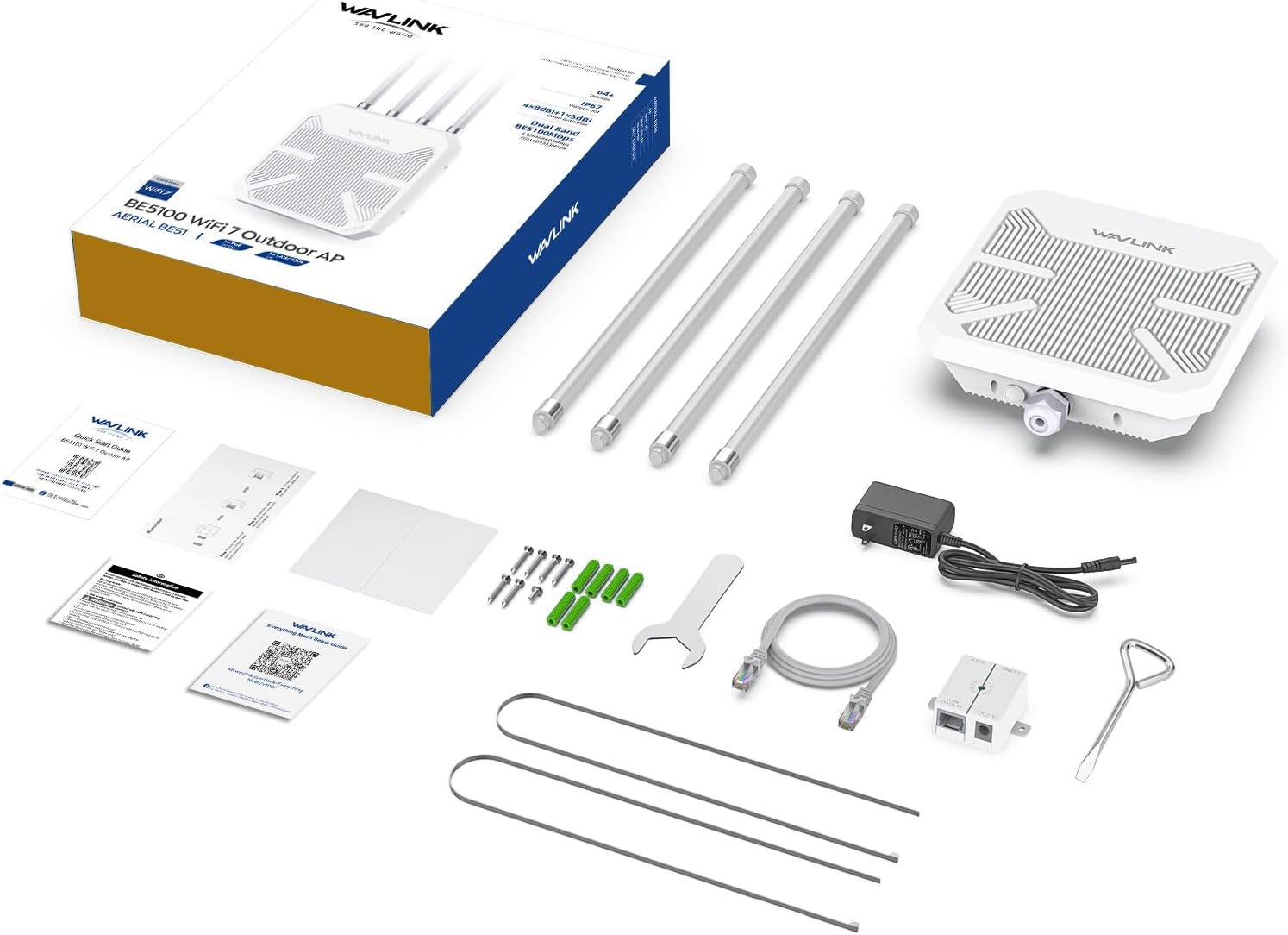
Figure 2.1: All components included in the WAVLINK BE5100 product package.
3. Setup and Installation
Follow these steps to properly set up your WAVLINK WiFi 7 BE5100 Outdoor WiFi Extender.
3.1 Antenna Attachment
Carefully screw the four 8dBi omni-directional detachable fiberglass antennas onto the corresponding ports on the top of the outdoor WiFi repeater. Ensure they are securely fastened but do not overtighten.
3.2 Power over Ethernet (PoE) Connection
The device supports both 802.3AF/AT active and passive PoE for flexible power supply. Connect the RJ45 Ethernet cable from the BE5100's 2.5G WAN/LAN port to the POE adapter. Then, connect the POE adapter to your network switch or router. Use the provided AC Power Adapter to power the POE adapter. Ensure to use CAT5E or above cable, and the length should not exceed 100m/328ft. Note: The PoE converter is not waterproof and must be protected from outdoor elements.

Figure 3.1: Illustration of PoE connection for the BE5100, highlighting the non-waterproof PoE adapter.
3.3 Mounting the Device
The BE5100 comes with a wall mounting kit for secure outdoor installation. Choose a suitable location that provides optimal WiFi coverage and is within range of your network source. The device is IP67 waterproof, making it suitable for various weather conditions.
- Stick two silicone pads on the bracket and the post (or wall) respectively to prevent slippage.
- Thread the cable ties through the fixing points of the bracket.
- Securely fix the product to the post or wall using the cable ties and the wall mounting kit.

Figure 3.2: Step-by-step guide for mounting the BE5100 outdoor unit.
4. Operating Modes
The WAVLINK BE5100 supports multiple working modes to adapt to various network requirements and outdoor connection scenarios.
4.1 Router/AP Mode
Ideal for converting wired connections to wireless networks. In this mode, the BE5100 acts as a central access point, providing WiFi coverage to connected devices.
4.2 Repeater Mode
Extends the range of an existing WiFi network. The BE5100 receives the signal from your main router and re-broadcasts it, expanding coverage to dead zones.
4.3 Mesh Mode
Provides seamless WiFi coverage with a single unified network name and password. This mode is only available for WAVLINK series products, allowing the BE5100 to integrate into an existing WAVLINK mesh network for extended, seamless coverage.

Figure 4.1: Different operational modes of the WAVLINK BE5100.

Figure 4.2: Example of extending an indoor network to outdoor areas using the WAVLINK Outdoor AP.
5. Maintenance
The WAVLINK BE5100 is designed for durability in outdoor environments. To ensure optimal performance and longevity, consider the following:
- Cleaning: Periodically wipe the exterior of the device with a soft, damp cloth to remove dust and debris. Do not use harsh chemicals or abrasive cleaners.
- Antenna Check: Ensure antennas remain securely attached and are not damaged.
- Cable Inspection: Regularly inspect the Ethernet cable and connections for any signs of wear or damage, especially the non-waterproof PoE converter, which should be kept in a dry, protected area.
- Environmental Protection: While the device is IP67 waterproof, 15 KV ESD protected, and 6 KV lightning protected, avoid direct exposure to extreme conditions beyond its specified operating temperature range of -20°C to 50°C (-4°F to 122°F) if possible.

Figure 5.1: The BE5100 is designed to withstand various harsh outdoor conditions.
6. Troubleshooting
If you encounter issues with your WAVLINK BE5100, please refer to the following common solutions:
- No Power:
- Ensure the AC power adapter is securely connected to the PoE adapter and a working power outlet.
- Verify the Ethernet cable from the PoE adapter to the BE5100 is properly connected.
- No Internet Connection:
- Check the connection between the PoE adapter and your main router/switch.
- Confirm your main router has an active internet connection.
- Restart both the BE5100 and your main router.
- Weak Signal or Poor Performance:
- Ensure the BE5100 is mounted in an optimal location, free from major obstructions.
- Verify antennas are correctly attached and oriented.
- Check for potential interference from other electronic devices.
- Consider adjusting the working mode for better performance in your specific environment.
- Cannot Access Web Management Interface:
- Ensure your device is connected to the BE5100's network.
- Verify you are using the correct IP address or domain name for access.
- Try clearing your browser's cache or using a different browser.
For more detailed troubleshooting or persistent issues, please contact WAVLINK customer support.
7. Specifications
| Feature | Description |
|---|---|
| Model Number | WL-WN573HBE2 |
| Wireless Standard | 802.11be (WiFi 7), 802.11a/b/g/n/ac, 802.11ax |
| Data Transfer Rate | Up to 5100 Mbps (4323 Mbps on 5 GHz, 688 Mbps on 2.4 GHz) |
| Frequency Band | Dual-Band |
| Antennas | 4 x 8dBi Omni-directional Detachable Fiberglass Antennas |
| Ethernet Port | 2.5 Gbps WAN/LAN Port |
| PoE Support | 802.3AF/AT Active & Passive PoE |
| Waterproof Rating | IP67 |
| Protection | 15 KV ESD Protection, 6 KV Lightning Protection |
| Operating Temperature | -20°C to 50°C (-4°F to 122°F) |
| Dimensions (Device) | Approximately 24cm x 24cm x 7cm (9.4in x 9.4in x 2.8in) |
| Item Weight | 5.62 pounds |

Figure 7.1: Physical dimensions of the WAVLINK BE5100 and its accessories.
8. Warranty and Support
WAVLINK is committed to providing excellent customer service and technical support for your product.
- Technical Support: Life-long technical support is available.
- Phone Support: +18889730883 (UTC-5) Monday - Friday, 9 AM - 6 PM.
- Email Support: Contact@wavlink.com. Solutions will be provided within 8 hours.
Please retain your proof of purchase for warranty claims.
Documents and downloads
Ask a question about this manual
Ask about setup, troubleshooting, compatibility, parts, safety, or missing instructions. Manuals+ will review the question and use this page’s manual context to help answer it.