1. Introduction
Thank you for choosing the Sharmeal GL963 Jump Box 5000A 58976. This multifunctional device serves as a powerful jump starter, a portable tire inflator, a power bank for electronic devices, and an emergency light source. Please read this manual thoroughly before use to ensure safe and optimal operation. Keep this manual for future reference.
2. Safety Instructions
WARNING: Improper use may result in injury, damage to the device, or property damage. Always follow these safety guidelines.
- Do not disassemble the unit. Refer servicing to qualified personnel.
- Do not expose the unit to rain or extreme temperatures. Store in a cool, dry place.
- Keep out of reach of children.
- Ensure proper polarity when connecting to a vehicle battery. Reverse polarity can cause sparks and damage.
- Do not jump start a frozen battery.
- Do not operate the air compressor continuously for more than 10 minutes to prevent overheating. Allow it to cool down between uses.
- Wear eye protection when jump starting a vehicle.
- If battery acid comes into contact with skin or eyes, flush immediately with water and seek medical attention.
3. What's in the Box
Carefully unpack the contents and ensure all items are present and undamaged.
- Sharmeal GL963 Jump Starter with Air Inflator
- Smart Jump Starter Clamps
- USB-A to USB-C Charging Cable
- Air Nozzle Adapters (various types)
- User Manual (this document)

Image: The Sharmeal GL963 Jump Box and its included accessories, such as the smart jump starter clamps, USB cable, and air nozzle adapters, displayed next to its packaging.
4. Product Overview
Familiarize yourself with the components of your Sharmeal GL963 Jump Box.

Image: A comprehensive view of the Sharmeal GL963 Jump Box, showcasing its main unit, attached air inflator hose, various air nozzles, smart jump starter clamps, and USB charging cables.
4.1 Device Components
- Main Unit: Contains the battery, control panel, and ports.
- Digital Display: Shows battery level, air pressure, and operational status.
- Control Buttons: Power, LED light, pressure unit selection, and +/- for pressure adjustment.
- Jump Start Port: For connecting the smart jump starter clamps.
- USB Output Ports: For charging external devices.
- USB-C Input Port: For charging the jump box itself.
- Air Inflator Hose: Integrated hose for tire inflation.
- LED Flashlight: Integrated light for illumination.
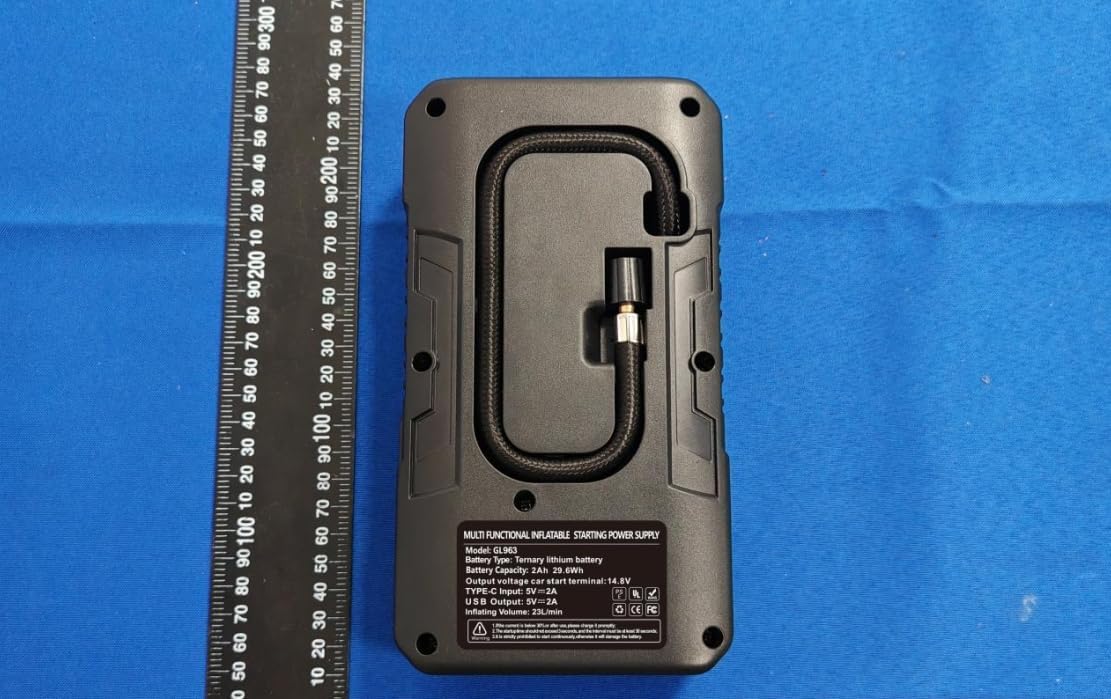
Image: The rear side of the Sharmeal GL963 Jump Box, displaying its integrated air hose and a label with detailed product specifications.
5. Setup and Charging
5.1 Charging the Jump Box
Before first use, fully charge the Sharmeal GL963. It is recommended to recharge the unit every 3-6 months to maintain battery health.
- Connect the provided USB-A to USB-C charging cable to the USB-C input port on the jump box.
- Connect the other end of the USB cable to a 5V/2A (or higher) USB wall adapter (not included) or a car charger.
- The digital display will show the charging status. The battery icon will animate, and the percentage will increase until 100% is reached.
- Once fully charged, disconnect the charging cable.
6. Operating Instructions
6.1 Jump Starting a Vehicle
The Sharmeal GL963 can jump start 12V vehicles with up to 8.0L gas or 6.0L diesel engines.

Image: The Sharmeal GL963 Jump Box connected to a car battery, illustrating its primary function of jump starting a vehicle with a dead battery.
- Prepare the Vehicle: Ensure the vehicle's ignition is off and all accessories (lights, radio) are turned off. Place the vehicle in park (automatic) or neutral (manual) and engage the parking brake.
- Connect Jump Cable: Insert the blue end of the smart jump starter clamps into the jump start port on the Sharmeal GL963. Ensure a firm connection. The device will power on automatically.
- Connect Clamps to Battery:
- Connect the RED (+) clamp to the positive (+) terminal of the vehicle's battery.
- Connect the BLACK (-) clamp to the negative (-) terminal of the vehicle's battery.
The smart clamps will indicate a correct connection (e.g., solid green light) or an error (e.g., flashing red light for reverse polarity).
- Start Engine: Once the clamps indicate a safe connection, start your car engine within 30 seconds. If the engine does not start, wait at least 1 minute before attempting again.
- Remove Clamps: After the engine starts, immediately remove the smart clamps from the vehicle battery (first the black, then the red) and then disconnect the jump cable from the Sharmeal GL963.

Image: A visual step-by-step guide demonstrating how to use the Sharmeal GL963 Jump Box to start a vehicle, from connecting cables to starting the engine.
6.2 Tire Inflation
The integrated air inflator can inflate tires up to 150 PSI and has a maximum pressure of 200 PSI.
- Connect Hose: Screw the air inflator hose onto the tire valve stem. Ensure it is securely fastened to prevent air leakage.
- Power On & Set Pressure: Press the power button to turn on the inflator. Use the '+' and '-' buttons to set the desired tire pressure. Press the 'M' button to cycle through pressure units (PSI, BAR, KPA, Kg/cm²).
- Start Inflation: Press the power button again to start inflation. The inflator will automatically stop once the preset pressure is reached.
- Disconnect: Unscrew the hose from the tire valve.

Image: The Sharmeal GL963 Jump Box actively inflating a car tire, highlighting its 150 PSI fast tire inflator capability and various applications for bicycles, balls, and motorcycles.
6.3 Using as a Portable Power Bank
The Sharmeal GL963 can charge various electronic devices via its USB output ports.
- Connect your device's USB charging cable to one of the USB output ports on the jump box.
- The jump box will automatically begin charging your device. The digital display may show the remaining battery percentage.
- Disconnect your device once charging is complete.

Image: The Sharmeal GL963 Jump Box connected via USB to a laptop, demonstrating its function as a portable power bank for various electronic devices like cell phones, tablets, and cameras.
6.4 Emergency Lights
The built-in LED flashlight offers multiple lighting modes for various situations.
- Press and hold the 'LED' button to turn on the flashlight.
- Press the 'LED' button again to cycle through modes: Flashlight → Strobe → SOS → Off.

Image: The Sharmeal GL963 Jump Box with its emergency lights activated, showcasing its flashlight, strobe, and SOS functions, useful for camping, car breakdowns, and wild exploration.
7. Maintenance
- Cleaning: Wipe the unit with a soft, dry cloth. Do not use harsh chemicals or abrasive cleaners.
- Storage: Store the jump box in a cool, dry place away from direct sunlight and extreme temperatures.
- Battery Care: For optimal battery life, fully charge the unit every 3-6 months, even if not in use. Do not store the unit with a completely depleted battery.
- Cable Inspection: Regularly inspect the jump starter clamps and cables for any signs of damage, fraying, or corrosion. Replace if necessary.
8. Troubleshooting
| Problem | Possible Cause | Solution |
|---|---|---|
| Jump box does not turn on. | Battery is depleted. | Charge the jump box fully. |
| Vehicle does not start after jump starting. | Incorrect clamp connection; Vehicle battery too low; Vehicle issue. | Check clamp polarity and connection. Ensure jump box is fully charged. Consult a mechanic if vehicle issues persist. |
| Air inflator not working or not reaching desired pressure. | Hose not securely connected; Jump box battery low; Inflator overheated. | Ensure hose is tightly screwed onto valve. Charge jump box. Allow inflator to cool down for 10-15 minutes. |
| Smart clamps show error (e.g., red light). | Reverse polarity; Short circuit; Over-current. | Disconnect and reconnect clamps with correct polarity. Ensure clamps do not touch each other. |
9. Specifications
| Feature | Detail |
|---|---|
| Model | GL963 |
| Peak Current | 5000 Amps |
| Battery Type | Lithium Ion (4 required) |
| Jump Start Output | 12V |
| Engine Compatibility | Up to 8.0L Gas / 6.0L Diesel |
| Air Compressor Max Pressure | 150 PSI (Operating), 200 PSI (Maximum) |
| Air Flow Volume | 45 L/min |
| USB Output | 5V/2A |
| USB-C Input | 5V/2A |
| Product Dimensions | 2.24 x 4.33 x 7.87 inches (5.69 x 10.99 x 19.99 cm) |
| Item Weight | 1.2 pounds (0.54 kg) |
| Manufacturer | Foshan Xianming Intelligent Technology Co, Ltd. |
10. Warranty and Support
Sharmeal products are designed and manufactured to the highest quality standards. For warranty information or technical support, please refer to the contact details provided with your purchase or visit the official Sharmeal website. Please retain your proof of purchase for warranty claims.