
ANYQOO HF-K2W-W3A
ANYQOO 3MP 2K Window Camera Instruction Manual
Model: HF-K2W-W3A | Brand: ANYQOO
1. Introduction
This manual provides detailed instructions for the setup, operation, and maintenance of your ANYQOO 3MP 2K Window Camera. Designed for both indoor and outdoor security, this camera offers 2K HD video, ChroMax AI Color Night Vision, person/motion detection, and dual-band Wi-Fi connectivity. Please read this manual thoroughly before using the product to ensure proper function and safety.
2. What's in the Box
Verify that all components are present in your package:
- 1x ANYQOO 3MP 2K Window Camera
- 1x Instruction Manual
- 1x Charger (Power Adapter)
- 1x Data Cable (USB-C to USB-A)
- 1x Multi-function Stand (90° bracket)
- 1x Right Angle Bracket (45° bracket)
- 4x Cable Clips
- 4x 3M Stickers (Adhesive Pads)

Figure 2.1: All components included in the ANYQOO 3MP 2K Window Camera package.
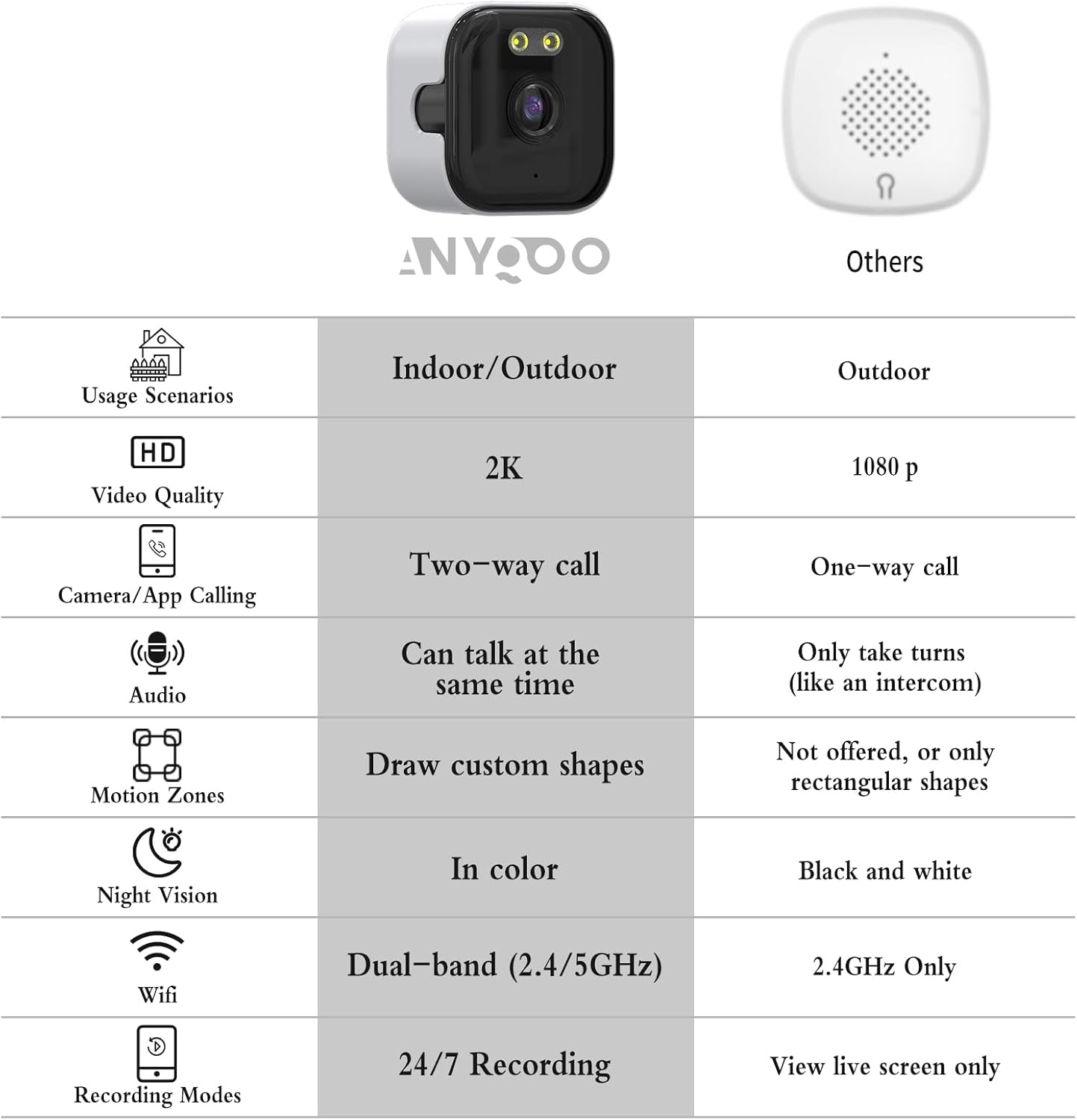
Figure 2.2: The ANYQOO 3MP 2K Window Camera and a comparison of its features.
3. Setup Guide
3.1 Physical Installation
- Choose a Location: Select a clean, smooth surface like a window or door. Ensure the camera has a clear view of the area you wish to monitor.

Figure 3.1: The camera can be installed in various indoor and outdoor window locations, including fish tanks, pet/baby rooms, and general windows.
- Clean the Surface: Thoroughly clean the window or surface where the camera will be mounted to ensure optimal adhesion.
Video 3.1: Unboxing and initial setup steps, including cleaning the window surface. This video demonstrates the physical installation process.
- Attach the Mounting Bracket:
- Peel off the protective film from one of the 3M adhesive stickers.
- Apply the sticker to the back of your chosen mounting bracket (either the multi-function stand for a 90° angle or the right-angle bracket for a 45° angle).
- Press the bracket firmly onto the cleaned window surface.
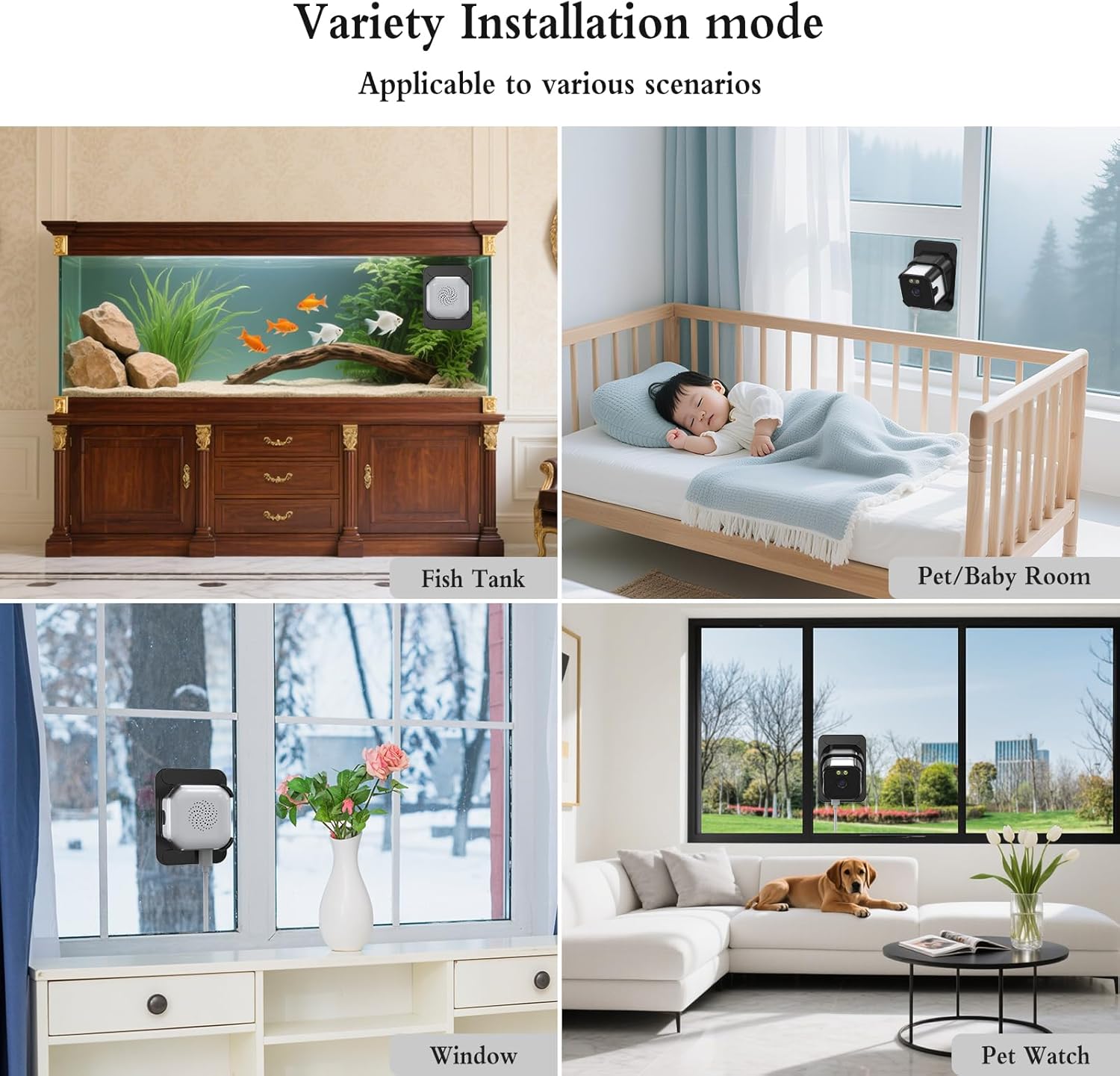
Figure 3.2: Step-by-step visual guide for attaching the adhesive sticker to the bracket and then to the window.
- Insert the Camera: Gently slide the ANYQOO camera into the mounted bracket. Ensure it is securely seated.

Figure 3.3: The camera securely mounted on a window, providing both indoor and outdoor surveillance.
- Power the Camera: Connect the data cable to the camera's USB-C port and the charger. Plug the charger into a power outlet. The camera will power on automatically.
Figure 3.4: Detailed view of the camera's ports, including the USB-C power input and Micro SD card slot.
Video 3.2: Demonstrates connecting the power cable to the camera and plugging it into an outlet.
- Cable Management: Use the provided cable clips to neatly secure the power cord along the window frame or wall.

Figure 3.5: Example of using cable clips for tidy power cord management.
3.2 App Download and Wi-Fi Connection
- Download the App: Scan the QR code in the instruction manual or search for the "O-KAM Pro" app in your device's app store (available for Android and iOS).
- Register/Log In: Create a new account or log in if you already have one.
- Enable Bluetooth and Location Services: Ensure Bluetooth and location services are enabled on your smartphone for the app to detect the camera.
- Add Device: In the app, tap "Add Device." The app should automatically detect the camera via Bluetooth. Select the correct UID code and tap "Connect."
Video 3.6: Step-by-step guide on connecting the camera to Wi-Fi using the mobile application.
- Connect to Wi-Fi:
- Select your home Wi-Fi network (supports both 2.4 GHz and 5.0 GHz).
- Enter the Wi-Fi password and confirm.
- Wait for the camera to connect to the network. Once connected, you can name your device.
Note: The device must stay connected to Wi-Fi to function properly.

Figure 3.7: The camera supports both 2.4 GHz for wider coverage and 5 GHz for faster streaming.
4. Operating Instructions
4.1 Live View and Playback
- Open the O-KAM Pro app and select your connected camera to view the live video feed.
- You can view up to four live feeds simultaneously if you have multiple cameras.
- Access recorded footage through the "Playback" option in the app.
4.2 AI Motion Detection and Alerts
- The camera features AI-powered person/motion detection to identify unusual activity.
- When motion is detected, instant alerts will be sent to your phone.
- Clips are automatically tagged for quick review of events.

Figure 4.1: Smart motion detection focuses on human movement, reducing false alarms from wind or animals.
4.3 ChroMax AI Color Night Vision
- The camera utilizes ChroMax AI technology to deliver full-color video details even in very low light conditions.
- This provides enhanced clarity and detail compared to traditional black and white night vision.

Figure 4.2: Visual comparison demonstrating the superior color detail of ChroMax AI Color Night Vision in low light.
4.4 Two-Way Audio
- The camera supports two-way audio communication, allowing you to speak and listen through the app.
4.5 Storage Options
- TF Card Storage: The camera supports local storage via a TF (Micro SD) card up to 256 GB (sold separately). This enables 24/7 continuous recording.
- Cloud Storage: Optional U.S. cloud storage is available (sold separately) for secure backup of your video recordings.

Figure 4.3: The camera offers flexible storage solutions, including local TF card and optional cloud storage.
4.6 Family Sharing
- Up to four users can be granted online access to view live feeds simultaneously.
- Share access with family members to monitor your home together.
5. Maintenance
- Cleaning: Regularly wipe the camera lens and the window surface with a soft, damp cloth to ensure clear image quality. Avoid abrasive cleaners.
- Firmware Updates: Check the O-KAM Pro app periodically for firmware updates to ensure your camera has the latest features and security enhancements.
- Power Connection: Ensure the power cable is securely connected and free from damage.
- Storage Management: If using a TF card, periodically review and manage stored footage to prevent the card from becoming full.
6. Troubleshooting
| Problem | Possible Cause | Solution |
|---|---|---|
| Camera not powering on | Power cable loose or damaged; power outlet not working. | Check cable connections. Try a different power outlet. |
| Unable to connect to Wi-Fi | Incorrect Wi-Fi password; camera too far from router; Wi-Fi band incompatibility (e.g., trying to connect to 5GHz on an older router). | Verify password. Move camera closer to router. Ensure your router supports 2.4GHz or 5GHz as needed. Re-attempt connection. |
| Poor image quality / Glare | Dirty lens or window; camera not pressed firmly against glass (for window mounting). | Clean the camera lens and window. Ensure the camera is firmly pressed against the glass to minimize glare. |
| Motion detection not working or too many false alerts | Incorrect sensitivity settings; camera not positioned correctly. | Adjust motion detection sensitivity in the app. Ensure the camera's view is not obstructed by moving objects (e.g., tree branches). |
| App not detecting camera via Bluetooth | Bluetooth or location services disabled on phone; app permissions not granted. | Enable Bluetooth and location services. Grant necessary app permissions in your phone settings. |
7. Specifications
- Model Name: HF-K2W-W3A
- Brand: ANYQOO
- Indoor/Outdoor Usage: Indoor, Outdoor
- Video Capture Resolution: 3MP (2K, 1296p)
- Connectivity Technology: Wired (for power), Wireless (Bluetooth, Wi-Fi)
- Wireless Communication: 2.4 GHz & 5.0 GHz Wi-Fi, Bluetooth
- Controller Type: Android, iOS (via O-KAM Pro App)
- Mounting Type: Window Mount (adhesive)
- Night Vision: ChroMax AI Color Night Vision (10 Meters range)
- Special Features: 2-Way Audio, 24/7 Recording, Person & Motion Detection, Anti-glare and Anti-reflection
- Storage: Supports TF (Micro SD) card up to 256 GB (sold separately), Optional U.S. Cloud Storage
- Dimensions: 1.97 x 1.97 x 1.18 inches
- Item Weight: 8.4 ounces (0.24 Kilograms)
- Material: Plastic
- Color: White
- Power Source: Corded Electric
8. Warranty and Support
For warranty information and technical support, please refer to the official ANYQOO website or contact their customer service directly. Contact details can typically be found on the product packaging or the manufacturer's website.
Ask a question about this manual
Ask about setup, troubleshooting, compatibility, parts, safety, or missing instructions. Manuals+ will review the question and use this page’s manual context to help answer it.