
Introduction
The Db Drive APT8MOTO-G3 are 8-inch WDX MOTO mini tower speakers designed for marine and off-road applications. These speakers are engineered to deliver robust audio performance with a maximum power handling of 550 watts and a nominal power of 275 watts. They feature a 1.25-inch high-power aluminum dome tweeter with a rear resonance chamber for clear high frequencies, and an ultralight, weather-resistant fiberglass midrange cone with a high-reaction ribbed cloth surround for durability and sound quality in challenging environments. The APT8MOTO-G3 speakers include RGB lighting (controller sold separately) and are housed in an IP52-rated, UV-inhibited enclosure. Installation is simplified with a weather-resistant quick-disconnect speaker connector and 360° swivel mounting brackets, compatible with roll cages from 1.5 to 3 inches. The frequency response ranges from 75 Hz to 21 kHz.
Safety Information
- Electrical Safety: Always disconnect the vehicle's battery before performing any electrical work. Ensure all wiring connections are secure and properly insulated to prevent short circuits and electrical hazards.
- Power Requirements: These speakers operate on a 12-volt DC power supply. Do not connect to higher voltage systems.
- Mounting Security: Ensure speakers are securely mounted to prevent detachment during vehicle operation, which could cause injury or damage. Use appropriate hardware for your specific mounting surface.
- Environmental Protection: While designed for marine use with an IP52 rating, these speakers are not fully waterproof. Avoid submersion or direct high-pressure water spray. Protect from extreme temperatures.
- Hearing Protection: Prolonged exposure to high volume levels can cause permanent hearing damage. Use caution when adjusting volume.
Package Contents
Verify that all items are present in the package:
- Db Drive APT8MOTO-G3 Marine Tower Speakers (Pair)
- Mounting Hardware (360° swivel brackets, bolts, nuts)
- Weather-resistant quick-disconnect speaker connectors
- Warranty Card
Setup and Installation
Proper installation is crucial for optimal performance and safety. If you are unsure about any steps, consult a professional installer.
1. Mounting the Speakers
- Select Mounting Location: Choose a secure location on your vehicle's roll cage or other suitable structure. The 360° swivel brackets are compatible with roll cages from 1.5 to 3 inches in diameter.
- Attach Brackets: Securely attach the swivel mounting brackets to the chosen location. Ensure the brackets are tightened sufficiently to prevent movement.
- Position Speakers: Attach the speakers to the mounting brackets. Adjust the speaker angle using the 360° swivel mechanism for optimal sound projection. Tighten all fasteners once the desired position is achieved.

Figure 1: Angled view of the Db Drive APT8MOTO-G3 speaker, illustrating the mounting bracket.
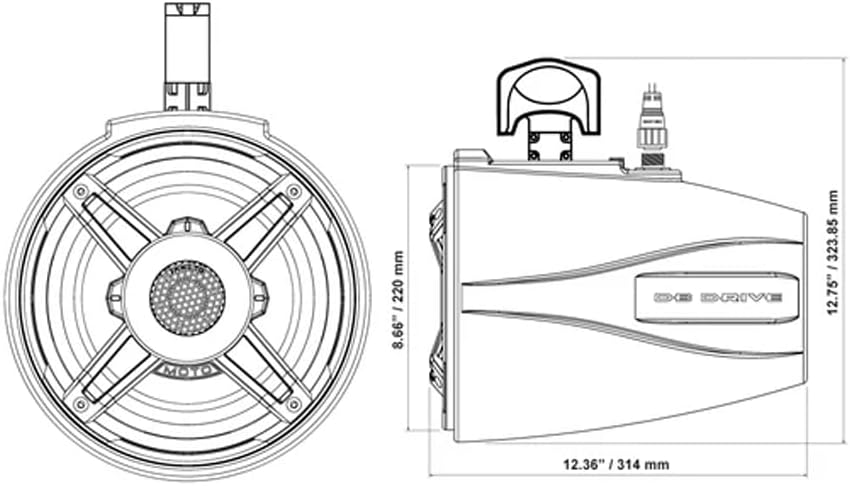
Figure 2: Dimensional drawing providing measurements for installation planning.
2. Wiring Connections
- Speaker Wiring: Connect the speaker wires from your amplifier or head unit to the weather-resistant quick-disconnect speaker connectors on the APT8MOTO-G3 speakers. Ensure correct polarity (+ to + and - to -).
- RGB Lighting Wiring: The speakers feature RGB lighting. Connect the RGB wires to a compatible RGB controller (not included). Follow the instructions provided with your RGB controller for proper connection and operation.
- Power Source: Ensure the amplifier or head unit powering the speakers is connected to a stable 12-volt power source with appropriate fusing.

Figure 3: Front view of the Db Drive APT8MOTO-G3 speaker.
Operating Instructions
Once installed and wired correctly, operating your Db Drive APT8MOTO-G3 speakers is straightforward.
- Power On: Turn on your vehicle's ignition and your audio source (head unit/amplifier).
- Audio Playback: Select your desired audio source and begin playback.
- Volume Adjustment: Gradually increase the volume from your audio source to a comfortable listening level. Avoid setting the volume too high to prevent distortion and potential speaker damage.
- RGB Lighting Control: If an RGB controller is connected, use its controls to select desired colors, patterns, or brightness for the speaker lighting. The speakers themselves do not have integrated RGB controls; an external controller is required.
Maintenance
Regular maintenance helps ensure the longevity and performance of your speakers.
- Cleaning: Clean the speaker grilles and housing with a soft, damp cloth. Avoid using harsh chemicals or abrasive cleaners, which can damage the finish or materials.
- Connection Check: Periodically inspect all wiring connections for corrosion or looseness. Ensure the quick-disconnect connectors are securely seated.
- Mounting Security: Check mounting bolts and brackets regularly to ensure they remain tight and secure, especially after off-road or marine use.
- Environmental Exposure: While weather-resistant, prolonged exposure to direct sunlight, salt spray, or extreme weather conditions can degrade materials over time. Consider covering the speakers when not in use for extended periods.
Troubleshooting
If you encounter issues with your speakers, refer to the following common problems and solutions:
- No Sound:
- Check all audio connections from the amplifier/head unit to the speakers.
- Verify the amplifier/head unit is powered on and functioning correctly.
- Ensure the volume is turned up on your audio source.
- Check for blown fuses in the amplifier's power circuit.
- Distorted Sound:
- Reduce the volume level. Distortion often occurs when the amplifier or speakers are overdriven.
- Check speaker wiring for loose connections or frayed wires that could cause a short.
- Ensure the amplifier's gain settings are not set too high.
- RGB Lighting Not Working:
- Verify the RGB controller is properly connected and powered.
- Check the RGB wiring from the speakers to the controller for secure connections.
- Consult the manual for your specific RGB controller for troubleshooting steps.
- Intermittent Sound:
- Inspect all wiring for loose connections, especially at the quick-disconnect points.
- Check for any signs of corrosion on terminals.
Specifications
| Model | APT8MOTO-G3 |
| Speaker Type | Marine Tower Speaker |
| Speaker Size | 8 Inches |
| Maximum Power Handling | 550 Watts |
| Nominal Power Handling | 275 Watts |
| Frequency Response | 75 Hz - 21 kHz |
| Impedance | 4 Ohms |
| Sensitivity | 103.5 dB |
| Tweeter Diameter | 1.25 Inches (3.7 cm) |
| Midrange Cone Material | Ultralight, weather-resistant fiberglass |
| Housing Material | IP52-rated, UV-inhibited enclosure |
| Input Voltage | 12 Volts DC |
| Mounting Compatibility | 1.5" to 3" Roll Cages |
| Color | Black |
| Water Resistance Level | IP52 (Dust protected, protected against dripping water) |
| Dimensions (D x W x H) | 31 cm x 22 cm x 22 cm (approx. 12.2 x 8.7 x 8.7 inches) |
| Weight | 9.1 Kilograms (per pair) |
| Control Method (RGB) | Push button (via external RGB controller, not included) |
Warranty and Support
This product is covered by a 30-day limited warranty from the date of purchase. This warranty covers manufacturing defects. It does not cover damage resulting from improper installation, accident, misuse, abuse, neglect, normal wear and tear, or unauthorized modification.
For warranty claims or technical support, please refer to the contact information provided on your warranty card or the retailer where the product was purchased.


