Introduction
Thank you for choosing the Mjkone Queen Cabinet Bed. This innovative furniture piece is designed to provide a comfortable sleeping solution while maximizing space in your home. It seamlessly transforms from a stylish cabinet into a queen-size bed, complete with a tri-fold mattress, integrated USB charging ports, and convenient storage drawers. This manual provides essential information for the safe assembly, operation, and maintenance of your new cabinet bed.
Safety Information
- Always read and understand all instructions before assembly and use.
- Assembly requires at least two adults. Do not attempt to assemble alone.
- Ensure all fasteners are securely tightened before use. Periodically check and retighten as necessary.
- Do not exceed the maximum weight capacity of 1100 lbs.
- Keep children and pets away from the unit during conversion between cabinet and bed forms. Moving parts can cause injury.
- Place the cabinet bed on a level, stable surface.
- Do not stand or jump on the bed frame.
- Ensure power cords for USB charging are properly routed and not pinched.
Package Contents
Please verify that all components are present and undamaged before beginning assembly. Refer to the separate assembly guide included with your product for a detailed parts list and diagrams.
- Cabinet Frame Components (various wooden panels and supports)
- Tri-fold Foam Mattress
- Two Storage Drawers with Wheels
- Hardware Kit (screws, bolts, connectors, tools)
- USB Charging Station Unit
Setup and Assembly
Assembly of the Mjkone Queen Cabinet Bed requires careful attention to detail. Please refer to the dedicated assembly instructions provided in your product packaging for step-by-step guidance and diagrams. The following are general recommendations:
- Unpack and Organize: Carefully unpack all boxes and lay out components. Identify each part using the provided labels and diagrams.
- Prepare Workspace: Ensure you have a clear, spacious area for assembly. A power screwdriver with a long Phillips head bit is highly recommended for efficiency.
- Initial Cabinet Assembly: Begin by assembling the main cabinet structure. It is crucial to place the partially assembled cabinet in its final desired location before adding heavier components, as it becomes difficult to move once fully assembled.
- Drawer and Mattress Frame Installation: Install the storage drawers and the bed frame mechanism according to the instructions. Pay close attention to the alignment of drawer glides.
- Mattress Placement: Once the frame is complete, place the tri-fold foam mattress onto the bed platform.
- USB Charging Station: Install the USB charging station into the designated slot and connect it to a power source.
For visual assistance with the product's features and conversion, please refer to the images and video below.
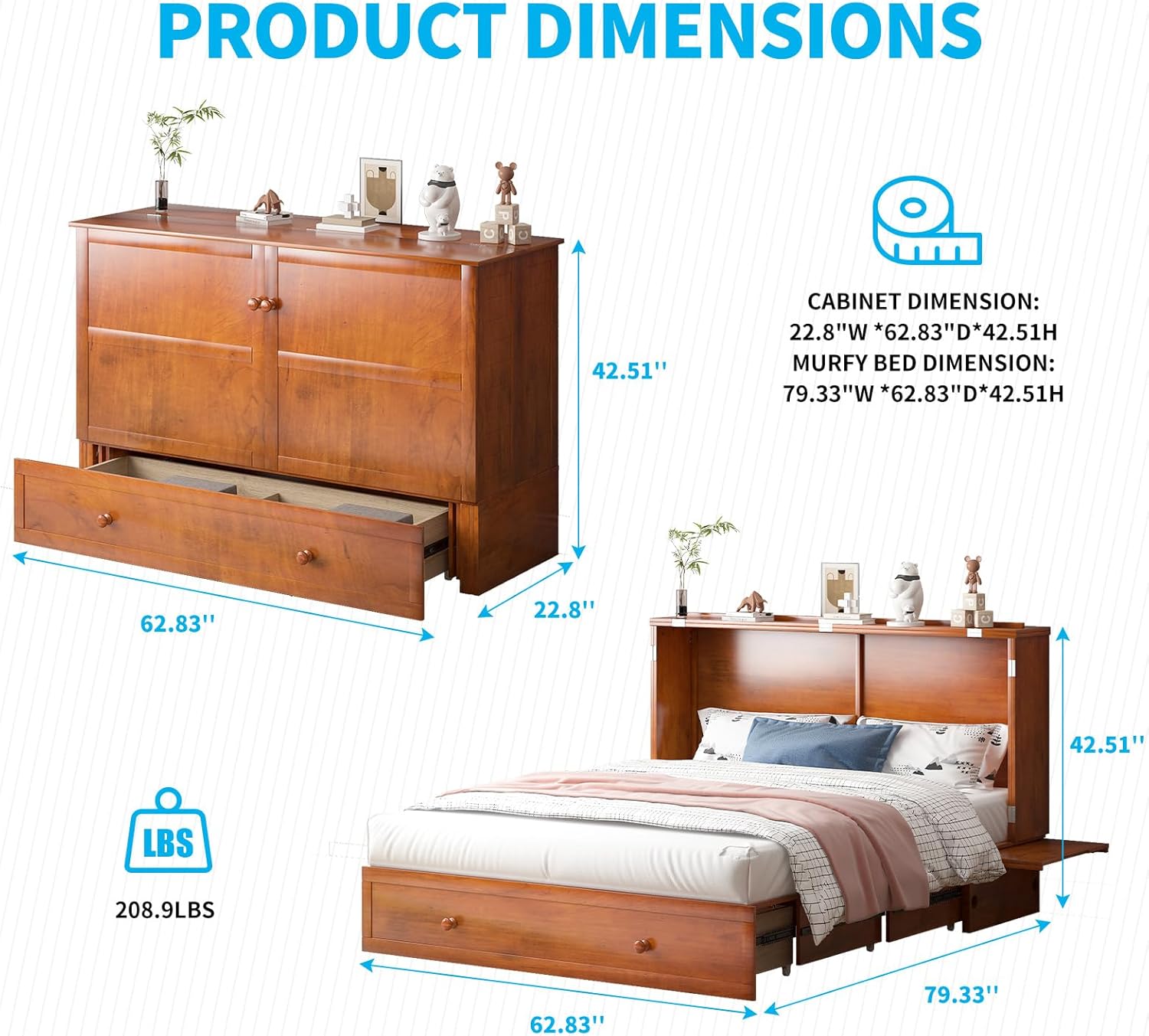
Figure 1: Product Dimensions and Weight

Figure 2: Key Features Overview
Operating Instructions
Converting from Cabinet to Bed
- Pull Out Drawers: Gently pull out the two storage drawers located at the bottom of the cabinet. These drawers are on wheels for easy movement.
- Open Cabinet Doors: Unlatch and open the two main cabinet doors.
- Unfold Bed Frame: The bed frame will extend forward. Carefully pull the bed platform out until it is fully extended.
- Unfold Mattress: Unfold the tri-fold foam mattress onto the extended bed platform.
- Extend Side Panels: Pull out the integrated bedside panels on either side of the bed for additional surface area.
Converting from Bed to Cabinet
To convert the bed back into a cabinet, reverse the steps above:
- Fold Mattress: Fold the tri-fold mattress neatly back onto the bed platform.
- Retract Side Panels: Push the bedside panels back into their stored position.
- Retract Bed Frame: Push the bed platform back into the cabinet until it is fully nested.
- Close Cabinet Doors: Close and latch the main cabinet doors.
- Push In Drawers: Push the storage drawers back into the cabinet base.
Using the USB Charging Station
The cabinet bed features a built-in charging station with USB ports and AC outlets. To use, simply plug your device's charging cable into the appropriate port. Ensure the cabinet bed is connected to a power source for the charging station to function.
Using Storage Drawers
The two large capacity drawers provide convenient storage for bedding, pillows, or other items. Pull them out gently using the knobs. The wheels ensure smooth operation.
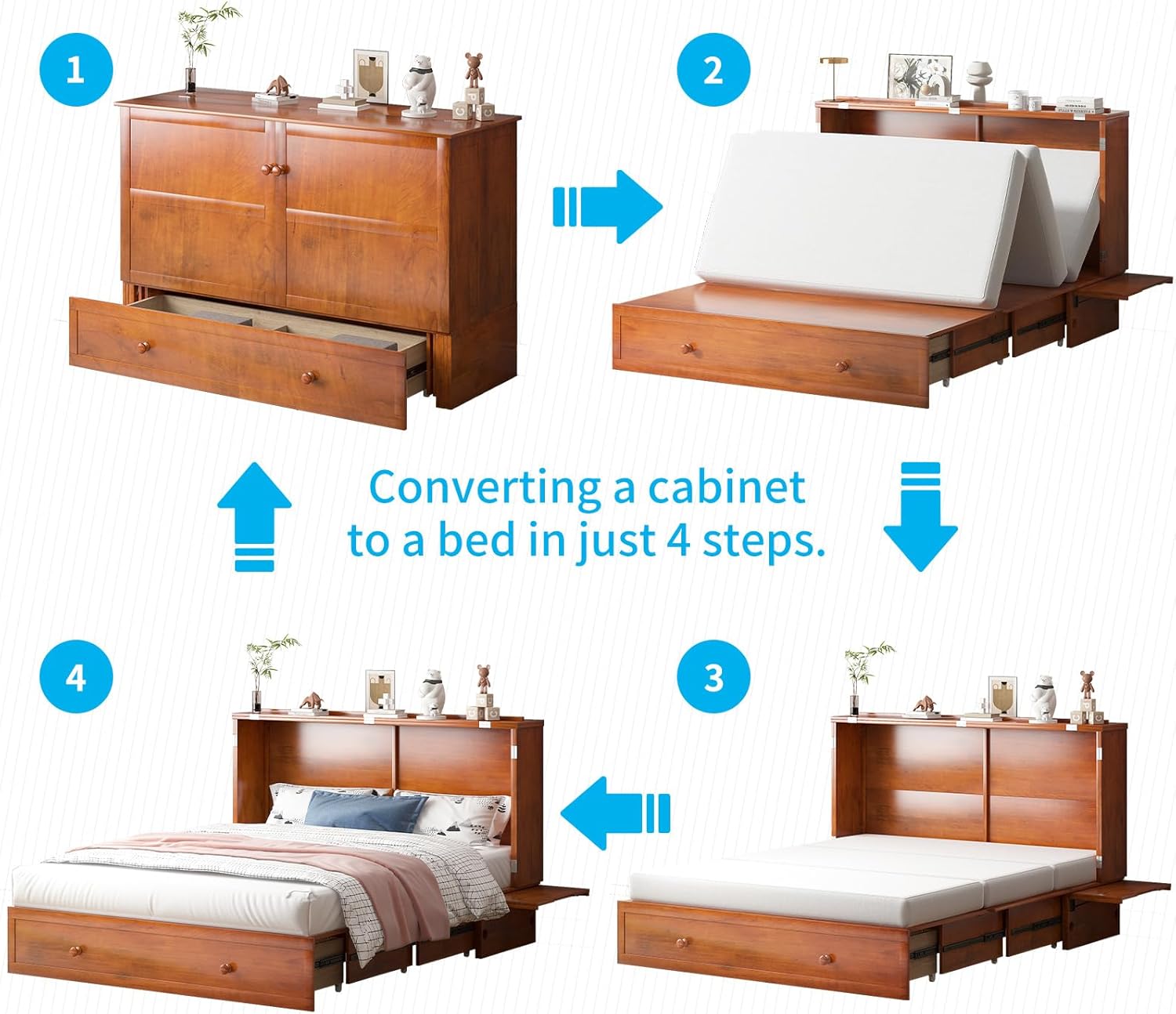
Figure 3: 4-Step Conversion Process

Figure 4: Built-in USB Charging Station

Figure 5: Storage Drawer Capacity
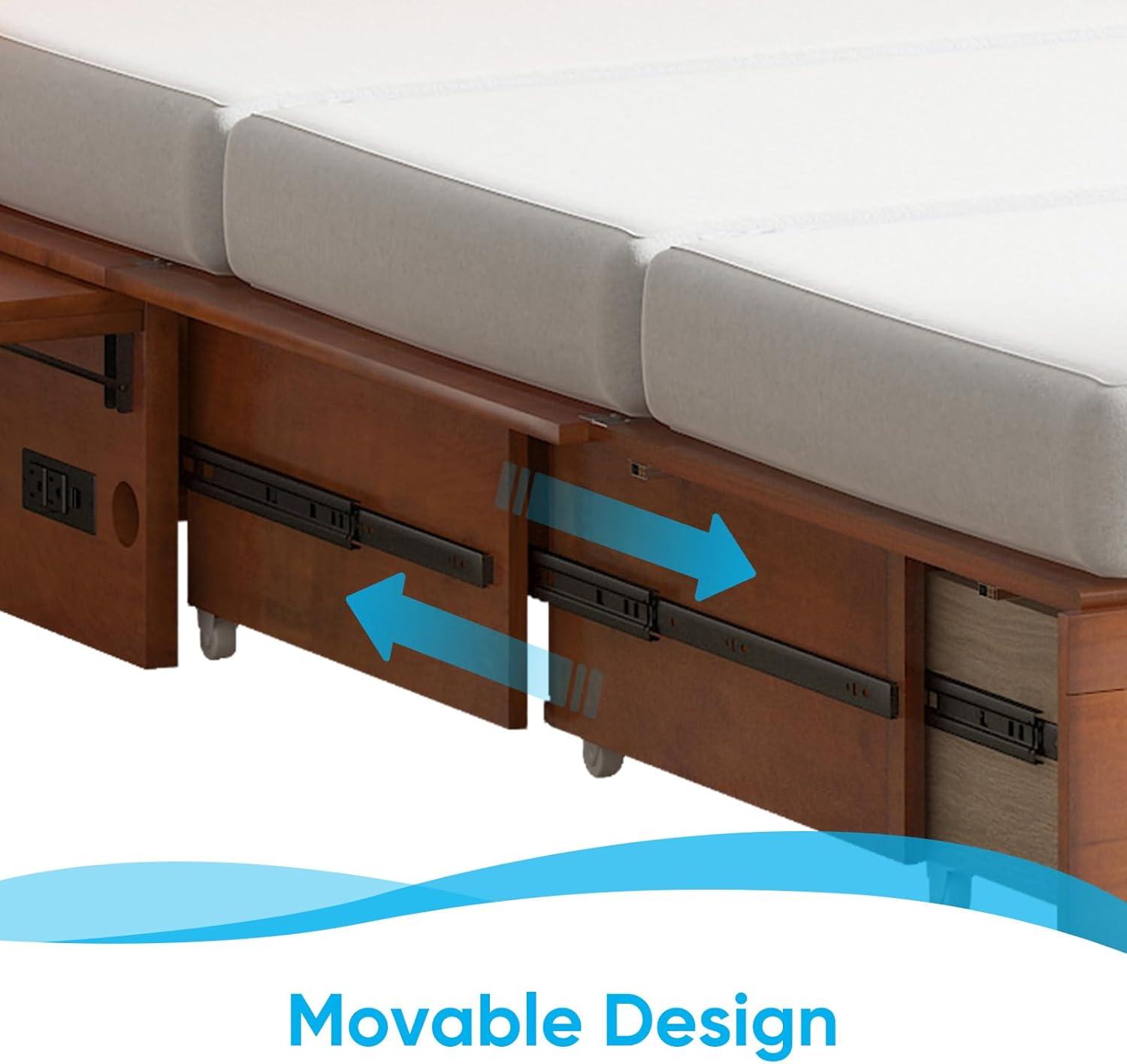
Figure 6: Movable Storage Drawers
Video 1: This video demonstrates the conversion process of the Mjkone Queen Cabinet Bed from a compact cabinet to a full queen-size bed, highlighting its storage drawers, USB charging ports, and overall functionality.
Maintenance
- Cleaning: Wipe wooden surfaces with a soft, damp cloth. Avoid harsh chemicals or abrasive cleaners. For the mattress, spot clean with a mild detergent and allow to air dry completely.
- Hardware Check: Periodically inspect all screws, bolts, and connections to ensure they remain tight. Retighten as needed to maintain stability and safety.
- Drawer Glides: If drawers become stiff, apply a small amount of silicone lubricant to the glide tracks.
- Mattress Care: Rotate the mattress regularly to ensure even wear. Allow the mattress to air out periodically.
Troubleshooting
- Drawers not sliding smoothly: Check for obstructions in the glide tracks. Ensure the drawers are properly aligned on their glides. Verify that all screws securing the glides are tight.
- Bed difficult to convert: Ensure no items are obstructing the mechanism. Check that the mattress is folded correctly and not interfering with the frame's movement.
- USB ports not working: Confirm that the cabinet bed's power cord is securely plugged into a functional wall outlet. Check the connection of the USB charging unit within the cabinet.
- Bed feels unstable: Re-check all assembly fasteners and tighten any that are loose. Ensure the bed is on a flat, level surface.
Specifications
| Feature | Detail |
|---|---|
| Brand | Mjkone |
| Model | Queen Cabinet Bed |
| Color | Cherry |
| Material | Solid Wood, Metal |
| Cabinet Dimensions (W x D x H) | 62.8" x 22.8" x 42.5" |
| Murphy Bed Dimensions (W x D x H) | 62.8" x 80" x 42.5" |
| Mattress Type | Tri-fold Foam Mattress (Included) |
| Weight Capacity | 1100 lbs |
| Special Features | Built-in USB Charging Station, 2 Storage Drawers, Bedside Panels, Space-Saving Design |

Figure 7: Product Features Summary
Warranty and Support
Mjkone products are manufactured to high-quality standards. For specific warranty information, please refer to the documentation included with your purchase or contact Mjkone customer support. If you encounter any issues or have questions regarding your Queen Cabinet Bed, please reach out to the retailer or manufacturer's customer service for assistance.