
1. Introduction
This manual provides comprehensive instructions for the installation, operation, and maintenance of your Lordear Waterfall Workstation Kitchen Sink, Model LTS33199R1-FY3. This T304 16-gauge stainless steel single bowl drop-in sink features a unique waterfall faucet, pull-out spray, and integrated workstation accessories designed to enhance your kitchen experience. Please read this manual thoroughly before beginning installation or use to ensure proper function and longevity of your product.
2. Safety Information
- Always wear appropriate personal protective equipment (PPE) such as safety glasses and gloves during installation.
- Ensure all water supply lines are turned off before beginning any plumbing work.
- If you are unsure about any installation steps, consult a qualified plumber or professional installer.
- Keep small parts and tools away from children.
- Avoid using harsh chemicals or abrasive cleaners on the sink surface, as this may damage the finish.
3. Package Contents
Verify that all components listed below are included in your package:
- 33" Drop-in Waterfall Kitchen Sink (x1)
- Cutting Board (x1)
- Dish Rack (x1)
- Bottom Grid (x1)
- Drain Assembly (x1)
- Redwood Handle Colander (x1)
- Waterfall Faucet (x1)
- Cup Washer (x1)
- Mounting Clips (1 set)
- Cutout Template Paper (x1)
- Instruction Manual (x1)
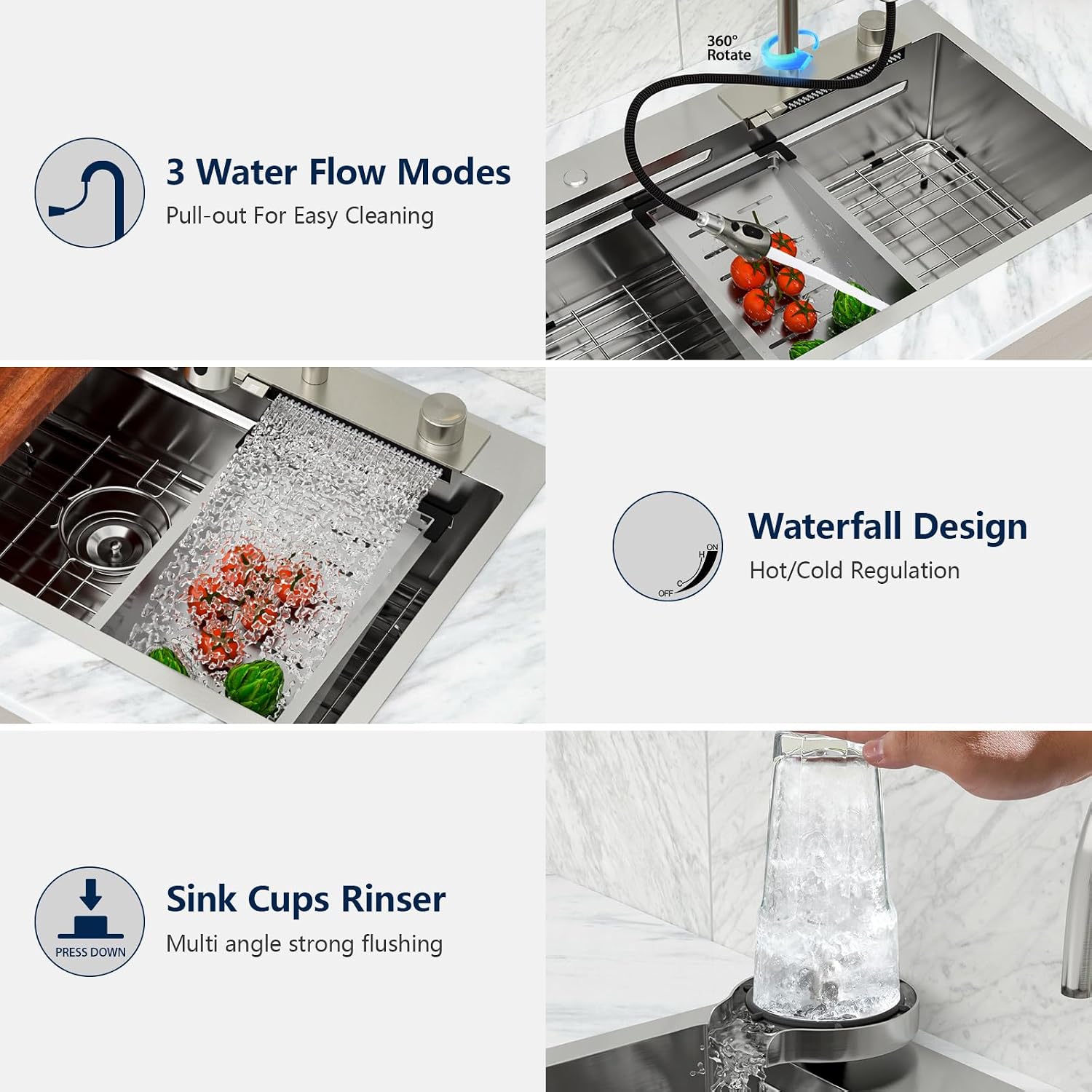
Image: Overview of the Lordear Waterfall Workstation Kitchen Sink and its included accessories.
4. Specifications
| Brand | Lordear |
| Model Number | LTS33199R1-FY3 |
| Material | T304 16 Gauge Stainless Steel |
| Exterior Dimensions | 33"L x 19"W x 9"D |
| Interior Dimensions | 31"L x 14.8"W x 8.75"D |
| Cutout Size | 32.2"L x 18.2"W |
| Minimum Cabinet Size | 36 inches |
| Drain Opening | Standard 3-1/2" (fits garbage disposal) |
| Installation Type | Drop In |
| Corner Radius | R10 Round Corners |

Image: Detailed dimensions and minimum cabinet base size for the sink.
5. Installation
This section outlines the general steps for installing your Lordear drop-in kitchen sink. Refer to the included cutout template for precise measurements and consult a professional if needed.
5.1 Pre-Installation Steps
- Review Components: Unpack the sink and all accessories. Verify that all parts listed in Section 3 are present and undamaged.
- Prepare Countertop: Using the provided cutout template, mark the opening on your countertop. Ensure the marked area is clear of any obstructions.
- Cut Opening: Carefully cut the opening in the countertop according to the template. Smooth any rough edges.
- Clean Area: Ensure the installation area is clean and dry before proceeding.
5.2 Sink Placement and Securing
- Apply Sealant: Apply a bead of silicone sealant around the perimeter of the countertop opening.
- Position Sink: Carefully lower the sink into the countertop opening, ensuring it is properly aligned. Press down firmly to create a seal.
- Attach Mounting Clips: From underneath the countertop, attach the mounting clips to the sink rim and tighten them evenly to secure the sink in place. Do not overtighten.
Video: Lordear drop-in kitchen sink installation guideline. This video demonstrates the general installation process for a drop-in sink.
5.3 Faucet and Accessory Installation
- Install Faucet: Follow the manufacturer's instructions for installing the waterfall faucet and pull-out spray into the designated holes on the sink deck. Connect hot and cold water supply lines.
- Install Cup Washer: Secure the cup washer into its opening on the sink deck and connect its water supply.
- Install Drain Assembly: Install the drain assembly into the sink's drain opening. Connect to your plumbing system, ensuring all connections are watertight. If using a garbage disposal, follow its specific installation instructions.
- Test for Leaks: Once all connections are made, turn on the water supply and check for any leaks. Tighten connections as necessary.

Image: The Lordear Waterfall Workstation Kitchen Sink after installation, showcasing its design.
6. Operation
Your Lordear Waterfall Workstation Kitchen Sink is designed with multiple features for convenience and efficiency.
6.1 Waterfall Faucet
- The integrated waterfall faucet provides a broad, gentle flow of water, ideal for rinsing fruits and vegetables or for general washing tasks.
- Control the water flow and temperature using the dedicated knobs or levers on the sink deck.

Image: Close-up view of the waterfall faucet in operation.
6.2 Pull-Out Kitchen Faucet
- The pull-out faucet offers flexibility for targeted cleaning and rinsing.
- It features three distinct spray modes: Stream Mode for filling, Spray Mode for general rinsing, and Rinse Mode for powerful cleaning. Switch between modes using the button on the faucet head.

Image: Illustration of the pull-out faucet's three spray modes.
6.3 Cup Washer
- Place a cup or glass upside down on the cup washer and press down to activate a multi-angle, strong flushing action for quick and effective cleaning.

Image: The cup washer in action, cleaning a glass.
6.4 Workstation Accessories
- The integrated ledge allows for sliding accessories such as the cutting board, dish rack, and colander across the sink, maximizing workspace and functionality.
- Use the cutting board for food preparation directly over the sink.
- The dish rack and colander can be used for drying dishes, rinsing produce, or thawing food.

Image: The workstation sink with cutting board, drainage basket, and roll-up rack in use.
7. Maintenance & Care
Proper care will ensure the longevity and appearance of your Lordear kitchen sink.
- Daily Cleaning: After each use, rinse the sink thoroughly with water and wipe it dry with a soft cloth to prevent water spots and mineral buildup.
- Avoid Abrasives: Do not use abrasive cleaners, steel wool, or scouring pads, as these can scratch the stainless steel finish.
- Gentle Cleaners: For deeper cleaning, use a mild soap or a non-abrasive stainless steel cleaner with a soft sponge or cloth. Always rinse thoroughly and dry.
- Protect from Damage: Keep the sink away from decoration materials during remodeling to avoid scratches. Avoid dropping heavy or sharp objects into the sink.
- R10 Round Corners: The R10 round corners are designed for easier cleaning and to prevent rust accumulation in tight spaces.
- X-Shape Flow Line: The X-shape flow line design on the sink bottom facilitates efficient water drainage, preventing clogging and standing water.

Image: Demonstrating how to wipe the sink clean with a soft cloth.

Image: The X-shaped diversion waterlines design for optimal drainage.
8. Troubleshooting
This section addresses common issues you might encounter with your kitchen sink. For problems not listed here, please contact customer support.
| Problem | Possible Cause / Solution |
|---|---|
| Water spots or stains on sink surface | Hard water deposits. Wipe the sink dry after each use. For existing spots, use a mixture of vinegar and water, then rinse and dry. |
| Slow drainage | Partial clog in the drain assembly or plumbing. Check the drain stopper for debris. If the issue persists, a plumber may be needed. |
| Leaking around faucet or drain | Loose connections or worn seals. Ensure all connections are tightened properly. If seals are worn, they may need replacement. Consult a plumber. |
| Faucet spray modes not switching | Mineral buildup in the spray head. Unscrew the spray head and clean it with a vinegar solution. |
9. Warranty & Support
Lordear is committed to providing high-quality products. For specific warranty details regarding your Waterfall Workstation Kitchen Sink, please refer to the warranty card included with your purchase or visit the official Lordear website. If you encounter any issues or have questions that are not covered in this manual, please contact Lordear customer support for assistance.
Contact Information: Please refer to your product packaging or the official Lordear website for the most current customer support contact details.
