
Mcezdy PG
Mcezdy Ebike Display UART Protocol Recognizer & Programmer Set Instruction Manual
Model: PG
Introduction
This manual provides detailed instructions for the Mcezdy Ebike Display UART Protocol Recognizer & Programmer Set, Model PG. It covers product components, setup procedures, operational guidelines for protocol recognition and programming, troubleshooting common issues, and product specifications. Please read this manual thoroughly before using the device to ensure proper operation and to prevent damage.
Product Components
The Mcezdy Ebike Display UART Protocol Recognizer & Programmer Set includes the following items:
- Recognizer Unit
- Programmer Unit
- Three-in-one adapter cable: SM6PIN, 5PIN, 6PIN
- Instrument pair wiring (SM-5PIN)
- USB cable (for power supply)
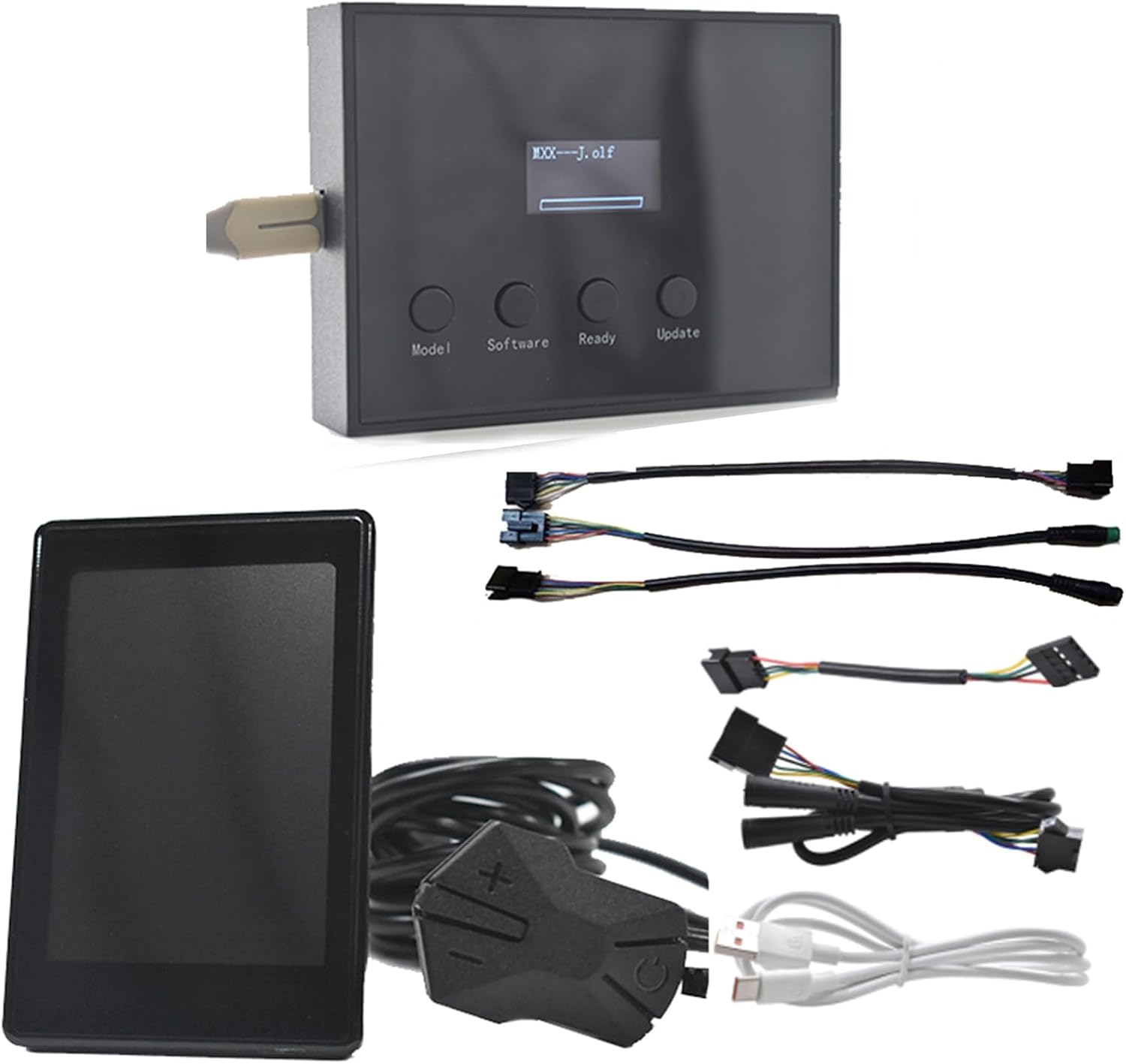
Image: Overview of the Mcezdy Ebike Display UART Protocol Recognizer & Programmer Set, showing the recognizer, programmer, various adapter cables, and USB power cable.

Image: A visual representation of the kit's contents, highlighting the recognizer, programmer, three-in-one adapter cable, instrument pair wiring, and USB cable.
Setup and Initial Use
1. Protocol Recognition
The recognizer unit is used to identify the UART communication protocol of your e-bike display. It supports Protocol 2, 5s protocol, J protocol, and KDS protocol.
- Connect the identifier (recognizer unit) to the instrument interface of your e-bike.
- Tap the power switch on your e-bike.
- The display on the recognizer will show the identified protocol information.

Image: Diagram illustrating the connection of the recognizer to an e-bike display for protocol identification, showing the steps and supported UART protocols.
2. Programmer Setup
The programmer unit is used to change or update the communication protocol of compatible e-bike displays. It supports Protocol 2, 5s protocol, J protocol, and KDS protocol.
Applicable instruments include H6C-2, H6C, M5C-2, M5, M6C, M6H, M7C-2, P3C, P3H, P5C.

Image: Visual guide for connecting the programmer unit and adapter cables to an e-bike display for protocol programming, listing compatible display models.
Operating Instructions for the Programmer
- Connect the plug wires of the instrument (e-bike display) to the programmer.
- Connect the USB cable to the programmer for power supply.
- Press the Model key on the programmer to select the corresponding instrument model.
- Press the Software key to select the required updated protocol software.
- Press and hold the plus key and the power key on the instrument simultaneously. Then, click the power key of the instrument once to enter the flashing mode. The display will show a flashing indicator.
- While the instrument is in flashing mode, press the Ready key on the programmer within 10 seconds to bind the programmer to the instrument in the upgrade state. If the Ready key is not pressed within 10 seconds, the instrument will automatically exit flashing mode.
- Press the Update key to update the internal software of the instrument. The update process will take approximately 35 seconds. During this time, do not disconnect the device.
- After the update is completed, the instrument will automatically shut down.
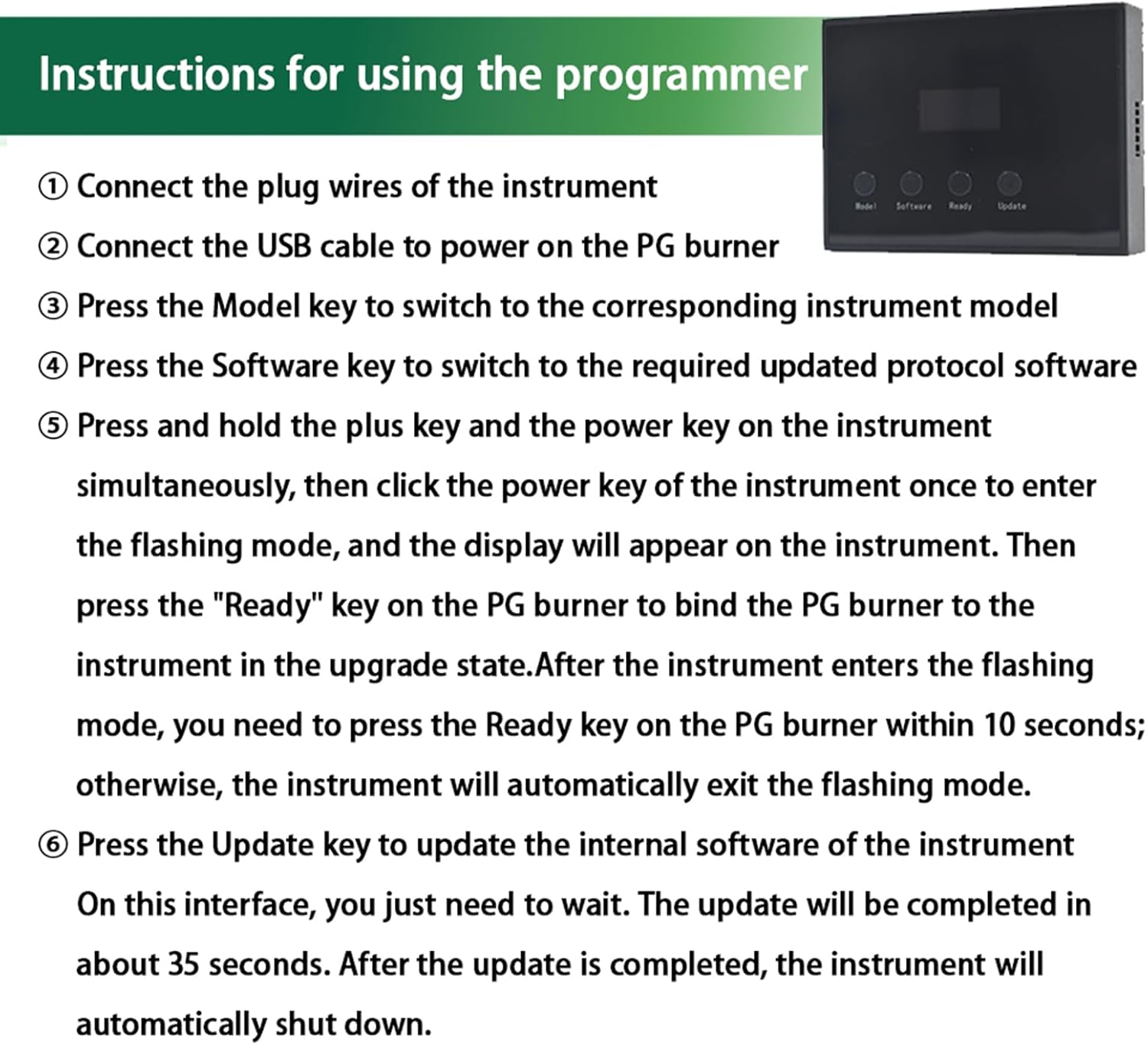
Image: Step-by-step guide on the programmer's display, detailing the sequence of button presses and actions required for successful protocol programming.

Image: Flowchart illustrating the programmer operation process, from selecting the model and software to the update success or failure outcomes.
Maintenance
- Keep the device clean and dry. Avoid exposure to moisture or extreme temperatures.
- Store the components in a safe place to prevent physical damage.
- Do not attempt to disassemble or repair the device yourself. Refer to qualified personnel for service.
- Use only the provided cables and accessories.
Troubleshooting
Common Issues and Solutions:
- Issue: Protocol not recognized by the identifier.
Solution: Ensure the identifier is correctly connected to the e-bike instrument interface and the e-bike is powered on. Verify that the e-bike's protocol is one of the supported types (Protocol 2, 5s protocol, J protocol, KDS protocol).
- Issue: Programmer fails to bind or update.
Solution:
- Ensure all cables are securely connected.
- Confirm the e-bike instrument is in flashing mode (step 5 of operating instructions).
- Press the Ready key on the programmer within the 10-second window after the instrument enters flashing mode.
- Verify that the instrument model is compatible with the programmer (H6C-2, H6C, M5C-2, M5, M6C, M6H, M7C-2, P3C, P3H, P5C).
- Ensure the correct software protocol is selected on the programmer.
- Issue: Error Code E10 (PG).
Solution: While the manual mentions troubleshooting Error Code E10, specific details for this error are not provided in the product description. Generally, error codes indicate a communication issue or an unsupported configuration. Recheck all connections, ensure compatibility, and retry the process. If the issue persists, contact customer support.
Specifications
| Feature | Detail |
|---|---|
| Brand | Mcezdy |
| Model Name | PG |
| Color | Black |
| Material | Plastic |
| Display Type | LCD |
| Recognizer Supported UART Protocols | Protocol 2, 5s protocol, J protocol, KDS protocol |
| Programmer Supported UART Protocols | Protocol 2, 5s protocol, J protocol, KDS protocol |
| Applicable Instruments (Programmer) | H6C-2, H6C, M5C-2, M5, M6C, M6H, M7C-2, P3C, P3H, P5C |
| Included Components | Recognizer, Programmer, 3-in-1 adapter cable (SM6PIN, 5PIN, 6PIN), Instrument pair wiring (SM-5PIN), USB cable (power supply) |
| Item Package Dimensions | 1 x 1 x 1 inches |
| Package Weight | 1.6 ounces |
Warranty and Support
Warranty Information:
The Mcezdy Ebike Display UART Protocol Recognizer & Programmer Set comes with a 1-Year Manufacturer Warranty from the date of purchase. This warranty covers defects in materials and workmanship under normal use. It does not cover damage caused by misuse, accident, unauthorized modification, or improper installation.
Customer Support:
For technical assistance, troubleshooting beyond this manual, or warranty claims, please contact Mcezdy customer support. Refer to the product packaging or the official Mcezdy website for the most current contact information.
You can also visit the Mcezdy Store on Amazon for additional product information and support resources.
Related documentsPG

Ask a question about this manual
Ask about setup, troubleshooting, compatibility, parts, safety, or missing instructions. Manuals+ will review the question and use this page’s manual context to help answer it.