1. Introduction
This manual provides essential information for the safe and effective operation of your XFALIGHTS COB Stage Light, Model XCOB-50W. This professional lighting fixture features 2x50W COB Golden LEDs for warm white wash and 2xSMD5050 RGB lights with 62x0.2W RGB halo LEDs for dynamic color mixing. It is designed for various stage applications, including DJ shows, weddings, clubs, and live performances.
2. Safety Information
- Always connect the fixture to a grounded circuit.
- Ensure proper ventilation around the unit to prevent overheating.
- Do not operate the fixture if the power cord is damaged.
- Avoid direct eye exposure to the light source.
- Disconnect power before cleaning or servicing.
- This product is for indoor use only.
3. Package Contents
Verify that all items are present in the package:
- XFALIGHTS COB Stage Light (XCOB-50W) x 1
- Power cable x 1
- User manual x 1
- DMX cable x 1
- Bow mount x 1
- Screws x 2
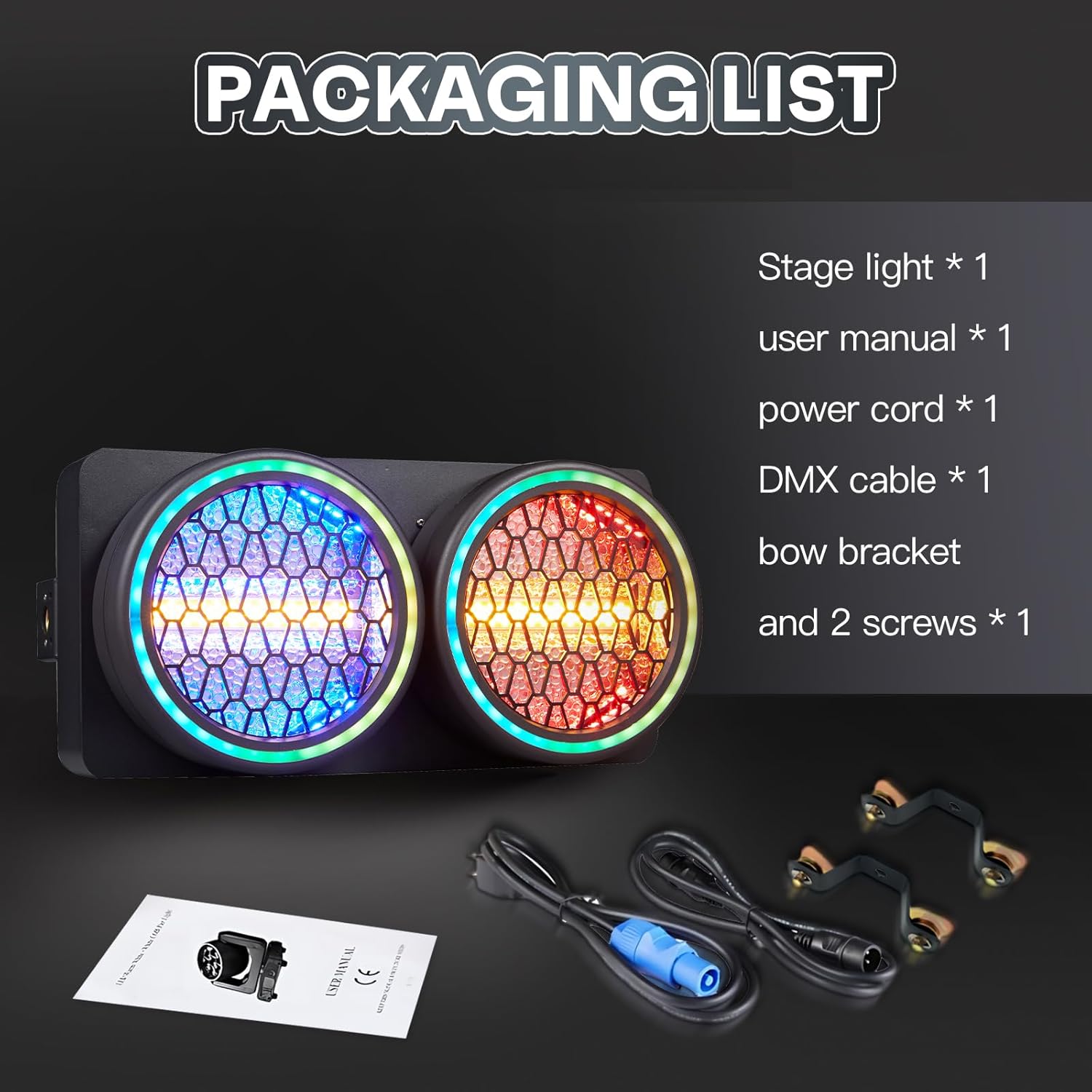
Image: Contents of the XFALIGHTS COB Stage Light package, including the light fixture, cables, mounting bracket, and user manual.
4. Product Overview
The XFALIGHTS COB Stage Light is a versatile lighting solution featuring:
- Light Source: 2x50W COB Golden LEDs and 2xSMD5050 RGB lights with 62x0.2W RGB halo LEDs.
- Effects: Warm white wash, vibrant RGB color mixing, golden halo effect, smooth dimming (0-100%), and adjustable strobe (1-25Hz).
- Control: DMX512, Master-Slave, Auto Programs (10 built-in), Sound-Active mode, and RDM remote addressing.

Image: Front view of the XFALIGHTS COB Stage Light, showcasing its two main light sources with active blue and red RGB halo effects.

Image: An illustrative diagram highlighting the various control modes (DMX512, Auto, Sound Active, Master-Slave, Rich In Color, High Lighting) and the '2 Eye Audience Blinder Retro Matrix Light' description.

Image: A grid displaying various lighting effects and color combinations achievable with the stage light, including solid colors, gradients, and halo effects.
5. Setup
5.1 Mounting
The fixture can be mounted using the included bow mount and screws. Ensure the mounting surface is secure and capable of supporting the weight of the light. The frame handle allows for self-supporting placement or hanging.
5.2 Connections
- Power Connection: Connect the provided power cable to the 'POWER IN' port. The unit supports AC100-240V, 50/60Hz.
- DMX Connection: Use the 3-pin DMX In/Out connections to daisy chain multiple fixtures. Connect a DMX controller to the 'DMX IN' port of the first fixture.

Image: A diagram illustrating the product dimensions (length, width, height) and detailed views of the DMX In/Out, power In/Out, and control panel with menu buttons and LED display.
6. Operating Modes
The XFALIGHTS COB Stage Light offers multiple control options for diverse lighting needs.
6.1 DMX512 Mode
This mode allows precise control over all parameters (color, brightness, motion, strobe) using an external DMX controller. The fixture supports 11, 19, or 25 DMX channels.

Image: An illustration depicting a DMX controller connected to multiple stage lights, demonstrating the DMX512 control mode for precise lighting manipulation.
6.2 RDM Mode
Remote Device Management (RDM) allows bi-directional communication with the fixture, enabling remote monitoring and configuration through a compatible DMX/RDM controller. This simplifies setup by eliminating the need for manual adjustments on the fixture itself.

Image: An illustration showing stage lights with glowing halo effects, accompanied by text explaining the benefits of RDM (Remote Device Management) for remote monitoring and configuration.
6.3 Master-Slave Mode
Link multiple fixtures together where one unit acts as the master, controlling all other slave units. This allows for synchronized lighting effects without a DMX controller.
6.4 Auto Programs
The fixture includes 10 built-in automatic programs that execute pre-recorded light effects such as gradients, scans, and jumps. These programs can be selected via the control panel.

Image: A grid of six images demonstrating different automatic lighting effects, including color changes, gradients, and patterns, as executed by the stage light.
6.5 Sound-Active Mode
In this mode, the lights change and react to the rhythm of music or ambient sound. This is suitable for parties or smaller venues where music synchronization is desired.

Image: A long row of stage lights, each displaying different vibrant colors, illustrating the dynamic effects possible in sound-active mode where lights respond to music.
7. Specifications
| Feature | Specification |
|---|---|
| Model Number | XCOB-50W |
| Light Source Type | Light Emitting Diode (LED) |
| COB LEDs | 2 x 50W Golden COB LEDs |
| RGB LEDs | 2 x SMD5050 RGB lights + 62 x 0.2W RGB halo LEDs |
| Power Source | Corded Electric |
| Voltage | 100-240V AC, 50/60Hz |
| Wattage | 120 Watts (Max) |
| Control Modes | DMX512 (11/19/25 channels), Master-Slave, Auto Programs (10), Sound-Active, RDM |
| Dimming | 0-100% Smooth Dimming |
| Strobe Rate | 1-25Hz |
| Material | Aluminum |
| Finish Type | Metallic |
| Product Dimensions | 8.97"L x 8.97"W x 15.99"H (22.78 cm L x 22.78 cm W x 40.61 cm H) |
| Item Weight | 10.12 pounds (4.59 kg) |
8. Maintenance
- Cleaning: Regularly clean the lens and housing with a soft, lint-free cloth. Do not use abrasive cleaners.
- Inspection: Periodically check all cables, connections, and mounting hardware for signs of wear or damage.
- Storage: Store the fixture in a dry, dust-free environment when not in use.
9. Troubleshooting
- No Power: Ensure the power cable is securely connected and the power outlet is functional. Check for any tripped circuit breakers.
- No Light Output: Verify the fixture is receiving power and is not in a blackout or dimmed state. Check DMX connections if applicable.
- Incorrect DMX Control: Confirm DMX addresses are correctly set on the fixture and controller. Ensure DMX cables are properly connected and terminated.
- Unresponsive Controls: If the control panel is unresponsive, try power cycling the unit.
10. Warranty and Support
For any questions regarding your XFALIGHTS COB Stage Light, please contact XFALIGHTS customer support. Refer to your purchase documentation for specific warranty terms and contact information. We are committed to providing assistance and resolving any issues you may encounter.