
1. Introduction
Thank you for choosing the NEXPEAK NC315 Smart Car Battery Charger. This intelligent charger is designed to efficiently charge and maintain 12V and 24V lead-acid (AGM, GEL, SLA, Flooded) and LiFePO4 batteries. It features advanced charging technology, multiple safety protections, and an intuitive LED display for ease of use. Please read this manual thoroughly before operation to ensure safe and optimal performance of your device.

Image: The NEXPEAK NC315 smart battery charger, highlighting its compatibility with various battery types and its role as a charger and maintainer.
2. Important Safety Information
Always prioritize safety when working with batteries and electrical equipment. Failure to follow these instructions may result in electric shock, fire, or serious injury.
- Read All Instructions: Before using the charger, read all instructions and cautionary markings on the charger, the battery, and the vehicle or device using the battery.
- Ventilation: Ensure the charging area is well-ventilated. Batteries can produce explosive gases.
- Eye and Skin Protection: Always wear eye protection (safety glasses) and protective clothing when working near batteries. Avoid touching eyes while working near batteries.
- Avoid Sparks and Flames: Do not smoke or allow a spark or flame in the vicinity of the battery or engine.
- Disconnect Power: Always disconnect the AC power cord from the outlet before connecting or disconnecting the charging clamps to the battery.
- Polarity: Connect the red (+) clamp to the positive battery terminal and the black (-) clamp to the negative battery terminal. Ensure correct polarity to prevent damage.
- Children: Keep the charger and batteries out of reach of children.
- Damaged Equipment: Do not operate the charger if it has received a sharp blow, been dropped, or otherwise damaged.
- Indoor Use: This charger is designed for indoor use. Do not expose it to rain or excessive moisture.

Image: Visual representation of the NEXPEAK NC315 charger highlighting its multiple safety features including intelligent control, temperature compensation, reverse polarity protection, cooling system, overcurrent, overvoltage, and short-circuit protection.
3. Product Overview
The NEXPEAK NC315 is an advanced smart battery charger featuring a robust design and intelligent functionalities. It is equipped with a large LED display that provides real-time information on charging status, voltage, current, and internal temperature.
Key Features:
- Multi-Battery Compatibility: Charges 12V and 24V LiFePO4, Lead-Acid, AGM, GEL, and SLA batteries.
- Fast Charging: Delivers 15A for 12V batteries and 8A for 24V batteries.
- 9-Stage Smart Charging: An optimized charging process that extends battery life and ensures efficient charging.
- Pulse Repair Function: Automatically detects battery sulfation and acid stratification, using pulse repair technology to restore lost battery performance.
- Temperature Compensation: Adjusts charging voltage and current based on ambient temperature (Summer/Winter modes) for optimal charging in various climates.
- Multiple Safety Protections: Includes protection against reverse polarity, overcurrent, overvoltage, short-circuit, and overheating. Features a powerful cooling system and flame-retardant ABS casing.
- Cable Management: Integrated storage for charging cables for convenience.

Image: The NEXPEAK NC315 charger connected to a lead-acid battery, illustrating its fast charging capabilities and compatibility with LiFePO4 and lead-acid types. Insets show quick charging, battery maintenance, and engine starting benefits.
4. Setup Instructions
Follow these steps to properly set up your NEXPEAK NC315 battery charger:
- Connect to Battery: First, connect the red positive (+) charging clamp to the positive terminal of the battery. Then, connect the black negative (-) charging clamp to the negative terminal of the battery. Ensure a secure connection.
- Connect to Power Outlet: Plug the AC power cord of the charger into a standard 100-240V AC electrical outlet. The charger will power on and display battery information.
- Select Charging Mode: Press the 'MODE' button on the charger to cycle through the available charging modes (e.g., LiFePO4, Lead-Acid, Motorcycle, Repair, Summer, Winter). Select the mode that corresponds to your battery type and charging needs. The charger will automatically begin the charging process.
Video: A short demonstration showing the steps to connect the NEXPEAK NC315 charger to a battery and select a charging mode. This video illustrates the connection of positive and negative terminals, plugging into an AC outlet, and using the mode button.
5. Operating Instructions
The NEXPEAK NC315 offers various charging modes to suit different battery types and conditions. The large LED display provides clear feedback during operation.
5.1. Understanding the Display
The LED display shows:
- Voltage (V): Current battery voltage.
- Current (A): Charging current.
- Temperature (°C/°F): Internal temperature of the charger, influencing temperature compensation.
- Charging Percentage: Visual indicator of battery charge level.
- Mode Indicators: Icons for selected battery type (e.g., AGM, LiFePO4, Motorcycle) and special modes (Repair, Summer, Winter).

Image: The NEXPEAK NC315 charger's LED display showing charging status and mode selection. It highlights the 5 available modes and the easy cable storage feature.
5.2. Selecting Charging Modes
Press the 'MODE' button to switch between the following options:
- Standard (Lead-Acid/AGM/GEL/SLA): For typical 12V or 24V automotive, marine, and deep-cycle batteries.
- LiFePO4: Specifically for 12V or 24V Lithium Iron Phosphate batteries.
- Motorcycle: Optimized for smaller 12V batteries commonly found in motorcycles.
- Repair Mode (PUL): Activates the pulse repair function to desulfate and recondition old or deeply discharged batteries. Note: This mode may not revive completely dead batteries.
- Summer Mode: Automatically engaged when the ambient temperature is above 28°C (82°F), providing a secure charge in hot conditions.
- Winter Mode: Automatically engaged when the ambient temperature is below 10°C (50°F), providing a powerful charge in cold conditions.
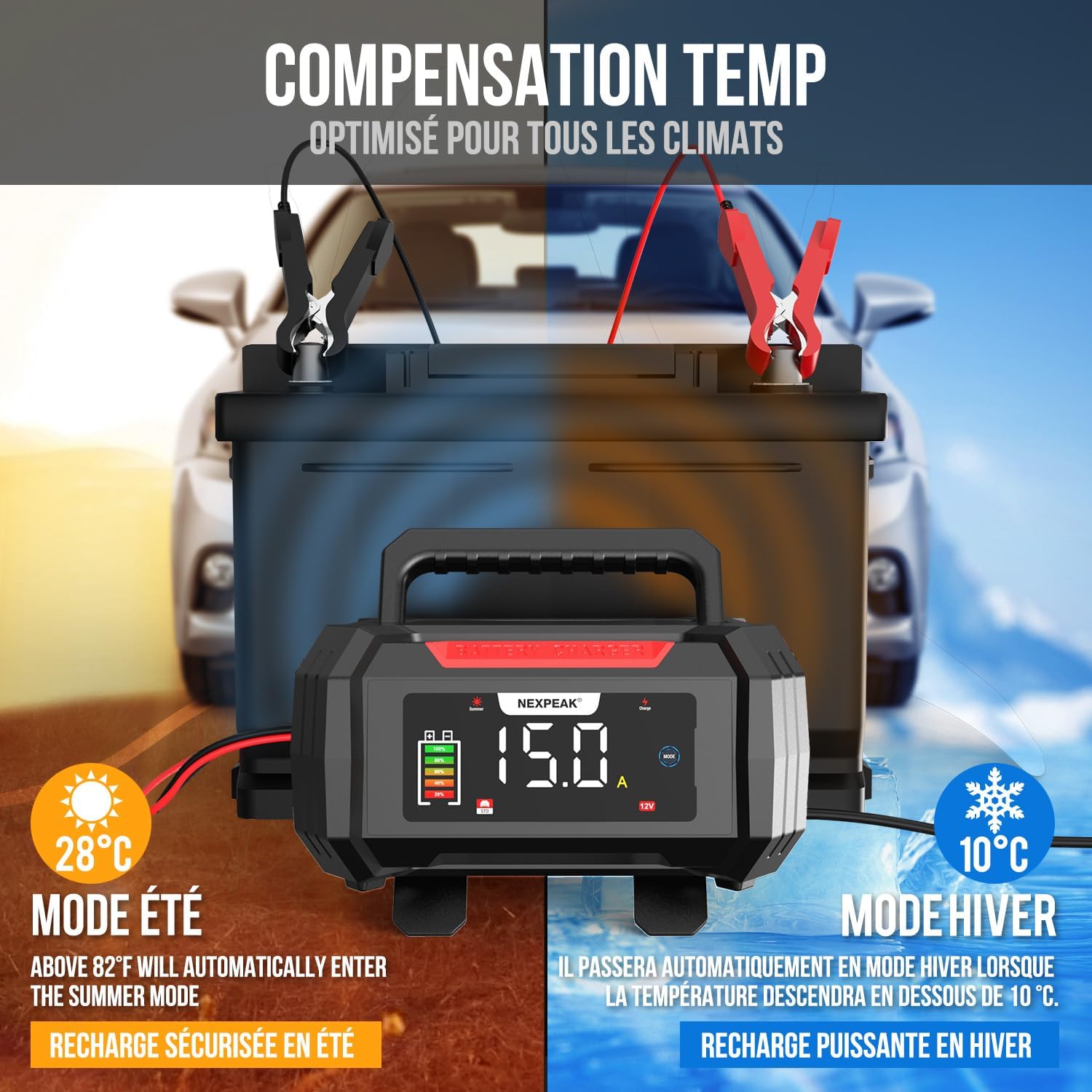
Image: The NEXPEAK NC315 charger demonstrating its temperature compensation feature, showing automatic adjustment for summer (above 28°C) and winter (below 10°C) charging conditions.
5.3. 9-Stage Smart Charging Process
The charger employs a sophisticated 9-stage charging algorithm to ensure optimal battery health and longevity:
- Battery Detection: Analyzes battery condition.
- Desulfation: Breaks down lead sulfate crystals.
- Soft Start: Gradually introduces current to prevent damage.
- Bulk Charge: Charges the battery to approximately 80% capacity.
- Absorption: Charges the battery to 100% at a decreasing current.
- Battery Test: Checks battery health.
- Repair Charge: Reconditions the battery if needed.
- Float Charge: Maintains the battery at full charge.
- Monitoring Phase: Continuously monitors battery status.

Image: Diagram illustrating the 9-stage intelligent charging process of the NEXPEAK NC315, showing how voltage and current are managed through detection, desulfation, soft start, bulk, absorption, test, repair, float, and monitoring stages.
6. Maintenance
Proper maintenance ensures the longevity and reliable operation of your NEXPEAK NC315 charger and your batteries.
- Charger Cleaning: Disconnect the charger from power and the battery before cleaning. Wipe the exterior with a soft, dry cloth. Do not use harsh chemicals or abrasives.
- Cable Inspection: Regularly inspect the charging cables and clamps for any signs of damage, fraying, or corrosion. Replace if necessary.
- Storage: Store the charger in a cool, dry place when not in use. Utilize the integrated cable storage to keep cables tidy and protected.
- Battery Maintenance: For vehicles stored for extended periods, use the charger's trickle charge or maintenance mode to keep the battery optimally charged.

Image: The NEXPEAK NC315 charger operating as a slow charger (1.75 Ampere), ideal for maintaining batteries in unused vehicles or those in storage, applicable to cars, boats, and other equipment.
7. Troubleshooting
If you encounter issues with your NEXPEAK NC315 charger, refer to the following common problems and solutions:
| Problem | Possible Cause | Solution |
|---|---|---|
| Charger does not turn on. | No power from outlet; loose connection. | Check AC power cord connection. Test outlet with another device. |
| Charger not charging. | Incorrect mode selected; poor battery connection; battery too deeply discharged. | Ensure correct mode for battery type. Check clamp connections. Try Repair Mode for deeply discharged batteries (if not completely dead). |
| Error message on display. | Reverse polarity; short circuit; overvoltage/overcurrent. | Disconnect charger. Reconnect clamps ensuring correct polarity (+ to +, - to -). Inspect cables for damage. If error persists, contact support. |
| Charger gets hot. | Normal operation; poor ventilation. | Some heat is normal during charging. Ensure adequate ventilation around the charger. The built-in cooling system will manage heat. If excessively hot, disconnect and allow to cool. |
If the problem persists after attempting these solutions, please contact NEXPEAK customer support.
8. Specifications
| Feature | Specification |
|---|---|
| Brand | NEXPEAK |
| Model Number | NC315 |
| Input Voltage | 100-240V AC |
| Output Voltage | 12V DC / 24V DC |
| Output Current (12V) | 15A |
| Output Current (24V) | 8A |
| Battery Types | LiFePO4, Lead-Acid (AGM, GEL, SLA, Flooded) |
| Dimensions (L x W x H) | 19P x 8.8l x 17H centimeters (approx.) |
| Item Weight | 1.13 Kilograms |
| Safety Certifications | TÜV, UL Certified (for cables) |
| Warranty | 2 Years Manufacturer Warranty |
9. Warranty and Support
9.1. Manufacturer's Warranty
The NEXPEAK NC315 Smart Car Battery Charger comes with a 2-year manufacturer's warranty from the date of purchase. This warranty covers defects in materials and workmanship under normal use. It does not cover damage caused by misuse, accident, unauthorized modification, or neglect.
Please retain your proof of purchase for warranty claims.
9.2. Customer Support
For technical assistance, warranty claims, or any questions regarding your NEXPEAK NC315 charger, please contact our customer support team. You can typically find contact information on the product packaging or the official NEXPEAK website.
When contacting support, please have your product model (NC315) and purchase details ready.


