
Introduction
This manual provides detailed instructions for the installation, operation, and maintenance of your Adapter-Universe Android 13 Car Radio. This unit is designed for Dodge, Chrysler, and Jeep vehicles manufactured between 1990 and 2000. It features a 6.2-inch IPS HD touch screen, 4G RAM + 64G ROM, Wireless CarPlay, Android Auto, GPS navigation, Bluetooth 5.2, FM radio, and supports a backup camera. Please read this manual thoroughly before installation and use to ensure proper function and safety.
Package Contents
Verify that all items listed below are included in your package:
- Radio Unit
- Power Cable & RCA Cable
- USB Cable & Microphone Cable
- HD 1080P Backup Camera & Camera Cable
- GPS Antenna & Signal Cable
Setup and Installation
Before beginning installation, ensure your vehicle's battery is disconnected to prevent electrical damage. Professional installation is recommended.
Vehicle Compatibility
This car radio is designed for specific Dodge, Chrysler, and Jeep models from 1990-2000. Please confirm the shape and size of your vehicle's center console before installation. Refer to the image below for reference.

Image: Car radio installed in a vehicle dashboard, showing compatibility for Dodge, Chrysler, and Jeep 1990-2000 models. The image also displays before and after views of the dashboard with the new radio.

Image: Before and after installation of the car radio in a vehicle dashboard, highlighting the fit for 1990-2000 Jeep, Chrysler, and Dodge models.
Wiring Diagram
Connect the provided cables according to the diagram below. Ensure all connections are secure to prevent malfunctions.
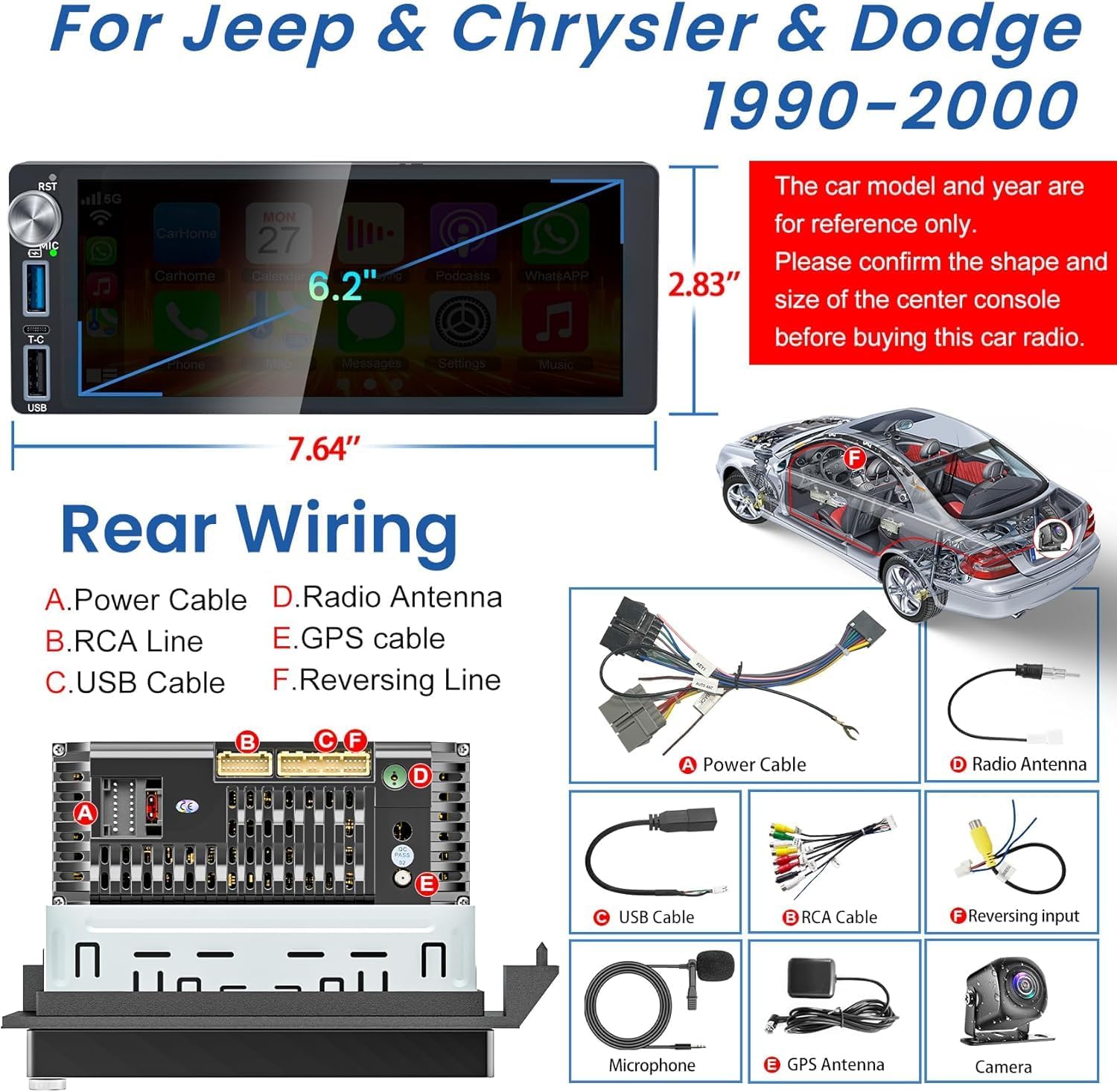
Image: Rear wiring diagram for the car radio, showing connections for power cable, RCA line, USB cable, radio antenna, GPS cable, and reversing line. Dimensions of the unit are also shown.
- A. Power Cable: Connect to vehicle's power supply.
- B. RCA Line: For audio/video output and input connections.
- C. USB Cable: For USB devices and wired CarPlay/Android Auto.
- D. Radio Antenna: Connect to vehicle's radio antenna.
- E. GPS Cable: Connect the GPS antenna for navigation functionality.
- F. Reversing Line: Connect to the backup camera input.
Operating Instructions
Wireless CarPlay & Android Auto
Connect your smartphone wirelessly or via USB to access CarPlay or Android Auto features. This allows for hands-free calls, navigation, messaging, and media playback directly on the car stereo's screen.
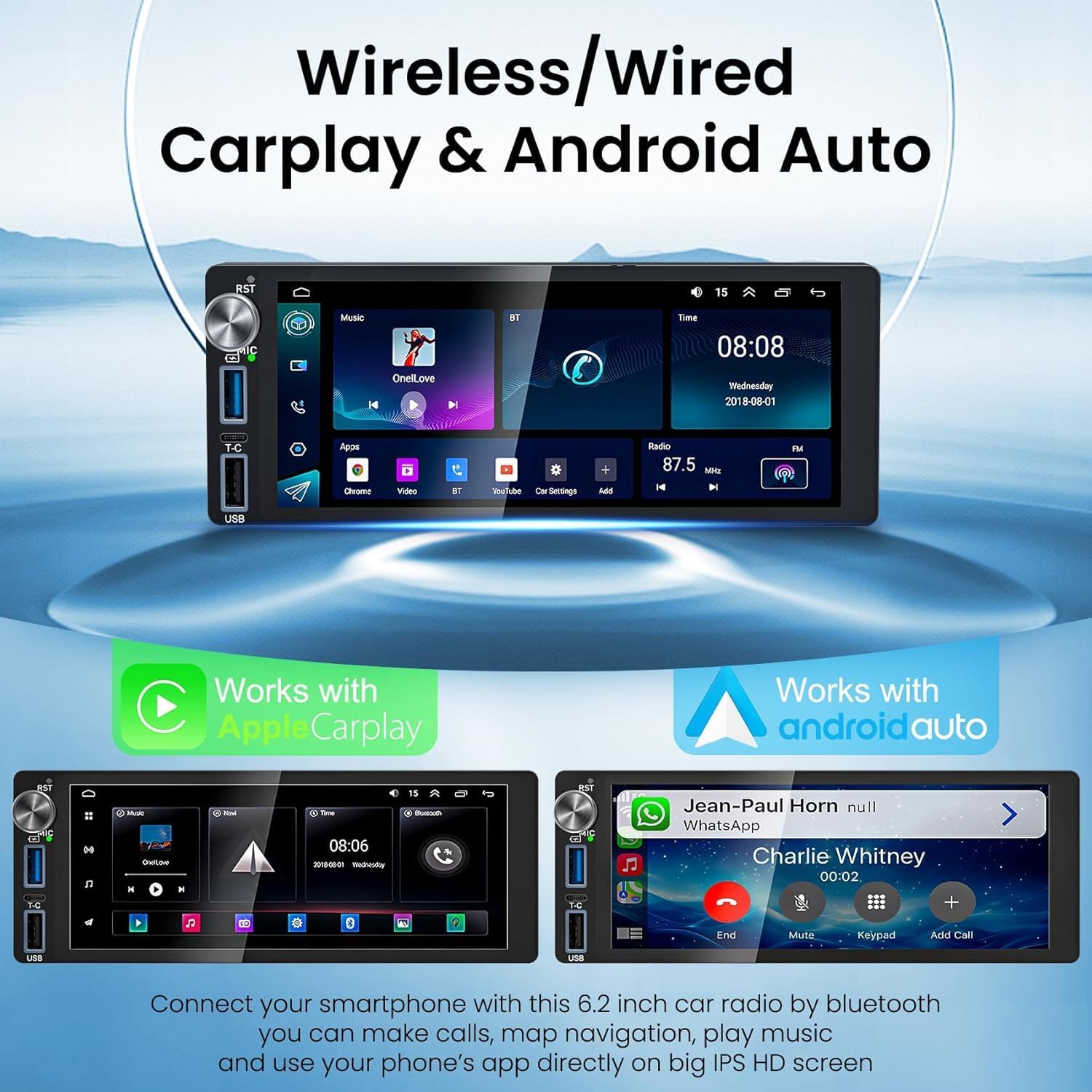
Image: Car radio display showing Wireless CarPlay and Android Auto interfaces, demonstrating smartphone integration for calls, map navigation, and media playback.
Bluetooth 5.2 Connectivity
Pair your mobile device via Bluetooth 5.2 for hands-free calling and wireless audio streaming. The built-in noise-canceling microphone and external microphone ensure clear call quality.

Image: Car radio display showing Bluetooth call interface and FM radio tuner with EQ settings. A smartphone is shown making a call, and the radio's equalizer settings are visible.
GPS Navigation & WiFi Connection
Utilize the built-in GPS module and external antenna for accurate navigation. Connect to Wi-Fi or a mobile hotspot to download maps, access online navigation services, and browse the internet.

Image: Car radio display showing GPS navigation and Wi-Fi connection interface, with various navigation apps like Google Maps and Waze, and internet browsing options. A smartphone is shown connecting to Wi-Fi.
Backup Camera Functionality
The included 1080P backup camera provides a clear, wide-angle view when reversing. The screen automatically switches to the camera feed when reverse gear is engaged, enhancing safety.

Image: Car radio display showing backup camera view with parking guidelines and a 170-degree wide-angle camera. The image highlights HD image quality, waterproof design, night vision, and wide viewing angle.
Steering Wheel Control (SWC)
Connect the unit to your vehicle's steering wheel controls to manage audio functions (volume, track change) directly from your steering wheel, promoting safer driving.
Split Screen Function
The split-screen feature allows you to run two applications simultaneously, such as navigation on one side and music playback on the other.

Image: Car radio display showing split-screen functionality with navigation on one side and a music player on the other, demonstrating multitasking capabilities.
Maintenance
To ensure the longevity and optimal performance of your car radio, follow these maintenance guidelines:
- Screen Cleaning: Use a soft, lint-free cloth to gently wipe the touch screen. Avoid abrasive cleaners or solvents that could damage the display.
- Software Updates: Periodically check for available software updates to ensure the system runs efficiently and has the latest features and security patches. Updates can typically be found through the system settings when connected to Wi-Fi.
- Environmental Care: Avoid exposing the unit to extreme temperatures, direct sunlight for prolonged periods, or excessive moisture.
- Cable Connections: Ensure all cables remain securely connected. Loose connections can lead to intermittent functionality or poor performance.
Troubleshooting
If you encounter issues with your car radio, refer to the following common troubleshooting steps:
- No Power:
- Check all power cable connections.
- Verify the vehicle's fuse for the radio is intact.
- Ensure the vehicle's battery is properly connected and charged.
- No Sound:
- Check speaker wiring connections.
- Ensure volume is not muted or set to minimum.
- Verify audio output settings in the system menu.
- GPS Signal Loss:
- Ensure the GPS antenna is correctly installed and has a clear view of the sky.
- Check the GPS antenna cable connection to the unit.
- CarPlay/Android Auto Not Connecting:
- For wireless connection, ensure Bluetooth and Wi-Fi are enabled on your phone and the radio.
- For wired connection, try a different USB cable.
- Restart both your phone and the car radio.
- Screen Unresponsive:
- Perform a soft reset by pressing the reset button (if available) or by turning off the vehicle and restarting.
- Ensure the screen is clean and free of debris.
If problems persist after attempting these steps, please contact customer support.
Specifications
| Feature | Detail |
|---|---|
| Brand | Adapter-Universe |
| Operating System | Android 13 |
| Memory Storage Capacity | 4GB RAM + 64GB ROM |
| Screen Size | 6.2 inches |
| Display Type | IPS HD Touch Screen |
| Connectivity Technology | Bluetooth 5.2, Wi-Fi |
| Special Features | Wireless/Wired CarPlay & Android Auto, GPS Navigation, Rearview Camera Input, Steering Wheel Control, FM Radio, Multi-UI Themes, Split Screen |
| Map Type | Worldwide (Offline/Online) |
| Audio Output Mode | Stereo |
| Compatible Vehicle Type | Dodge, Chrysler, Jeep (1990-2000) |
| Item Weight | 1.32 kg |
Warranty and Support
Your Adapter-Universe car radio comes with a 2-Year Warranty from the date of purchase, covering manufacturing defects and malfunctions under normal use. For warranty claims or technical assistance, please contact Adapter-Universe customer support.
For further assistance, please refer to the seller's contact information on the platform where the product was purchased.