
1. Introduction
Thank you for choosing the Weicoca 12V 2A Fast Charger. This universal power tool charger is designed to provide efficient and reliable charging for your Warrior cordless drills and other compatible Li-Ion battery-powered devices. Featuring an LED indicator for charging status, this charger is an essential accessory for your workshop or home use, ensuring your tools are always ready for action.

Figure 1.1: Weicoca 12V 2A Fast Charger with its power cord.
2. Product Features
- Efficient Power Conversion: Optimized circuit design minimizes energy loss, improves power efficiency, and extends the operational time of connected devices.
- Universal Compatibility: Compatible with various audio device models, meeting power requirements for different brands, and allowing easy plug-and-unplug.
- Non-Slip Grip: Textured surface enhances grip, preventing slippage or accidental disconnection during handling.
- Durable and Wear-Resistant: Black anti-slip casing and sturdy prongs resist wear and ensure stable connection, ideal for long-term use.
- Portable and Practical: Compact rectangular design makes it easy to carry or fix on sockets, suitable for home, stage, or outdoor audio setups.
- LED Indicator: Provides visual feedback on charging status.
3. Safety Information
Please read and understand all safety instructions before using this charger. Failure to follow these instructions may result in electric shock, fire, or serious injury.
- Indoor Use Only: This charger is designed for indoor use. Do not expose it to rain, moisture, or extreme temperatures.
- Proper Voltage: Ensure the input voltage of the charger (120 Volts DC) matches your power outlet's voltage.
- Unplug When Not In Use: Always unplug the charger from the power outlet when not in use or before cleaning.
- Avoid Damage: Do not operate the charger if the cord or plug is damaged. Do not pull the cord to disconnect from the outlet.
- Ventilation: Ensure adequate ventilation around the charger during operation. Do not cover the charger.
- Compatibility: Only use this charger with compatible Li-Ion batteries and devices as specified by the manufacturer. Using incompatible batteries may cause fire or explosion.
- Children and Pets: Keep the charger out of reach of children and pets.
4. Setup
Follow these steps to set up your Weicoca 12V 2A Fast Charger:
- Inspect the Charger: Before first use, visually inspect the charger and its cable for any signs of damage.
- Connect to Power: Plug the charger's AC plug into a standard 120V DC wall outlet.
- Connect to Device: Insert the barrel connector of the charger's output cable into the charging port of your compatible Warrior cordless drill or other Li-Ion powered device. Ensure a secure connection.
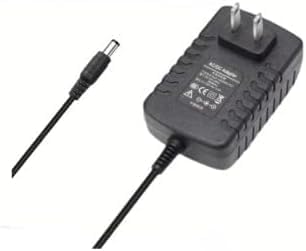
Figure 4.1: The charger and its output cable with barrel connector.

Figure 4.2: Close-up of the charger's barrel connector for device connection.
5. Operating Instructions
Once connected, the charger will begin charging your device. Observe the LED indicator for charging status:
- Red LED: Indicates the device is currently charging.
- Green LED: Indicates charging is complete, or the charger is in standby mode (not connected to a device).
Charging times will vary depending on the battery capacity and its current charge level. Always disconnect the charger once the device is fully charged to prolong battery life.

Figure 5.1: The charger in a typical workshop environment, ready for use.
6. Maintenance
Proper maintenance ensures the longevity and optimal performance of your charger:
- Cleaning: Disconnect the charger from the power outlet and the device before cleaning. Use a soft, dry cloth to wipe the exterior. Do not use abrasive cleaners or solvents.
- Storage: Store the charger in a cool, dry place away from direct sunlight and extreme temperatures. Keep the cable neatly coiled to prevent kinks or damage.
- Inspection: Periodically inspect the charger, cable, and connectors for any signs of wear, cuts, or damage. If damage is found, discontinue use and replace the charger.
7. Troubleshooting
If you encounter issues with your charger, refer to the following common problems and solutions:
| Problem | Possible Cause | Solution |
|---|---|---|
| Charger LED does not light up. | No power from outlet; Charger not properly plugged in; Damaged charger. | Check the power outlet with another device; Ensure the charger is fully plugged in; Inspect charger for damage and replace if necessary. |
| Device not charging. | Loose connection; Incompatible device/battery; Device battery is faulty. | Ensure the barrel connector is securely inserted into the device; Verify device/battery compatibility; Test the device with another known-good charger or battery if possible. |
| Charger feels warm during operation. | Normal operation; Poor ventilation. | A slight warmth is normal. Ensure the charger is in a well-ventilated area and not covered. If it becomes excessively hot, unplug immediately and contact support. |
8. Specifications
| Specification | Value |
|---|---|
| Brand | Weicoca |
| Model (ASIN) | B0FG2JD794 |
| Input Voltage | 120 Volts (DC) |
| Output | 12V 2A |
| Product Dimensions | 2 x 0.2 x 2 inches |
| Item Weight | 0.48 ounces |
| UPC | 729604860055 |
| Date First Available | June 30, 2025 |
9. Warranty and Support
For warranty information or technical support, please contact the seller or manufacturer directly. Keep your purchase receipt as proof of purchase.
Manufacturer: Weicoca
For further assistance, please refer to the contact information provided at the point of purchase or on the product packaging.