
Introduction
Thank you for choosing the LITTOAK GM05 Computer Speakers. These speakers are designed to provide high-quality audio for music, gaming, and movies, featuring versatile connectivity options and customizable RGB lighting. This manual will guide you through the setup, operation, and maintenance of your new speakers.
Package Contents
Please verify that all items are present in your package:
- LITTOAK GM05 Computer Speakers (2 units)
- Quick Start Guide
- 3.5 mm to 3.5 mm Audio Cable
- Power Adapter (DC)
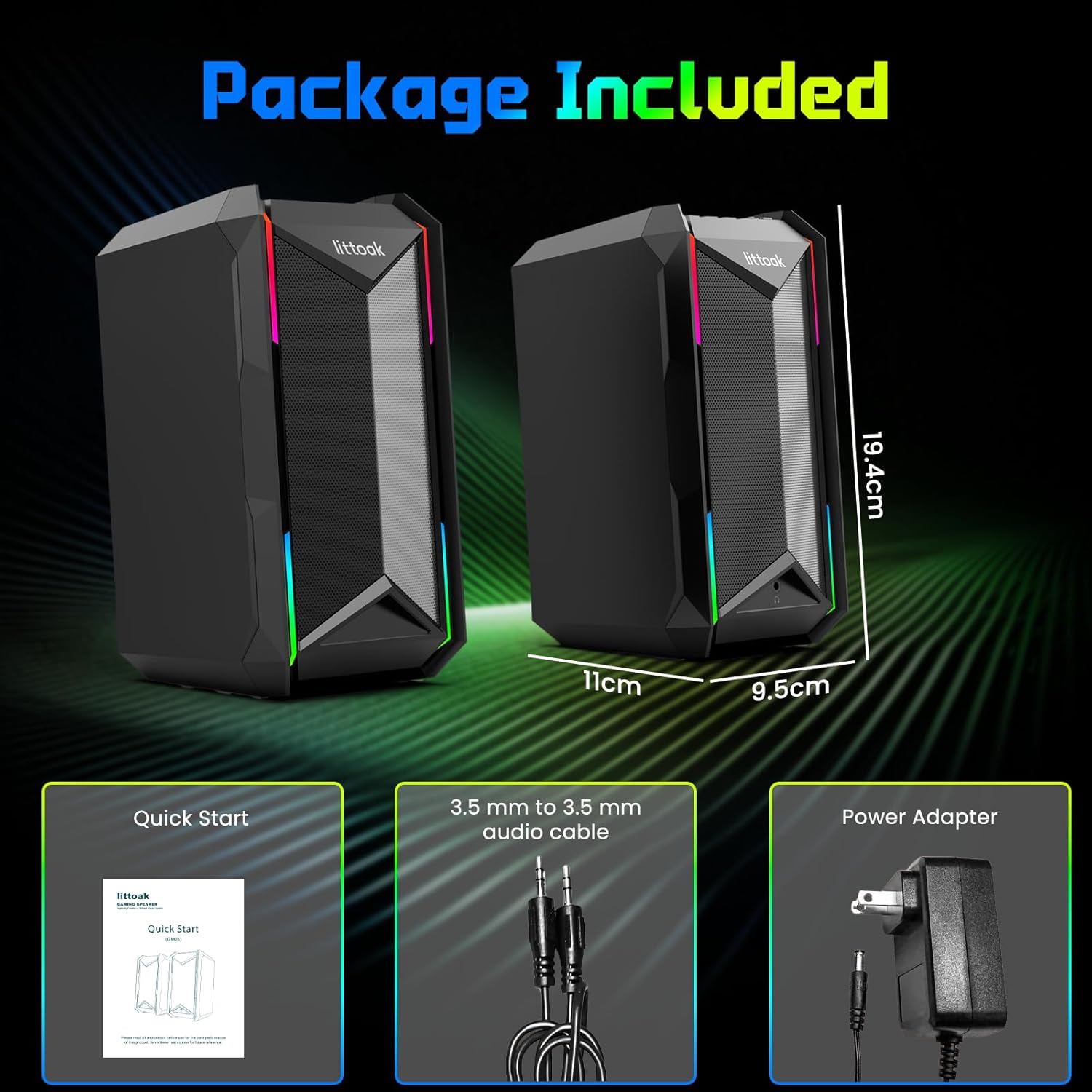
Image: Package contents including two speakers, quick start guide, 3.5mm audio cable, and power adapter.
Video: Unboxing the LITTOAK GM05 Computer Speakers, showing the contents and initial setup.
Product Overview
Front-Panel Controls
The main speaker features easily accessible controls on its top panel:
- Power/Mode Button (Ⓘ/M): Press and hold to power on/off. Short press to switch input modes (Bluetooth, AUX, Type-C).
- EQ Button (EQ): Cycles through sound modes and RGB lighting modes.
- Play/Pause Button (⏸/⏵): Play or pause audio.
- Volume Down (-): Decrease volume.
- Volume Up (+): Increase volume.

Image: Top-mounted controls for easy access.
Rear Ports
The rear of the main speaker provides various connection options:
- DC Input: For connecting the power adapter.
- SPK OUT: Connects to the secondary speaker.
- Type-C Port: For digital audio input (sound card function).
- AUX IN: For analog audio input using the 3.5mm cable.

Image: Rear panel with various audio input and output ports.
Headphone Port
A 3.5mm headphone output port is located on the front of the main speaker for private listening.
Setup Instructions
- Connect Speakers: Connect the main speaker (with controls) to the secondary speaker using the provided SPK OUT cable.
- Power Connection: Plug the DC power adapter into the DC input port on the main speaker, then connect the adapter to a power outlet.
- Power On: Press and hold the Power/Mode button (Ⓘ/M) on the main speaker to turn it on.
- Select Input Mode: Short press the Power/Mode button (Ⓘ/M) to cycle through input modes: Bluetooth, AUX, or Type-C.
Connecting via AUX (3.5mm Audio Cable)
- Ensure the speakers are powered on.
- Connect one end of the 3.5mm audio cable to the AUX IN port on the speaker.
- Connect the other end of the 3.5mm audio cable to the headphone jack or audio output port of your device (PC, TV, laptop, etc.).
- Short press the Power/Mode button (Ⓘ/M) until the AUX input mode is selected.
Connecting via Bluetooth 5.3
- Ensure the speakers are powered on.
- Short press the Power/Mode button (Ⓘ/M) until the Bluetooth input mode is selected. The RGB lights will flash, indicating pairing mode.
- On your device (smartphone, tablet, laptop), enable Bluetooth and search for "LITTOAK GM05".
- Select "LITTOAK GM05" to pair. Once connected, the speakers will emit a confirmation sound, and the RGB lights will stop flashing.
Connecting via Type-C (USB Sound Card)
- Ensure the speakers are powered on.
- Connect a USB Type-C cable (not included) from your device to the Type-C port on the speaker.
- Short press the Power/Mode button (Ⓘ/M) until the Type-C input mode is selected.
- Your computer should automatically recognize the speakers as an audio output device.
Operating Instructions
Volume Control
Use the + and - buttons on the top panel to adjust the volume.
EQ Sound Modes and RGB Lighting
The EQ button serves a dual function. Short press the EQ button to cycle through three distinct sound modes: Music Mode, Movie Mode, and Game Mode. Continuing to press the EQ button will then cycle through 10 vibrant RGB lighting modes, including various static colors and music-synced effects. This allows you to customize both your audio experience and the visual ambiance.

Image: Visual representation of the three equalizer modes.

Image: Examples of the 10 RGB light effect modes.
Video: Demonstrates connecting the GM05 speakers via Bluetooth and AUX, adjusting volume, switching EQ modes, and cycling RGB lighting.
Maintenance
- Cleaning: Use a soft, dry cloth to clean the speaker surfaces. Do not use liquid cleaners or aerosols.
- Storage: Store speakers in a cool, dry place away from direct sunlight and extreme temperatures.
- Avoid Water: These speakers are not waterproof. Keep them away from liquids.
Troubleshooting
- No Sound:
- Ensure the speakers are powered on and the volume is turned up.
- Check that the correct input mode (Bluetooth, AUX, Type-C) is selected.
- Verify all cables are securely connected.
- If using AUX, ensure the 3.5mm cable is fully inserted into both the speaker and your device.
- If using Bluetooth, ensure the speakers are paired and connected to your device.
- Bluetooth Pairing Issues:
- Make sure the speakers are in Bluetooth pairing mode (RGB lights flashing).
- Ensure your device's Bluetooth is enabled and within range (typically 10 meters).
- Forget "LITTOAK GM05" from your device's Bluetooth list and try pairing again.
- Turn off and on both the speakers and your device.
- Distorted Sound:
- Lower the volume on both the speakers and your connected device.
- Check for loose cable connections.
- Ensure the audio source is not distorted.
Specifications
| Feature | Detail |
|---|---|
| Model Name | GM05 |
| Brand | LITTOAK |
| Speaker Type | Bookshelf |
| Connectivity Technology | Bluetooth 5.3, Auxiliary (3.5mm), Type-C |
| Speaker Maximum Output Power | 30 Watts |
| Audio Output Mode | Stereo, Music, Movie, Game (EQ Modes) |
| RGB Lighting | 10 Modes (Static, Music-synced) |
| Control Method | Touch Buttons (Front-Panel) |
| Power Source | AC (DC Adapter Powered) |
| Product Dimensions | 9.45"D x 11.26"W x 6.38"H |
| Item Weight | 4.31 pounds |
| Material | Plastic |
Warranty and Support
LITTOAK products are designed for reliability and performance. For warranty information or technical support, please refer to the contact details provided in your Quick Start Guide or visit the official LITTOAK website. Keep your purchase receipt for warranty claims.