
1. Product Overview
The KESHIDE Digital Alarm Clock Model 210 is a battery-operated alarm clock featuring a large LCD display, indoor temperature reading, night light, and snooze function. It is designed for ease of use in various settings such as bedrooms, offices, and during travel.

Figure 1: Front view of the KESHIDE Digital Alarm Clock Model 210.
Key Features:
- Large LCD display with time, date, and indoor temperature.
- 12/24 hour format selection.
- Daily alarm with 5-minute snooze function.
- Night light with a 5-second illumination or glow-in-the-dark function.
- Temperature display in Celsius (℃) or Fahrenheit (℉).
- Battery operated (3 AAA batteries, not included).
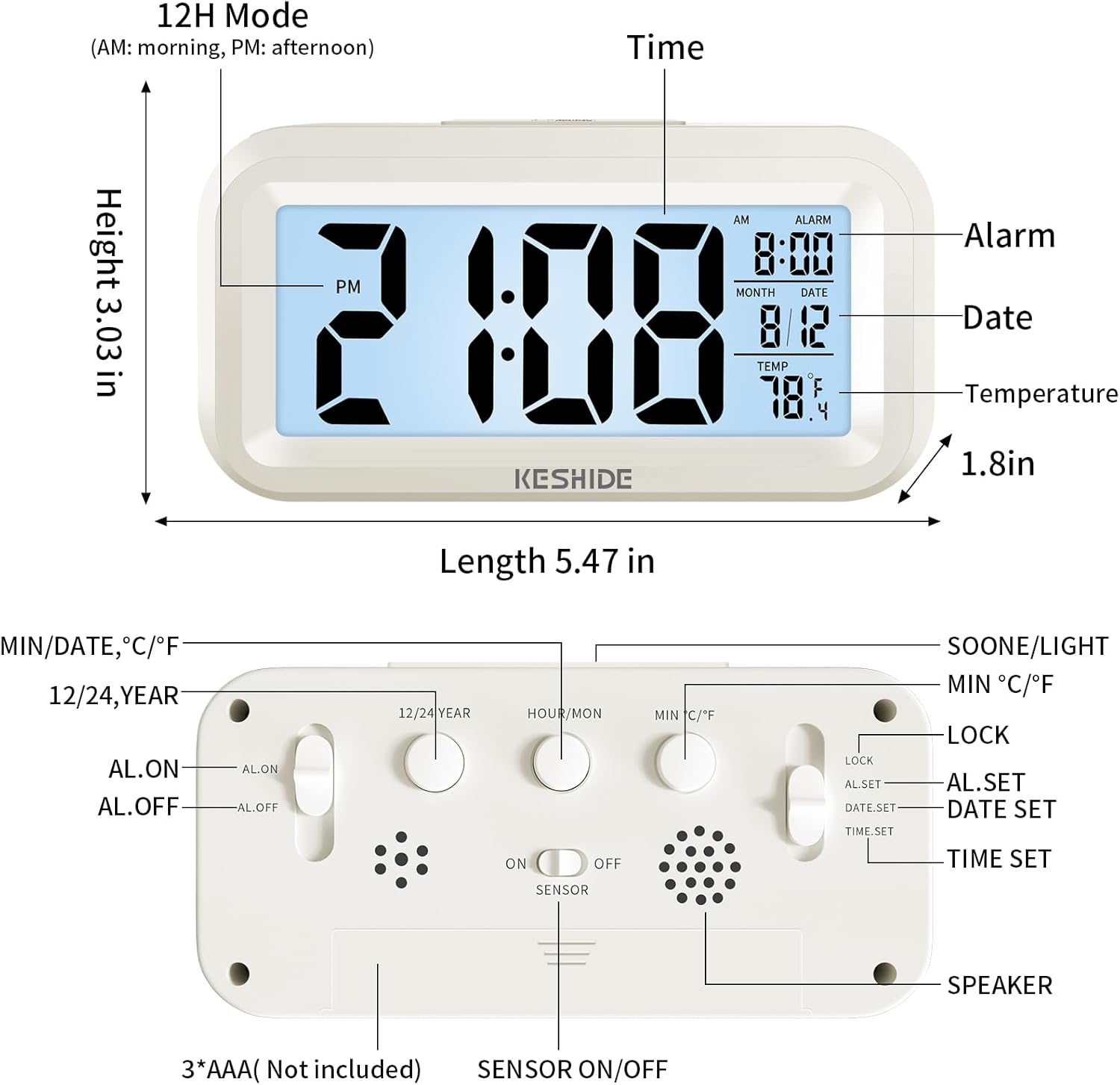
Figure 2: Labeled diagram of the alarm clock, showing display elements and dimensions.
2. Setup
2.1 Battery Installation
- Locate the battery compartment on the back of the clock.
- Open the battery compartment cover.
- Insert 3 new AAA batteries (not provided), ensuring correct polarity (+/-).
- Close the battery compartment cover securely.

Figure 3: Back panel controls and battery compartment.
3. Operating Instructions
3.1 Setting Time and Date
- Slide the LOCK/AL.SET/DATE.SET/TIME.SET switch on the back to TIME.SET.
- Press the HOUR/MON button to adjust the hour.
- Press the MIN/DATE button to adjust the minute.
- To set the year, press the 12/24 YEAR button.
- To set the month, slide the switch to DATE.SET and press HOUR/MON.
- To set the day, slide the switch to DATE.SET and press MIN/DATE.
- Once time and date are set, slide the switch back to LOCK to save settings.
3.2 12/24 Hour Format Selection
While in normal time display mode (switch set to LOCK), press the 12/24 YEAR button to toggle between 12-hour (AM/PM) and 24-hour formats.

Figure 4: Switching between 12-hour and 24-hour time display.
3.3 Setting the Alarm
- Slide the LOCK/AL.SET/DATE.SET/TIME.SET switch on the back to AL.SET.
- Press the HOUR/MON button to adjust the alarm hour.
- Press the MIN/DATE button to adjust the alarm minute.
- Once the alarm time is set, slide the switch back to LOCK.
- To activate or deactivate the alarm, use the AL.ON/AL.OFF switch on the back. When set to AL.ON, an alarm icon will appear on the display.
3.4 Snooze Function
When the alarm sounds, press the large SNOOZE/LIGHT button on the top of the clock. The alarm will temporarily stop and sound again after approximately five minutes. To turn off the alarm completely, press any button on the back of the clock, or the alarm will automatically stop after 60 seconds if no action is taken.
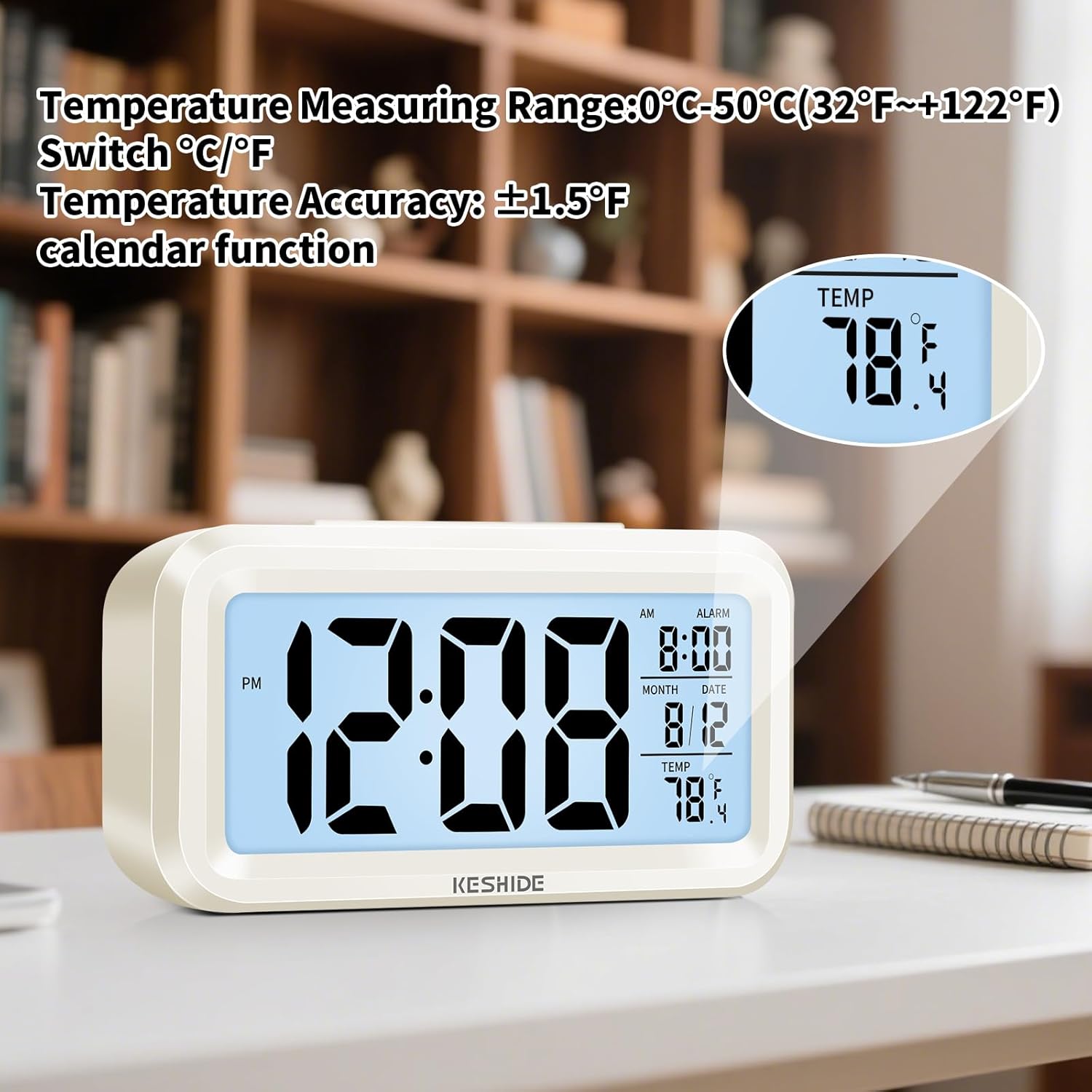
Figure 5: Activating the snooze function.
3.5 Night Light and Backlight
- Temporary Backlight: Press the SNOOZE/LIGHT button on the top to illuminate the screen for five seconds.
- Automatic Glow-in-the-Dark: The clock features a photosensitive sensor. Slide the SENSOR ON/OFF switch on the back to ON. In dark environments, the screen will emit a soft glow, allowing you to see the time without pressing any buttons. Slide the switch to OFF to disable this feature.

Figure 6: Automatic screen standby during the day and soft glow at night.
3.6 Temperature Display
The clock displays the indoor temperature. To switch between Celsius (℃) and Fahrenheit (℉), press the MIN ℃/℉ button on the back of the clock. The temperature range is 0℃~50℃ (32℉~122℉).

Figure 7: Indoor temperature display.
4. Maintenance
4.1 Battery Replacement
When the display dims or functions become erratic, it is time to replace the batteries. Follow the steps in Section 2.1 for battery installation.
4.2 Cleaning
Wipe the clock with a soft, dry cloth. Do not use abrasive cleaners or immerse the clock in water.
5. Troubleshooting
- Display is blank or dim:
Ensure batteries are correctly installed and not depleted. Replace with fresh AAA batteries. - Alarm does not sound:
Check if the AL.ON/AL.OFF switch is set to AL.ON. Verify that the alarm time is correctly set. - Night light/backlight not working:
For temporary backlight, ensure the SNOOZE/LIGHT button is pressed firmly. For automatic glow, ensure the SENSOR ON/OFF switch is set to ON and the environment is sufficiently dark. - Incorrect temperature reading:
The clock measures ambient indoor temperature. Ensure it is not placed near heat sources or air conditioning vents that could affect readings.
6. Specifications
| Feature | Detail |
|---|---|
| Brand | KESHIDE |
| Model Number | 210 |
| Display Type | LCD |
| Power Source | 3 x AAA Batteries (not included) |
| Product Dimensions | 6.7"W x 3"H |
| Item Weight | 5.6 ounces |
| Temperature Range | 0℃~50℃ (32℉~122℉) |
| Material | Plastic |
| Mounting Type | Tabletop |
7. Warranty and Support
KESHIDE is committed to providing quality products and customer satisfaction. If you encounter any issues or have concerns regarding your product, please contact KESHIDE customer service via the Amazon Platform. We are dedicated to addressing your problems even if the standard return window has closed, ensuring you receive appropriate support.