1. Introduction
Thank you for choosing the WOPET Automatic Pet Feeder with Camera. This intelligent feeding system is designed to provide consistent meal schedules for your pets, ensuring they are fed on time, every time. Equipped with an HD camera, two-way audio, and night vision, it allows you to monitor and interact with your pets remotely via the WOPET Life app. This manual provides detailed instructions for setup, operation, maintenance, and troubleshooting to help you get the most out of your new feeder.
2. Safety Information
- This appliance is for indoor use only. Do not expose to rain or moisture.
- Always use the provided AC power adapter. Ensure the power cord is not damaged or pinched.
- Keep the feeder on a stable, level surface to prevent tipping.
- Do not allow pets to chew on the power cord or feeder components.
- Do not immerse the main unit in water or any other liquid. Only the food bowls are washable.
- Unplug the feeder before cleaning or when not in use for extended periods.
- Keep out of reach of children.
- Use only dry pet food. Do not use wet, canned, or moist pet food.
- Ensure the kibble size is between 2-12mm to prevent jamming.
3. Product Overview
Familiarize yourself with the components of your WOPET Automatic Pet Feeder.

Image: The WOPET Automatic Pet Feeder, showing the main unit, camera, and dual food bowls. A smartphone screen displays a live view of pets.
Key Features:
- Smart APP Control: Schedule up to 10 meals daily with 1-20 portions each.
- HD Camera with Night Vision: 1080P HD camera with 160° ultra-wide-angle lens and 4X digital zoom. Enhanced night vision up to 33 ft.
- Two-way Audio & Meal Call: Built-in microphone and speaker for real-time interaction and personalized meal announcements.
- Privacy Protection: Option to enable or disable the camera via the app.
- Multi-User Access: Share access with family and friends.
- Dual Power Backup: Operates with AC adapter and 3x D-cell batteries (not included) for uninterrupted feeding.
- Low Food Sensor: Alerts you when food levels are low.
- SD Card Storage: Supports up to 256GB (4G SD card included).

Image: Visual representation of the feeder's key features including two-way audio, privacy mode, instant alerts, full HD resolution, night vision, and built-in 4G card.
4. Setup
4.1 Unpacking and Initial Inspection
- Carefully remove all components from the packaging.
- Check for any damage during transit. If any parts are missing or damaged, contact customer support.
- Ensure you have the main feeder unit, power adapter, and dual food bowls.
4.2 Power Supply
- Connect the AC power adapter to the feeder's power port and plug it into a wall outlet.
- For power backup, insert 3 D-cell batteries (not included) into the battery compartment at the bottom of the feeder. This ensures continuous operation during power outages.
4.3 App Installation and Connection
- Download the WOPET Life app from the App Store (iOS) or Google Play Store (Android).
- Register a new account or log in if you already have one.
- Follow the in-app instructions for adding a new device.

Image: Step-by-step guide for network pairing the WOPET feeder with the mobile app, showing screens for device selection, Bluetooth pairing, Wi-Fi connection, and device naming.
4.4 Food Loading
- Ensure the feeder is clean and dry before adding food.
- Open the lid of the food hopper.
- Pour dry pet food into the hopper. The feeder has a 6L capacity.
- Close the lid securely to maintain food freshness.
- Important: Only use dry kibble with a size between 2-12mm. Larger kibble may cause jams.

Image: Visual guide showing recommended kibble sizes (2mm, 8mm, 12mm) and types (single-shaped, mixed-shaped, freeze-dried) suitable for the feeder.
5. Operating Instructions
5.1 Scheduling Feeds
- Open the WOPET Life app and select your feeder.
- Navigate to the "Meal Schedule" section.
- Set desired feeding times (up to 10 meals per day).
- Adjust the portion size for each meal (1-20 portions). Each portion is approximately 5g.
- Save your schedule. The feeder will automatically dispense food at the programmed times.

Image: A screenshot of the WOPET Life app displaying the meal schedule interface, allowing users to set total portions, approximate weight, and specific meal times like breakfast, lunch, and dinner.
5.2 Manual Feeding
- From the app's main screen for your feeder, you can manually dispense food.
- Tap the manual feed button and select the number of portions you wish to dispense immediately.
5.3 Camera Features
- Live View: Access the live 1080P HD video feed of your pet's feeding area anytime, anywhere.
- Night Vision: The camera automatically switches to night vision in low-light conditions, providing clear visibility up to 33 feet.
- Two-Way Audio: Use the built-in microphone and speaker to talk to your pets or listen to them.
- Meal Call: Record a 10-second voice message that plays during dispensing to call your pets to eat.
- Privacy Mode: You can enable or disable the camera through the app's privacy settings for enhanced privacy.
- Video Recording: Videos can be saved to the included 4G micro SD card (expandable up to 256GB).
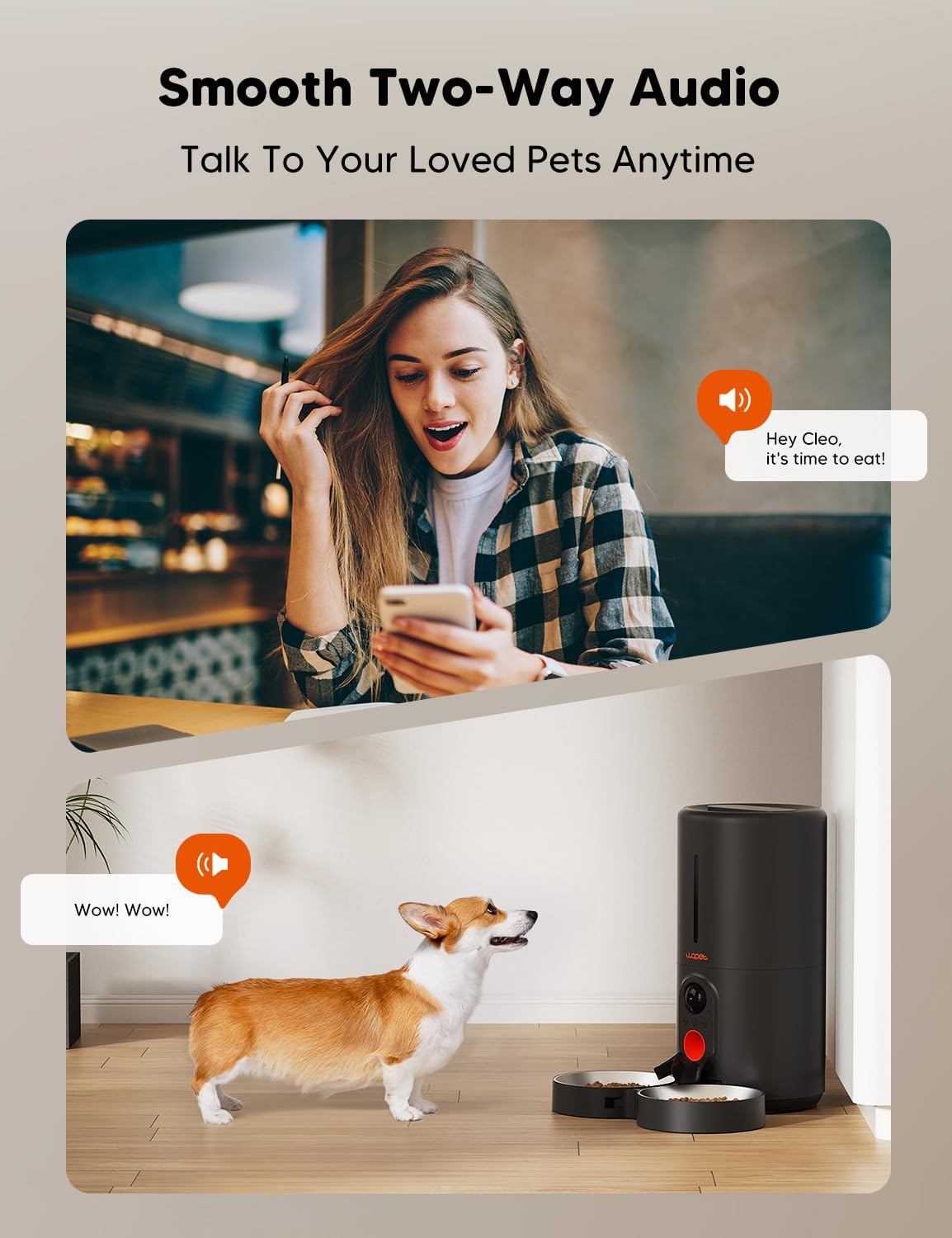
Image: A woman using her smartphone to communicate with her dog through the feeder's two-way audio feature, demonstrating remote interaction.

Image: A woman viewing her cat on the WOPET app at night, demonstrating the clear night vision capabilities of the feeder's camera.

Image: Screenshots of the WOPET app showing privacy settings, including the option to turn the camera on or off, ensuring user control over privacy.
5.4 Low Food Sensor
- The feeder is equipped with a sensor that detects low food levels in the hopper.
- You will receive an alert via the WOPET Life app when it's time to refill the food.
5.5 Multi-User Sharing
- The WOPET Life app supports multiple users, allowing you to share access to the feeder with family members or pet sitters.
- This enables simultaneous viewing and control from different devices.

Image: A collage depicting various individuals (family, friends) simultaneously accessing and interacting with the WOPET feeder via their smartphones, highlighting the multi-user sharing feature.
6. Maintenance
6.1 Cleaning the Feeder
- Before Cleaning: Always unplug the feeder from the power outlet and remove any batteries.
- Food Bowls: The stainless steel food bowls are removable and dishwasher-safe or can be hand-washed with mild soap and water. Ensure they are completely dry before reattaching.
- Food Hopper: The food hopper can be detached for cleaning. Wipe it with a damp cloth and mild detergent. Rinse thoroughly and allow to air dry completely.
- Main Unit: Wipe the exterior of the main unit with a soft, damp cloth. Do not submerge the main unit in water. Avoid getting water into the camera or electronic components.
- Dispenser Outlet: Periodically check the food dispenser outlet for any food residue or blockages. Use a small brush if necessary to clear it.
- Reassembly: Ensure all parts are completely dry before reassembling the feeder and reconnecting power.
7. Troubleshooting
If you encounter issues with your WOPET Automatic Pet Feeder, refer to the table below for common problems and solutions.
| Problem | Possible Cause | Solution |
|---|---|---|
| Feeder not dispensing food. | Food hopper empty; food jammed; dispenser blocked; power issue. | Refill hopper. Check for kibble jams (kibble too large?). Clear dispenser outlet. Check power connection and batteries. |
| App cannot connect to feeder. | Incorrect Wi-Fi password; feeder too far from router; 5GHz/2.4GHz incompatibility; app issues. | Ensure correct 2.4GHz Wi-Fi network. Move feeder closer to router. Restart feeder and app. Re-pair device if necessary. |
| Camera not working or blurry. | Privacy mode enabled; poor lighting; lens dirty; network issue. | Disable privacy mode in app. Ensure adequate lighting or check night vision. Clean camera lens. Check Wi-Fi connection. |
| Two-way audio not functioning. | Microphone/speaker muted in app; volume too low; network issue. | Check app settings for audio mute/volume. Ensure stable network connection. |
| Low food alert not received. | Sensor dirty; app notifications disabled. | Clean the low food sensor area. Enable notifications for the WOPET Life app in your phone settings. |
If the problem persists, please contact WOPET customer support for further assistance.
8. Specifications
| Feature | Detail |
|---|---|
| Model Name | HV10DP |
| Item Weight | 4 pounds |
| Product Dimensions (LxWxH) | 7 x 7 x 15 inches |
| Material | BPA free |
| Color | Black/Grey |
| Hopper Capacity | 6 Liters |
| Camera Resolution | 1080P HD |
| Camera View Angle | 160° Ultra-wide-angle |
| Night Vision Range | Up to 33 ft |
| Wi-Fi Compatibility | 5G/2.4G WiFi (Note: Feeder connects to 2.4GHz) |
| Power Supply | AC Adapter; 3x D-cell batteries (backup, not included) |
| Max Meals/Day | 10 |
| Portions/Meal | 1-20 portions (approx. 5g per portion) |
| Recommended Kibble Size | 2-12mm |
| SD Card Storage | Up to 256GB (4G SD card included) |
9. Warranty and Support
9.1 Warranty Information
The WOPET Automatic Pet Feeder with Camera comes with a 1-year limited warranty from the date of purchase. This warranty covers manufacturing defects and malfunctions under normal use. It does not cover damage caused by misuse, accidents, unauthorized modifications, or failure to follow the instructions in this manual.
9.2 Customer Support
For any questions, technical support, or warranty claims, please contact WOPET customer service. Refer to the contact information provided on the product packaging or the official WOPET website.


