1. Introduction
Thank you for choosing the ApexNexus Walking Pad with Handle Bar. This 3-in-1 portable treadmill is designed for versatile use, functioning as a walking pad, an under-desk treadmill, or a compact treadmill for home use. It features an extended running surface, a powerful yet quiet motor, and a foldable design for easy storage. Please read this manual thoroughly before initial use to ensure proper setup, safe operation, and effective maintenance.

This image illustrates the ApexNexus Walking Pad Treadmill in its primary configuration with the handle bar extended, suitable for walking or light jogging. An inset shows its use as an under-desk treadmill, highlighting its versatility.
2. Safety Information
WARNING: To reduce the risk of serious injury, read all important precautions and instructions in this manual before using the treadmill.
General Safety Precautions:
- Always place the treadmill on a level surface.
- Keep children and pets away from the treadmill during operation.
- Ensure adequate clear space (at least 2 feet) around the treadmill.
- Do not exceed the maximum user weight capacity of 300 lbs (136 kg).
- Wear appropriate athletic footwear.
- If you experience pain, dizziness, or shortness of breath, stop exercising immediately.
- Always hold the handle bar for stability when starting or stopping the treadmill, or if you feel unsteady.
Electrical Safety:
- Plug the treadmill into a properly grounded outlet.
- Do not use extension cords or adapters.
- Keep the power cord away from hot surfaces.
Emergency Stop:
In case of an emergency, step off the running belt and press the stop button on the remote control or the main unit. The treadmill will gradually come to a halt.
3. Package Contents
Verify that all components listed below are included in your package. If any items are missing or damaged, please contact customer support.
- ApexNexus Walking Pad Treadmill Unit x 1
- Remote Control x 1
- Small Wrench x 2
- User Manual x 1
- Knob x 2 (for handle bar)
- Lubricant x 1
- Removable Tablet Holder x 1
- Bracket Screws x 2

This image displays all items included in the product package, ensuring users can verify they have received all necessary components for assembly and operation.
4. Setup
Unpacking:
- Carefully remove the treadmill and all components from the packaging.
- Place the treadmill on a flat, stable surface.
Handle Bar Assembly (Optional):
The handle bar can be easily raised or lowered. To secure it in the upright position:
- Lift the handle bar to its vertical position.
- Insert and tighten the two included knobs on each side of the handle bar base to secure it. These knobs can be removed by hand without tools for folding.
Placement:
Ensure the treadmill is placed on a hard, level surface. Avoid placing it on thick carpets, which may obstruct ventilation or affect performance. Maintain at least 2 feet of clear space around the unit.
5. Operating Instructions
Powering On/Off:
- Plug the power cord into a grounded electrical outlet.
- Flip the main power switch (usually located near the power cord inlet) to the 'ON' position. The LED display will illuminate.
- To turn off, flip the main power switch to 'OFF' and unplug the unit.
Using the Remote Control:
The included remote control allows for convenient adjustment of speed and workout settings.
- Start/Stop Button: Press to begin or end a workout.
- Speed +/- Buttons: Adjust the treadmill speed in increments.
- Mode Button: Cycle through different pre-set programs or display modes (if applicable).
Understanding the LED Display:
The clear LED display provides real-time feedback on your workout progress.
- Speed: Current speed of the running belt (MPH).
- Distance: Total distance covered during the current workout.
- Time: Duration of the current workout.
- Calories: Estimated calories burned during the current workout.

This image demonstrates the ease of controlling the treadmill using the included remote. The clear LED display, visible from the handle bar, provides essential workout data including speed, distance, time, and calories.
6. Modes of Operation
The ApexNexus Walking Pad Treadmill offers three distinct modes to accommodate various fitness levels and activities:
- Working Mode (0.6 - 2.5 MPH): Ideal for light activity while working at a standing desk or for gentle rehabilitation.
- Jogging Mode (2.5 - 4.0 MPH): Suitable for a brisk walk or light jog, providing a moderate cardiovascular workout.
- Running Mode (4.0 - 6.2 MPH): For more intense cardio, allowing for a comfortable running pace.
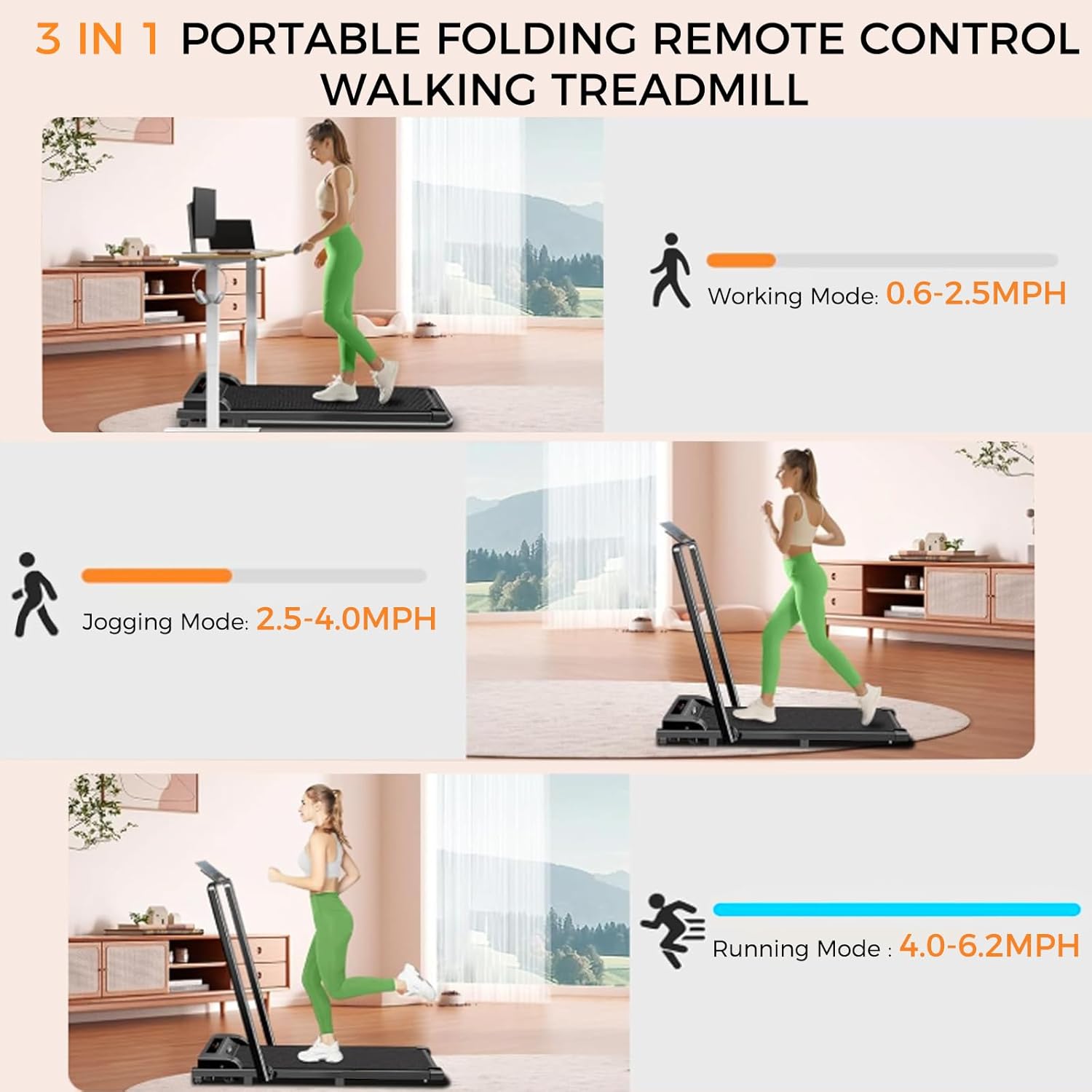
This visual guide displays the three distinct operational modes of the treadmill: a low-speed working mode for under-desk use, a moderate-speed jogging mode, and a higher-speed running mode, each with its corresponding speed range.
7. Features
Powerful & Quiet Motor:
The treadmill is equipped with a 2.5HP high-quality motor, providing consistent performance for speeds ranging from 0.6 to 6.2 MPH. Its advanced design ensures operation below 50dB, minimizing noise disruption. The robust construction supports users up to 300 lbs.

This image provides an internal view of the treadmill's 2.5HP motor, illustrating its robust design and highlighting key performance metrics such as low noise operation, speed capabilities, and maximum user weight.
Shock Absorption & Non-Slip Design:
The multi-layer shock absorption system effectively cushions impacts, reducing stress on knees, ankles, and joints. The running belt features a 6-layer anti-slip design, providing a secure and stable surface for all workout intensities.

This image highlights the treadmill's advanced shock absorption and non-slip running belt, engineered to reduce impact on joints and provide a secure workout surface. An accompanying graphic details the six layers of the running belt.
Effortless Storage:
Designed with a sleek, ultra-slim profile and a foldable handle bar, this treadmill is easy to store. It can be tucked under a bed, slid into a closet, or stood against a wall. Integrated wheels enhance mobility, allowing for convenient relocation.

This image demonstrates the compact, foldable design of the treadmill, highlighting its dimensions when stored flat and the integrated wheels for convenient movement and storage in small spaces.
8. Maintenance
Regular maintenance ensures the longevity and optimal performance of your treadmill.
Cleaning:
- Unplug the treadmill before cleaning.
- Wipe down the display and exterior surfaces with a soft, damp cloth. Avoid abrasive cleaners.
- Periodically vacuum dust from around the motor cover.
Lubrication:
The running belt requires periodic lubrication to reduce friction and extend its lifespan. Use the provided lubricant or a 100% silicone treadmill lubricant.
- Unplug the treadmill.
- Loosen the rear roller bolts slightly to lift the belt.
- Apply a small amount of lubricant evenly under the center of the running belt.
- Tighten the rear roller bolts.
- Plug in the treadmill and run it at a low speed (e.g., 1 MPH) for 5 minutes to distribute the lubricant.
Belt Adjustment:
The running belt may require adjustment if it becomes off-center or slips. Use the included small wrench.
- To center the belt: If the belt drifts to the left, turn the left rear roller bolt clockwise by a quarter turn. If it drifts to the right, turn the right rear roller bolt clockwise by a quarter turn. Run the treadmill for 1-2 minutes and re-check. Repeat as necessary.
- To tighten the belt: If the belt slips during use, turn both rear roller bolts clockwise by a quarter turn. Run the treadmill for 1-2 minutes and re-check. Repeat as necessary. Do not overtighten.

This image focuses on the treadmill's running surface dimensions and illustrates the adjustment points for the belt, ensuring proper tension and alignment for optimal performance and longevity.
9. Troubleshooting
If you encounter issues with your treadmill, refer to the following common problems and solutions:
| Problem | Possible Cause | Solution |
|---|---|---|
| Treadmill does not power on. | Power cord not plugged in; Main switch off; Circuit breaker tripped. | Ensure power cord is securely plugged in. Turn main switch to 'ON'. Check household circuit breaker. |
| Running belt stops or slips. | Belt too loose; Insufficient lubrication; Overload. | Adjust belt tension (see Maintenance). Lubricate belt (see Maintenance). Ensure user weight is within limits. |
| Unusual noise during operation. | Loose components; Belt friction; Motor issue. | Check for loose screws and tighten. Lubricate belt. If noise persists, contact customer support. |
| Remote control not working. | Battery depleted; Obstruction. | Replace remote control battery. Ensure no obstructions between remote and treadmill sensor. |
If the problem persists after attempting these solutions, please contact ApexNexus customer support.
10. Specifications
| Specification | Detail |
|---|---|
| Brand | ApexNexus |
| Model | Treadmill-01 |
| Product Dimensions (LxWxH) | 48"D x 21"W x 42"H (Upright) |
| Item Weight | 42 Pounds (19.05 kg) |
| Material | Carbon Steel |
| Maximum Weight Recommendation | 300 Pounds (136 kg) |
| Motor Power | 2.5 HP |
| Speed Range | 0.6 - 6.2 MPH |
| Noise Level | Below 50dB |
| Assembly Required | No (Minimal setup) |
| Power Source | Corded Electric |
| Metrics Measured | Calories Burned, Distance, Speed, Time |
11. Warranty and Support
Warranty Information:
The ApexNexus Walking Pad Treadmill is covered by a 1-year limited warranty from the date of purchase. This warranty covers manufacturing defects in materials and workmanship under normal use. It does not cover damage caused by misuse, accident, unauthorized modification, or improper maintenance.
Customer Support:
For any questions, concerns, or warranty claims, please contact our dedicated support team. We are committed to resolving your queries promptly.
Email: support@apexnexus.com
Please provide your product model (Treadmill-01) and purchase details when contacting support to expedite assistance.


