Introduction
This manual provides detailed instructions for the safe and efficient operation of your PETNF PF124 Smart Dog House Heater. Designed to provide warmth and comfort for your pets in various outdoor shelters, this heater features smart controls, energy-saving modes, and robust safety mechanisms. Please read this manual thoroughly before installation and use to ensure optimal performance and pet safety.
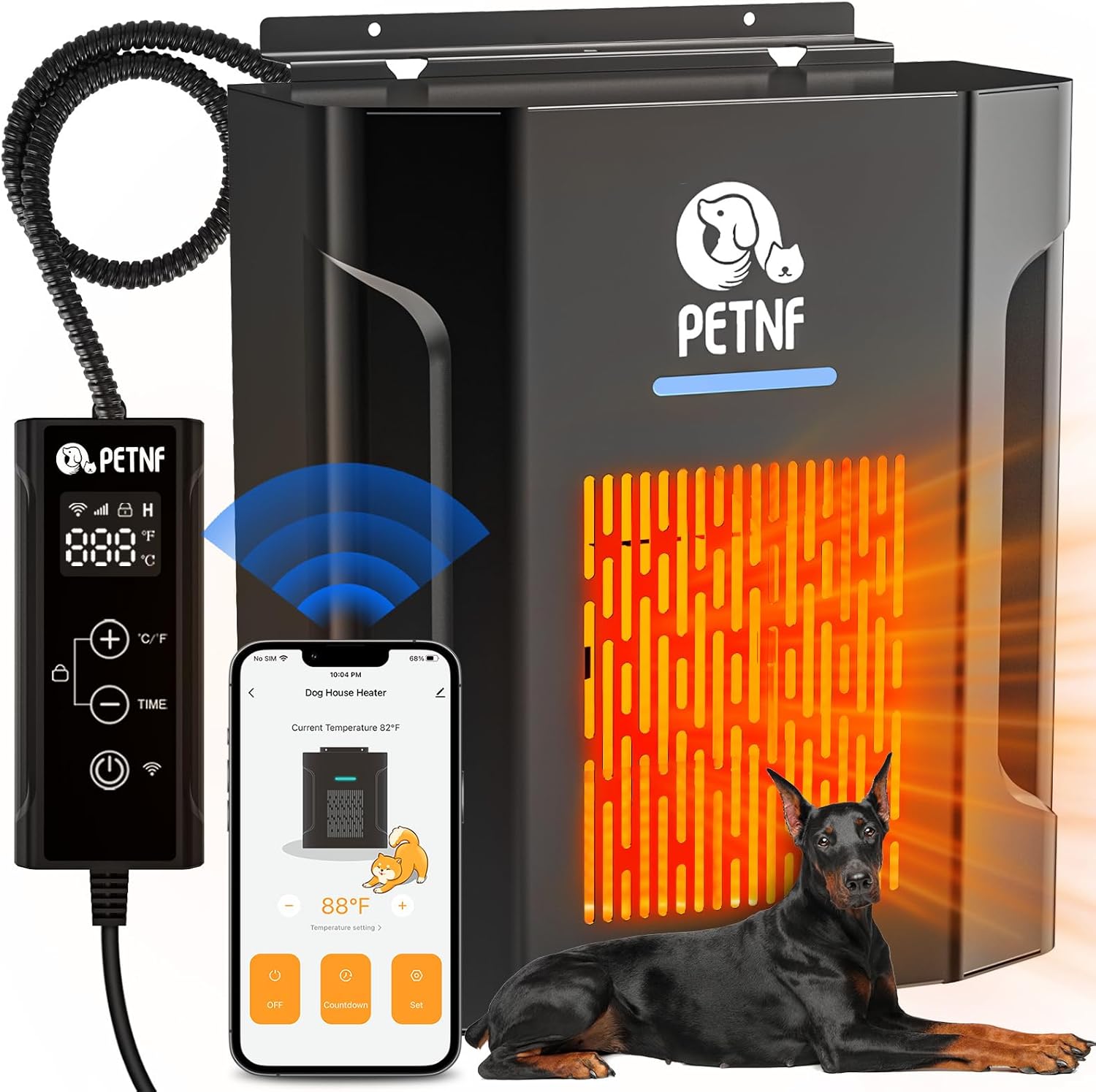
Image: The PETNF PF124 Smart Dog House Heater, showcasing its main unit, wired remote control, and a smartphone displaying the control app. A Doberman dog rests beside the heater, illustrating its intended use.
Important Safety Instructions
Failure to follow these safety instructions may result in fire, electric shock, injury, or property damage. Keep this manual for future reference.
- Always ensure the heater is installed in a well-ventilated area, away from flammable materials.
- Do not cover the heater or block its air inlets/outlets.
- The heater is equipped with overheat protection; it will automatically shut down if it reaches unsafe temperatures.
- The power cord is a 6FT Anti-Chew Cord, designed to resist damage from pets. Regularly inspect the cord for any signs of wear or damage.
- The unit features V-0 Flame Retardant materials for enhanced safety.
- The controller is IPX5 Waterproof, suitable for outdoor use, but avoid direct submersion.
- Ensure the heater is securely mounted to prevent tipping.
- Keep children and pets away from the heater during operation to prevent burns.
- Unplug the heater when not in use or before cleaning.

Image: Two golden retrievers relaxing in a doghouse equipped with the PETNF heater. Safety icons at the bottom highlight V-0 flame retardant materials, overheat protection, and a 6-foot anti-chew cord.
Product Features
- Thermostat & Smart Wi-Fi Control: Remotely adjust temperature via the SmartLife App (45°F to 113°F).
- Powerful 300W Rapid Heating: Advanced ceramic heating technology provides warmth in three seconds, covering up to 150 cubic feet.
- Energy Saving ECO Mode: Automatically adjusts heating cycles to reduce energy consumption.
- Multi-Scene Applications: Suitable for dog houses, chicken coops, small barns, rabbit hutches, greenhouses, and patios.
- Enhanced Durability: Robust, weather-resistant casing for demanding outdoor conditions.
- Quiet Operation: Operates at less than 45dB, ensuring a peaceful environment for pets.
- Customizable Timer Function: Set heating schedules to match your pet's routine.
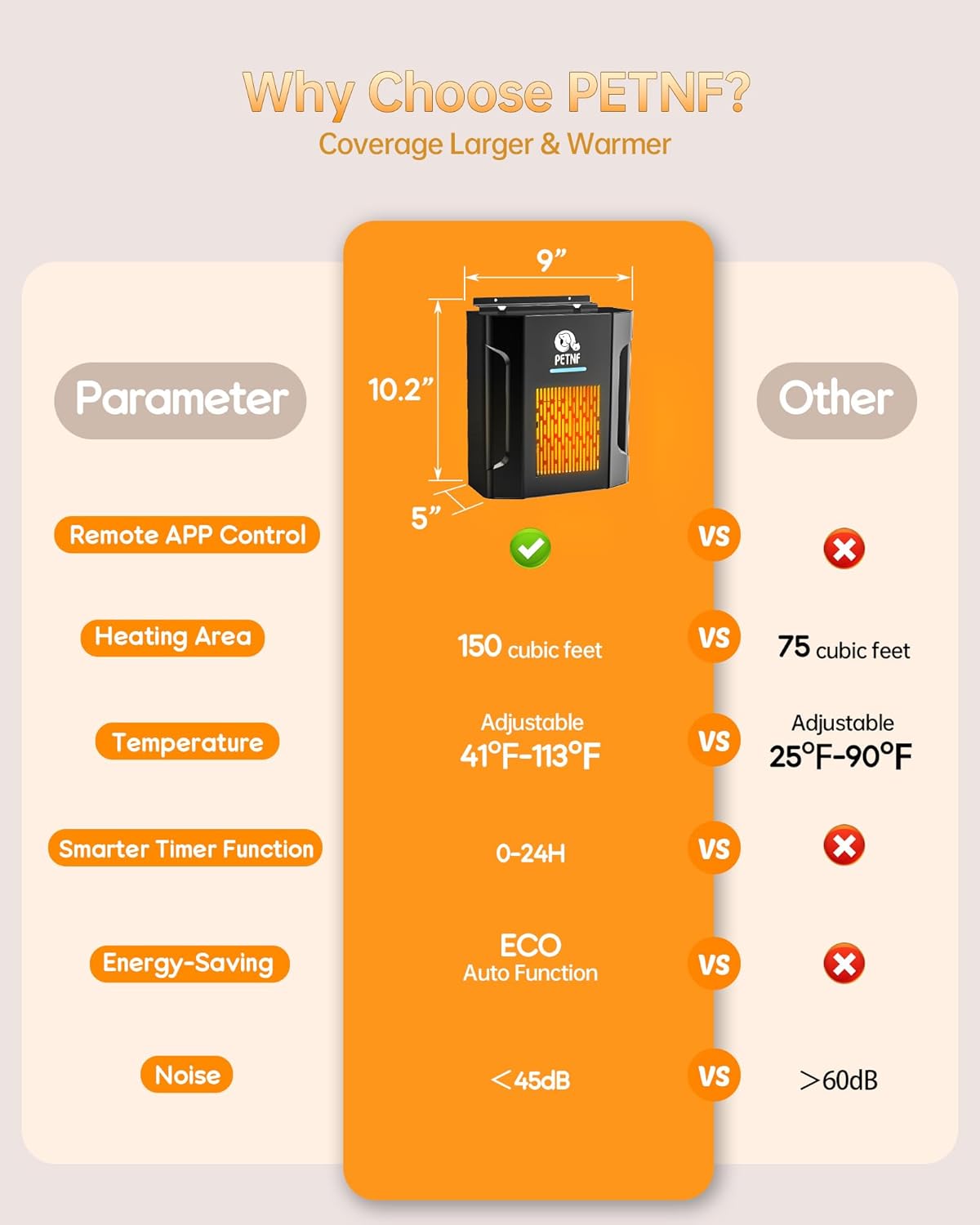
Image: A comparison table illustrating the superior features of the PETNF heater, including remote app control, a larger heating area of 150 cubic feet, a wider temperature range, a smarter timer, ECO auto function, and low noise levels compared to other heaters.
Setup and Installation
Follow these steps to properly install your PETNF PF124 Smart Dog House Heater. The package includes the heater, controller, hanging board, screws, and a safety bolt.
- Choose a Location: Select a suitable location within the pet shelter, ensuring it is protected from direct weather exposure and has access to a power outlet. The heater can be wall-mounted or floor-mounted.
- Install the Hanging Board: Securely attach the provided hanging board to a sturdy surface inside the shelter using the included screws.
- Drill a Hole for the Controller (if needed): If routing the controller outside the enclosure, drill a hole of at least 66mm diameter to accommodate the controller and its cable.
- Guide the Controller: Pass the controller and its cable through the drilled hole (if applicable) or position it conveniently within the shelter.
- Mount the Heater: Hang the main heater unit onto the installed hanging board. Ensure it is stable and securely attached.
- Connect to Power: Plug the heater into a standard 120V power outlet.
Operating Instructions
Manual Control
The wired controller allows for direct adjustment of settings.
- Power On/Off: Press the power button on the controller.
- Temperature Adjustment: Use the '+' and '-' buttons to set the desired temperature between 45°F and 113°F.
- Temperature Unit: Press the 'C/F' button to switch between Celsius and Fahrenheit.
- Timer Function: Press the 'TIME' button to set a countdown timer for operation.
- Child Lock: To activate/deactivate the child lock, press and hold the lock icon button on the controller.
SmartLife App Control
Control your heater remotely using the SmartLife application on your smartphone.
- Download the App: Scan the QR code on the heater or controller, or search for "SmartLife" in your app store. You can also visit https://smartapp.tuya.com/smartlife.
- Connect Heater to Wi-Fi: Power on the heater. In the SmartLife app, select "Add Device" and follow the on-screen instructions to connect your heater to your 2.4GHz Wi-Fi network. Ensure your phone is connected to the same Wi-Fi network during the initial setup.
- Add Device: The app will guide you through the process of discovering and adding your PETNF Dog House Heater.
- Remote Control: Once connected, you can remotely power on/off, adjust temperature, set timers, and activate ECO mode from anywhere.
ECO Mode
Activate ECO mode via the SmartLife app to optimize energy consumption. The heater will intelligently adjust its heating cycles to maintain the set temperature while minimizing electricity usage.

Image: The PETNF heater prominently displayed with the word "ECO" and a "45% Energy Savings" icon, illustrating the energy-saving benefits of its ECO auto function.
Scheduling and Timers
Utilize the SmartLife app to create personalized heating schedules or set countdown timers for specific heating durations.

Image: A golden retriever sleeping comfortably in a heated doghouse, accompanied by smartphone screenshots demonstrating the SmartLife app's personalized scheduling and countdown timer features.
Maintenance
Regular maintenance ensures the longevity and efficient operation of your heater.
- Cleaning: Before cleaning, always unplug the heater from the power outlet. Use a soft, dry cloth to wipe down the exterior of the heater. Do not use abrasive cleaners or immerse the unit in water.
- Inspection: Periodically inspect the power cord for any signs of damage, fraying, or chew marks. Ensure the heater's air inlets and outlets are free from dust, debris, or obstructions.
- Storage: If storing the heater for an extended period, ensure it is clean and dry. Store it in a cool, dry place, protected from extreme temperatures and moisture.
Troubleshooting
If you encounter issues with your PETNF PF124 heater, refer to the following common problems and solutions.
| Problem | Possible Cause | Solution |
|---|---|---|
| Heater does not turn on. | No power, power button not pressed, or overheat protection activated. | Check power connection. Press power button. Unplug, wait 10 minutes, then plug back in to reset overheat protection. |
| Heater not heating effectively. | Temperature setting too low, ECO mode active, or space too large. | Increase temperature setting. Disable ECO mode if maximum heat is desired. Ensure the heated space is within the recommended 150 cubic feet. |
| Wi-Fi connection issues. | Incorrect Wi-Fi password, router too far, or app not properly set up. | Verify Wi-Fi password. Move heater closer to router. Re-follow SmartLife app setup steps. Ensure 2.4GHz Wi-Fi network is used. |
| Unusual noises or odors. | Dust accumulation, foreign object, or internal malfunction. | Unplug immediately. Clean the heater. If problem persists, discontinue use and contact customer support. |
Specifications
| Brand | PETNF |
| Model Number | PF124 |
| Color | Black |
| Product Dimensions | 5"D x 9.1"W x 10.3"H |
| Item Weight | 6.04 pounds |
| Voltage | 120 Volts |
| Fuel Type | Electric |
| Heating Coverage | Up to 150 cubic feet |
| Min Temperature Setting | 45 Degrees Fahrenheit |
| Max Temperature Setting | 113 Degrees Fahrenheit |
| Mounting Type | Wall-Mount or Floor-Mount |
| Indoor/Outdoor Usage | Indoor, Outdoor |
| Special Features | Adjustable Temperature, Remote Control, ECO Mode, Overheat Protection, Anti-Chew Cord, IPX5 Waterproof Controller |
Warranty and Support
For warranty information and customer support, please refer to the official PETNF website or contact their customer service department directly. Keep your purchase receipt as proof of purchase.
- Manufacturer: PETNF
- Website: Visit the PETNF Store on Amazon (for general brand information)
- Contact: Refer to the product packaging or the official PETNF website for specific customer support contact details.


