
1. Introduction
Welcome to the isinwheel M60 Electric Bike user manual. This guide provides essential information for the safe and efficient operation, maintenance, and troubleshooting of your new electric bicycle. Please read this manual thoroughly before your first ride and keep it for future reference.

Figure 1: The isinwheel M60 Electric Bike, showcasing its sleek black frame, front headlight, and integrated rear rack.
2. Safety Guidelines
Always wear a helmet and appropriate safety gear. Ensure all components are securely fastened before each ride. Adhere to local traffic laws and regulations. Avoid riding in adverse weather conditions or on unsafe terrain.
- Perform pre-ride checks: brakes, tires, battery, and lights.
- Do not exceed the maximum load capacity of 264 lbs (120 kg).
- Familiarize yourself with the bike's controls before riding in traffic.
3. Setup and Assembly
Your isinwheel M60 Electric Bike arrives approximately 90% assembled. Follow these steps to complete the assembly:
- Unboxing and Inspection: Carefully remove all components from the packaging. Inspect for any damage during transit.
- Install Kickstand: Attach the kickstand to the designated mounting point near the rear wheel. Secure it with the provided screws.

Figure 2: Detail of the kickstand installation near the rear wheel, showing the disc brake and gear system.
- Front Wheel Installation: Align the front wheel with the fork. Ensure the disc brake rotor slides correctly into the caliper. Secure the wheel using the quick-release skewer.
- Fender and Headlight Attachment: Mount the front fender and headlight to the front fork using the provided hardware.
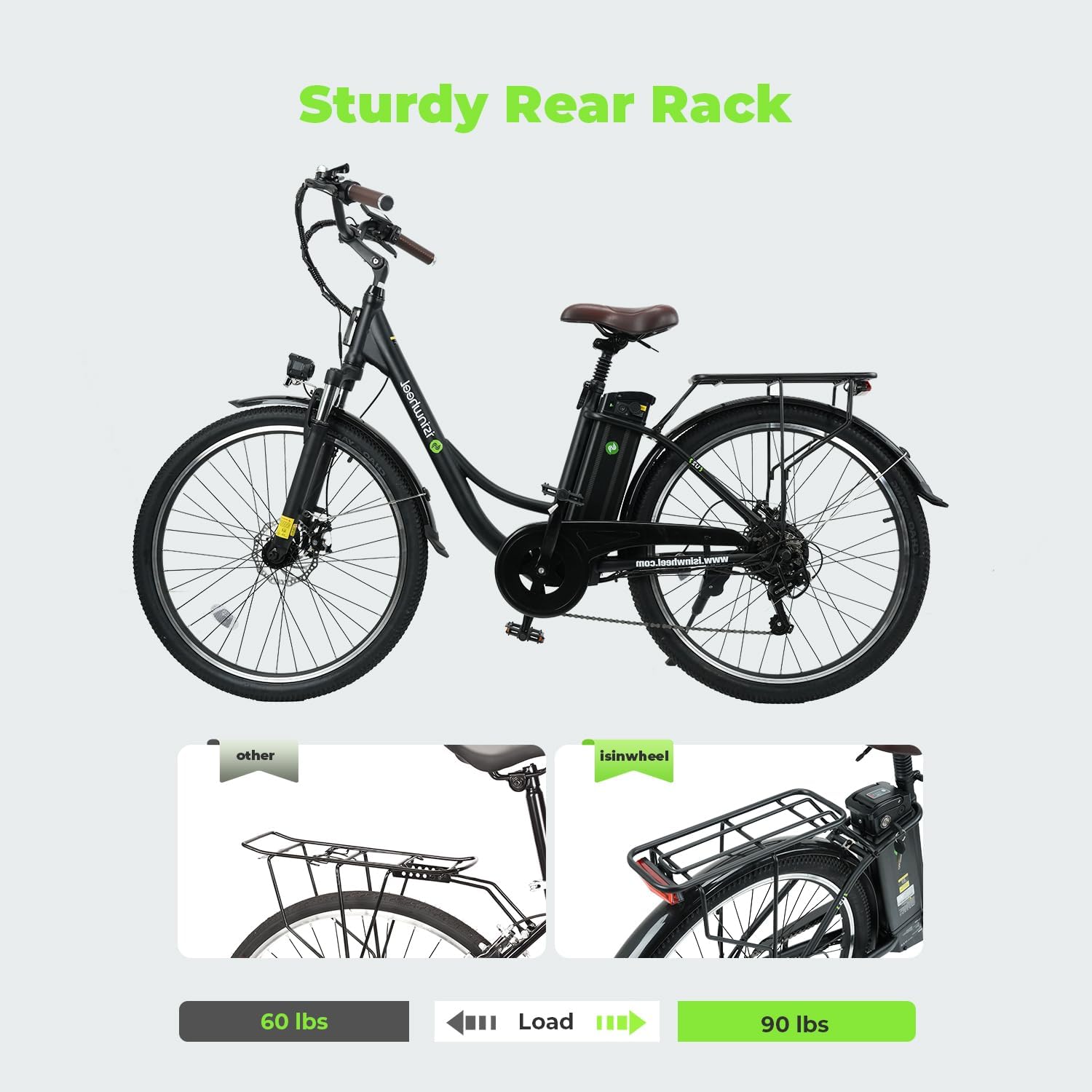
Figure 3: The front section of the bike with the headlight and fender installed, highlighting the front suspension.
- Handlebar Installation: Insert the handlebar stem into the fork tube and tighten the bolts. Attach the handlebars to the stem, ensuring they are centered and secure.
- Pedal Installation: Identify the left (L) and right (R) pedals. The left pedal screws counter-clockwise, and the right pedal screws clockwise. Tighten securely with a wrench.
- Rear Rack Installation: Attach the rear rack to the designated mounting points on the bike frame. Secure all screws.

Figure 4: The isinwheel M60 with its sturdy rear rack, designed to support up to 90 lbs.
- Connect Cables: Ensure all electrical cables are securely connected. The main motor cable is typically located near the rear wheel.
- Inflate Tires: Inflate tires to the recommended PSI (Min 40 PSI, Max 65 PSI) as indicated on the tire sidewall.
- Adjust Seat Height: Adjust the seat height for comfortable pedaling, ensuring your feet can touch the ground when stopped. The seat post features a suspension for added comfort.
Video 1: U2 Installation Operation Video. This video provides a visual guide for assembling your isinwheel electric bike, covering key steps from unboxing to final adjustments.
4. Operating Instructions
The isinwheel M60 offers three working modes: Electric bike, Assisted bike, and Normal bike.
4.1 Powering On/Off
To power on the bike, insert the key into the battery lock and turn it to the 'ON' position. Then, press and hold the 'M' button on the LCD display until the screen illuminates. To power off, press and hold the 'M' button again.
4.2 LCD Display and Controls
The Smart LCD Dashboard displays battery level, current speed (MPH), pedal assist level, and odometer. Use the '+' and '-' buttons to adjust the pedal assist level from 0 to 5.

Figure 5: The Smart LCD Dashboard and Shimano 7-Speed Derailleur, providing clear information and smooth gear changes.
4.3 Riding Modes
- Electric Bike Mode: Use the thumb throttle on the right handlebar for pure electric power. Max speed up to 20 mph.
- Assisted Bike Mode: Engage pedal assist by pedaling while the motor provides assistance based on your chosen assist level.
- Normal Bike Mode: Ride the bike like a traditional bicycle without any electric assistance.
4.4 Gear Shifting
The bike is equipped with a Shimano 7-speed gearshift. Use the twist grip shifter on the right handlebar to change gears, allowing for efficient riding on various terrains.
4.5 Braking System
The isinwheel M60 features dual disc brakes for reliable stopping power. Squeeze both brake levers simultaneously for effective braking. The integrated lighting system includes a bright headlight and a rear brake light for enhanced visibility.
Video 2: U2 Electric Bike is your perfect Cruiser. This video demonstrates the riding experience and features of the isinwheel electric bike, including its comfortable ride and various modes.
Video 3: Commute smarter, go U2 electric. This video highlights the convenience and efficiency of using the isinwheel electric bike for daily commutes.
5. Battery and Charging
The bike is powered by a modular 48V 13Ah removable lithium-ion battery, offering a range of up to 55+ miles per charge using pedal assist.
5.1 Charging the Battery
The battery can be charged while installed on the bike or removed. Connect the charger to a standard wall outlet and then to the charging port on the battery. A full charge typically takes 5-6 hours.
Figure 6: The 48V 13Ah removable battery being charged both on and off the bike, highlighting its convenience.
5.2 Battery Removal
To remove the battery, unlock it with the provided key and slide it out from its compartment. This allows for convenient off-bike charging or secure storage.
6. Maintenance and Care
Regular maintenance ensures the longevity and optimal performance of your isinwheel M60 Electric Bike.
- Tire Pressure: Check tire pressure regularly and maintain it within the recommended range (40-65 PSI).
- Brakes: Inspect brake pads and rotors for wear. Adjust brake tension as needed.
- Chain: Keep the chain clean and lubricated to ensure smooth gear changes and prevent rust.
- Battery: Store the battery in a cool, dry place. Charge it regularly, even if not in use, to maintain battery health.
- Cleaning: Clean the bike with a damp cloth. Avoid high-pressure washing directly on electrical components.
7. Troubleshooting
| Problem | Possible Cause | Solution |
|---|---|---|
| Bike not powering on | Battery not charged; Key not in ON position; Loose connection | Charge battery; Turn key to ON; Check all cable connections |
| Motor not assisting | Pedal assist level too low; Battery low; Motor cable disconnected | Increase assist level; Charge battery; Reconnect motor cable |
| Brakes squealing | Dirty brake pads/rotors; Worn brake pads | Clean with brake cleaner; Replace brake pads |
| Gears not shifting smoothly | Dirty/dry chain; Derailleur out of adjustment | Clean and lubricate chain; Adjust derailleur (consult professional if unsure) |
8. Specifications
- Model: M60 (U2)
- Motor: 750W Rear-drive motor
- Battery: 48V 13Ah Removable Lithium-ion
- Max Speed: 28 mph (throttle), 20 mph (pedal assist)
- Range: 55+ miles (pedal assist)
- Frame Material: Carbon Steel
- Wheel Size: 26 inches
- Tires: 26" puncture-resistant tires
- Gearshift: Shimano 7-Speed
- Brakes: Dual Disc Brakes
- Suspension: Front Suspension (Dual Shock Absorber)
- Max Load: 264 lbs (120 kg)
- Charging Time: 5-6 hours
- Special Features: USB Charging Port, Integrated Headlight & Rear Brake Light, Sturdy Rear Rack

Figure 7: The dual shock absorber system of the isinwheel M60, designed for a more comfortable ride.
9. Warranty and Support
isinwheel provides a one-year warranty for the electric motor, battery, and charger. For any issues or support, please contact isinwheel customer service. They aim to respond and solve issues within 24 hours.
- Customer Service: support@isinwheel.com
- Phone: 1(888) 293-5788