
1. Safety Instructions
Please read and understand all safety instructions before operating this device. Failure to follow these instructions may result in electric shock, fire, or serious injury.
- Indoor Use Only: This unit is designed for indoor use only. Do not expose it to rain, moisture, or extreme temperatures.
- High Voltage: This unit operates with high voltage. Only qualified personnel should open or attempt to service the device.
- Proper Connection: Ensure the regulator is switched ON before connecting any appliance to its output.
- Ventilation: Ensure adequate ventilation around the unit. Do not block ventilation openings.
- Grounding: Always connect the unit to a properly grounded power outlet.
- Overload Protection: Do not exceed the maximum rated power of 10000 VA. Overloading can damage the unit and connected appliances.
- Children and Pets: Keep the device out of reach of children and pets.
2. Product Overview
The Kemot MSER-10000 is an automatic voltage stabilizer designed to provide a stable 230 VAC output voltage for various electrical appliances. It utilizes a servomotor for precise voltage regulation and features comprehensive protection mechanisms.

Image 2.1: Front panel of the Kemot MSER-10000 Automatic Voltage Stabilizer. This view shows the digital LED display, indicating input and output voltage, frequency, and load percentage. Below the display are the 'POWER ON' and 'BY PASS' switches, each with an 'ON' and 'OFF' position, protected by circuit breakers.
Key Features:
- High Capacity: 10000 VA for stable power supply to multiple devices.
- Precision Regulation: Maintains output voltage within +/- 3% accuracy.
- Servomotor Technology: Ensures smooth and accurate voltage adjustments.
- Comprehensive Protection: Includes safeguards against short-circuits, overvoltage, and overheating.
- Digital Display: Provides real-time information on input/output voltage, frequency, and load.
- Multiple Output Sockets: Equipped with two output sockets (German and French/Polish type).
3. Setup
Follow these steps to properly set up your voltage stabilizer:
3.1. Placement
- Place the unit on a stable, flat surface.
- Ensure there is sufficient space (at least 10-15 cm) around the unit for proper air circulation and heat dissipation. Do not place it near heat sources or in direct sunlight.
- Avoid areas with high humidity or dust.
3.2. Connections
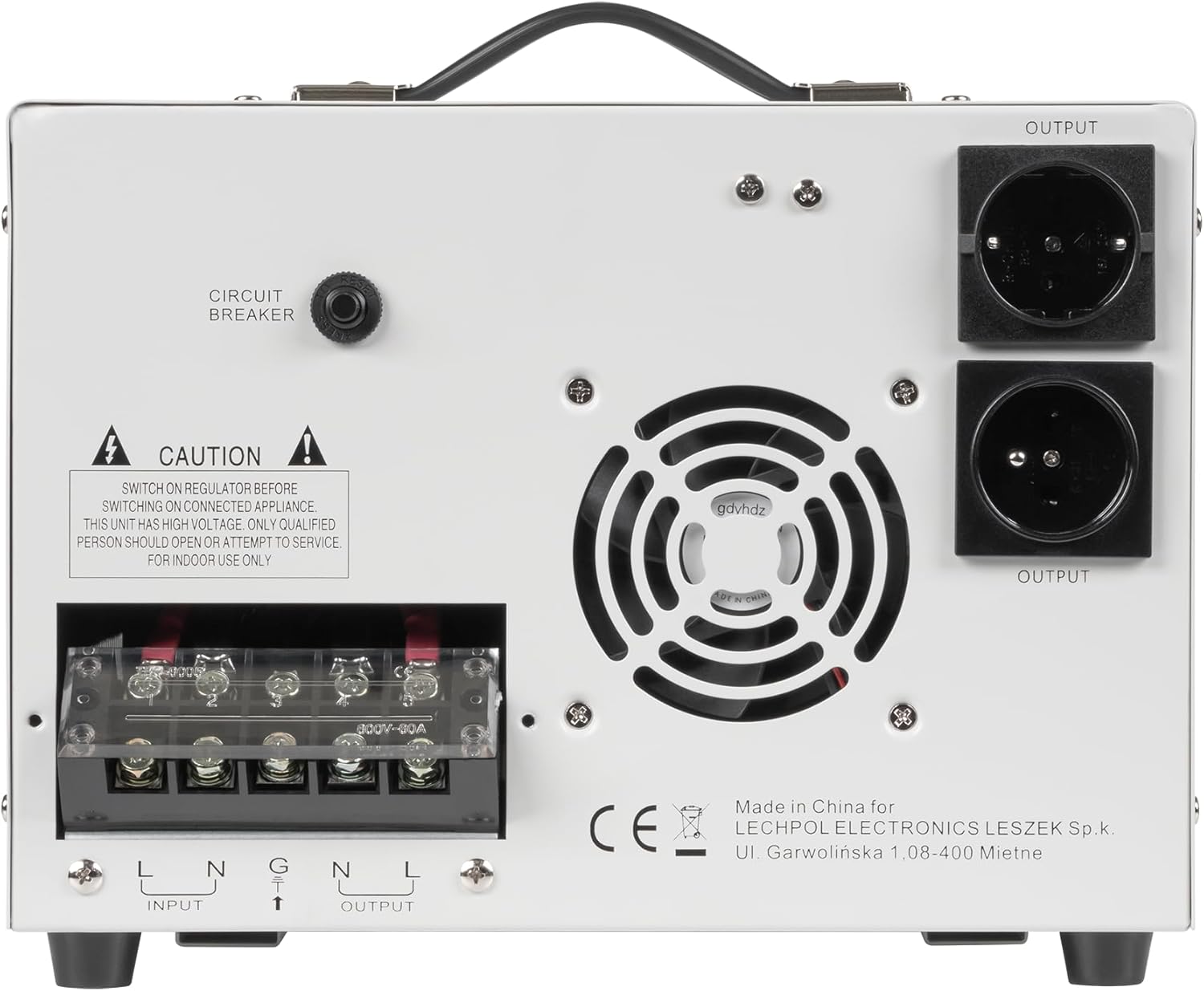
Image 3.1: Rear panel of the Kemot MSER-10000 Automatic Voltage Stabilizer. This image highlights the two output sockets, the 'CIRCUIT BREAKER' button, and a 'CAUTION' label regarding high voltage and qualified personnel for service. A cooling fan is also visible.

Image 3.2: Rear panel of the Kemot MSER-10000 Automatic Voltage Stabilizer, focusing on the terminal block. This shows the 'INPUT' and 'OUTPUT' screw terminals for hardwired connections (L, N, G for Input; L, N for Output), along with the 'CAUTION' label and 'CIRCUIT BREAKER' button.
- Input Power Connection: Connect the main power supply (130-260 VAC, 50 Hz) to the 'INPUT' terminals on the rear panel. Ensure correct polarity (Live, Neutral, Ground). For models with a power cord, plug it into a grounded wall outlet.
- Output Appliance Connection: Connect your appliances to the 'OUTPUT' sockets on the rear panel. Alternatively, for hardwired installations, connect to the 'OUTPUT' terminals (L, N).
- Circuit Breaker: Ensure the 'CIRCUIT BREAKER' button on the rear panel is reset (pushed in) before operation.
4. Operating Instructions
Operating the Kemot MSER-10000 is straightforward:
- Power On: After ensuring all connections are secure and the circuit breaker is reset, switch the 'POWER ON' toggle switch on the front panel to the 'ON' position. The LED display will illuminate.
- Bypass Mode (Optional): If you wish to bypass the voltage stabilization function and provide direct input power to the output, switch the 'BY PASS' toggle switch to the 'ON' position. In normal operation, this switch should be in the 'OFF' position.
- Monitoring: The digital LED display provides real-time information:
- Input Voltage (V): Shows the current voltage from the main power supply.
- Output Voltage (V): Shows the stabilized voltage supplied to your appliances (nominally 230 VAC).
- Frequency (Hz): Displays the operating frequency (50 Hz).
- Load (%): Indicates the percentage of the stabilizer's maximum capacity currently being used.
- Indicators: May show warnings for 'UNUSUAL' conditions (e.g., overvoltage, undervoltage, overload).
- Power Off: To turn off the unit, first switch off all connected appliances, then switch the 'POWER ON' toggle switch to the 'OFF' position.
5. Maintenance
Regular maintenance ensures optimal performance and longevity of your stabilizer:
- Cleaning: Periodically clean the exterior of the unit with a soft, dry cloth. Do not use liquid cleaners or solvents.
- Ventilation: Ensure the ventilation openings are free from dust and obstructions. Use a soft brush or compressed air to clean them if necessary.
- Inspections: Regularly check power cords and connections for any signs of damage or wear.
- Internal Service: Do not attempt to open the unit or perform internal servicing. Refer all repairs to qualified service personnel.
6. Troubleshooting
If you encounter issues with your Kemot MSER-10000, refer to the following common problems and solutions:
| Problem | Possible Cause | Solution |
|---|---|---|
| No power/Unit does not turn on |
|
|
| Unstable output voltage |
|
|
| Overload warning on display | Total power consumption exceeds 10000 VA. | Disconnect some appliances to reduce the load. |
| Unit overheats |
|
|
If the problem persists after attempting these solutions, contact customer support or a qualified technician.
7. Specifications
Technical specifications for the Kemot MSER-10000 Automatic Voltage Stabilizer:
| Parameter | Value |
|---|---|
| Power Capacity | 10000 VA |
| Input Voltage | 130-260 VAC |
| Input Frequency | 50 Hz |
| Output Voltage | 230 VAC |
| Output Frequency | 50 Hz |
| Output Precision | +/- 3% |
| Efficiency | 98% |
| Output Type | Single phase |
| Transformer Type | C.R.G.O. toroidal transformer |
| Output Sockets | 2 (German, French/Polish type) |
| Protections | Short-circuit, Overvoltage, Overheating |
| Operating Temperature | 0-40°C |
| Humidity | 10-90% |
| Storage Temperature | -15-45°C |
| Weight | 22 kg |
| Dimensions (L x W x H) | 388 x 302 x 210 mm |
| Manufacturer | LECHPOL ELECTRONICS LESZEK Spółka komandytowa |
| Country of Origin | China |
8. Warranty and Support
This Kemot MSER-10000 Automatic Voltage Stabilizer comes with a 2-year warranty from the date of purchase, covering manufacturing defects.

Image 8.1: Product packaging for the Kemot MSER-10000, clearly displaying the '2 YEARS WARRANTY' badge, confirming the warranty period for the device.
For warranty claims, technical support, or service inquiries, please contact your retailer or the manufacturer directly. Keep your proof of purchase for warranty validation.
Manufacturer: LECHPOL ELECTRONICS LESZEK Spółka komandytowa
Address: Ul. Garwolińska 1, 08-400 Miętne, Poland
Information regarding spare parts availability and software updates is currently unavailable.


