
1. Introduction
Thank you for choosing the UNIWEIGH Digital Parcel Scale. This high-precision scale is designed for accurate weighing of parcels, luggage, and other items up to 200 kg (440 lbs) with a precision of 10 g (0.02 lb / 0.35 oz). Its robust steel platform and versatile features make it ideal for various applications, including shipping, postal services, warehouses, small businesses, and home use. Please read this manual thoroughly before operating the scale to ensure proper use and to maximize its lifespan.

2. Safety Information
- Do not overload the scale beyond its maximum capacity of 200 kg (440 lbs).
- Place the scale on a stable, flat, and hard surface to ensure accurate readings.
- Avoid exposing the scale to extreme temperatures, humidity, or direct sunlight.
- Keep the scale away from strong electromagnetic fields.
- Do not immerse the scale in water or use abrasive cleaners. Use a soft, damp cloth for cleaning.
- If the scale will not be used for an extended period, remove the batteries to prevent leakage.
3. Package Contents
Please check the box for the following items:
- UNIWEIGH Digital Parcel Scale (Platform and Display Unit)
- 2 x AAA Batteries
- USB Cable
- Mounting Screws and Wall Plugs (for display unit)
- Instruction Manual
4. Product Overview
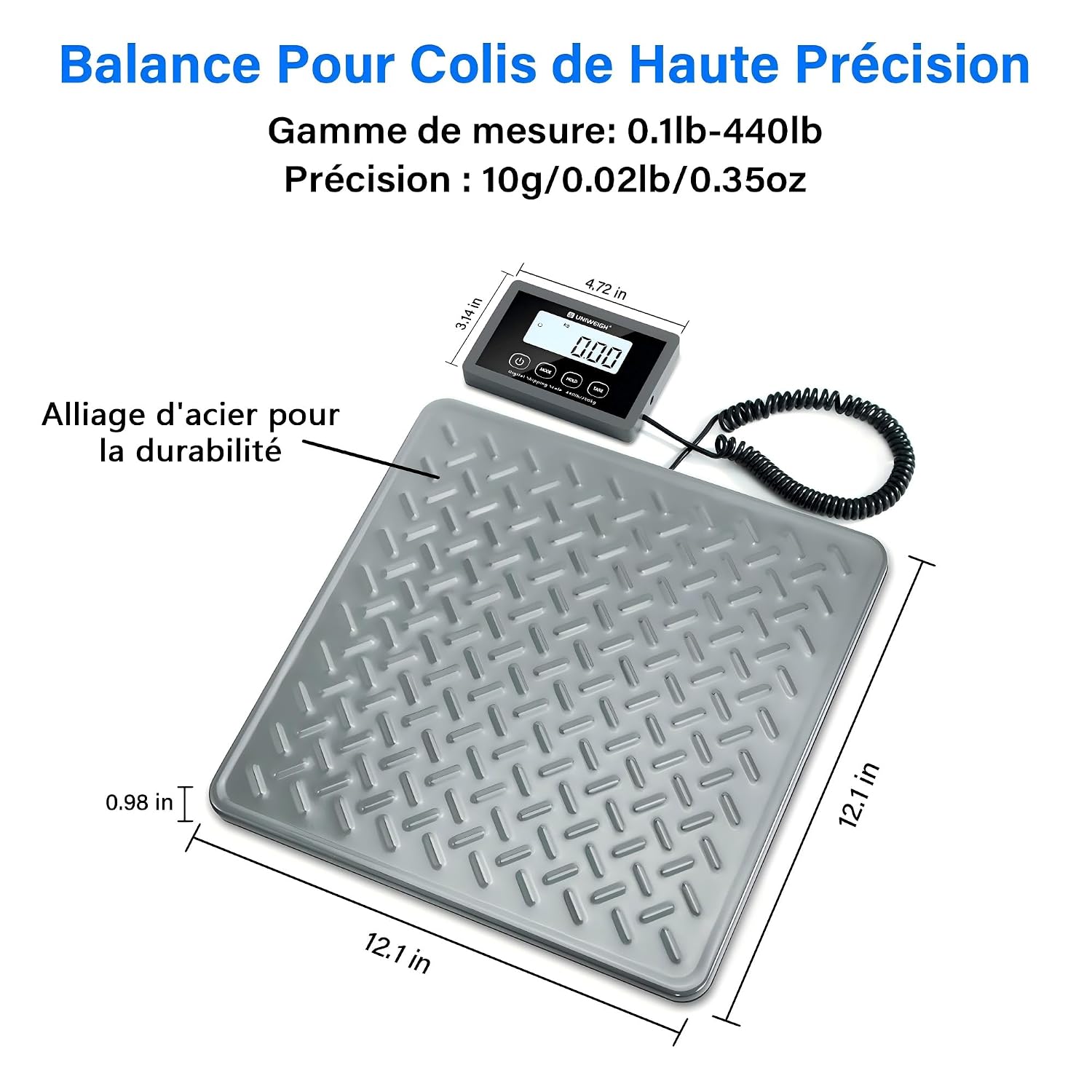
The UNIWEIGH Digital Parcel Scale consists of a robust weighing platform and a separate LCD display unit connected by a coiled cable. This design allows for flexible placement of the display, even when weighing large items.
4.1. Components
- Weighing Platform: Made of durable alloy steel with an anti-slip, industrial-textured surface for stability and corrosion resistance.
- LCD Display Unit: Features a high-definition, white-backlit screen for clear readings. Includes control buttons and a retractable coiled cable for connection to the platform.
- Control Buttons:
- ON/OFF: Powers the scale on or off.
- MODE: Switches between weighing units (kg, lb, lb:oz).
- HOLD: Locks the displayed weight.
- TARE: Resets the scale to zero, removing the weight of a container.

5. Setup
5.1. Power Supply
The scale can be powered by either AAA batteries or a USB connection.
- Battery Installation: Open the battery compartment on the back of the display unit. Insert 2 AAA batteries, ensuring correct polarity (+/-). Close the compartment.
- USB Power: Connect the provided USB cable to the round DC port on the back of the display unit and plug the other end into a compatible USB power source (e.g., wall adapter, computer USB port).
5.2. Placement
For accurate measurements, place the weighing platform on a firm, level, and stable surface. The platform features 4 anti-slip pads on its underside to prevent movement during weighing.


6. Operating Instructions
6.1. Basic Weighing
- Press the ON/OFF button to turn on the scale. The display will show "88888" and then "0.00" (or "0.0" depending on the unit).
- Place the item to be weighed gently on the center of the platform.
- Read the weight displayed on the LCD screen.
- To turn off the scale, press and hold the ON/OFF button for a few seconds until the display turns off.
6.2. Unit Conversion
The scale supports three weighing units: kilograms (kg), pounds (lb), and pounds:ounces (lb:oz).
- With the scale on, press the MODE button repeatedly to cycle through the available units: kg → lb → lb:oz.
- The selected unit will be indicated on the display.

7. Special Functions
7.1. Hold Function
The Hold function allows you to lock the displayed weight, even after removing the item from the platform. This is particularly useful for weighing large or awkwardly shaped items that might obstruct the display.
- Place the item on the platform and wait for the weight to stabilize.
- Press the HOLD button. The displayed weight will be locked, and the "HOLD" indicator will appear.
- You can now remove the item from the platform, and the weight will remain displayed.
- To exit the Hold function, press the HOLD button again.

7.2. Tare Function
The Tare function allows you to subtract the weight of a container, so you can measure only the net weight of its contents.
- Place an empty container on the weighing platform. The display will show its weight.
- Press the TARE button. The display will reset to "0.00", effectively subtracting the container's weight.
- Now, place the items you wish to weigh into the container. The display will show only the net weight of the items.
- To clear the Tare function, remove the container from the platform and press the TARE button again.

7.3. Auto-Off Function
The scale features an automatic shut-off function to conserve battery life. You can adjust the auto-off time or disable it.
- The scale can be set to automatically turn off after 60, 180, or 300 seconds of inactivity.
- If the auto-off time is set to 0, the scale will remain on until manually turned off.
- Refer to the specific instructions for setting the auto-off time, usually involving a combination of button presses while turning on the scale (details may vary, consult the quick start guide if provided).

8. Maintenance
- Cleaning: Wipe the scale surface with a soft, damp cloth. Do not use harsh chemicals or abrasive cleaning agents.
- Storage: Store the scale in a cool, dry place. If storing for an extended period, remove the batteries.
- Calibration: The scale is factory-calibrated. If you suspect inaccuracies, refer to the troubleshooting section or contact customer support.
9. Troubleshooting
If you encounter any issues with your UNIWEIGH Digital Parcel Scale, please refer to the following common problems and solutions:
| Problem | Possible Cause | Solution |
|---|---|---|
| Scale does not turn on. | Low or dead batteries; incorrect battery installation; no USB power. | Replace batteries with new ones, ensuring correct polarity. Check USB cable connection and power source. |
| Inaccurate readings. | Scale not on a flat, stable surface; overloaded; strong vibrations; electromagnetic interference. | Place scale on a firm, level surface. Ensure weight is within capacity. Avoid vibrations and electronic devices nearby. |
| Display shows "Err" or other error messages. | Overload; internal error. | Remove item if overloaded. Turn off the scale, wait a few seconds, then turn it back on. If the error persists, contact customer support. |
| Weight fluctuates. | Unstable surface; air currents; item not centered. | Ensure stable surface. Avoid drafts. Place item centrally on the platform. |
10. Specifications
| Feature | Specification |
|---|---|
| Brand | UNIWEIGH |
| Model | UNI-PS4B-PRO-GY |
| Maximum Weight Capacity | 200 kg (440 lbs) |
| Minimum Weighing Weight | 40 g |
| Reading Precision | 10 g (0.02 lb / 0.35 oz) |
| Measurement Units | kg, lb, lb:oz |
| Display Type | LCD with white backlight |
| Platform Material | Alloy Steel |
| Power Supply | 2 x AAA Batteries (included) or USB Cable (included) |
| Special Features | Auto-Off, Backlit Display, High Weight Capacity, Tare Function, Hold Function, Anti-slip Platform |
| Included Components | Parcel Scale, 2 AAA batteries, USB cable |
11. Warranty and Support
UNIWEIGH products are designed for reliability and performance. For warranty information, technical support, or any questions regarding your product, please refer to the documentation included with your purchase or contact UNIWEIGH customer service through the retailer where the product was purchased. Please have your model number (UNI-PS4B-PRO-GY) and purchase date ready when contacting support.