
1. Introduction
Thank you for choosing the MYNTA M1612 Full Body Massage Chair. This manual provides essential information for the safe and effective use of your new massage chair. Please read it thoroughly before operation and retain it for future reference.
2. Safety Information
Please read and follow all safety instructions before use. Do not exceed the maximum weight capacity of 330 pounds. Be cautious when adjusting the chair's position and features.
Always ensure the power cord is not damaged and is properly connected to a grounded outlet. Keep children and pets away from the chair during operation. Do not use the chair if you have any medical conditions that may be aggravated by massage, or if you are pregnant, without consulting a physician.
3. Setup
3.1 Unboxing and Placement
The MYNTA M1612 massage chair is delivered fully assembled. Carefully remove the packaging materials. Ensure you have adequate space for the chair, considering its dimensions and reclining capabilities. The chair measures approximately 57"D x 30"W x 43"H. For placement, ensure a minimum door width of 31 inches for easy entry.

Image: Dimensions of the MYNTA M1612 massage chair, showing it is fully assembled and its package dimensions.
3.2 Power Connection
Connect the power cord securely to the chair's power inlet and then to a standard electrical outlet. Ensure the power switch is in the 'Off' position before plugging in.
4. Operating Instructions
4.1 Controls
The chair features an intelligent touchscreen for comprehensive control and shortcut buttons for quick access to frequently used functions.

Image: Close-up of the intelligent touchscreen controller and the shortcut buttons on the armrest.
4.2 Massage Features
4.2.1 Extended SL Track
The 3D rollers travel along an extended SL track, providing a comprehensive massage from your neck down to your thighs. This design helps maintain the natural 'S' curve of the spine, promoting relaxation and muscle tension relief.

Image: Diagram illustrating the extended SL-track massage path covering neck, back, waist, hip, and leg areas.
4.2.2 Full Body Airbag Massage
Airbags are strategically placed to provide compression massage to your shoulders, arms, back, waist, calves, and feet, promoting circulation and muscle relaxation.

Image: Diagram highlighting the shoulder, back, lower back, arm, calf, and foot airbag massage areas, along with 3D massage rollers and heating elements.
4.2.3 Zero Gravity Positioning
Experience three levels of zero-gravity positioning. This feature elevates your legs above your heart, minimizing strain on joints and back muscles, and enhancing the effectiveness of the massage.
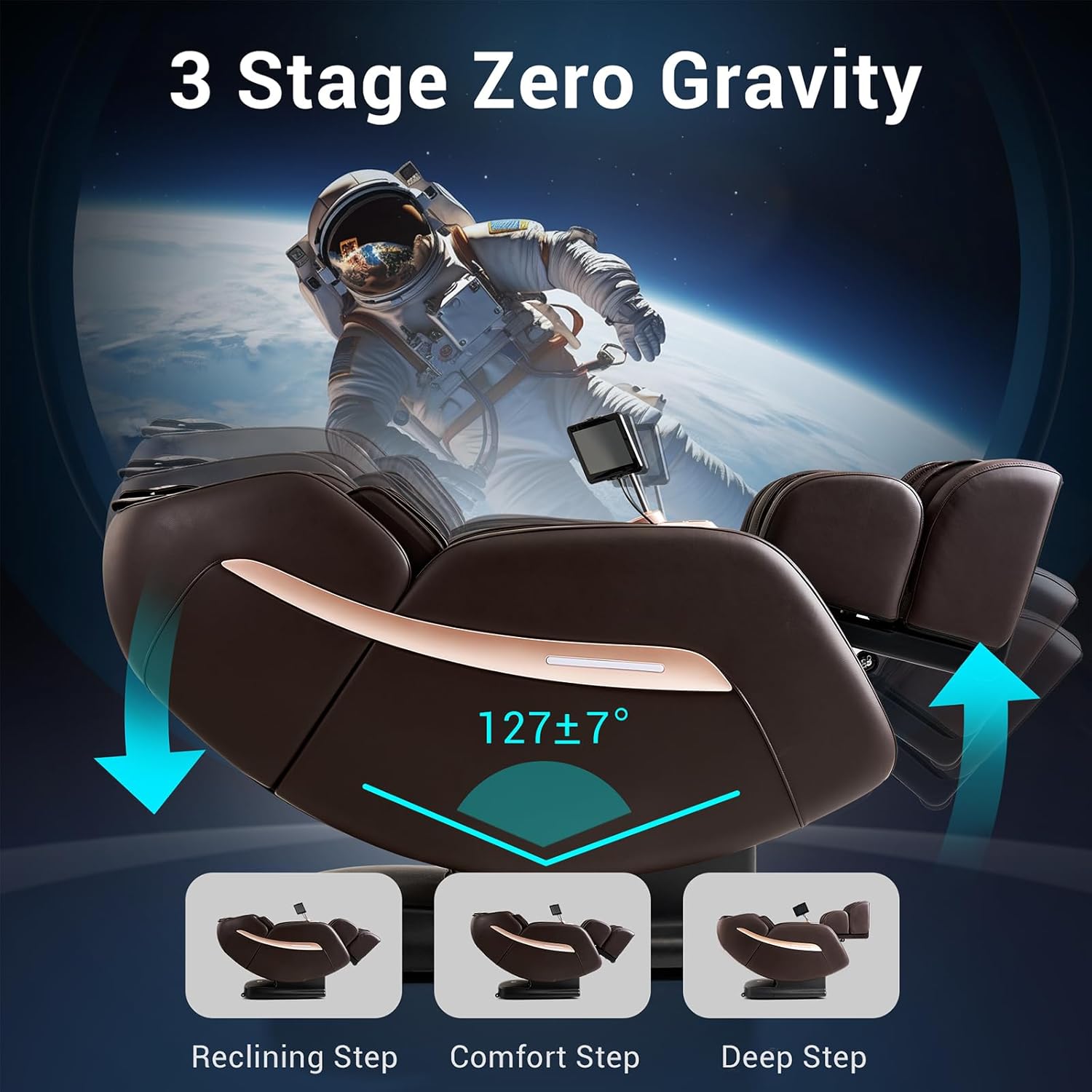
Image: Illustration of the three stages of zero gravity recline: Reclining Step, Comfort Step, and Deep Step, with an angle of 127±7 degrees.
4.2.4 Calf and Waist Heating
Targeted heat therapy is available for your calves and waist, helping to soothe muscle tension and improve blood circulation in these areas.
4.2.5 12 Auto Modes
Choose from 12 pre-set auto modes designed for various needs, including 'Thai' and 'Waist & Hip'. You can also use the manual mode to customize your massage experience.

Image: Icons representing the 12 auto modes (e.g., Work Relief, Recovery, Athletic, Deep Tissue, Thai) and 6 massage techniques (Shiatsu, Kneading, Knead & Knock, Rubbing, Knocking, Tapping).
4.2.6 Thai Stretch
The Thai Stretch program gently stretches your back and legs, which can be controlled separately for a personalized stretching experience.

Image: Illustration of the Thai Stretch function, showing the chair extending to stretch the user's body.
4.2.7 Bluetooth Speaker
Connect your device via Bluetooth to the integrated speakers and enjoy your favorite music or audio during your massage session.

Image: A smartphone displaying Bluetooth settings connected to the chair's speakers, with musical notes indicating audio playback.
4.3 Video Demonstrations
Watch these official seller videos for a visual guide on the MYNTA M1612 massage chair's features and operation.
Video: Overview of the Mynta MC1612 Full Body Massage Chair, demonstrating its various functions.
Video: Demonstration of the Mynta Upgraded 3D Massage Chair Series 1612, highlighting new features.
Video: Detailed look at the Mynta Upgraded 3D Massage Chair MC1612 Series, showcasing its design and functionality.
5. Maintenance
5.1 Cleaning
To clean the chair, wipe surfaces with a soft, damp cloth. Do not use abrasive cleaners or harsh chemicals, as these can damage the upholstery. For leather surfaces, use a specialized leather cleaner and conditioner as needed.
5.2 Storage
When not in use for extended periods, unplug the chair and store it in a cool, dry place away from direct sunlight and extreme temperatures.
6. Troubleshooting
| Problem | Possible Cause | Solution |
|---|---|---|
| Chair does not power on. | Power cord is loose or unplugged. No power from outlet. | Check power cord connection. Ensure outlet is functional. |
| Massage function is weak or inconsistent. | Incorrect mode selected. Airbag pressure setting is low. | Select a different auto mode or adjust intensity settings via the touchscreen. |
| Unusual noises during operation. | Loose components. Obstruction. | Turn off and unplug the chair. Inspect for any visible obstructions or loose parts. If the issue persists, contact customer support. |
If you encounter any issues not listed here, or if the suggested solutions do not resolve the problem, please contact MYNTA customer support.
7. Specifications
- Brand: MYNTA
- Model Name: Massage Chair Full Body
- Model Number: MC1612
- Color: Expresso
- Material: Metal frame, Leather upholstery
- Product Dimensions (D x W x H): 57" x 30" x 43"
- Item Weight: 172 pounds
- Maximum Weight Recommendation: 330 pounds
- Reclining Position Count: 3 (Zero Gravity)
- Indoor/Outdoor Usage: Indoor
- Age Range Description: Adult
8. Warranty & Support
8.1 Warranty Information
Your MYNTA M1612 Massage Chair is covered by a manufacturer's warranty. Please refer to the warranty card included with your purchase for specific terms and conditions. Keep your proof of purchase for warranty claims.
8.2 Customer Support
For technical assistance, troubleshooting, or warranty inquiries, please contact MYNTA customer support. You can find contact information on the official MYNTA website or through your purchase platform. For more information, visit the MYNTA Store on Amazon.