
1. Introduction
Thank you for choosing the DaranEner Portable Power Station NEO. This manual provides essential information for the safe and efficient operation, maintenance, and troubleshooting of your power station. Please read this manual thoroughly before using the product and retain it for future reference.
2. Safety Instructions
To ensure safe operation, always follow these guidelines:
- Do not expose the power station to water, rain, or high humidity.
- Do not disassemble, repair, or modify the unit. Unauthorized modifications can lead to hazards and void the warranty.
- Use only the charging cables and adapters provided or approved by DaranEner.
- Ensure adequate ventilation during use and charging to prevent overheating.
- Avoid operating the unit in extreme temperatures (below 0°C/32°F or above 40°C/104°F).
- Keep the power station out of reach of children and pets.
- The built-in Battery Management System (BMS) provides protection against over-temperature, over-load, over-voltage, and short-circuits. Do not attempt to bypass these safety features.
- In case of fire, use a dry powder fire extinguisher. Do not use water.
3. Product Overview
The DaranEner Portable Power Station NEO is designed to provide reliable power for various devices. It features a 288Wh LiFePO4 battery and delivers a stable 600W pure sine wave output (1200W peak).
3.1 Components and Ports
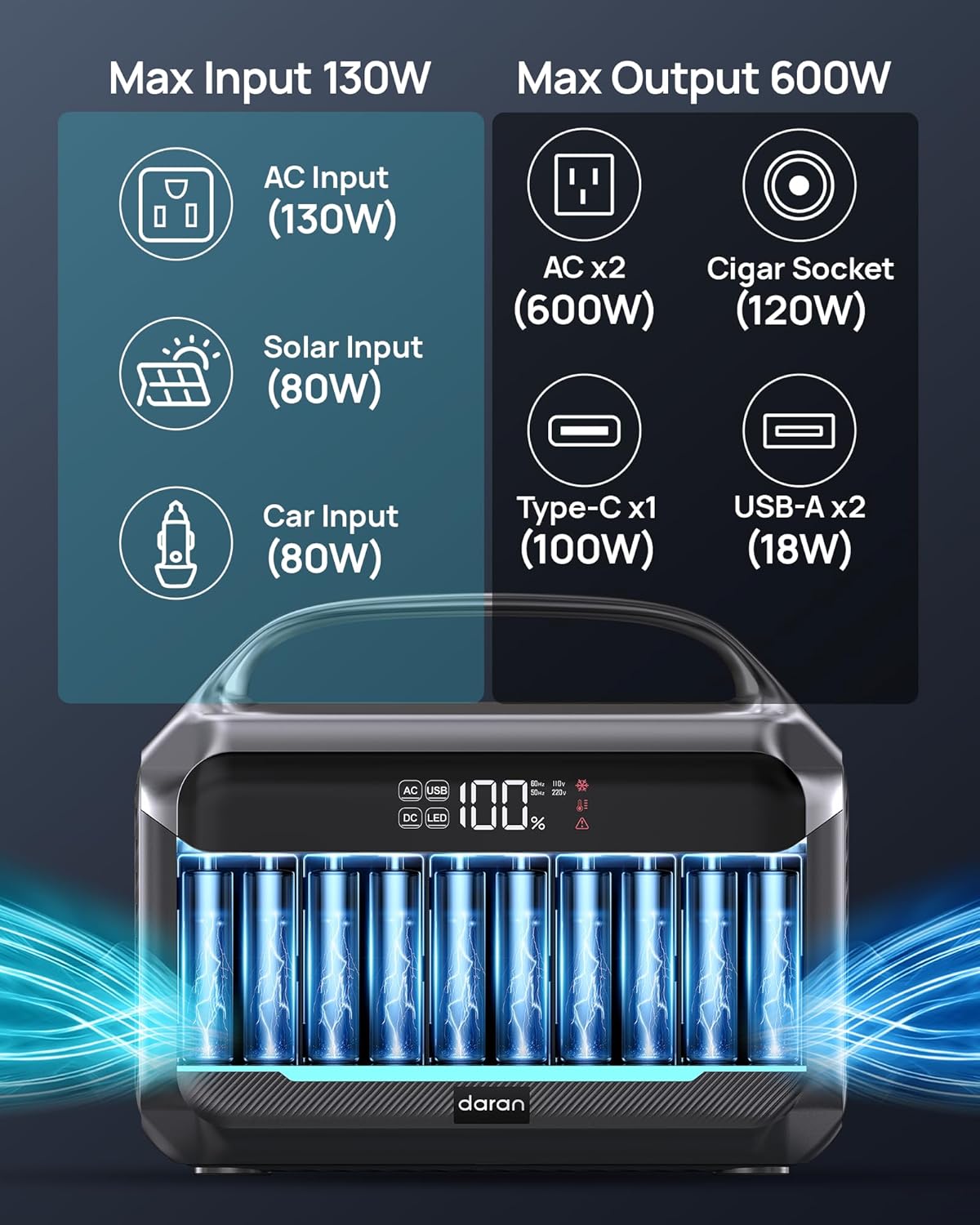
Figure 1: Front panel of the DaranEner NEO Power Station, highlighting input and output ports.
- AC Outlets (x2): 600W (1200W Surge) for household appliances.
- Car Socket (x1): 12V output for car-powered devices.
- Type-C Port (x1): For fast charging compatible devices.
- USB-A Ports (x2): For charging standard USB devices.
- DC Input Port: For AC adapter, solar panel, or car charging.
- LED Light: Integrated light with multiple modes.
3.2 LED Screen Display

Figure 2: Detailed view of the LED screen display.
The LED screen provides real-time information:
- Battery Percentage: Shows the current charge level.
- Output Status: Indicates active AC, USB, or DC outputs.
- Temperature Monitor: Displays the internal temperature.
- Warning Indicators: Alerts for overload, high temperature, or other issues.
3.3 LiFePO4 Battery Technology

Figure 3: LiFePO4 battery safety and longevity features.
The power station utilizes a LiFePO4 battery, known for its enhanced safety, longer lifespan (up to 10 years), and environmental friendliness compared to traditional lithium batteries. It is fireproof, puncture-resistant, and features thermal runaway resistance.
4. Setup
4.1 Initial Charging
Before first use, fully charge the power station. This ensures optimal battery performance and calibration.

Figure 4: Charging methods and approximate times.
- AC Charging: Connect the provided AC charging cable to the power station's input port and a wall outlet. The unit can reach 80% charge in approximately 2 hours.
- Solar Charging (Optional): Connect a compatible 80W solar panel (not included) to the DC input port. Charging time varies based on sunlight intensity.
- Car Charging (Optional): Use a car charging cable (not included) to charge from your vehicle's 12V outlet.
5. Operating Instructions
5.1 Powering On/Off
- To turn on the power station, press and hold the main power button until the display illuminates.
- To turn off, press and hold the main power button again until the display turns off.
5.2 Using AC Outlets
- Press the AC ON/OFF button to activate the AC outlets. The AC indicator on the display will light up.
- Plug your AC-powered devices into the outlets. Ensure the total wattage does not exceed 600W.
- Press the AC ON/OFF button again to turn off the AC outlets when not in use to conserve power.
5.3 Using DC and USB Ports
- Press the DC ON/OFF button to activate the DC (Car Socket) and USB outputs. The DC/USB indicators on the display will light up.
- Connect your USB devices to the USB-A or Type-C ports, and 12V devices to the car socket.
- Press the DC ON/OFF button again to turn off these outputs when not in use.
5.4 LED Light Operation
- Press the LED light button once for a steady beam.
- Press again to cycle through different modes: strobe, and emergency SOS.
- Press a fourth time to turn off the LED light.
5.5 Estimated Device Runtimes
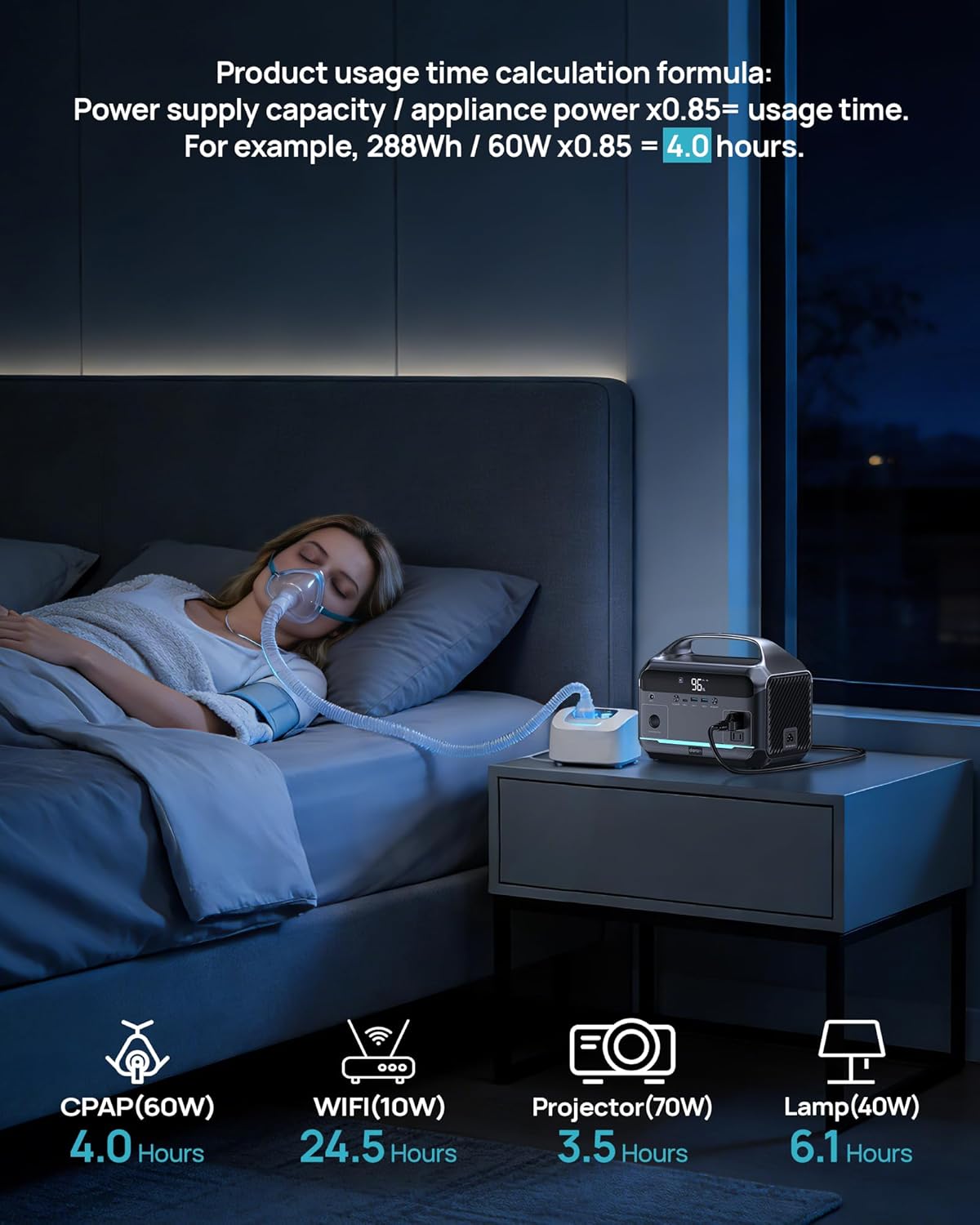
Figure 5: Estimated runtimes for common devices.
The usage time for devices can be estimated using the formula: Power supply capacity / appliance power x 0.85 = usage time. For example, a 30W CPAP machine can operate for approximately 8 hours (288Wh x 0.85 / 30W = 8.16 hours).

Figure 6: Additional estimated runtimes for various devices.
6. Maintenance
6.1 Storage
- Store the power station in a cool, dry place, away from direct sunlight and heat sources.
- For long-term storage, ensure the battery is charged to at least 50% and recharge it every 3-6 months to maintain battery health.
6.2 Cleaning
- Use a dry, soft cloth to clean the exterior of the power station.
- Do not use abrasive cleaners or immerse the unit in water.
7. Troubleshooting
If you encounter issues with your DaranEner Portable Power Station NEO, refer to the following common problems and solutions:
| Problem | Possible Cause | Solution |
|---|---|---|
| Power station does not turn on. | Battery is completely discharged. | Connect to an AC outlet and charge for at least 30 minutes. |
| Device not charging from AC outlet. | AC output not activated; device wattage exceeds 600W; power station battery low. | Press AC ON/OFF button; check device wattage; recharge power station. |
| Overload warning on display. | Too many devices connected, or a single device exceeds 600W. | Disconnect some devices to reduce load. |
| Over-temperature warning. | Unit is overheating due to high ambient temperature or heavy load. | Move to a cooler environment, ensure proper ventilation, reduce load. |
8. Specifications

Figure 7: DaranEner NEO Power Station dimensions.
| Feature | Specification |
|---|---|
| Brand | DaranEner |
| Model Name | NEO |
| Battery Type | LiFePO4 |
| Capacity | 288Wh |
| AC Output | 600W (1200W Surge), 110V |
| Max AC Input | 130W |
| Solar Recharging | 80W (Max) |
| USB-A Output | 2 x 18W |
| Type-C Output | 1 x 100W |
| Car Socket Output | 1 x 12V |
| Dimensions (L x W x H) | 10.0 x 6.6 x 8.2 inches (25 x 15 x 20 cm) |
| Weight | 8.86 lbs (4.02 kg) |
| Operating Temperature | 0°C to 40°C (32°F to 104°F) |
9. Warranty and Support
The DaranEner Portable Power Station NEO comes with a 1-year manufacturer warranty. This warranty covers defects in materials and workmanship under normal use.
For any questions, technical support, or warranty claims, please contact our customer service team. Refer to the contact information provided with your purchase or on the official DaranEner website.


