
1. Introduction
This manual provides essential information for the safe operation and maintenance of your LKHLTBF D27 Pro MAX GPS Drone. Please read this manual thoroughly before operating the drone to ensure proper function and to prevent damage or injury. Keep this manual for future reference.
2. Safety Guidelines
- Flight Environment: Fly in open areas, away from people, buildings, and obstacles. Avoid flying near airports, military bases, or other restricted zones.
- Weather Conditions: Do not fly in strong winds, rain, snow, or fog. Optimal flight conditions are calm and clear.
- Battery Safety: Use only the provided charger and batteries. Do not overcharge or puncture batteries. Discontinue use if batteries show signs of swelling or damage.
- Propeller Safety: Keep hands, face, and loose clothing away from rotating propellers. Ensure propellers are correctly installed before each flight.
- Operator Responsibility: The operator is responsible for safe flight and adherence to local regulations. Maintain visual line of sight with the drone at all times.
- Age Recommendation: This product is recommended for adult users due to its advanced features and operational requirements.
3. Package Contents
Verify that all items are present in the package:
- D27 Pro MAX Drone (1 unit)
- Remote Control with 4.5-inch Screen (1 unit)
- 3.7V 3000mAh Battery (3 units for Triple Battery variant)
- USB Charging Cable (1 unit)
- Spare Propellers (4 units)
- User Manual (1 unit)
- Storage Box and Color Bag (1 set)
4. Product Overview
Familiarize yourself with the main components of your D27 Pro MAX drone and its remote control.
4.1 Drone Components

Image: The D27 Pro MAX drone with its remote control, highlighting features like brushless motors, GPS return, 5000m range, and a 4.5-inch screen on the remote.
- 8K EIS HD Camera: Front-mounted camera for high-resolution photo and video capture with Electronic Image Stabilization.
- Optical Flow Sensor: Located on the bottom for stable hovering and precise positioning in environments without GPS.
- 360° Obstacle Avoidance Sensors: Integrated sensors detect obstacles from all directions to prevent collisions.
- Brushless Motors: Provide powerful, quiet, and efficient flight with enhanced wind resistance.
- GPS Module: Enables precise outdoor positioning, intelligent flight modes, and return-to-home functions.
- LED Lights: Indicate drone status and aid in orientation during flight.

Image: A close-up view of the drone's low-noise brushless motor, emphasizing stability and wind resistance.
4.2 Remote Control
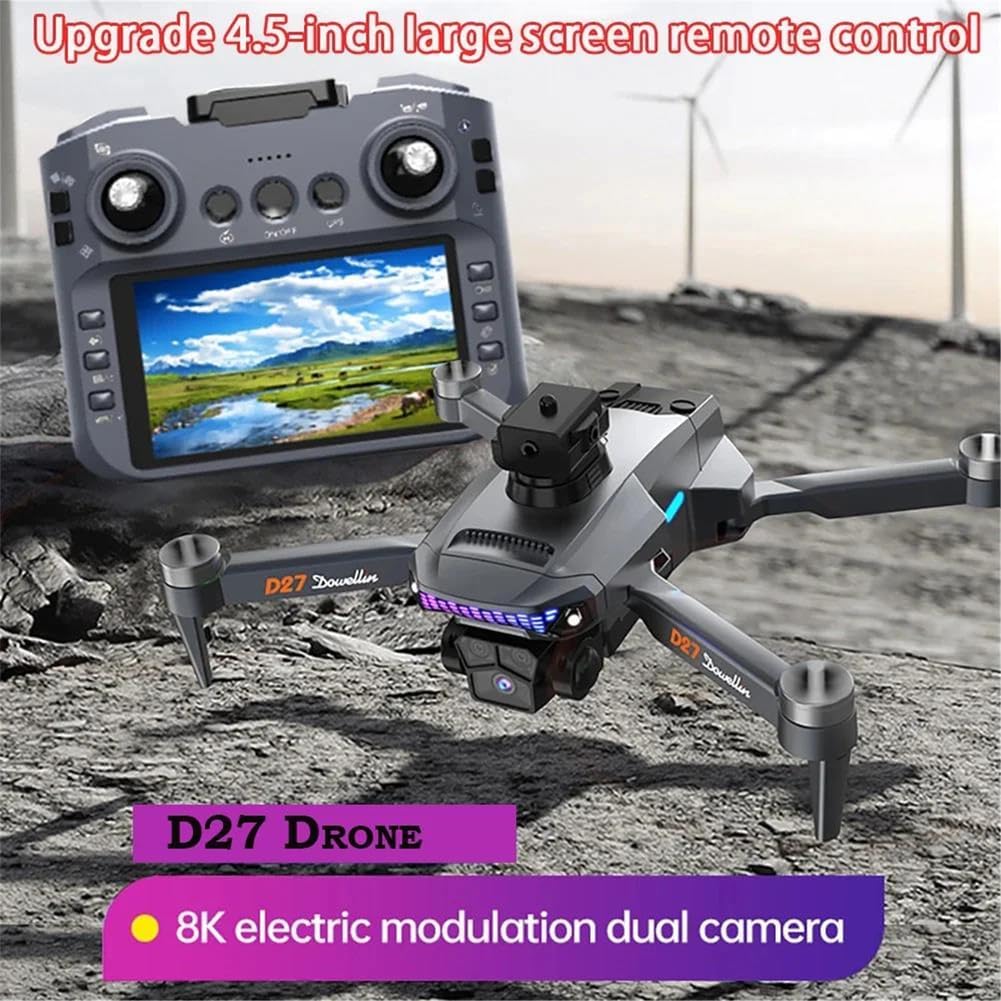
Image: The D27 Pro MAX remote control featuring a 4.5-inch integrated screen for real-time FPV viewing and flight data.
- 4.5-inch Integrated Screen: Displays real-time FPV feed and flight telemetry.
- Control Sticks: Left stick for throttle and yaw, right stick for pitch and roll.
- Function Buttons: Dedicated buttons for GPS return, photo/video capture, speed modes, and other intelligent flight functions.
- Antennas: For 5G WiFi FPV transmission and control signal.
5. Setup
5.1 Battery Installation and Charging
- Drone Battery: Insert the fully charged 3.7V 3000mAh battery into the drone's battery compartment until it clicks into place.
- Remote Control Battery: Ensure the remote control is charged. Connect the USB cable to the remote control and a power source for charging.
- Charging: Use the provided USB cable to charge the drone batteries. The indicator light will show charging status.
5.2 Propeller Installation
- Match the propellers with the corresponding motor arms (usually marked A and B).
- Securely attach each propeller to its motor shaft. Ensure they are tight but do not overtighten.
5.3 Pairing the Drone and Remote Control
- Place the drone on a flat, level surface.
- Power on the drone, then power on the remote control.
- The drone and remote control will automatically attempt to pair. Wait for the indicator lights to stabilize, indicating a successful connection.
6. Operating
6.1 Basic Flight Controls
- Take-off/Landing: Use the dedicated one-key take-off/landing button or simultaneously push both control sticks down and outwards to arm motors, then push the left stick up to ascend.
- Throttle (Left Stick Up/Down): Controls altitude.
- Yaw (Left Stick Left/Right): Rotates the drone horizontally.
- Pitch (Right Stick Up/Down): Moves the drone forward/backward.
- Roll (Right Stick Left/Right): Moves the drone left/right.
6.2 Intelligent Flight Modes and Features

Image: The D27 Pro MAX drone demonstrating its GPS homing capability, ensuring a secure return to the take-off point.
- GPS Return to Home (RTH): With a single click, the drone will automatically return to its take-off point. This function also activates automatically upon low battery or loss of signal.
- Intelligent Tracking:
- GPS Tracking: The drone follows the remote control's GPS signal.
- Image Tracking: The drone identifies and automatically tracks a selected target.
- Gesture Recognition: From 1 to 3 meters away from the drone, perform specific hand gestures towards the camera to trigger photo or video capture.
- Multi-point Route Planning: Plan a flight path on the remote control's screen. The drone will autonomously fly along the preset route, allowing the operator to focus on capturing footage.
- Fixed-Point Surround: Select a central point on the screen, and the drone will orbit around it at a desired radius, controlled by the joystick.
- Aircraft Search: Triple-click the GPS signal icon on the map interface to view the drone's last known distance, latitude, and longitude.
- 5G FPV Transmission: Enjoy ultra-smooth, real-time video feed on the remote control's 4.5-inch screen.
- 360° Obstacle Avoidance: The drone's sensors continuously scan for obstacles, providing omnidirectional protection during flight.

Image: The D27 Pro MAX drone utilizing optical flow technology for stable hovering, even in complex environments.

Image: The D27 Pro MAX drone demonstrating its 360° omnidirectional obstacle avoidance system, designed to navigate complex paths safely.
6.3 Photo and Video Sharing
Photos can be shared individually or in batches. Videos can only be shared separately.
7. Maintenance
- Cleaning: Use a soft, dry cloth to clean the drone and remote control. Avoid using solvents or harsh chemicals.
- Propeller Inspection: Regularly check propellers for cracks, bends, or damage. Replace damaged propellers immediately using the provided spares.
- Battery Care: Store batteries in a cool, dry place. Do not store fully charged or completely depleted batteries for extended periods.
- Storage: When not in use, store the drone and its components in the provided storage box to protect them from dust and physical damage.
8. Troubleshooting
| Problem | Possible Cause | Solution |
|---|---|---|
| Drone does not power on | Battery not charged or improperly installed. | Ensure battery is fully charged and correctly inserted. |
| Remote control does not connect | Remote control battery low; pairing failed. | Charge remote control. Repeat pairing procedure. |
| Unstable flight/Drifting | Improper calibration; strong wind; damaged propellers. | Perform gyroscope calibration. Fly in calm conditions. Replace damaged propellers. |
| Poor video transmission | Interference; drone too far; low battery. | Fly in open areas. Keep drone within range. Ensure batteries are charged. |
| GPS functions not working | Insufficient GPS satellites; flying indoors or near tall structures. | Fly outdoors in an open area with clear sky. Wait for sufficient GPS signal acquisition. |
9. Specifications
| Feature | Detail |
|---|---|
| Brand | LKHLTBF |
| Model Name | D27 Pro MAX |
| Special Functions | Obstacle avoidance, GPS return to home, 8K HD camera, 5G transmission, Intelligent flight modes |
| Age Range (Description) | Adult |
| Video Capture Resolution | 8K |
| Effective Still Image Resolution | 33.17 MP |
| Connectivity Technology | 5G, WiFi |
| Included Components | Remote control, Battery, USB cable, Blades, Storage box |
| Skill Level | Advanced |
| Battery Capacity | 3000 mAh (per battery) |
| Video Capture Format | MP4 |
| Control Type | Remote control, Gesture control |
| Battery Composition | Lithium Polymer |
| Optical Sensor Technology | CMOS, CCD |
| Material | Plastic |
| Country of Origin | China |
10. Warranty and Support
For warranty information and technical support, please refer to the contact details provided with your purchase or visit the official LKHLTBF website. Keep your proof of purchase for warranty claims.