
1. Safety Information
Please read all safety instructions carefully before using the ENCHEN Spark 3 Trimmer. Retain this manual for future reference.
- Keep the appliance out of reach of children.
- Do not immerse the charging base or power adapter in water or other liquids.
- Ensure the trimmer is completely dry before placing it on the charging base or connecting the charging cable.
- Do not use the trimmer if the blades are damaged, as this may cause injury.
- For external grooming use only. Avoid contact with eyes.
- Only use the provided charging cable and base.
- Do not disassemble or attempt to repair the trimmer yourself. Contact customer support for assistance.
2. Product Overview
The ENCHEN Spark 3 is a versatile and efficient grooming tool designed for precise trimming of beard, groin, and body hair. It features durable ceramic blades, a powerful motor, and a waterproof design for convenient wet and dry use.
Included Components
- Trimmer Body
- Charging Base
- USB-C Charging Cable
- Cleaning Brush
- Guide Combs (4 sizes: 3mm, 6mm, 9mm, 12mm)

Figure 2.1: The complete ENCHEN Spark 3 grooming kit, including the main trimmer unit, its charging stand, a USB-C charging cable, a small cleaning brush, and four different sized guide combs (3mm, 6mm, 9mm, 12mm) for various trimming lengths.
3. Setup
Initial Charging
Before first use, fully charge the trimmer to ensure optimal performance and battery life.
- Connect the USB-C charging cable to the charging base.
- Plug the other end of the USB-C cable into a compatible USB power adapter (not included) or a power bank.
- Place the trimmer onto the charging base. The indicator light on the trimmer will illuminate, indicating it is charging.
- Charge the trimmer for approximately 1.5 hours for a full charge. A full charge provides up to 120 minutes of cordless runtime.

Figure 3.1: The ENCHEN Spark 3 Trimmer being charged via its USB-C cable, illustrating convenient charging from various power sources like a laptop or power bank.
4. Operating Instructions
Attaching Guide Combs
- Ensure the trimmer is turned off.
- Select the desired guide comb (3mm, 6mm, 9mm, or 12mm) based on your preferred hair length.
- Align the comb with the trimmer blade and push it firmly until it clicks securely into place.
Trimming
- Turn on the trimmer by pressing the power button.
- For optimal results, use the trimmer on clean, dry hair. The trimmer is also suitable for wet trimming.
- Hold the trimmer with the blades flat against the skin or at a slight angle, depending on the area and desired style.
- Move the trimmer slowly and steadily against the direction of hair growth.
- The built-in LED spotlight can assist in identifying and trimming fine or hidden hairs for enhanced precision.
Wet and Dry Use
The ENCHEN Spark 3 is designed for both wet and dry use. Its waterproof construction allows for safe use in the shower or with shaving cream for a more comfortable grooming experience.

Figure 4.1: This image illustrates the multi-purpose functionality of the ENCHEN Spark 3 Trimmer, demonstrating its application for grooming various body areas including the groin, hands, beard, armpits, legs, and chest.

Figure 4.2: The image highlights the 100% waterproof feature of the ENCHEN Spark 3 Trimmer, showing it being used near water, emphasizing its suitability for wet grooming and easy cleaning under running water.

Figure 4.3: This close-up image demonstrates the integrated LED spotlight on the ENCHEN Spark 3 Trimmer, designed to illuminate the trimming area and help users identify and trim fine or hidden hairs more effectively.
5. Maintenance
Cleaning the Trimmer
Regular cleaning ensures optimal performance and extends the lifespan of your trimmer.
- Turn off the trimmer and detach the guide comb.
- To detach the blade assembly, gently push it in the direction indicated by the arrow (refer to Figure 5.2).
- Use the provided cleaning brush to remove loose hairs from the blades and the trimmer body.
- Rinse the blades and the trimmer body under running water. The trimmer is fully waterproof.
- Wipe the trimmer and blades dry with a clean, soft cloth.
- Reattach the blade assembly by aligning it with the guiding slot and pushing it firmly until it clicks into place.
- For optimal performance and blade longevity, apply a small drop of lubricating oil (not included) to the blades after every few uses.
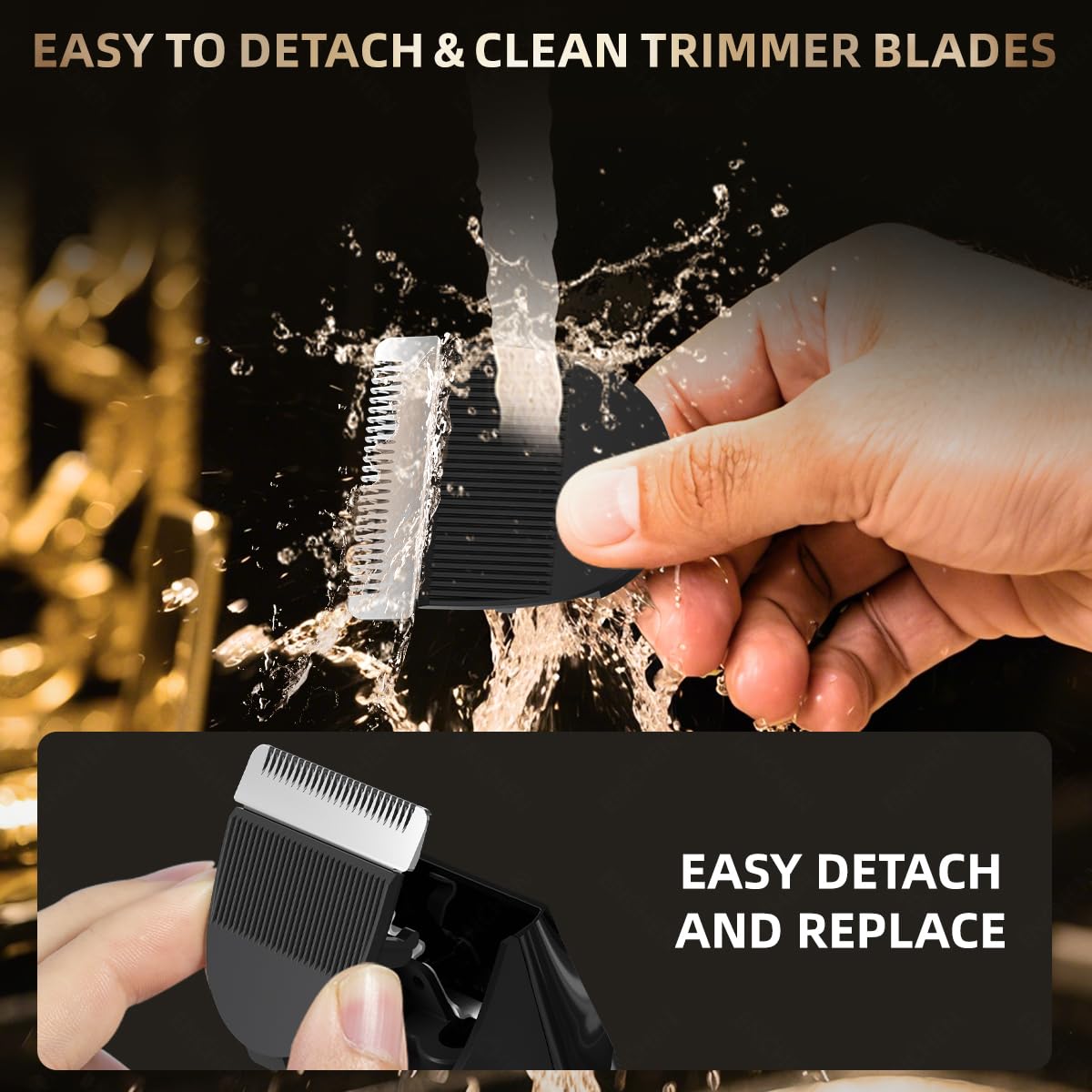
Figure 5.1: This visual guide illustrates the steps for maintaining the trimmer blades, including using the cleaning brush, rinsing under water, wiping dry, and applying lubricating oil for longevity and performance.

Figure 5.2: This image provides a step-by-step visual instruction on how to safely detach the trimmer blade for thorough cleaning and then reattach it correctly, ensuring proper maintenance.
6. Troubleshooting
If you encounter any issues with your ENCHEN Spark 3 Trimmer, refer to the following common problems and solutions:
Trimmer Not Turning On
- Battery Depleted: Ensure the trimmer is fully charged. Connect it to the charger for the recommended 1.5 hours.
- Power Button: Press the power button firmly and hold for a moment to ensure activation.
Poor Trimming Performance
- Clogged Blades: Clean the blades thoroughly to remove any hair buildup.
- Improper Comb Attachment: Ensure the guide comb is correctly and securely attached.
- Lack of Lubrication: Apply lubricating oil to the blades as part of regular maintenance.
- Low Battery: The battery might be low; recharge the trimmer.
Trimmer Pulls Hair
- Dirty Blades: Clean the blades to remove any trapped hairs or debris.
- Dry Blades: Ensure the blades are properly oiled.
- Technique: Move the trimmer slower and consistently against the direction of hair growth.
- Dull Blades: If performance does not improve after cleaning and oiling, the blades may be dull and require professional servicing or replacement.
7. Specifications
Detailed technical specifications for the ENCHEN Spark 3 Trimmer:

Figure 7.1: Internal view of the ENCHEN Spark 3 Trimmer, highlighting its advanced 7500 RPM motor, which ensures efficient and smooth trimming with low noise, complemented by an LED indicator.
| Feature | Detail |
|---|---|
| Model | T-Spark3 |
| Brand | Enchen |
| Power Source | Battery Powered |
| Battery Type | 1 Nonstandard Battery (included) |
| Charging Time | Approx. 1.5 hours |
| Runtime | Up to 120 minutes |
| Blade Material | Ceramic |
| Special Features | Low Noise, Multigroomer, Rechargeable, Super Smooth and Safe Trimming, Waterproof, LED Spotlight |
| Dimensions (LxWxH) | 32 x 35 x 142 Millimeters |
| Item Weight | 230 Grams |
| Country of Origin | China |
| Included Components | Trimmer Body, Charging Base, USB-C Charging Cable, Cleaning Brush, Guide Combs (3/6/9/12 mm) |
8. Warranty and Support
For detailed warranty information, product support, or service inquiries, please refer to the official Enchen website or contact your authorized retailer. It is recommended to retain your purchase receipt as proof of purchase for any warranty claims.
- Manufacturer: ENCHEN
- Importer: LZB India Electric Private Limited